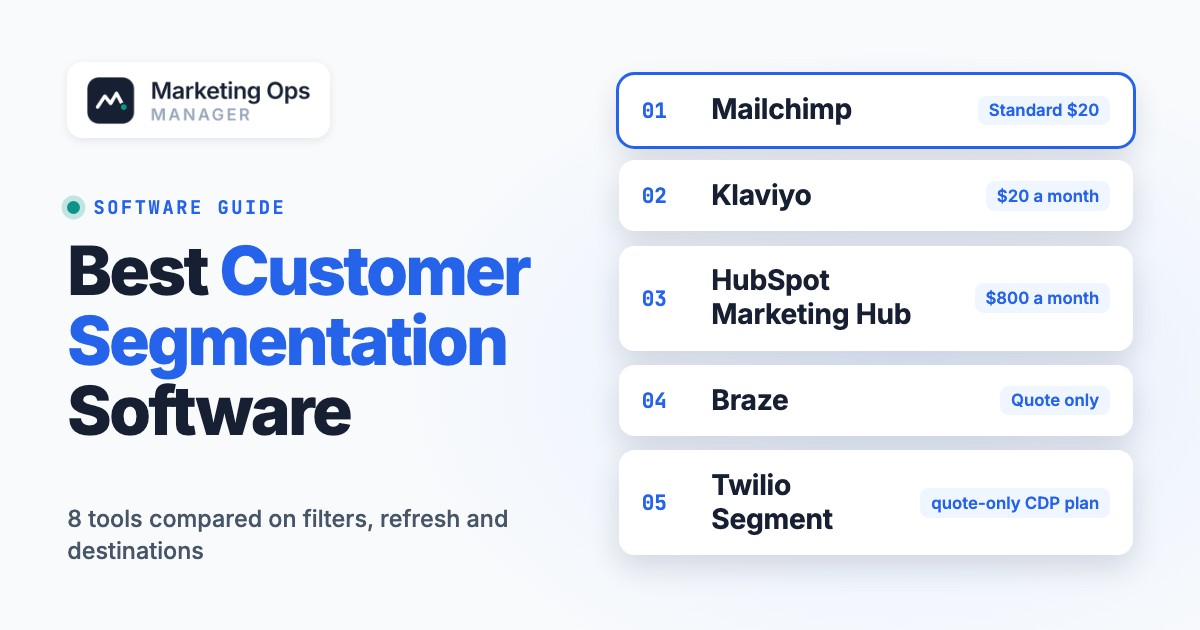
Customer segmentation software is the part of your stack that groups customers by rules on who they are and what they did, keeps those groups current, and passes them to the tools that send messages or buy ads. Most teams already own a version of it inside an email tool, a CRM or an engagement platform.
This guide covers eight tools in three groups: tools that build segments inside a messaging platform, tools that build them inside a cross-channel engagement platform, and tools that build them on event and customer data. Each entry says what a segment can filter on, how fast it updates, where it can be sent, which plan unlocks it and who should skip it. We read vendor material and didn't run these products.
- tools compared, from a free email plan to quote-only engagement platforms
- 8
- conditions in Mailchimp's basic builder versus filters in one HubSpot segment
- 10 vs 250
- default batch interval for Twilio Segment funnel and time-window audiences
- 8 hours
- free plans (Amplitude, Twilio Segment) don't include cohorts or computed audiences
- 2 of 8
What is customer segmentation software?#
Customer segmentation software is a tool that sorts customers into groups using rules on their attributes and behavior, such as "ordered twice in 90 days" or "works at a company with 200 to 500 employees", and keeps each group up to date as the data changes. The group is then used to send a message, start a journey, build an ad audience or filter a report.
It overlaps with three other tool types, and the overlap is where buying mistakes start. A CRM holds the customer record and can filter it, but its segments rarely see store or product events. A customer data platform collects events and resolves identities, and some of its plans add audiences on top. An email tool builds segments from its own data only. Our customer engagement software guide covers the platforms in the second group below, and the marketing automation software guide covers the tools that run the campaigns a segment feeds.
| Customer segmentation software | CRM | Customer data platform | Email tool | |
|---|---|---|---|---|
| Core job | Build rule-based groups and keep them current | Hold contacts, deals and rep activity | Collect events, resolve identities and route data | Send campaigns to a list |
| Where the data comes from | Its own store plus synced sources | Records reps and forms create | SDKs, servers and apps | Its own sends and the store it connects |
| Builds segments | Yes, that's the product | Yes, as lists or views | On some plans, as audiences | Yes, with limits |
| Example in this guide | Klaviyo, Braze, MoEngage | HubSpot Marketing Hub segments | Twilio Segment | Mailchimp |
Our picks by situation#
 Best for predictive buyer segments in a low-cost email toolMailchimpLikelihood to purchase, predicted lifetime value and churn risk as segment fields from Standard at $20 a month, with a connected store.
 Best for store-event segments that sync to Meta and GoogleKlaviyoSegments on order events, revenue and predicted CLV, with up to 100 criteria and one-to-one syncs to Meta custom audiences and Google Customer Match.
 Best for segments on CRM records and associated companiesHubSpot Marketing HubActive segments on properties, company data and workflow enrollment, with up to 250 filters and no sync step between CRM and campaign.
 Best for one segment across push, in-app and ad platformsBrazeSegments that feed Canvas journeys and Audience Sync to eight ad platforms, with Segment Extensions that look back up to two years. Quote only.
 Best for built-in RFM, affinity and predictive segmentsMoEngageEleven named RFM cohorts, affinity and predictive segments next to rule-based and SQL warehouse segments. Quote only.
 Best for account-aware segments fed by reverse ETLCustomer.ioData-driven, snapshot and manual segments that combine person data with account objects, from $100 a month.
 Best for behavioral cohorts from product usageAmplitudeCohorts on event counts, sums and distinct days, synced to ad and lifecycle tools, with unlimited seats on every plan.
 Best for audiences on event data pushed to many toolsTwilio SegmentReal-time and batch audiences on collected events and traits, available in the quote-only Customer Data Platform plan.
Customer segmentation software compared#
| Tool | Where the segment is built | Where a segment can go | Starting price |
|---|---|---|---|
| Mailchimp | Email platform with a basic and an advanced builder | Email, text messages and ads (Google retargeting ads from Standard) | Free; Essentials $13, Standard $20, Premium $350 a month |
| Klaviyo | Ecommerce messaging platform | Email, SMS, push, flows, Meta custom audiences, Google Customer Match | Free to 250 active profiles; from $20 a month at 500 |
| HubSpot Marketing Hub | Segments on HubSpot CRM records | Email, workflows, ad audiences on four networks, Salesforce inclusion list | Starter $20 a seat; Professional $800 a month plus $3,000 onboarding |
| Braze | Cross-channel engagement platform | Campaigns, Canvas journeys, Content Cards, eight ad platforms | Quote only, no free plan |
| MoEngage | Cross-channel engagement platform | Push, email, SMS, WhatsApp, Flows, Facebook and Google audiences | Quote only, 1-year minimum |
| Customer.io | Behavior-based messaging platform | Journeys, broadcasts, CSV export, Google and Facebook audiences | Essentials from $100 a month at 5,000 profiles |
| Amplitude | Product analytics cohorts | Ad platforms, lifecycle tools, warehouses, webhooks | Free to 2M events; behavioral cohorts from Plus |
| Twilio Segment | Audiences on a customer data platform | Ad platforms, Braze, Iterable, Klaviyo, HubSpot, Marketo, Salesforce | Connections from $0; audiences need the quote-only CDP plan |
 The Marketing Ops Manager Our product | Campaign monitoring | Checks every handoff in the campaign journey on a schedule | Starter $199 per month (up to 10 campaigns, checks every 15 minutes), Growth $499 per month (up to 50 campaigns, checks every 5 minutes); billed monthly in advance through Stripe, card required at checkout, cancel anytime (vendor homepage, as of 2026-11-02) |
What should customer segmentation software do?#
Check six things before you compare price. Each one decides whether a segment still matches reality a month after you built it.
| Feature | What to check | Where the tools differ |
|---|---|---|
| Data the rules can use | Store orders, CRM fields, product events, devices, predicted values | Klaviyo filters on order events and predicted CLV; HubSpot on CRM and associated company properties; Amplitude on event counts and distinct days |
| Rule depth and caps | Nesting, exclusions, lookback windows, condition caps | Mailchimp's basic builder stops at 10 conditions; Klaviyo allows 100 criteria; HubSpot allows 250 filters; Braze standard event-count filters look back 30 days, Segment Extensions 730 |
| Refresh | How long until a change moves someone in or out | HubSpot takes minutes up to 2 hours; MoEngage evaluates 10 segments in real time and refreshes others every 3 to 6 hours; Twilio Segment batch audiences run every 8 hours |
| Static or dynamic | Whether a segment can be frozen | Customer.io has snapshot segments, HubSpot has static segments, Klaviyo can create a list from current members |
| Destinations | Which ad and lifecycle tools receive the segment, and how often | Customer.io's ad sync covers Google and Facebook only; Braze names eight ad platforms; Amplitude can't sync real-time cohorts to Facebook, Google Ads, TikTok or HubSpot |
| Billing metric | What grows the bill | Contacts (Mailchimp, HubSpot), active profiles (Klaviyo), profiles and emails (Customer.io), monthly active users (Braze), tracked users (MoEngage, Twilio Segment), events (Amplitude) |
None of the eight lists segment size as a billing metric. The cost comes from the profile, contact, user or event count that feeds the segment, so a large, mostly inactive list costs the same whether or not you ever segment it.
Best customer segmentation software inside a messaging platform#
Mailchimp, Klaviyo and HubSpot Marketing Hub build segments in the same product that sends the email, so a segment never has to be exported to be used. The trade-off is that the segment can only use the data that platform holds or syncs in.
Mailchimp#
Mailchimp suits small teams that want purchase-based segments next to the email builder, with predictive fields as the step up from tags and activity filters.
Mailchimp
Mailchimp is an email-first platform with visual automation flows, 60+ flow templates and strong Shopify triggers. Branching and webhooks need Standard.
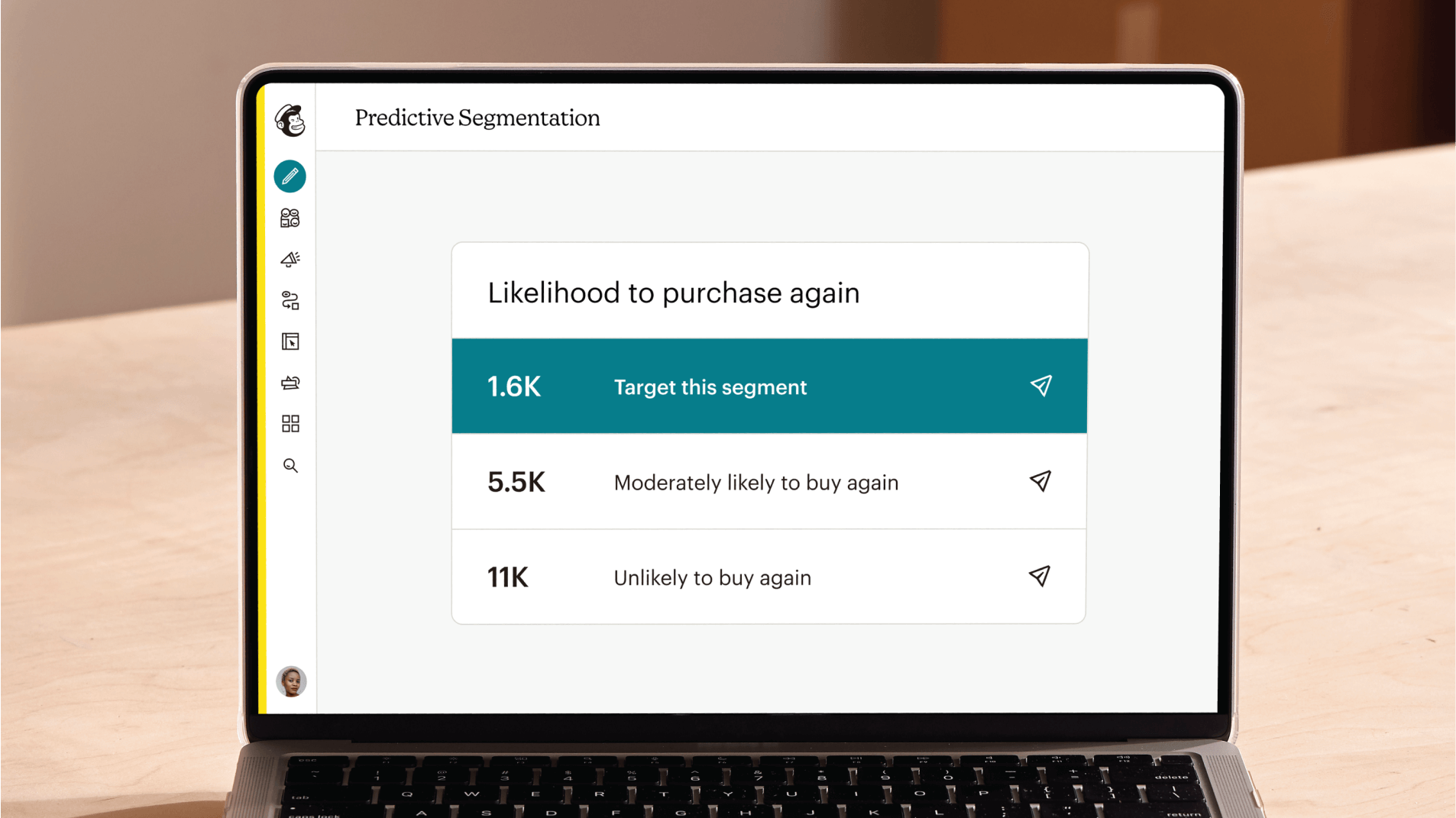
Mailchimp builds segments from tags, contact details, store purchases and email activity, with a basic builder on Free and Essentials and an advanced builder with predictive fields from Standard.
The basic builder allows up to 10 conditions with a single and/or operator. The advanced builder, on Standard and Premium, adds nested and/or groups, and Mailchimp's help describes the number of conditions as unlimited, with a note that very large segments can load slowly. Nested conditions don't work inside automations, so a segment you plan to use in a flow has to stay flat.
The predictive fields are the reason to look at Mailchimp for segmentation. Likelihood to Purchase covers 60, 90 and 365 days, and Predicted CLV, Customer Churn Risk and Predicted Next Order Date sit beside it. They need Standard or Premium, a connected store and at least one email campaign sent, and contacts who only have an SMS subscription get no scores.
A segment recalculates as contact data changes, and Mailchimp's help says changes appear within minutes. A static segment, the same object as a tag, changes only when you add or remove contacts. The billing unit is contacts with a monthly send cap of 10 times contacts on Essentials, 12 on Standard and 15 on Premium.
- a small store wants likelihood-to-purchase, predicted lifetime value and churn-risk buckets inside the email tool: Standard at $20 a month includes them
- you run separate customer databases: Standard allows 5 audiences and Premium unlimited, against 1 on Free and 3 on Essentials
- you need 11 or more conditions or nested groups on Free or Essentials: the basic builder stops at 10 conditions with one and/or operator
- you want predictive segments without a connected store: the purchase, value and churn fields need Standard or Premium, store data and a sent campaign
- your stack is built on Salesforce or a warehouse: Mailchimp's segment help names email, text and ad destinations but no warehouse export
- Users like
- Ease of use (142 mentions)
- Users dislike
- Expensive (45 mentions), then limited features in lower tiers (32) and a steep learning curve (31)
- Source: G2, 13,001 reviews
Limits worth knowing
Premium starts at $350 a month. Mailchimp's help names email, text messages and ads as the places a segment can be used. For the head-to-head with Klaviyo, see Klaviyo vs Mailchimp, and for the plan ladder see Mailchimp pricing.
- Starting price
- Free under 250 contacts; Essentials from $13, Standard from $20 and Premium from $350 per month, priced by contacts with a monthly send cap; 14-day trial on paid plans
- Filters on
- Tags, groups, contact details, acquisition source, store purchases by product, category and total spent, email and SMS activity, and predicted fields on Standard and up
- Refreshes
- Recalculated as contact data changes, with changes visible within minutes; static segments change only when you add or remove contacts
- Sends to
- Email, text messages and ads, with Google retargeting ads on Standard and Premium
- Condition cap
- 10 on Free and Essentials; advanced builder on Standard and Premium with nested groups
- Billing basis
- Contacts plus a monthly send cap; segment size isn't billed
Klaviyo#
Klaviyo suits stores that want segments on orders and revenue that update on their own and feed ads without a separate data platform.
Klaviyo
Klaviyo is the email and SMS platform most ecommerce stores start with: Shopify orders and onsite events land on the profile, and flows trigger on purchases, price drops or low inventory.
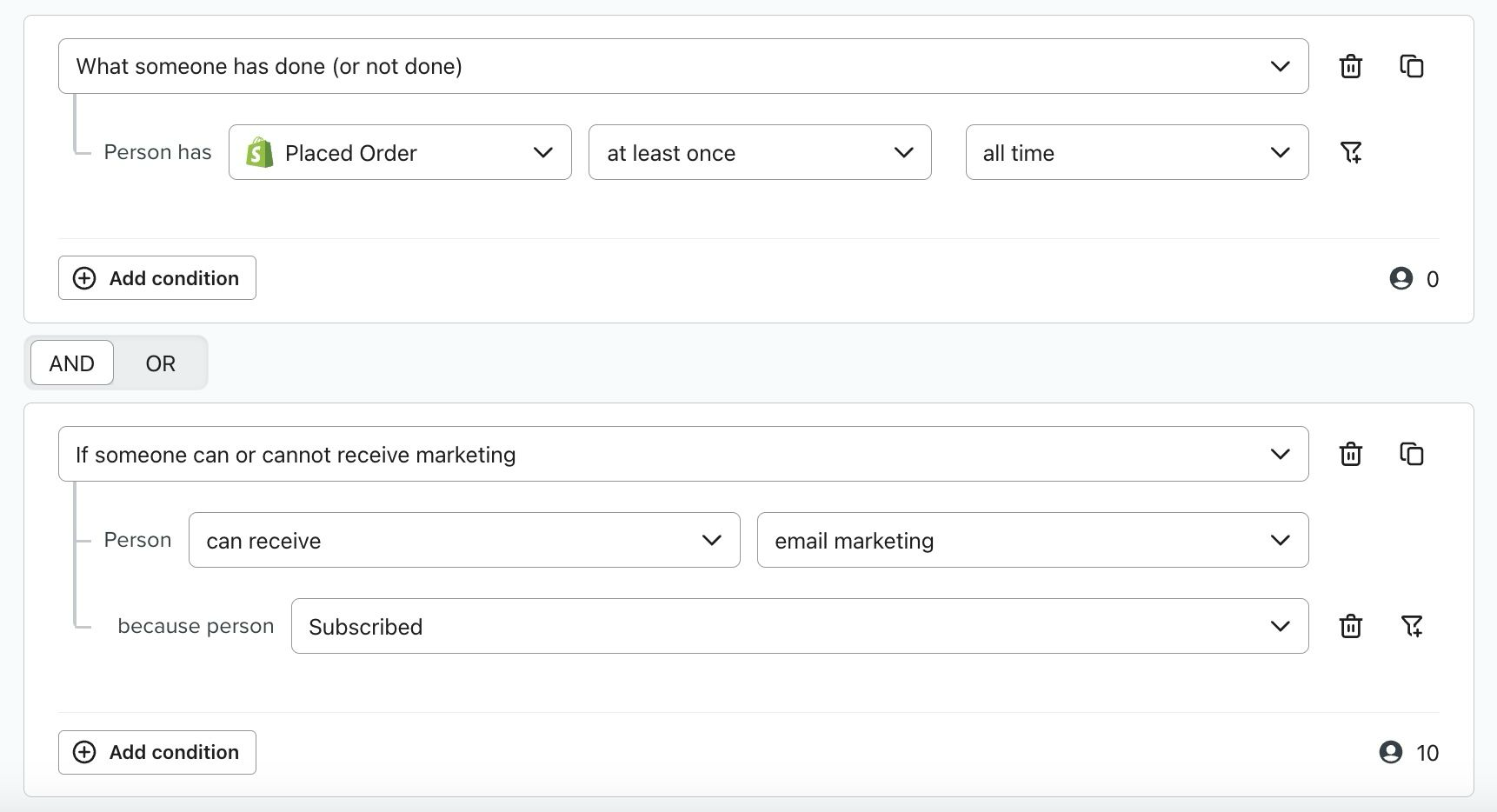
Klaviyo builds segments on store events and profile properties, keeps them current in close to real time and lets a flow start the moment someone joins one.
A segment condition can test what someone did or didn't do, such as Placed Order with a frequency and a time frame, or a profile property, list membership, consent status, a location radius or a predicted value. Predicted CLV and predicted gender need an ecommerce integration, at least 500 customers with orders, 180 days of order history and an order in the last 30 days. Klaviyo shows a live size preview while you build and can turn the current members into a static list.
Segments update in close to real time. A manual update takes up to 15 minutes and monitored segments up to an hour, and conditions with a relative window such as the last 30 days remove people only once every 24 hours, so a person can stay in a segment a day longer than the rule suggests.
Two send paths matter for ad teams. Segments sync one to one to Meta custom audiences, which need 100 or more profiles and can take up to 48 hours to update at Meta, and to Google Ads Customer Match, which can also take up to 48 hours. Salesforce data comes into Klaviyo hourly, up to 6 objects, matched by email.
- you sell through Shopify or another store and want segments on order events, revenue and predicted CLV that update without list uploads
- paid retargeting matters: segments sync one to one to Meta and Google audiences with no separate customer data platform
- your CRM is Salesforce and you need segment results written back: the sync Klaviyo describes pulls up to 6 Salesforce objects into Klaviyo hourly
- you want customer tables synced to a warehouse without a second contract: that needs the separate Advanced KDP subscription
- your list is large and mostly inactive: the price follows active profiles, $150 for Email or $195 for Marketing at 10,000
- Users like
- Ease of use (160 mentions) and email marketing (123)
- Users dislike
- Expensive (69 mentions), then missing features (56) and a steep learning curve (55)
- Source: G2, 1,372 reviews
Limits worth knowing
Klaviyo's warehouse export covers profile, event and metric tables at intervals from 1 to 24 hours, and segment membership isn't listed as an export. Both ad syncs need an ad account connected first. For the price curve, see Klaviyo pricing and Klaviyo alternatives.
- Starting price
- Free up to 250 active profiles and 500 emails a month; Email from $20 and Marketing from $25 per month at 500 active profiles (USD slider, November 6, 2026), $150 and $195 at 10,000 profiles; mobile messaging billed per message
- Filters on
- Events with frequency and time windows, profile properties, revenue, list membership, consent, location radius and predicted CLV and gender
- Refreshes
- Close to real time; relative-time removals run once every 24 hours; a manual update takes up to 15 minutes
- Sends to
- Email, SMS and push campaigns, flows that start on joining a segment, Meta custom audiences and Google Ads Customer Match
- Limits
- 100 criteria per segment, 1,000 active segments and 1,250 new segments per rolling 7 days
- Billing basis
- Active profiles; segment size isn't billed
HubSpot Marketing Hub#
HubSpot Marketing Hub suits teams whose contacts, companies and deals already live in HubSpot CRM, because the segment and the record are the same database.
HubSpot Marketing Hub
Marketing automation integrated with HubSpot CRM. Its shared-record model can reduce separate marketing-to-CRM handoffs for teams that also use HubSpot CRM.
HubSpot builds segments on CRM records, so one rule can combine contact properties, associated company data, workflow enrollment and ad interactions without any sync step.
HubSpot now calls its lists segments, and they come in two kinds. An active segment updates itself as records start or stop matching. A static segment captures who matched at the moment of processing and doesn't change, which HubSpot recommends for one-time sends and event attendee groups. Segments exist on every plan including Free, but filters differ by plan: filtering by workflow enrollment needs Professional or Enterprise, and filtering by custom events needs Enterprise.
A segment can hold up to 250 filters, including up to 60 on associated objects such as the company on a contact. Active segments reprocess within a few minutes after a change. Complex segments and bulk property updates can take up to an hour, and filters on integrations, page views or segment membership up to two hours, so a send scheduled right after an import can use stale membership.
Contact and company segments can feed ad audiences on Facebook, Google, Microsoft and LinkedIn. Google needs 1,000 users for Search and YouTube or 100 for Display and Gmail within 30 days, and Facebook caps audiences at 500 per ad account. Breeze Assistant can draft a segment from a plain-language prompt.
- your contacts and deals already live in HubSpot CRM: segments on properties, lifecycle stage and associated company data feed email, workflows and ads without a sync
- you run paid social from CRM data: contact and company segments sync both ways with Facebook, Google, Microsoft and LinkedIn audiences
- you need segments on product or custom events: filtering by custom events requires Enterprise at $3,600 a month plus $7,000 onboarding
- you want to segment on workflow enrollment on a small budget: that filter starts at Professional, $800 a month plus a required $3,000 onboarding
- you need to know exactly when a send will see new data: complex segments and integration filters can lag by one to two hours
- Users like
- Intuitive and easy to navigate (1,574 mentions) and all-in-one marketing tools (953)
- Users dislike
- Advanced features take time to learn (360 mentions), pricing for smaller teams (259) and features locked behind higher tiers (243)
- Source: G2, 16,100 reviews

Limits worth knowing
Starter lists $20 a seat with 1,000 marketing contacts and Professional includes 3 seats and 2,000 marketing contacts. HubSpot's pages don't give the account-level cap on segments. Segments used by a HubSpot tool can't be deleted. See HubSpot Marketing Hub pricing and the HubSpot Marketing Hub review.
- Starting price
- Free tools for up to 2 users; Starter $20 per seat per month list ($7 for new customers in a limited promotion); Professional from $800 per month ($890 struck through on the page) plus required $3,000 onboarding; Enterprise from $3,600 per month plus required $7,000 onboarding
- Filters on
- Properties, events such as CTA interactions, memberships such as workflow enrollment and other segments, associated company and deal properties, and Google, Facebook and LinkedIn ad properties
- Refreshes
- Active segments reprocess in minutes; complex or bulk updates take up to 1 hour; integration, page-view and segment-membership filters up to 2 hours
- Sends to
- Marketing email, workflows, other segments and reports, Facebook, Google, Microsoft and LinkedIn audiences, and a Salesforce inclusion list on Professional and Enterprise
- Limits
- 250 filters per segment, up to 60 on associated objects
- Billing basis
- Marketing contacts, 2,000 included on Professional; non-marketing contacts can't be emailed
Best customer segmentation software inside a cross-channel engagement platform#
These three tools target app and web users across push, in-app, email, SMS and messaging apps. Segments here are the targeting layer for journeys, so the questions are lookback length, refresh speed and what the segment costs to keep alive.
Braze#
Braze suits teams with an app and several channels, where one segment has to drive journeys and ad suppression.
Braze
Braze is a customer engagement platform built for consumer apps: events from Braze's SDKs, its API or a warehouse sync trigger Canvas journeys across push, in-app, email, SMS and WhatsApp.
Braze builds segments from live user data and from Segment Extensions that look back up to two years, then reuses the same segment in campaigns, Canvas journeys and ad platform audiences.
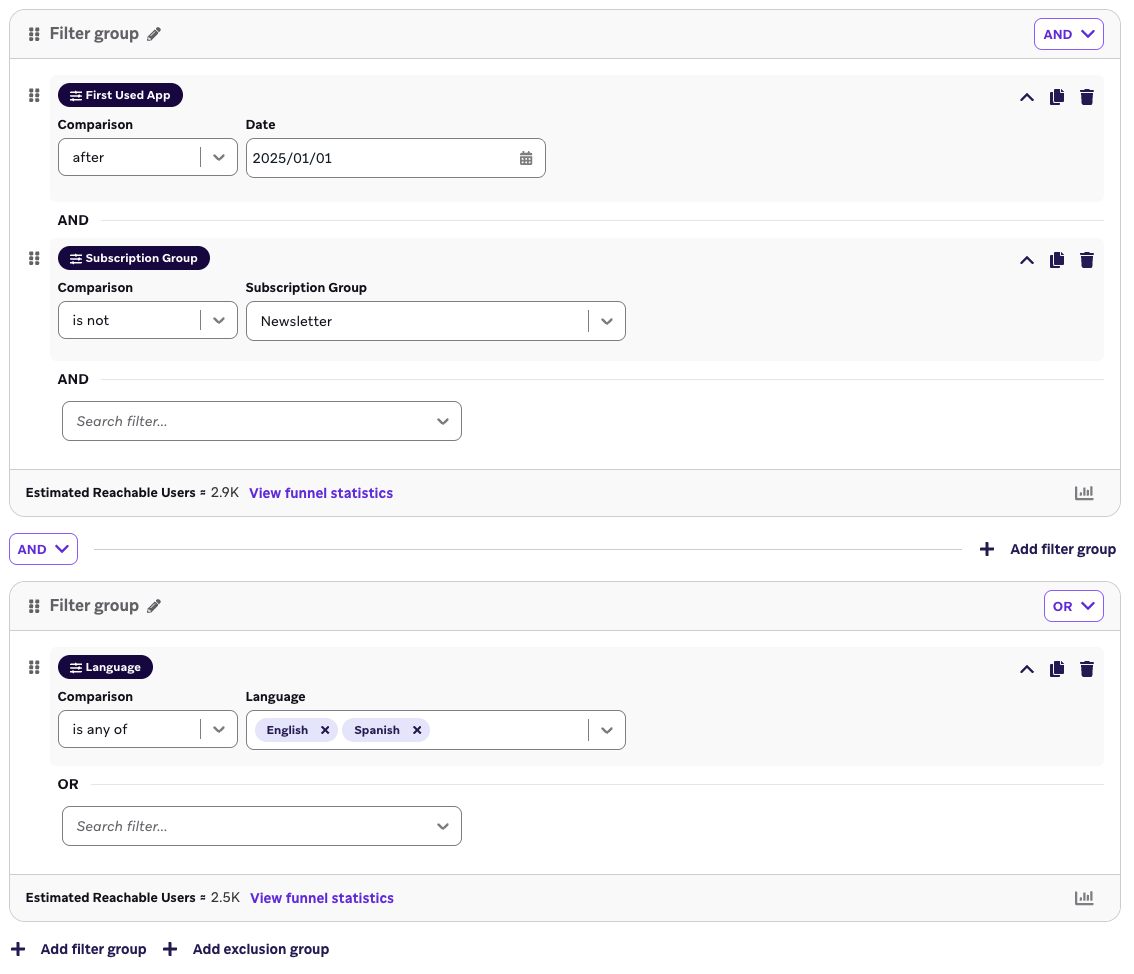
The builder sits under Audience, Segments. A segment is a set of filter groups joined by AND or OR, with exclusion groups for AND NOT, funnel statistics per group and a User Lookup to test one person by external ID. Braze says segments update as data is processed, typically instantly. Braze lists more than 100 built-in filters and also takes plain-text prompts and SQL.
Lookback is the limit to know. Standard X-in-Y count filters cover 1 to 30 days, and event property filters on purchase or custom events cover 30 days. Segment Extensions are a separate object with lookbacks up to 730 days. They can stay static or refresh hourly, daily, weekly or monthly, with hourly not offered for form-based extensions. By default a workspace can hold 50 active extensions, and an extension that is unused or unmodified for over 7 days stops refreshing. SQL extensions run on Snowflake and use Braze SQL credits, while CDI Segments query your own warehouse and bill on the warehouse side.
Segment size figures are sampled estimates at 95 percent confidence once a workspace passes 50,000 users, and exact membership is calculated before a campaign or Canvas send. A device filter such as app version puts the user in the segment, and the message then goes to all of that user's devices.
- you need the same segment to drive app push, in-app messages, Content Cards, WhatsApp and Canvas journeys, plus ad suppression through Audience Sync
- your data team wants warehouse-driven audiences: Cloud Data Ingestion is in every edition and CDI Segments don't use Braze credits
- you need event-count lookbacks beyond 30 days without extra setup: standard filters stop there, and longer windows mean Segment Extensions, capped at 50 active by default
- your audience SQL lives in a warehouse other than Snowflake: SQL Segment Extensions run on Snowflake and burn Braze SQL credits
- you want a published price or a free plan: Braze sells Go, Select, Pro and Enterprise editions by quote and offers no free plan
- Users like
- Ease of use (364 mentions)
- Users dislike
- Missing features (140 mentions) and a learning curve (139)
- Source: G2, 1,999 reviews
Limits worth knowing
A segment that uses the Segment Membership filter can't be nested into another segment, and archiving a segment also archives the campaigns and Canvases that use it. For the price structure, see Braze pricing and the Braze review.
- Starting price
- Quote only (Go, Select, Pro, Enterprise editions, priced on monthly active users and profiles plus Action Credits; no free plan)
- Filters on
- Attributes, events, purchases, devices and campaign engagement, with AND/OR filter groups, exclusion groups, SQL and plain-text builders; Segment Extensions look back up to 730 days
- Refreshes
- Segments update as data is processed, typically instantly; Segment Extensions are static or refresh hourly, daily, weekly or monthly
- Sends to
- Campaigns and Canvas journeys across push, in-app, email, SMS, WhatsApp and Content Cards, and Audience Sync to Meta, Google, TikTok, Snapchat, Pinterest, LinkedIn, Criteo and The Trade Desk
- Limits
- Standard event-count filters look back 1 to 30 days; 50 active Segment Extensions per workspace by default
- Billing basis
- Monthly active users and profiles plus Action Credits, which Audience Sync and webhooks consume; SQL extensions use SQL credits
MoEngage#
MoEngage suits consumer app teams that want RFM, affinity and predictive segments without building them from raw events.
MoEngage
MoEngage is a customer engagement platform for app-first consumer brands, with event-triggered Flows, behavioral segmentation and push and in-app messaging next to email and SMS.
MoEngage ships RFM, affinity and predictive segments next to rule-based, file and warehouse segments, and it can evaluate a limited set of segments in real time.
MoEngage lists six segment types. File segments come from a CSV, with the product page citing S3 and SFTP imports up to 5,000,000 rows. Rule-based segments are dynamic and combine user properties, user behavior, affinity and saved custom segments. Affinity segments group users by preferred category or product. RFM segments sort users into named buckets such as Loyal, Promising and At Risk. Warehouse segments use a SQL query on BigQuery, Snowflake, Databricks or Redshift.
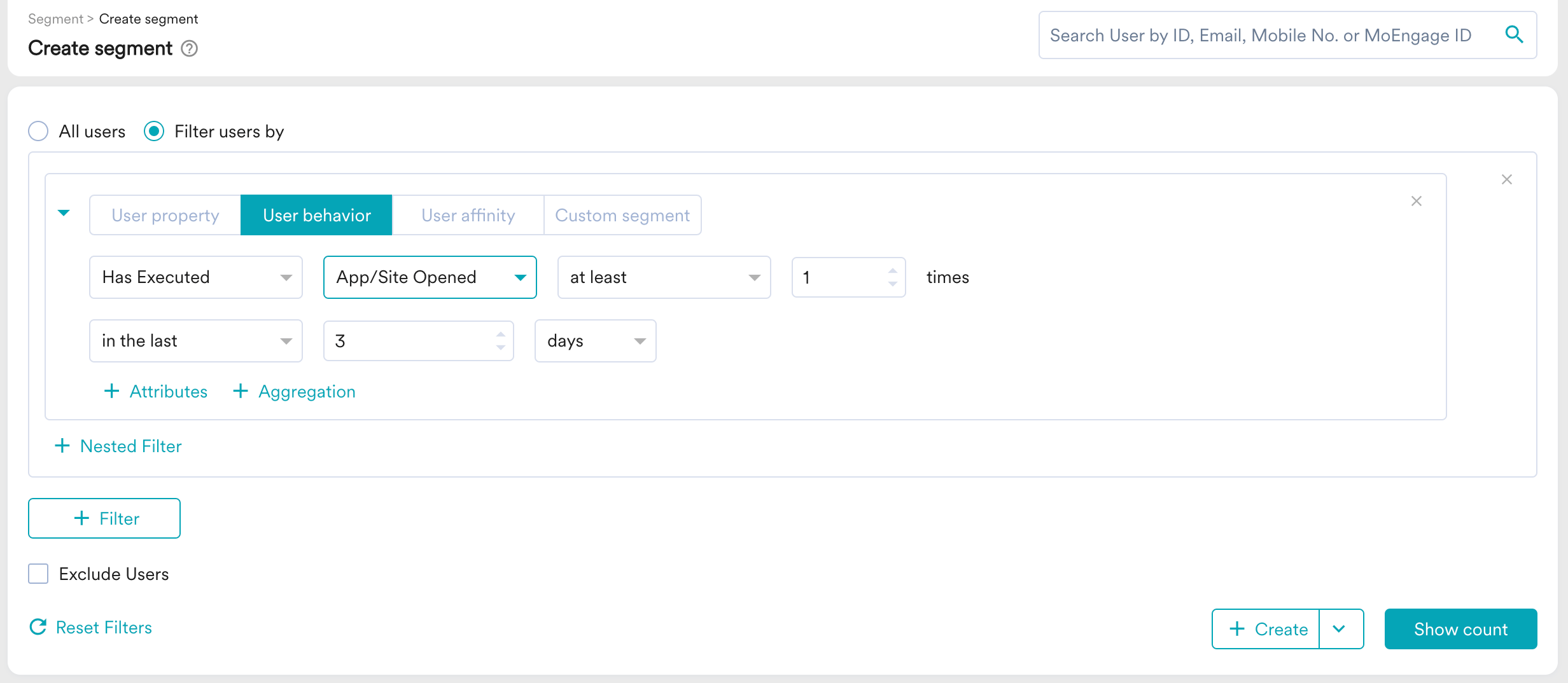
The behavior filter has frequency, a time window, event properties and aggregation options, and a Show count button reports reachable users per channel. The product page adds three out-of-the-box predictions, for conversion, uninstall and dormancy, and Segment Assist, which turns a plain-English prompt into filters.
Freshness is split in two. Real-time segment evaluation reacts to a user action and sends an event-triggered campaign within about 30 to 60 seconds, but only for 10 active real-time segments per workspace, with 10 new per day. Other segments refresh about every 3 hours for Smart Trigger campaigns and Flows and about every 6 hours for in-app, on-site and cards. A custom segment that hasn't run in 60 days is archived automatically.
- you want RFM, affinity and predictive segments built in, with 11 named RFM cohorts on the product page and plain-English filters through Segment Assist
- you need one segment to feed push, email, SMS, WhatsApp, Flows and Google and Meta audiences, and want a SQL-defined warehouse audience with no data copy
- you need real-time segment triggers at scale: only 10 real-time segments are active per workspace and the rest refresh every 3 to 6 hours
- you want warehouse-driven or ad-network audiences without a sales step: Warehouse Segments and Connected Segments are add-ons, and enabling BigQuery goes through MoEngage support
- you want a short contract: Growth and Enterprise carry a 1-year minimum and quote-only tracked-user pricing
- Users like
- Ease of use (54 mentions)
- Users dislike
- Missing features (16 mentions) and a learning curve (14)
- Source: G2, 535 reviews
Limits worth knowing
MoEngage's marketing page and its docs disagree on how deeply custom segments can nest, so check the current limit in a trial before you design nested logic. Custom segments can include up to 10 other custom segments, and archived file segments drop their users after 30 days.
- Starting price
- Quote only (Growth and Enterprise plans, priced on monthly tracked users with a 1-year minimum commitment; Warehouse Segments, Connected Segments, Computed Traits and WhatsApp are add-ons)
- Filters on
- User properties, user behavior with frequency, time window, event properties and aggregations, affinity, saved custom segments, RFM buckets and warehouse SQL
- Refreshes
- Real time for up to 10 active real-time segments; other segments about every 3 hours for Flows and Smart Triggers and about every 6 hours for in-app, on-site and cards
- Sends to
- Push, email, SMS, WhatsApp, in-app, on-site messages and Flows, plus Facebook and Google Ads audience sync
- Limits
- 10 active real-time segments per workspace and 10 new per day; one warehouse segment per warehouse connection, with a 15-minute SQL timeout
- Billing basis
- Monthly tracked users, 1-year minimum commitment; Warehouse Segments, Connected Segments and Computed Traits are add-ons
Customer.io#
Customer.io suits product and B2B teams that send on behavior and want segments that can see account objects as well as people.
Customer.io
Customer.io sends messages triggered by what people do in your product, with published pricing based on profiles, reverse ETL from your warehouse and account-level objects for B2B.
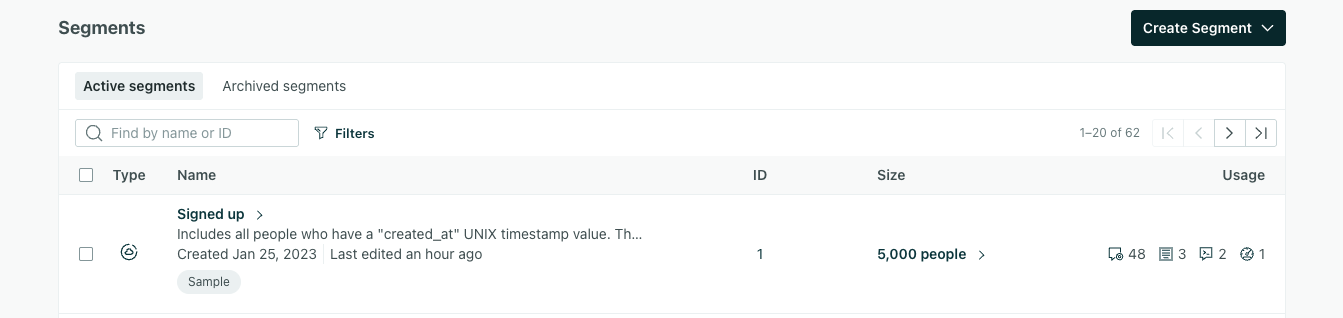
Customer.io separates data-driven segments that update as data changes from snapshot segments that stay frozen, and manual segments you fill from a CSV, a workflow or the API.
A data-driven segment's members enter and leave as their data changes. A snapshot segment keeps the same conditions but stays frozen until you click Refresh or edit the conditions, which is useful for a send you want to reproduce. A manual segment is filled by CSV upload, a workflow action or the API.
Conditions can use attributes, events, relationships to objects such as accounts, forms, page events, devices, consent records, other segments and messaging activity from email, Slack, SMS, webhooks and in-app messages. Groups nest, and a condition can match all or at least one. Collection attributes are read as plain strings, so you can't segment on an item inside an array, and regex support covers only the characters *, | and +. An AI builder writes conditions from a prompt using attribute names only, not values.
Two behaviors catch teams out. "Not in segment" also matches people who were never in it, and a segment used by an automation, a draft send or another segment can't be archived. The optional daily auto-archive runs at 00:00 UTC after 3, 6, 9 or 12 months without use. Customer.io doesn't publish a refresh latency for data-driven segments beyond describing them as real time.
- your data lives in a warehouse: reverse ETL from Snowflake, BigQuery, Redshift, Postgres, MS SQL or Databricks can run as often as every minute, so data-driven segments track it without list uploads
- you sell to accounts: segments can combine person conditions with relationships to custom objects, and Premium raises the limit from 2 to 10 object types
- you need segments to sync to LinkedIn Ads or other networks: ad audience sync covers Google Ads and Facebook Ads, and the docs list LinkedIn as not supported
- you want to segment on an item inside an array or JSON attribute: collection values are treated as plain strings in segment conditions
- you need more than 2 object types or 2 workspaces: that is Premium, from $1,000 a month billed yearly
- Users like
- Easy campaigns and workflows (250 mentions) and automation based on customer behavior (158)
- Users dislike
- Steep learning curve, especially onboarding (98 mentions), then missing features in reporting and template customization (83)
- Source: G2, 1,016 reviews
Limits worth knowing
Essentials starts at $100 a month with 5,000 profiles and 1 million emails, and extra emails cost $0.12 per 1,000. Customer.io takes inbound data from HubSpot, Segment and RudderStack. See Customer.io pricing for the profile tiers.
- Starting price
- Essentials from $100 per month at 5,000 profiles, $145 at 10,000, $505 and up at 50,000 (billed monthly); Premium from $1,000 per month billed yearly; Enterprise custom (customer.io/pricing, November 11, 2026)
- Filters on
- Attributes, events, object relationships, forms, page events, devices, consent, other segments and messaging activity, with nested all or any groups
- Refreshes
- Data-driven segments update as data changes, with no latency figure published; snapshot segments refresh only on request
- Sends to
- Automation triggers and filters, one-time sends, reverse ETL import targets, CSV export, and Google Ads and Facebook Ads audiences
- Limits
- Essentials allows 2 object types and 2 workspaces; collection attributes are read as plain strings
- Billing basis
- Profiles, meaning people plus objects, and emails; $0.009 per extra profile on Essentials
Best customer segmentation software built on event and customer data#
Amplitude and Twilio Segment start from events rather than from messages. They build the group, then send it to the tools that act on it, which makes the destination list and the sync schedule the main things to check.
Amplitude#
Amplitude suits product-led teams that already track in-product events and want to hand a behavioral cohort to ad and lifecycle tools.
Amplitude
Amplitude is an event-based analytics platform for funnels, retention and cohorts, with session replay, experiments and guides on the same data. Pricing is by event volume with unlimited seats on every plan.
Amplitude builds cohorts from what users did in your product, and syncs them to ad, email and CRM tools on a schedule that depends on the plan.
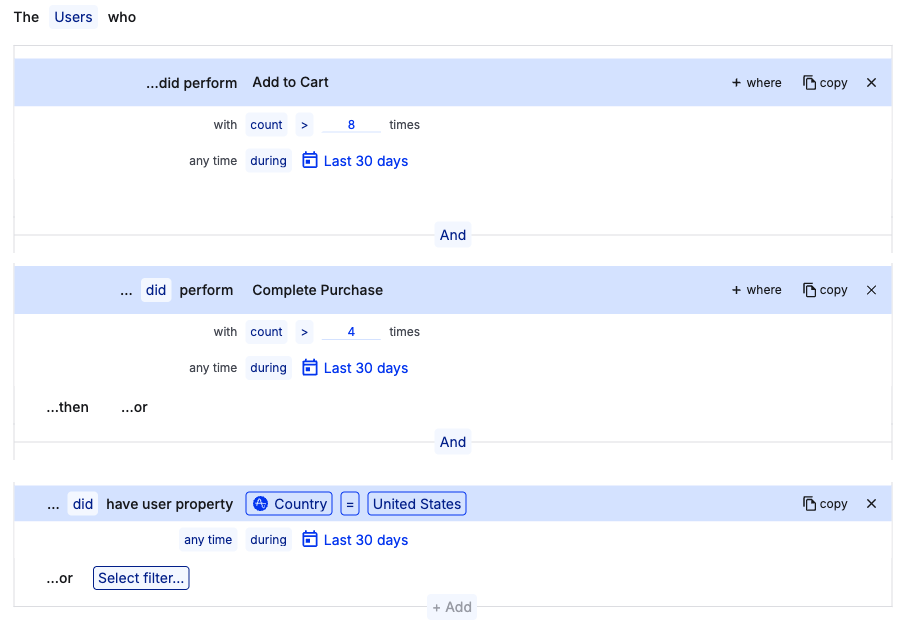
The cohort builder accepts performed events with counts, sums of a property, distinct property values, activity on at least N distinct days and time windows, plus user property clauses, membership in another cohort, sessions and a predictive propensity score. A property clause can use the most recent value or any value in the date range. Group-level cohorts need the Accounts add-on.
How a cohort is created decides whether it stays current. Only the cohort builder produces fully dynamic behavioral cohorts. Cohorts made from a chart data point, a CSV of user IDs or a pasted list are mostly static. A cohort used in a chart recomputes whenever the chart loads.
Sync is where the plan matters. A one-time sync is on every plan, recurring hourly or daily sync starts on Plus, and real-time sync, which updates about every minute after the first population, is on Growth and Enterprise only. Real-time cohorts are capped at 1,000,000 users by default, can't be funnel, retention, stickiness, Nth-time or distinct-interval cohorts, and can't go to Facebook Ads, Google Ads, TikTok Ads or HubSpot. A partly failed sync can still show as successful, and users without a valid ID or email at the destination are dropped.
- segments should come from product behavior such as counts, sums, distinct days, funnels and propensity, with unlimited seats on every plan
- you want a no-code path from a behavioral cohort to ad and lifecycle tools on Plus or above
- you need audiences defined from warehouse tables or CRM records: the cohort builder works on events and properties already in Amplitude
- you need real-time sync to Meta, Google Ads, TikTok or HubSpot: those destinations only take hourly or daily recurring syncs, and real time is Growth and Enterprise
- you want a firm cohort cap or a price above 2M events: Plus gives an estimator, Growth and Enterprise are quote only, and the docs and pricing page disagree on the Plus cohort cap
- Users like
- Ease of use (315 mentions) and visibility into feature usage (249)
- Users dislike
- Learning curve (139 mentions) and missing features across plans (78)
- Source: G2, 3,116 reviews
Limits worth knowing
Behavioral cohorts are included on Growth and Enterprise. Amplitude's Plus plan starts at $0 with the first 2M events a month free, needs a card and scales up to 70M events. For other choices, see Amplitude alternatives.
- Starting price
- Free: 2M events a month, unlimited seats, no card. Plus: starts at $0 with the first 2M events free, card required, price above that shown only in a bill estimator. Growth and Enterprise: custom, contact sales (vendor pricing page, read 2026-11-11)
- Filters on
- Performed events with counts, property sums, distinct values and distinct days, user properties, other cohorts, sessions and predictive propensity
- Refreshes
- A cohort recomputes when a chart using it loads; syncs are one time on every plan, hourly or daily on Plus and up, and about every minute in real time on Growth and Enterprise
- Sends to
- Google, Bing, Facebook, LinkedIn and TikTok ads, Braze, Customer.io, Iterable, Klaviyo, Mailchimp, Marketo, HubSpot, Salesforce Marketing Cloud, Snowflake, BigQuery and webhooks
- Limits
- Behavioral cohorts aren't on Free; 20 per organization on Plus per the pricing page, while the docs say five
- Billing basis
- Event volume with unlimited seats on every plan; Plus shows a bill estimator above 2M events
Twilio Segment#
Twilio Segment suits teams that already collect events through it and want audiences on that same data pushed to many tools, with a budget for the Customer Data Platform plan.
Twilio Segment
Twilio Segment collects customer events from sites, apps and servers, resolves them to users and routes them to marketing, analytics and warehouse destinations. Its pricing is based on monthly tracked users (MTUs).
Twilio Segment builds audiences from the events and traits it collects, but computed audiences sit in the Customer Data Platform plan, not in the Free or Team Connections plans.
Twilio splits the product in two. Customer Data Pipeline is Connections, which collects and routes data. Customer Data Platform adds Unify for identity-resolved profiles and Engage for audiences and journeys. The docs mark Audiences, Journeys and Unify as not available on Free or Team, so a team on Team at $120 a month can route data but can't build computed audiences. The Customer Data Platform plan has no published price.
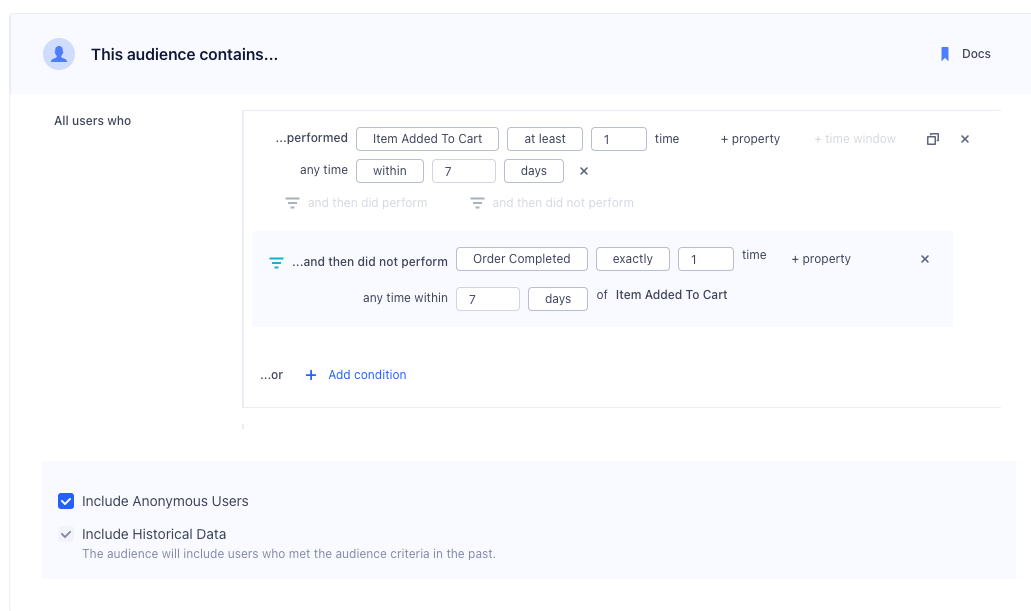
An audience groups users or accounts from Track, Page and Screen events, traits, computed traits, SQL traits and membership in other audiences. Event conditions support within and in-between windows, so you can find users active 30 to 90 days ago but not in the last 30. Funnel audiences enforce strict event order. An Include Anonymous Users setting decides whether a profile needs a user ID, email or device ID, and Include Historical Event Data sets a lookback such as 90 days.
Simple audiences are real time. Funnel, dynamic-property, account-level and time-window audiences run in batch, by default every 8 hours. Facebook Custom Audiences, Marketo lists and Google Ads remarketing lists are rate limited and sync every 1 to 6 hours. Classic Journeys can no longer be created or edited since June 25, 2026.
- you want audiences driven by warehouse data: SQL traits and Reverse ETL from Snowflake, BigQuery, Redshift, Databricks or Postgres feed the same audiences
- you need one audience pushed to many ad and lifecycle tools, with enter and exit events removing users downstream
- you are on Free or Team and want audiences: computed audiences, Journeys and Unify aren't available on either, and the Customer Data Platform plan has no published price
- your segments depend on time windows or funnels and need fast activation: those run in batch, by default every 8 hours, and real-time audiences reach batch destinations only every 12 to 15 hours
- you have a few thousand users and a small budget: Team starts at $120 a month for 10,000 tracked users, with $10 to $12 per extra 1,000
- Users like
- Easy integrations
- Users dislike
- Cost
- Source: G2, 568 reviews
Limits worth knowing
For the collection side of the stack, see our Segment vs RudderStack comparison. Twilio sells identity resolution inside the Customer Data Platform plan and not in Connections Business, so a team that needs identity-resolved profiles should price that plan first.
- Starting price
- Connections: Free ($0, 1,000 MTUs) and Team (from $120 per month, 10,000 MTUs); Business and the Customer Data Platform (Audiences, Unify, Journeys) by quote (vendor pricing pages, as of 2026-11-22)
- Filters on
- Track, Page and Screen events with time windows and and-not conditions, traits, computed and SQL traits, strictly ordered funnels and membership in other audiences
- Refreshes
- Real time by default; funnel, time-window, dynamic-property and account-level audiences run in batch, by default every 8 hours
- Sends to
- Facebook, Google Ads, LinkedIn, TikTok, Pinterest and Snapchat audiences, Braze, Iterable, Klaviyo, HubSpot, Customer.io, Mailchimp, Marketo static lists, Salesforce and Salesforce Marketing Cloud
- Limits
- SQL traits: 25 per space, up to 25M rows and 25 columns; 5 concurrent audience computations
- Billing basis
- Monthly tracked users; Team adds $12, $11 or $10 per extra 1,000 as volume rises
How does a segment get from data to a message?#
A segment passes through five handoffs between the event and the send, and each one fails without an error message. A broken segment usually shows up as a campaign that went to the wrong people, not as an alert.
- Step 1Collect
- Klaviyo
- Amplitude
- Twilio Segment
Breaks when an event is renamed or a property stops arriving, so the rule matches nobody and nothing errors - Step 2Match the person
- Twilio Segment
- Braze
- Customer.io
Breaks when one person has two profiles, so a buyer stays in the never-purchased segment - Step 3Define the rule
- Mailchimp
- HubSpot Marketing Hub
- MoEngage
Breaks when a time window or an AND/OR group is built wrong, so the segment is far larger or smaller than expected - Step 4Refresh
- HubSpot Marketing Hub
- MoEngage
- Twilio Segment
Breaks when a send runs before membership catches up, which can take up to 2 hours in HubSpot and 8 hours for batch audiences in Twilio Segment - Step 5Send
- Klaviyo
- Braze
- Amplitude
Breaks when the ad audience is too small or syncs late, such as a Meta audience that needs 100 profiles and up to 48 hours to update - Step 6Check the journey
- The Marketing Ops Manager
Catches a form that still submits while the tracking event or the CRM contact the segment depends on is missing
Steps 1 to 5 belong to the segmentation tool and the stack around it. Step 2 is the one teams underestimate: Twilio Segment has an Include Anonymous Users setting that changes who counts, and a Braze device filter puts a user in the segment and then messages every device that user has. Step 4 matters for scheduling. If a campaign is set for 9:00 and an import finishes at 8:30, a HubSpot segment with an integration filter can still be up to two hours behind.
Step 6 sits outside all eight tools. The Marketing Ops Manager isn't a segmentation tool and doesn't build segments. It checks landing pages, tracking, forms and CRM contacts on a schedule, opens an incident with evidence when one of them fails, and connects to HubSpot, GA4, Google Ads, Slack, Jira and Asana. Treat it as the check on the inputs a segment depends on, not as a replacement for anything above. Our campaign tracking checklist covers the tracking side before a launch.
Which customer segments should you build first?#
Build the segments that change a message you already send. Six segments cover most teams, and each one needs different data, which is why the first tool question is where that data lives.
| Segment | Rule | Data it needs | Easy to build in |
|---|---|---|---|
| First-time buyers | One order, placed in the last 30 days | Order events | Klaviyo, Mailchimp with a connected store |
| Lapsed customers | Two or more orders, none in the last 90 days | Order history | Klaviyo, MoEngage RFM At Risk |
| High-value customers | Top tier by revenue or predicted lifetime value | Revenue, predicted CLV | Mailchimp Standard, Klaviyo |
| Active users who skipped a feature | Used the product 3 or more days, never fired a feature event | Product events | Amplitude, Customer.io |
| Engaged but not buying | Clicked emails 3 or more times in 30 days, no order | Email activity plus orders | Mailchimp, HubSpot |
| Target accounts with a pricing visit | Company size in range and a contact viewed pricing | Company properties, page views | HubSpot, Customer.io with account objects |
RFM is the classic way to sort buyers: recency of the last order, frequency of orders and monetary value. MoEngage ships it as 11 named cohorts, and in the other tools you rebuild it with order filters. A lead scoring model plays the same role for B2B leads, with points where RFM has buckets. Start with three segments, name an owner for each and review their size monthly, because a segment nobody owns keeps running after the campaign it served has ended.
How do you choose customer segmentation software?#
Choose by where your customer data lives first, then by how fresh a segment must be, then by where the segment has to go. Four questions separate the eight tools.
- Where does the data live? Store orders point to Klaviyo or Mailchimp, HubSpot CRM records to HubSpot, app and device data to Braze or MoEngage, and product events to Amplitude or Customer.io.
- How fresh must it be? A welcome series needs seconds, so check real-time rules: MoEngage allows 10, Twilio Segment makes simple audiences real time, and HubSpot can lag an hour or two on complex rules.
- Where does the segment have to go? Ad networks differ. Customer.io covers Google and Facebook, Klaviyo covers Meta and Google, HubSpot covers four networks, Braze covers eight.
- Who will maintain it? G2 reviewers describe a learning curve for Braze, MoEngage, Customer.io, Amplitude and HubSpot, so budget admin time alongside the license.
| Your data lives in | Start with | Why |
|---|---|---|
| A Shopify-style store, small list | Klaviyo or Mailchimp Standard | Order-based segments and predicted fields, from $20 a month on Mailchimp Standard or Klaviyo Email at 500 profiles |
| HubSpot CRM | HubSpot Marketing Hub | Segments on CRM and company data, no sync step |
| A mobile app plus several channels | Braze or MoEngage | One segment across push, in-app, email and SMS, quote only |
| A warehouse such as Snowflake or BigQuery | Braze CDI Segments, MoEngage Warehouse Segments or Customer.io reverse ETL | Audiences from your tables without a data copy or with minute-level sync |
| Product analytics events | Amplitude | Behavioral cohorts synced to ad and lifecycle tools on Plus and up |
| Events across many tools | Twilio Segment Customer Data Platform | Audiences pushed to many destinations, quote only |
What should you test before a segment goes live?#
Check a segment against a count you trust before you send to it. A segment that looks right in the builder can still be wrong on a time window, a duplicate profile or a stale sync.
- The preview size matches a count you can get elsewhere, such as the store, the CRM or a warehouse query
- A test profile that should match joins the segment, and one that shouldn't match stays out
- A time-window condition, such as the last 30 days, drops a person when it should, and you know how often that removal runs
- Unsubscribed and suppressed contacts are excluded, and non-marketing contacts in HubSpot aren't expected to receive email
- The refresh interval is shorter than the gap between the data change and the send
- Ad audiences meet the network minimum, such as 100 profiles for Meta through Klaviyo, and you know the sync delay
- Static segments, snapshots and CSV cohorts are labeled as frozen and have a date
- The same person has one profile across store, CRM and app, so the segment doesn't double count them
- Someone owns the segment, and unused segments are archived on a schedule
For the wider stack around segmentation, see marketing operations software and lead management software.
What is customer segmentation software?
Customer segmentation software sorts customers into groups using rules on attributes and behavior, keeps each group current as data changes and passes it to tools that send messages, run journeys or build ad audiences. Klaviyo, HubSpot Marketing Hub, Braze and Customer.io all build segments this way.
How much does customer segmentation software cost?
Segmentation usually comes inside a platform rather than as its own product. Mailchimp starts at $13 a month for Essentials and $20 for Standard, Klaviyo at $20 a month at 500 active profiles, Customer.io at $100 a month and HubSpot Professional at $800 a month plus $3,000 onboarding. Braze and MoEngage are quote only, and Twilio Segment audiences need the quote-only Customer Data Platform plan.
Do I need a customer data platform for segmentation?
Not for a single data source. Mailchimp, Klaviyo and HubSpot segment on the data they already hold. A customer data platform helps when events come from several tools and one audience has to reach many destinations. Twilio Segment's computed audiences are part of its Customer Data Platform plan, not its Free or Team plans.
How often do customer segments update?
Update speed depends on the tool and the rule. Klaviyo segments update in close to real time, with relative-time removals once every 24 hours. HubSpot active segments reprocess in minutes and complex ones can take up to 2 hours. MoEngage refreshes most segments every 3 to 6 hours, and Twilio Segment batch audiences run every 8 hours by default.
What is the difference between a segment and a list?
A segment is rule-based and changes as customer data changes, while a list is a fixed set of people. HubSpot offers active and static segments, Customer.io has data-driven and snapshot segments, and Klaviyo can turn a segment's current members into a static list.