Lead nurturing software sends timed, behavior-based follow-up to leads who aren't ready to buy, and hands them to sales once they cross a score or take a defined action. It sits between the form fill and the CRM owner field, which is where most marketing programs lose track of a lead.
This guide covers eight tools in three groups: tools that nurture next to the CRM, tools built for Salesforce-centered B2B teams, and tools that start a nurture from behavior or product events. Each entry says how enrollment, waits and goals work, where scoring lives, what reaches sales, which plan unlocks it and who should skip it. We read vendor material and didn't run these products.
- tools compared, from a free open-source install to a $15,000 a month edition
- 8
- publish a starting price (only Marketo is quote only)
- 7 of 8
- tie scoring, goals or CRM handoff to a higher plan or an add-on
- 5
- per month at 1,000 contacts, the lowest published starting price (Zoho Marketing Automation Standard, annual billing)
- $14
What is lead nurturing software?#
Lead nurturing software is a tool that enrolls a known lead in a sequence of messages and tasks, waits for what the lead does, and moves the lead along or out based on rules. A sequence can send an email after a download, wait three days, check whether the lead clicked, and then either send a case study or alert a rep.
It differs from a plain email sender because the next step depends on behavior and on lead data, not only on a send date. It differs from lead generation software, which captures the lead in the first place, and from lead management software, which also covers capture, routing and record upkeep. Many of the tools below also appear in our marketing automation software guide. This page looks at them through one job: keeping a lead warm until sales should pick it up.
| Lead nurturing software | Email marketing tool | Lead scoring alone | |
|---|---|---|---|
| Core job | Run multi-step follow-up that reacts to behavior | Send campaigns and newsletters | Rank leads by fit and interest |
| Decides the next step | Yes, with waits, branches and goals | Mostly no, a schedule decides | No, it only produces a number |
| Hands a lead to sales | Yes, through a task, owner change or CRM sync | Rarely | Only if another tool acts on the score |
| Example here | HubSpot Marketing Hub, ActiveCampaign, Marketo | A newsletter send in any email tool | A score field with no workflow |
Scoring still matters, because it decides when a nurture ends. The lead scoring guide covers how to build a model. Here, scoring is one of the criteria for choosing a tool.
Our picks by situation#
 Best for goal-based exits on HubSpot CRMHubSpot Marketing HubContact workflows with goals, separate fit and engagement scores and a rotate-to-owner step, with Professional at $800 a month plus $3,000 onboarding.
 Best for a low-priced nurture next to Zoho CRMZoho Marketing AutomationJourneys that create tasks and deals in Zoho CRM from Professional, starting at $14 a month at 1,000 contacts.
 Best for a large list that gets mailed rarelyBrevoPricing by email volume, unlimited multi-step workflows from Standard and a score you build yourself with an attribute.
 Best for score and grade handoff to SalesforceSalesforce Marketing Cloud Account EngagementEngagement Studio programs plus an automation rule that assigns a prospect by score and grade, from $1,250 a month.
 Best for content streams on Salesforce, Dynamics or VeevaAdobe Marketo EngageEngagement programs with per-stream cadence and Smart Campaign scoring, quote only.
 Best for behavior triggers from a low starting priceActiveCampaignMulti-step automations from $15 a month at 1,000 contacts, with scoring and deals in a paid Pipelines add-on.
 Best for product-event and account-based nurtureCustomer.ioJourneys triggered by events and attributes, with account objects for B2B and published pricing from $100 a month.
 Best for teams that run their own installMauticOpen-source campaign builder with points and a Salesforce plugin, free software or managed from 247.50 euros a month.
 Best for checking the nurture still works after launchThe Marketing Ops ManagerIt doesn't run nurtures. It checks the journey from form to CRM record and lead owner on a schedule.
Lead nurturing software compared#
| Tool | Where the nurture runs | What reaches sales | Starting price |
|---|---|---|---|
| HubSpot Marketing Hub | Workflows on HubSpot CRM records | Rotate record to owner and a rep notification at a score threshold | Professional $800 a month, 3 seats, plus $3,000 onboarding |
| Zoho Marketing Automation | Journeys synced with Zoho CRM | Create Task and Create Deal in Zoho CRM (Professional and up) | $14, $22 or $44 a month at 1,000 contacts, billed annually |
| Brevo | Automations on emails sent | Assign a user or create a deal at a score you define | Free; Standard $18 a month at 5,000 emails (monthly billing) |
| Salesforce Marketing Cloud Account Engagement | Engagement Studio programs for Salesforce | Automation rule assigns by score and grade through Salesforce | $1,250 to $15,000 a month per org, annual contract |
| Adobe Marketo Engage | Engagement programs and Smart Campaigns | MQL campaign alerts the owner; Sync Person to SFDC | Quote only |
| ActiveCampaign | Automations with event triggers | Create a deal from an automation; scoring needs the Pipelines add-on | $15 to $145 a month at 1,000 contacts, billed yearly |
| Customer.io | Journeys on events and attributes | Webhook or Slack step; native Salesforce on Premium | Essentials from $100 a month at 5,000 profiles |
| Mautic | Self-hosted campaign builder | Point trigger pushes the contact to Salesforce or emails the owner | Software free; managed from 247.50 euros a month |
| The Marketing Ops Manager Our product | Campaign monitoring | Checks every handoff in the campaign journey on a schedule | Starter $199 per month (up to 10 campaigns, checks every 15 minutes), Growth $499 per month (up to 50 campaigns, checks every 5 minutes); billed monthly in advance through Stripe, card required at checkout, cancel anytime (vendor homepage, as of 2026-11-02) |
Prices and limits come from vendor pages read in November 2026. Zoho, ActiveCampaign and Customer.io list contact or profile tiers, so your bill moves with list size. Brevo prices on emails sent. Salesforce prices per org.
What features matter in lead nurturing software?#
Check how a tool handles seven things before you compare price. Each one decides whether a nurture stays correct six months after launch.
| Feature | What to check | Where the tools differ |
|---|---|---|
| Enrollment and re-entry | Who enters, how often, and whether existing matches are added | HubSpot enrolls a record once by default and re-enrollment is a trigger setting; Brevo keeps re-entry off by default; ActiveCampaign offers "Once" or "Multiple times" |
| Waits and branches | Delay types, conditions and split tests | HubSpot has six delay types; Customer.io has Time Delay, Time Window and Wait Until with a maximum wait; Brevo's percentage split needs Professional |
| Goals and exit | What removes a lead who already converted | HubSpot goals need Professional; Customer.io exits default to leaving when the entry filter stops matching; Account Engagement relies on lists and an End step |
| Scoring | Points, grade, decay and where the model lives | Account Engagement pairs a score with an A+ to F grade; Marketo scores with Change Score steps; Customer.io lists no native scoring |
| Handoff to sales | What happens at the threshold | Tasks, deals, owner rotation or a CRM push, each on a different plan |
| Consent and unsubscribes | Whether suppressed contacts can still advance | Marketo non-marketable people keep moving through streams unless paused or moved to an exclusion stream |
| Pricing metric | What grows the bill | Contacts (Zoho, ActiveCampaign), profiles (Customer.io), emails sent (Brevo), org edition (Account Engagement) |
Price comes last for a reason, especially on tools that charge per contact. A cheap tool that can't exit a converted lead, however polished its builder, sends the next email to someone who just booked a demo.
How does a lead move through a nurture?#
A lead passes through six stages, and each tool below implements them with different building blocks.
- Enter. A form, a list, a segment or an event puts the lead in the track.
- Wait. A delay or a wait-until step gives the lead time to act.
- Branch. A condition checks what the lead did, such as opening an email or visiting a page, and sends the lead down a different path.
- Score. Actions add or subtract points, and some tools add a fit grade.
- Hand off. At a threshold, the tool creates a task, changes the owner or syncs the record to the CRM.
- Exit. A goal, a sales status or an unsubscribe removes the lead from the track.
The test of a tool isn't the builder but stages 5 and 6, because those are the ones teams forget to configure. The entries below say which tool has what at each stage.
Best lead nurturing software for CRM-native teams#
These three tools run the nurture next to the CRM or bring their own, so there's no separate sync step between the track and the lead record. The trade-off is that the nurture logic lives in one vendor's world.
HubSpot Marketing Hub#
HubSpot Marketing Hub is the tool for teams that already keep leads, deals and owners in HubSpot CRM, and want nurture, scoring and handoff in the same database.
HubSpot Marketing Hub
Marketing automation integrated with HubSpot CRM. Its shared-record model can reduce separate marketing-to-CRM handoffs for teams that also use HubSpot CRM.
HubSpot Marketing Hub runs a nurture as a contact workflow on CRM records, with goals, branches and separate fit and engagement scores on Professional.
A nurture starts from one of four trigger types: filter-based, event-based, schedule-based or webhook-based. When you publish, you choose whether contacts who already match get enrolled. A record enrolls once by default, and re-enrollment is a per-trigger setting. Delays come in six types, including a set amount of time, a day of the week, a time of day and an event such as a form submission. Branches split on one property, on AND/OR filters or, on Professional and Enterprise, randomly into even groups.
Goals are the feature to check first, and they're gated. When a contact meets the goal criteria, HubSpot removes them from the workflow before the next action runs, so someone who booked a demo doesn't get the next nurture email. Setting goals needs Professional or Enterprise, so a Starter team can't build exits this way. HubSpot also advises goals only for workflows that send marketing email and suppression lists otherwise.
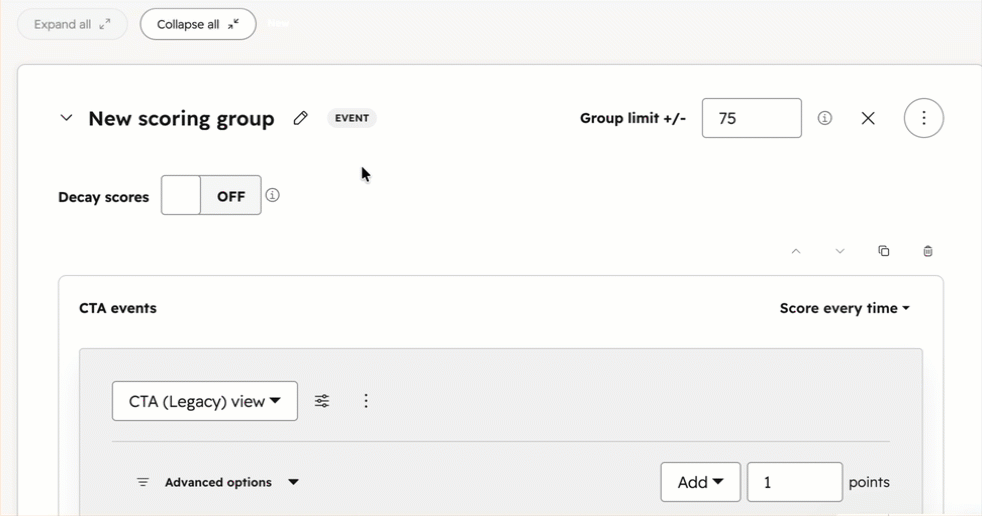
Scoring is split in two. Fit scores grade a contact A to C by profile, and engagement scores rate activity from 1 to 3, with optional decay. Professional allows 5 scores and Enterprise 50. In HubSpot's own example, a workflow enrolls records when the score property reaches High, leaves re-enrollment off so contacts reach sales once, rotates the record to an owner and notifies the rep. The rotate action needs a Sales Hub or Service Hub Professional or Enterprise seat.
Professional costs $800 a month with 3 seats and 2,000 marketing contacts, plus a required $3,000 onboarding fee. Enterprise is $3,600 a month plus $7,000 onboarding. Starter allows up to 10 automated email actions and lists no lead scoring.
- you need goal-based exits with a measured goal conversion rate: goals are a Professional feature
- you want separate fit (A to C) and engagement (1 to 3) scores with decay, from 5 scores on Professional
- your reps work in HubSpot CRM, so a score threshold can rotate the record to an owner and notify them without a connector
- you can't fund Professional at $800 a month plus $3,000 onboarding: Starter stops at 10 automated email actions and has no lead scoring
- you need random-split branches or goals on a small budget: both are Professional or Enterprise
- you need more than 5 scores or predictive scoring: that's Enterprise at $3,600 a month plus $7,000 onboarding
- Users like
- Ease of use with built-in integration and automation (2,525 mentions)
- Users dislike
- Steep learning curve (808 mentions), missing features for smaller teams (786) and cost as the contact list grows (667)
- Source: G2, 16,036 reviews
Limits worth knowing
Predictive lead scoring and behavioral events are Enterprise only. HubSpot keeps workflow action logs for 90 days and enrollment history for 6 months, so a nurture that misfires needs a look within that window. Marketing contacts are the billable unit, and the contact tier you pick can't be lowered until the contract renews.
- Starting price
- Free tools for up to 2 users; Starter $20 per seat per month list ($7 for new customers in a limited promotion); Professional from $800 per month ($890 struck through on the page) plus required $3,000 onboarding; Enterprise from $3,600 per month plus required $7,000 onboarding
- Workflows
- Up to 300 (Professional), 1,000 (Enterprise)
- Lead scores
- 5 (Professional), 50 (Enterprise)
- Delay types
- 6
- Billing metric
- Marketing contacts, 2,000 included on Professional
Zoho Marketing Automation#
Zoho Marketing Automation is a journey builder with native two-way sync to Zoho CRM, aimed at teams that already run Zoho and want the nurture priced per contact.
Zoho Marketing Automation
Zoho's omnichannel journey builder, separate from Zoho Campaigns, with website tracking, lead scoring and native two-way sync with Zoho CRM.
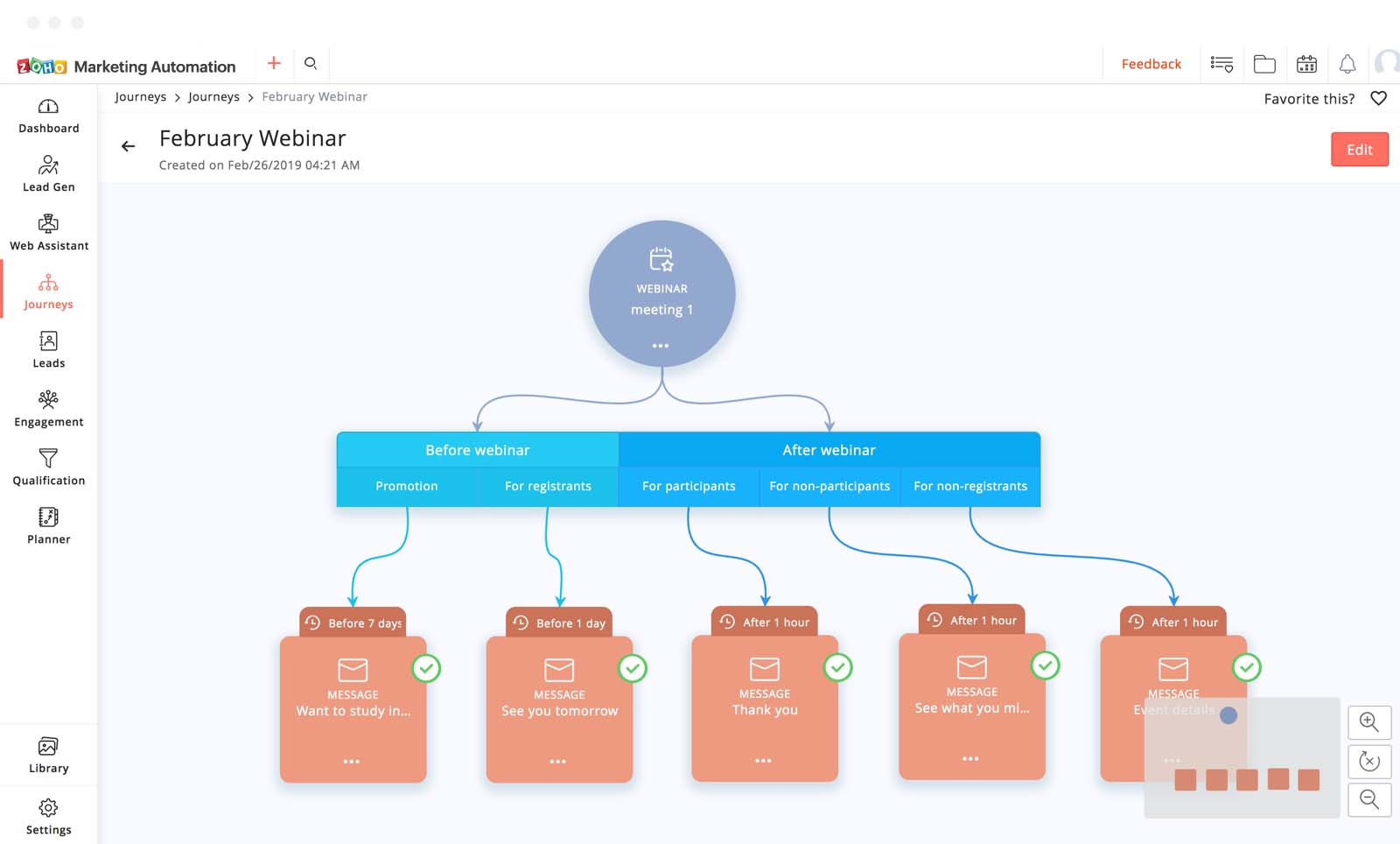
Zoho Marketing Automation builds a nurture as a Journey, separate from Zoho Campaigns, with scoring on every plan and CRM task and deal actions from Professional.
Journeys start from triggers that are on all plans: form submission, added to a list or segment, criteria match, page visit, lead stage update and lead score update. Email-action triggers (opened, clicked, replied), tag triggers and abandoned cart come with Professional. Date-field and cyclic triggers are Enterprise only.
Waits and conditions are where the plans split. Time Delay is on every plan. A Wait Condition, which holds a lead until criteria match or a period ends, starts at Professional, together with multi-step conditions and email-activity checks. Standard has no Wait Condition, no tag actions, no update-lead-score action and no re-entry.
Scoring works by website activity, profile field values and email activity, and a lead score update can itself trigger a journey. Zoho says contacts at the target score can be considered marketing qualified. The handoff runs through Zoho CRM: Push Data works on all plans, while Create Task and Create Deal need Professional and up. A created deal can take its owner from the CRM owner, a specific rep or round robin.
Plans cost $14, $22 and $44 a month at 1,000 contacts on annual billing, or $19, $29 and $59 billed monthly, with unlimited emails and 10, 15 or 25 users. There's a 14-day trial but no free plan.
- your CRM is Zoho CRM and you want Create Task and Create Deal actions with round-robin deal owners (Professional and up)
- you need a Wait Condition and multi-step conditions without enterprise pricing: Professional is $22 a month at 1,000 contacts
- you want a lead score update as a journey trigger, on every plan including Standard
- you need webhooks or the Move to Another Journey action: both are Enterprise only at $44 a month at 1,000 contacts
- you can't use Zoho CRM: Create Task and Create Deal are CRM actions, and only one CRM account connects
- you plan to run on Standard: it has no Wait Condition, no tag actions and no re-entry
- Users like
- Automation and journey management
- Users dislike
- Learning curve and customer support
- Source: G2, 116 reviews
Sync limits
CRM sync has fixed choices. The module you sync, Leads, Contacts or one custom module, can't be changed once sync starts. A score can only go back into a custom Number field you map in the CRM. Salesforce, HubSpot, SugarCRM and Dynamics 365 appear on Zoho's integration list, along with GoToWebinar, Eventbrite and Unbounce.
- Starting price
- At 1,000 contacts billed annually: Standard $14, Professional $22, Enterprise $44 per month ($19, $29, $59 billed monthly); unlimited emails; no free plan, 14-day trial
- Billing metric
- Marketing contacts, unlimited emails
- CRM sync
- Zoho CRM two-way; score returns only to a mapped custom Number field
- Users
- 10 / 15 / 25 (Standard / Professional / Enterprise)
Brevo#
Brevo suits teams with a large list that gets mailed rarely, because it prices on emails sent and ships its own sales CRM.
Brevo
Brevo prices on emails sent, not contacts, and bundles email, SMS, WhatsApp and a sales CRM. Unlimited multi-step workflows start on the Standard plan.
Brevo prices nurture on email volume and builds it as automations, with a scoring pattern you assemble from a number attribute and a conditional split.
Automations start from list, segment, filter, form, email, link, cart, order, page-visit or custom-event triggers, and one automation can have several triggers. Page visits and custom events need the Brevo tracker. The rules are a time delay, a conditional split, a percentage split and a wait-until step that takes a No branch if the event doesn't happen within a time limit. Re-entry is off by default, and entry settings carry exit conditions and restart conditions.
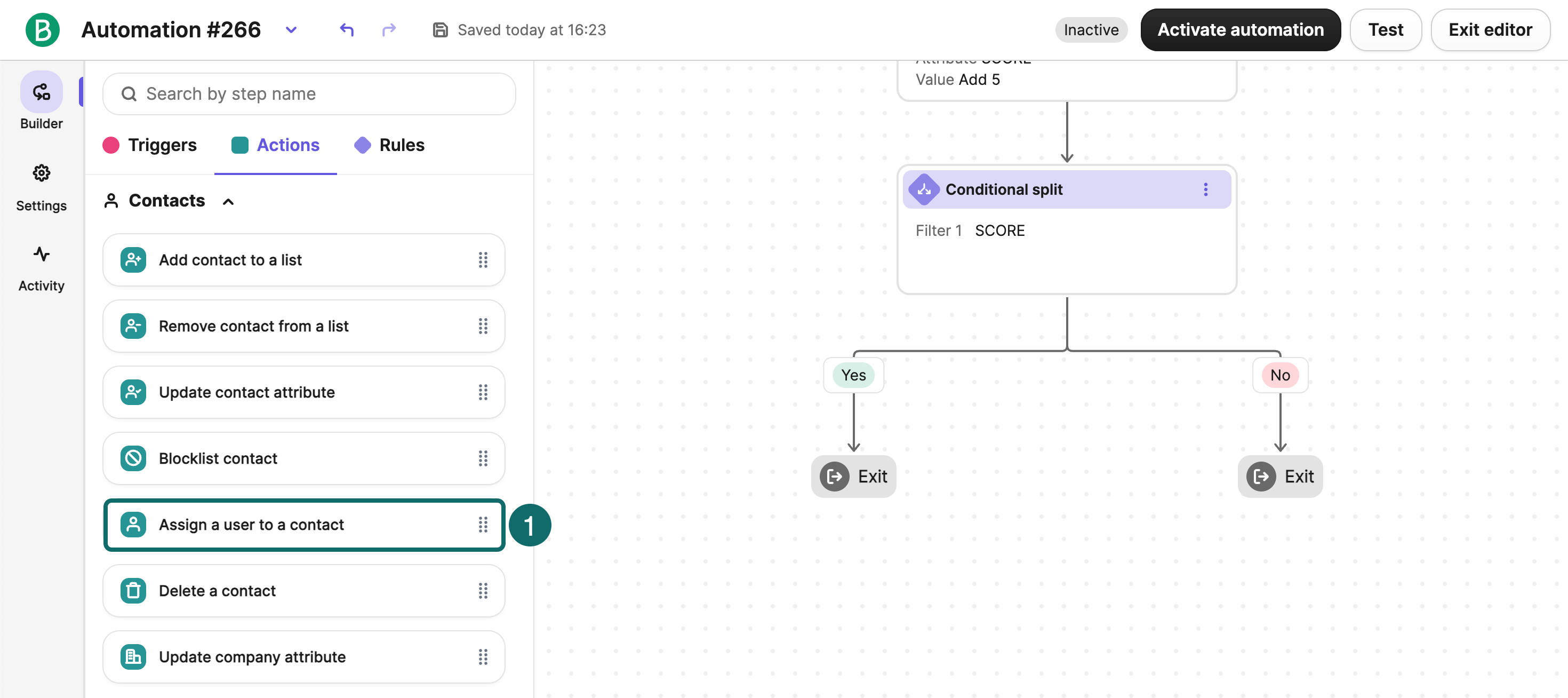
Scoring isn't built in below Professional, but Brevo documents a manual pattern. Create a number attribute such as SCORE, add 5 points when a contact opens an email or clicks a link, split on SCORE of at least 20 and assign a salesperson on the Yes branch. The assignment step takes a single user or a round-robin rotation, and an automation can also create a deal at a score. Built-in contact scoring (engagement, purchases, behavior, RFM, CLV) is Professional and Enterprise.
Plan gating is the detail to read. Automation is limited to 2,000 contacts on Free and Starter and unlimited multi-step on Standard and above. Percentage-split testing is Professional and Enterprise. Brevo lists deal and task actions under its Sales Essentials and Advanced add-ons, although one help page ties the add-ons only to more than 50 open deals, so confirm it on a trial before you build around it.
Brevo is free with 300 emails a day. At 5,000 emails a month, Starter is $9 and Standard $18 on monthly billing, and Professional is $499 a month from 150,000 emails with 10 seats. Yearly billing takes 10 percent off.
- you have a large list but send rarely, so a price on emails sent beats a price per contact
- you want to build a score yourself with a SCORE attribute and a conditional split, then assign a rep or create a deal
- you want email, SMS and WhatsApp steps in one workflow with exit and restart conditions
- you need nurtures for more than 2,000 contacts on Free or Starter: automation is capped there
- you need built-in contact scoring, RFM or CLV: that starts at Professional, $499 a month
- you need percentage-split tests inside a workflow below Professional
- Users like
- Ease of use (314 mentions)
- Users dislike
- Missing automation features and design limits (107 mentions); expensive with rising SMS costs (55)
- Source: G2, 2,776 reviews
Sync and integrations
Native HubSpot and Salesforce sync is set up with Brevo's Enterprise team and sits on Professional and Enterprise, so a Salesforce-centered team will find it heavy. The pricing page counts more than 150 integrations, including Shopify, WordPress, Stripe and Zapier. Branding removal starts on Standard.
- Starting price
- Free with 300 emails a day; at 5,000 emails a month Starter is $9 and Standard $18 on monthly billing; Professional from $499 at 150,000 emails; automation workflows start at Standard
- Billing metric
- Emails sent per month
- Automation
- Capped at 2,000 contacts on Free and Starter; unlimited multi-step from Standard
- Built-in scoring
- Professional and Enterprise
Best lead nurturing software for Salesforce-centered B2B teams#
Both tools here assume Salesforce, or another enterprise CRM, is the system of record. The nurture is a program that feeds lead status back to it, and a person owns the sync rules.
Salesforce Marketing Cloud Account Engagement#
Account Engagement, formerly Pardot, is Salesforce's B2B nurture product, and its main idea is a score and a grade that together decide when a prospect goes to sales.
Salesforce Marketing Cloud Account Engagement
Salesforce B2B marketing automation for lead capture, nurture, scoring and CRM handoff; pricing depends on edition, contact blocks and optional consumption.
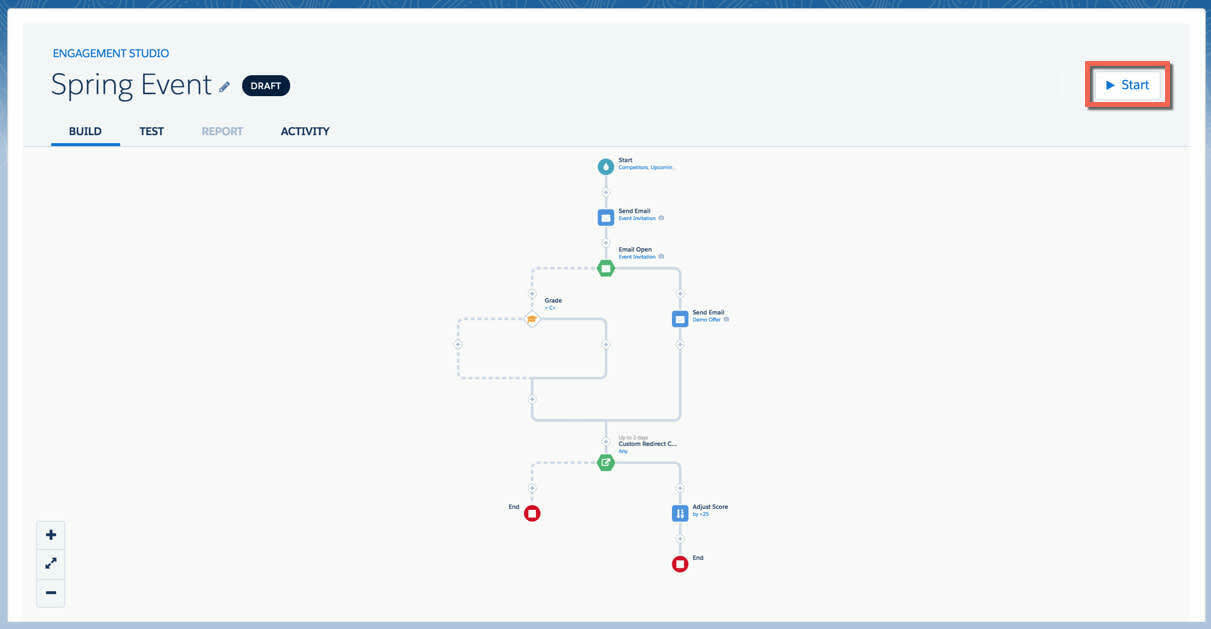
Account Engagement runs nurture as Engagement Studio programs on a recipient list, and an automation rule assigns the prospect to sales by score and grade.
An Engagement Studio program runs on a recipient list with an optional suppression list. Its steps are actions (send an email, change a field, create a Salesforce task, add to a campaign, notify a user), triggers that listen for an event such as an email open or a form submission within a set number of days, and rules that check prospect data at that moment. Triggers and rules branch into Yes and No paths. A trigger has a maximum window: if the prospect acts inside it, they take the Yes path at once, and if the window closes they take No. Salesforce's training advises a long wait before the End step, because End is permanent.
Scoring and grading are separate. A score is interest, earned in points per action. A grade runs from A+ to F for fit against a profile, and new prospects start at D. Salesforce suggests starting thresholds of a score of 100 and a grade of B minus. The training example assigns prospects with a score above 150 and a grade above B+ through the active Salesforce assignment rule, and a prospect who already has an owner keeps it. Once assigned, the record syncs with Salesforce.
Editions are $1,250 (Growth+), $2,750 (Plus+), $4,400 (Advanced+) and $15,000 (Premium+) per org a month on an annual contract. Each includes 10,000 contacts, except Premium+ with 75,000, and extra contacts cost $100 per 10,000 a month. Automation rules are capped at 50, 100, 150 and 150 by edition. Salesforce CRM licenses are separate.
- Salesforce Sales Cloud is your CRM and you want an automation rule that assigns prospects by score and grade through the active assignment rule
- you need two-axis qualification, with interest as a score and fit as an A+ to F grade
- you want program steps that create Salesforce tasks, add prospects to campaigns and notify users inside the nurture itself
- you need broad entry criteria inside Engagement Studio: forms, landing pages and email opens are automation rule criteria, so programs are fed through dynamic lists
- your database is above 10,000 contacts and you don't need Premium+ at $15,000: extra contacts add $100 per 10,000 a month
- you need business units, a dedicated IP or a sandbox: business units start at Advanced+ with 2 included, and a dedicated IP is $500 a month on Plus+
Packaging notes
Salesforce sells these editions as Account Engagement+, and says no Account Engagement plan has an end-of-sale date. The Sales Emails and Alerts add-on costs $50 per user a month. Salesforce's pricing table lists engagement programs and scoring rows without a clear per-edition marker, so confirm what Growth+ includes before you buy it.
- Starting price
- Per org per month on an annual contract: Growth+ $1,250, Plus+ $2,750, Advanced+ $4,400, Premium+ $15,000; 10,000 contacts included (75,000 on Premium+), extra contacts $100 per 10,000 per month
- Contacts
- 10,000 included (75,000 on Premium+), then $100 per 10,000 a month
- Automation rules
- 50 / 100 / 150 / 150 by edition
- Salesforce CRM
- Separate license, not in this price
- Scoring
- Score (interest) plus grade A+ to F (fit)
Adobe Marketo Engage#
Marketo Engage splits nurture into two parts: engagement programs for content cadence and Smart Campaigns for the logic. That split is its strength and its learning curve.
Adobe Marketo Engage
Adobe marketing automation organized around programs, Smart Campaigns and CRM synchronization. The operational fit depends on existing CRM ownership and administrative capacity.
Marketo Engage runs nurture as engagement programs of content streams, with scoring and the sales handoff built as Smart Campaigns.
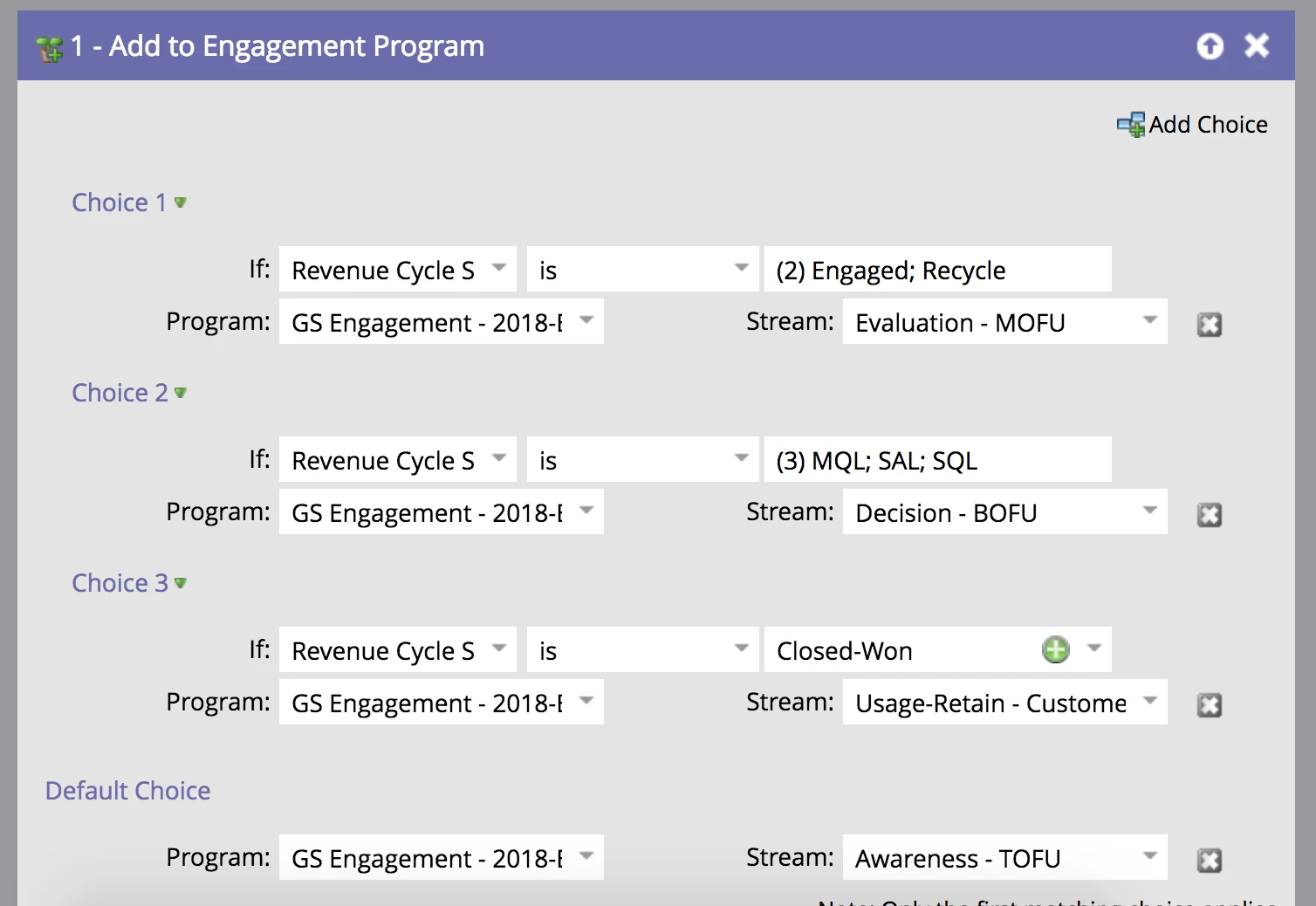
An engagement program groups content into streams. Each stream has a cadence, weekly every 1 to 12 weeks on chosen weekdays or monthly, and each cast sends the next piece. Marketo never sends the same email asset twice to one person. A program holds up to 25 streams, and adding a 26th fails with an error, so large content libraries need a second program and a Smart Campaign to move leads. Leads enter through a Smart Campaign with the Add to Engagement Program step.
Moving a lead between streams uses transition rules on the destination stream. A rule needs at least one trigger, every condition must match, and OR logic isn't supported, so OR needs a separate Smart Campaign. People who unsubscribe or become non-marketable keep advancing through streams unless you pause them or move them to an exclusion stream.
Scoring is the Change Score flow action in a Smart Campaign, with positive or negative values. Adobe's Success Series example uses +10 for a short form, +10 for a webinar registration, +1 for an email open and +5 for a link click, and builds a decay campaign with negative points for inactive leads. The example MQL threshold is 50 points: an MQL campaign alerts the owner, sets the lead status and stamps the MQL date and time, and sales accepts or rejects each one.
The Sync Person to SFDC step pushes a person to Salesforce as a lead immediately and assigns by Salesforce rules or to a set user or queue. Salesforce rejects a record without Company and Last Name. Pricing is quote only across Growth, Select, Prime and Ultimate. Users are capped at 10, 25, 25 and 25, and daily API calls at 20,000, 50,000, 50,000 and 50,000.
- you want multi-stream programs with per-stream cadence (weekly every 1 to 12 weeks, monthly) and up to 25 streams per program
- you want scoring as Smart Campaign steps, including negative points and a decay campaign, with an MQL campaign that alerts the owner
- your CRM is Salesforce, Microsoft Dynamics or Veeva and you want the native sync, including the Sync Person to SFDC step
- you need a published price: all four editions are quote only
- you expect a built-in grade next to the score: Marketo scoring runs through Change Score steps and custom fields
- your stream transitions need OR conditions: transition rules need a trigger and all conditions to match
- Users like
- Automation and flexible audience targeting
- Users dislike
- Steep learning curve (135 mentions) and learning curve (176)
- Source: G2, 3,350 reviews
Gotchas from the docs
A Wait step takes natural language such as 4 hours, and an abbreviation such as 4 hrs makes the wait get ignored without an error. A contact can't be assigned to a lead queue, and Marketo then creates a duplicate lead. Adobe lists native, bidirectional sync with Salesforce, Microsoft and Veeva CRMs.
- Starting price
- Custom quote based on package and database scope
- Edition limits
- Users 10 / 25 / 25 / 25; API calls per day 20,000 / 50,000 / 50,000 / 50,000
- Engagement program
- Up to 25 streams per program
- Editions
- Growth, Select, Prime, Ultimate
Best lead nurturing software for event-driven and self-hosted nurture#
These three start a nurture from what a person does, in the app, on a site or in a data store, and leave the CRM link to you. They fit teams with a builder who owns the integration.
ActiveCampaign#
ActiveCampaign is the usual first step up from a newsletter tool: multi-step automations from $15 a month, with the CRM side kept in a paid add-on.
ActiveCampaign
Contact-priced email and cross-channel automation with event tracking, site tracking and ecommerce triggers; lead scoring and deal automation sit in a separate Pipelines add-on.
ActiveCampaign builds a nurture as an automation with waits, if/else paths and goals, and keeps lead scoring and deal records in its Pipelines add-on.
An automation starts from a trigger and runs actions. Entry can be set to once or multiple times, and a trigger set to run multiple times lets a contact in up to 10 times in 24 hours. A Wait step holds a contact until time passes or conditions are met, with an optional limit so the contact moves on. If/Else paths use the segment builder, and ActiveCampaign's docs advise putting a Wait before an If/Else so the check doesn't run before the recipient can open the email.
A Goal step has a name, criteria and a location, and "wait until conditions are met" keeps a contact at the goal with no time limit. That makes it the exit mechanism: a lead who reaches the goal skips the rest of the track.
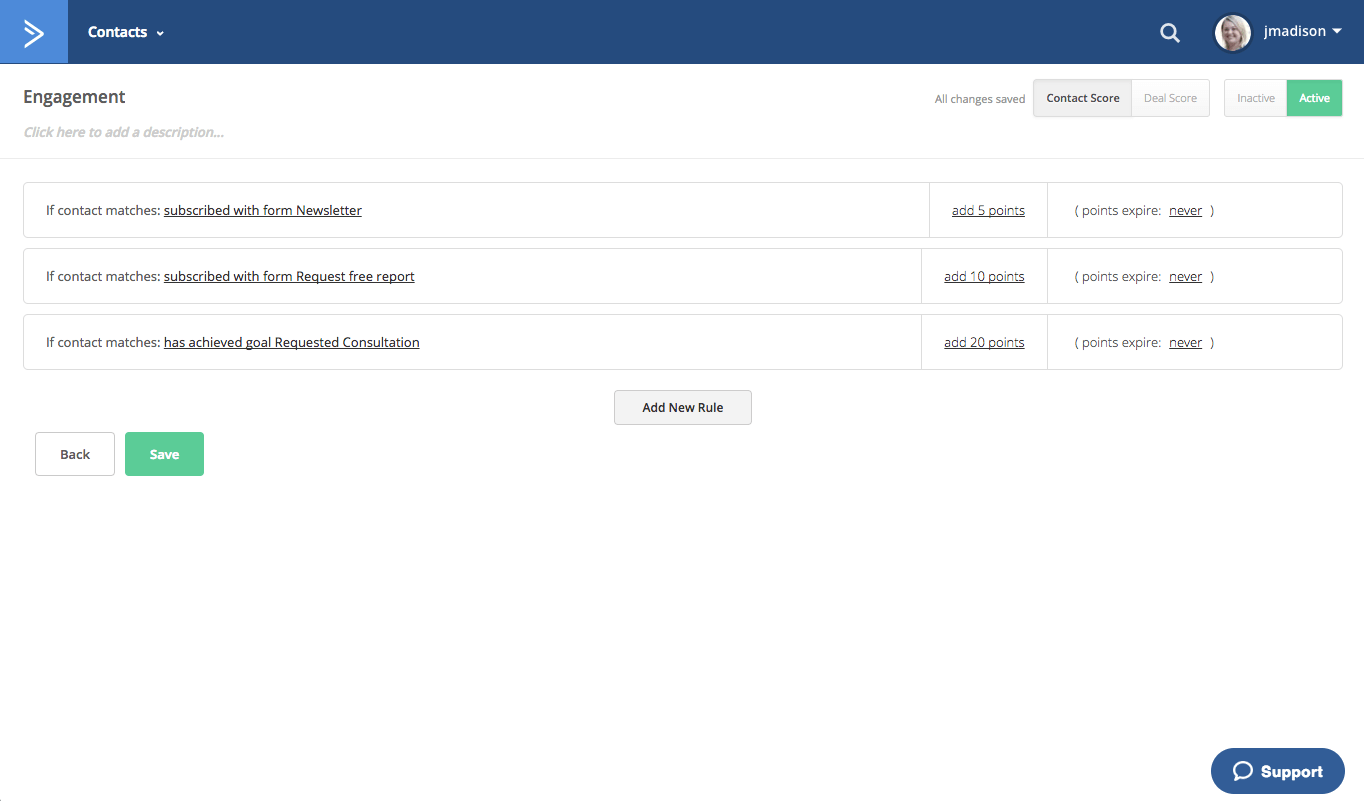
Scoring is a contact or deal score under Contacts, then Scoring. One-time conditions add points once, and repeated behavior is scored through automations with If/Else and optional point expiry. The pricing page marks lead scoring, deal records and pipeline management as part of an add-on for Plus, Pro and Enterprise, with the add-on price unpublished. A lead-scoring guide shows an automation that creates a deal in the CRM when a gated asset is downloaded.
Plans are billed yearly at 1,000 contacts: Starter $15, Plus $49, Pro $79, Enterprise $145 a month. Starter caps an automation at 5 actions, and Plus and above are unlimited. At 5,000 contacts the same plans cost $79, $145, $205 and $375.
- you want unlimited automation actions from the $49 Plus plan, while the $15 Starter plan stops at 5 actions per automation
- you need Goal steps with a location setting and wait-until behavior to pull converted leads out of a track
- you need score-based deal creation, and accept the Pipelines add-on cost
- you need lead scoring or deal records without the Pipelines add-on: its price isn't published and Starter has none
- you need near-real-time Salesforce sync: it runs to Salesforce every 10 minutes and from Salesforce every 1 to 24 hours as you set
- you need more than one seat on a low plan: Starter and Plus include 1, Pro 3 and Enterprise 5
- Users like
- Ease of use (1,270 mentions) and easy automation building (1,254)
- Users dislike
- Missing features such as simple form creation and custom date triggers (535 mentions); high prices (506)
- Source: G2, 14,841 reviews
Plan details
The integrations page counts more than 1,000 apps and lists a Salesforce data sync and Google Ads. Pro adds advanced segmentation and conditional content, and Enterprise adds custom objects, premium CRM integrations and SSO.
- Starting price
- Billed yearly, per month at 1,000 contacts: Starter $15, Plus $49, Pro $79, Enterprise $145; Pro rises to $375 at 10,000 contacts; no free plan, 14-day trial
- Users included
- 1 (Starter, Plus), 3 (Pro), 5 (Enterprise)
- Lead scoring
- In the Pipelines add-on, price not published
- Price at 5,000 contacts
- Billed yearly, per month: Starter $79, Plus $145, Pro $205, Enterprise $375
Customer.io#
Customer.io is built for messages that react to product events, and its account objects make it usable for account-based B2B nurture.
Customer.io
Customer.io sends messages triggered by what people do in your product, with published pricing based on profiles, reverse ETL from your warehouse and account-level objects for B2B.
Customer.io starts a nurture from segments, events, forms, relationships, dates or webhooks, and models B2B accounts as objects linked to people.
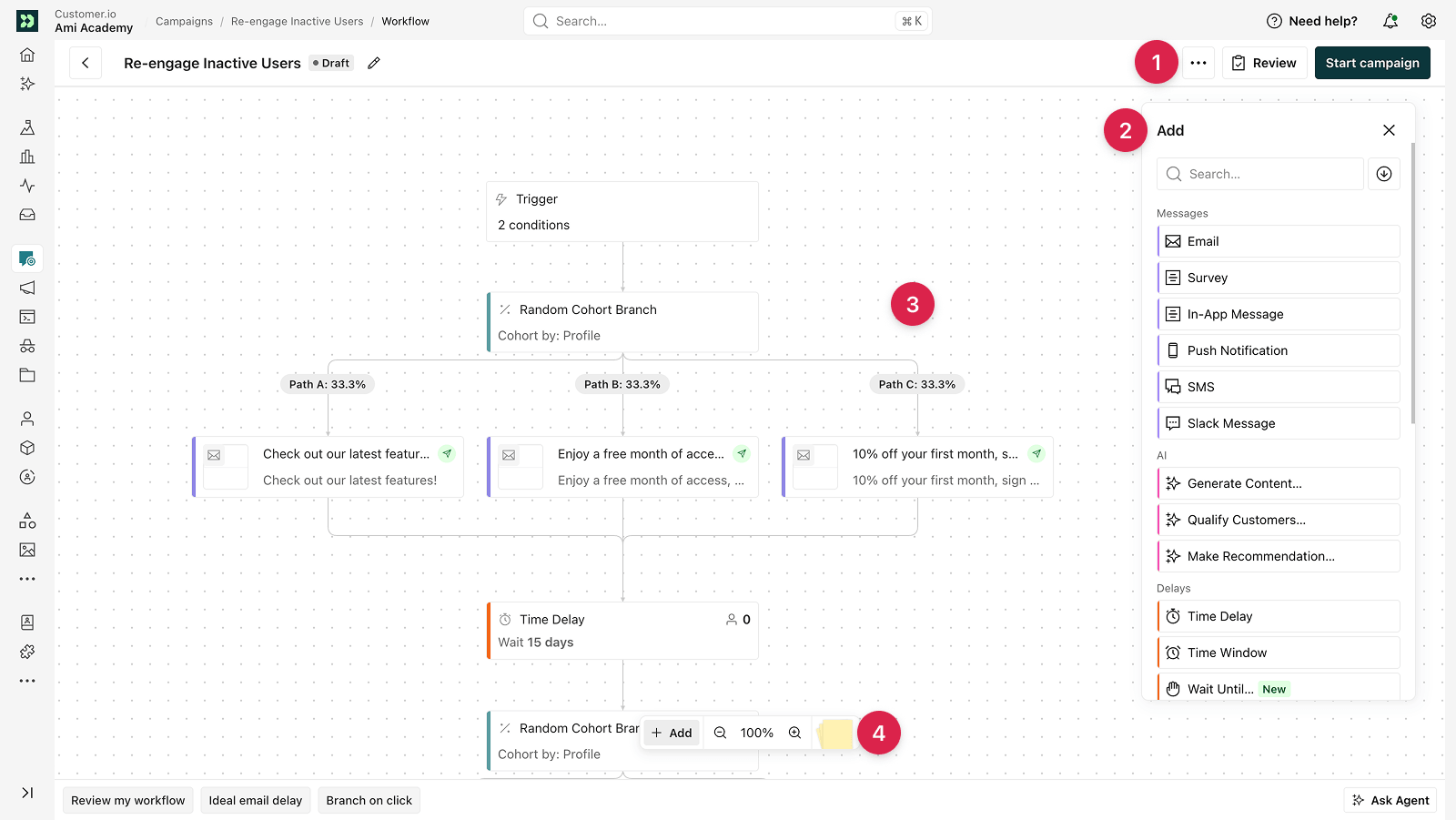
A journey starts from a segment, event, form, relationship, date or webhook trigger. Delays are a Time Delay, a Time Window for a set day and time, and a Wait Until that takes a condition, a maximum wait or both. Branches are true or false, multi-split by data value and random cohort, where you set the number of paths and their percentages. A goal is optional and measures the outcome the journey aims for. Exit conditions combine as OR, the default exit is leaving when the person stops matching the entry filter, and you can remove every exit condition so people always finish the track.
For B2B, objects such as accounts link people to companies, and you can segment on those relationships. Essentials includes 2 object types and Premium 10. Objects count toward billable profiles, so a large account list raises the bill. Customer.io's pricing and feature pages list no native lead scoring, so a score is an attribute you maintain and segment on.
The handoff is a webhook step or a Slack message to the sales team. Native Salesforce is a Premium feature, and data can arrive through reverse ETL, the API or a CSV. Channels are email, push, in-app, SMS, WhatsApp, LINE, Slack and webhooks.
Essentials starts at $100 a month on monthly billing with 5,000 profiles, $145 at 10,000 and $505 at 50,000. Premium starts at $1,000 a month billed yearly.
- your nurture triggers come from product events, segments or webhooks, not from a list send
- you run account-based B2B nurture and need accounts as objects that people link to (2 object types on Essentials, 10 on Premium)
- you need Wait Until steps with a maximum wait, plus multi-split and random cohort branches, goals and exit conditions in one builder
- you need native Salesforce sync below $1,000 a month: it's a Premium feature
- you need built-in lead scoring: it isn't listed, so scores are attributes you build
- you have a large passive database: Essentials profiles, people plus objects, step from $100 at 5,000 to $505 at 50,000
- Users like
- Ease of use and automation
- Users dislike
- Learning curve on advanced features and limited features
- Source: G2, 1,015 reviews
Limits worth knowing
Essentials includes 1 million emails a month, then $0.12 per extra 1,000. Warehouse destinations and data replay are Premium. Reviewers on G2 describe a learning curve on advanced features and say complex workflows and segments took trial and error.
- Starting price
- Essentials from $100 per month at 5,000 profiles, $145 at 10,000, $505 and up at 50,000 (billed monthly); Premium from $1,000 per month billed yearly; Enterprise custom (customer.io/pricing, November 11, 2026)
- Channels
- Email, SMS, push, in-app, WhatsApp, LINE, Slack, webhooks
- Pricing metric
- Profiles (people plus objects)
- Object types
- 2 (Essentials), 10 (Premium)
Mautic#
Mautic is open-source marketing automation: the software is free, and the cost is hosting, upkeep and the person who runs it.
Mautic
Open-source marketing automation under GPLv3 with campaign builder, segments, points and forms. Self-hosted or managed through a partner.
Mautic runs nurture in a visual campaign builder with segments and points, and pushes contacts to Salesforce through a plugin.
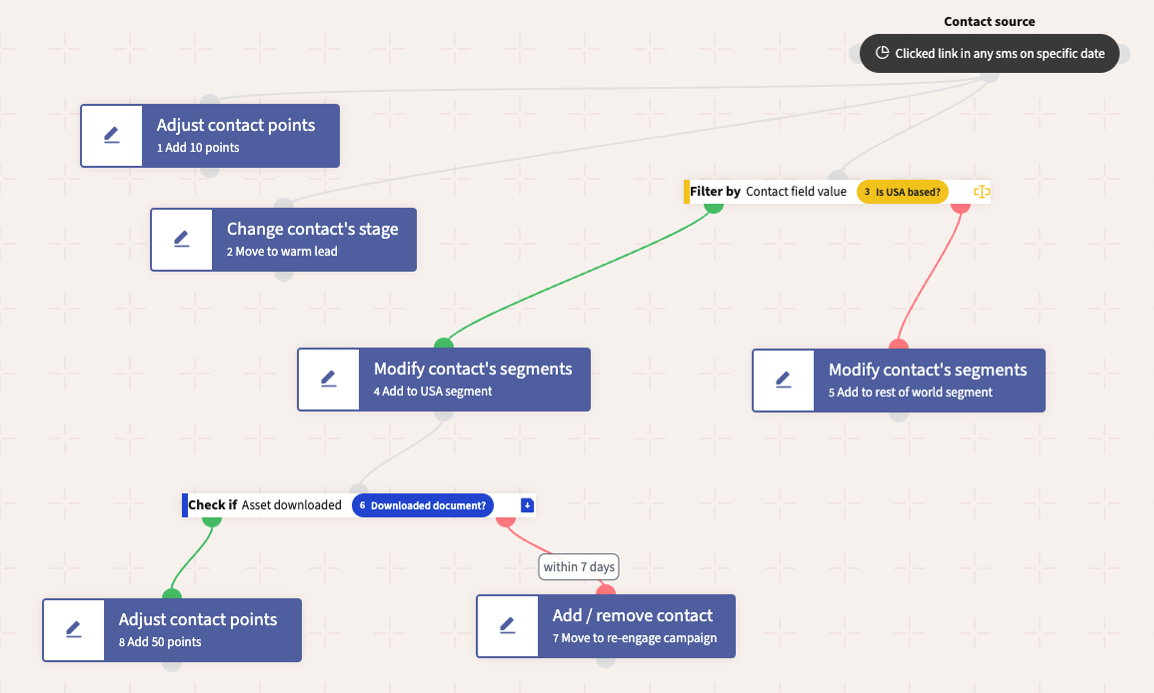
The campaign builder is visual, with decision, condition and action steps. A campaign can be time-driven, contact-driven or mixed, and delays run after a number of days or on a date. Actions send an email, assign a segment, change points or push the contact to an integration.
Points are the scoring system. A point action adds or subtracts points, and by default awards them once per contact unless you set it to repeatable. Each contact has one total score. Point triggers fire at a minimum score and can add a segment, email the contact or an owner, or push the contact to an integration. Mautic's points documentation describes no decay.
For Salesforce, the plugin pulls contacts from Leads or Contacts and pushes them to the Lead object, with direction set per field mapping. The push sync runs about every 8 to 10 minutes. The activity timeline goes to a custom mautic_timeline object that needs seven custom fields, and sales reps need Mautic user accounts to open it. Salesforce requires Last Name and Company, and Mautic sends "Unknown" when they are blank.
The software is free under GPLv3. Managed Mautic Essential starts at 247.50 euros a month billed yearly, for up to 50,000 contacts, 50,000 emails a month and 100 emails a minute. Professional starts at 1,237 euros a month, and Enterprise is custom.
- you want to control hosting and data flows, since the software is free and managed hosting starts at 247.50 euros a month
- you need a score-based handoff: point triggers fire at a minimum score and can add a segment, email the owner or push to an integration
- you use Salesforce and want contacts pushed to Leads with an activity timeline, and accept a sync cycle of about 8 to 10 minutes
- nobody on the team can run setup: G2 reviewers cite hard technical configuration at the start
- you need more than 100 emails a minute or 50,000 emails a month on managed hosting: Essential caps there and Professional starts at 1,237 euros
- you need score decay or a documented stages workflow out of the box: Mautic's documentation describes neither
- Users like
- Drag-and-drop nurturing builder
- Users dislike
- Technical configuration at the start
- Source: G2, 22 reviews
Integration notes
Mautic's documentation covers the Salesforce plugin through a knowledge base article. For other CRMs, check the plugin list before you commit.
- Starting price
- Software free under GPLv3; Managed Mautic Essential from 247.50 EUR per month billed yearly (up to 50,000 contacts and 50,000 emails a month); Professional from 1,237 EUR per month; Enterprise custom
- Software
- Free, GPLv3
- Managed
- Essential 247.50 euros a month (yearly billing), Professional from 1,237 euros
- Scoring
- Points with point triggers, no decay documented
What breaks between a nurture and a sales handoff?#
A lead moves through six handoffs, and each one fails without an error message. That's why a broken nurture often runs for weeks before anyone notices.
- Step 1Enter
- HubSpot Marketing Hub
- Zoho Marketing Automation
- ActiveCampaign
Breaks when re-entry is set wrong, so the same lead gets the track twice or never gets it - Step 2Wait and branch
- Brevo
- Customer.io
- Salesforce Marketing Cloud Account Engagement
Breaks when a branch checks before the lead could act, so everyone goes down the No path - Step 3Score
- Adobe Marketo Engage
- HubSpot Marketing Hub
- Mautic
Breaks when points never expire or only count once, so a lead stays hot or never warms up - Step 4Hand off
- Salesforce Marketing Cloud Account Engagement
- Adobe Marketo Engage
- Zoho Marketing Automation
Breaks when the record lacks a required CRM field or lands on no owner, so the sync rejects it or nobody sees it - Step 5Exit
- HubSpot Marketing Hub
- Customer.io
- ActiveCampaign
Breaks when no goal or exit condition removes a lead who already booked a call - Step 6Check the journey
- The Marketing Ops Manager
Catches a form that still submits while the tracking event or the CRM owner is missing
Steps 1 to 5 are the nurture tool's job. Step 2 depends on the wait. ActiveCampaign's docs advise a Wait before an If/Else for this reason, and in Marketo a wait written as "4 hrs" is ignored without an error. Step 4 depends on required fields: Salesforce rejects a lead without Company and Last Name, which hits Marketo and Mautic pushes alike, and Marketo creates a duplicate lead if a contact is assigned to a lead queue. For the routing side of the handoff, read the lead routing software guide and the lead routing workflow walkthrough. The stage a lead holds afterward is covered in lead lifecycle stages.
Step 6 sits outside all eight tools. The Marketing Ops Manager isn't a nurture tool. It checks each journey from the ad to the CRM handoff on a schedule, including the form, the tracking event, the CRM record and the lead owner, and it connects to HubSpot, GA4, Google Ads, Slack, Jira and Asana. Treat it as the check that the nurture you built still gets leads to a person, not as a replacement for anything above.
How do you choose lead nurturing software?#
Choose by the system of record first, then by the stage you can't build today, then by what the feature costs on your plan. Four questions separate the eight tools.
- Which CRM owns the lead? HubSpot Marketing Hub fits HubSpot CRM, Zoho Marketing Automation fits Zoho CRM, and Account Engagement and Marketo fit Salesforce. Brevo, ActiveCampaign, Customer.io and Mautic keep the CRM link as an integration you maintain.
- Which stage is missing? If it's exit logic, look at goals in HubSpot or ActiveCampaign. If it's fit scoring, look at Account Engagement's grade or HubSpot's fit score. If it's product-event triggers, look at Customer.io.
- What does the feature cost on your plan? HubSpot's goals and random splits need Professional. Zoho's Wait Condition needs Professional. Brevo's percentage split needs Professional. ActiveCampaign's scoring needs an add-on.
- Who runs the tool? Reviewers on G2 describe a learning curve for HubSpot, Marketo, Zoho and Customer.io, and Mautic reviewers describe a hard first configuration. Budget admin time, not just the license.
| Your situation | Start with | Why |
|---|---|---|
| HubSpot CRM, goals and fit scoring needed | HubSpot Marketing Hub Professional | Goals, fit and engagement scores, rotate to owner, $800 a month plus $3,000 onboarding |
| Zoho CRM, tight budget | Zoho Marketing Automation Professional | Create Task and Create Deal, $22 a month at 1,000 contacts |
| Large list, rare sends, no CRM yet | Brevo Standard | Unlimited multi-step workflows, priced on emails sent, $18 a month at 5,000 emails |
| Salesforce, score plus grade qualification | Account Engagement | Assignment by score and grade through Salesforce, from $1,250 a month |
| Salesforce, Dynamics or Veeva, content streams | Marketo Engage | Engagement programs with cadence, Smart Campaign scoring, quote only |
| Behavior triggers, low starting price | ActiveCampaign Plus or Pro | Unlimited actions from $49 a month, scoring in an add-on |
| Product events, account-based B2B | Customer.io | Account objects, Wait Until, from $100 a month |
| Own hosting, admin capacity | Mautic | Free software, point triggers, Salesforce plugin |
What should you test before a nurture goes live?#
Run one test lead through the whole track before real leads enter it. A nurture that looks right in the builder can still fail on a blank field, a re-entry setting or a missing owner.
- A test lead enters the track once, and a second form fill doesn't restart it unless you want it to
- A wait step is long enough that the next branch checks after the email could have been opened
- A lead who clicks goes down the Yes branch and a lead who doesn't goes down the No branch
- A lead who reaches the goal, books a call or becomes a customer leaves the track before the next email
- The score crosses the threshold once, and points expire or decay the way you planned
- The handoff creates a task, deal or owner change, and the rep gets an alert without a manual step
- The CRM record has every required field, such as Company and Last Name for Salesforce, and an owner
- An unsubscribed or suppressed contact can't advance through the track
- Someone owns a weekly check for leads stuck in the track or sitting in the CRM with no owner
For the wider stack around nurture, see marketing operations software, and run the campaign tracking checklist before a launch that sends leads into a new track.
What is lead nurturing software?
Lead nurturing software enrolls a known lead in a sequence of messages and tasks, waits for what the lead does and moves the lead along or out based on rules. It hands the lead to sales through a task, an owner change or a CRM sync once a score or action is reached.
Do I need lead nurturing software if I already have a CRM?
A CRM with workflows covers a short nurture. HubSpot, Zoho and Brevo run nurture next to their own CRM. Add a dedicated tool when you need waits, branches, goals or scoring that your CRM plan can't hold, and check that it writes lead status back to the CRM.
How much does lead nurturing software cost?
Lead nurturing software ranges from free software to $15,000 a month. Zoho Marketing Automation starts at $14 a month at 1,000 contacts, ActiveCampaign at $15, Brevo at $18 with workflows at 5,000 emails and Customer.io at $100 a month. HubSpot Professional is $800 a month plus $3,000 onboarding, Account Engagement runs from $1,250 to $15,000 a month, and Marketo is quote only.
When should a lead leave a nurture?
A lead should leave a nurture when they meet a goal, such as booking a call, when they are handed to sales, when they unsubscribe or when the track ends. HubSpot and ActiveCampaign have goal steps, and Customer.io has exit conditions. Without one of these, a converted lead keeps receiving nurture emails.
What is the difference between lead nurturing and lead scoring?
Lead nurturing is the sequence of follow-up that keeps a lead engaged, and lead scoring is the points model that ranks the lead. Scoring decides when a nurture ends and a handoff starts. Account Engagement and HubSpot pair interest or engagement with a fit grade.