Lead lifecycle stages describe how a prospective buyer moves from an initial inquiry to a qualified sales conversation, an open opportunity and eventually a customer. A useful lifecycle isn't just a funnel label. Each stage needs an entry rule, a named owner, an exit rule and evidence that the handoff worked, and you'll want all four written down before anyone builds automation. For the tools that create those leads in the first place, see lead generation software.
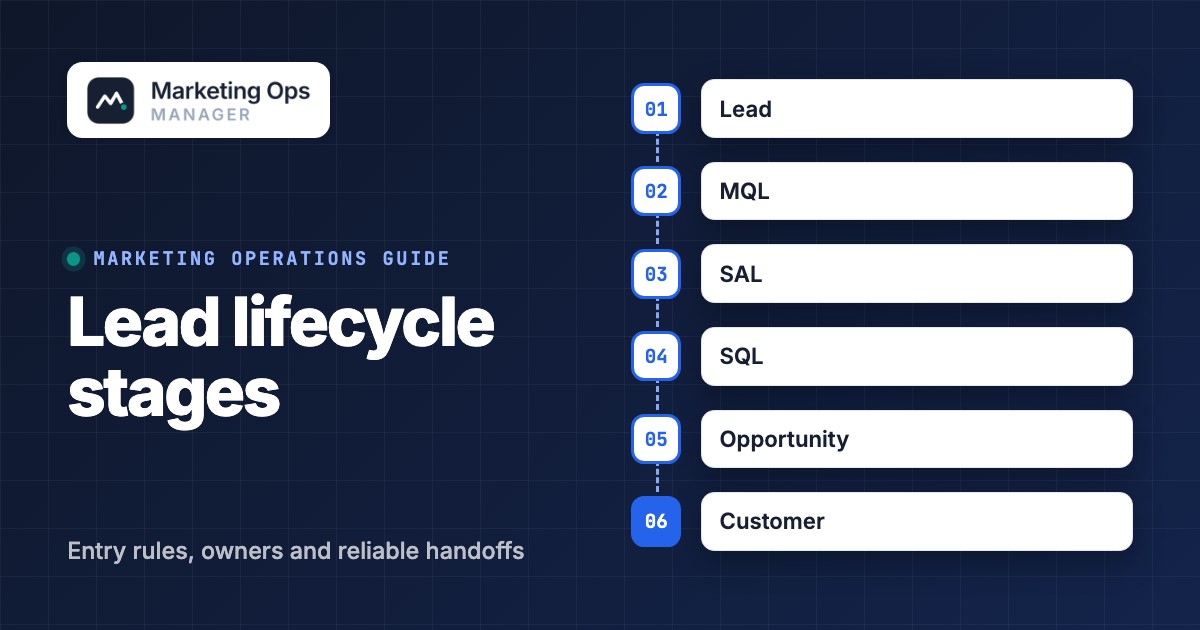
For most B2B teams, the operating path is Lead > Marketing Qualified Lead (MQL) > Sales Qualified Lead (SQL) > Opportunity > Customer. Subscriber and advocate states can sit around that path. A Sales Accepted Lead (SAL) checkpoint is useful when marketing and sales need to measure whether a rep accepted a handoff before completing qualification. These are working definitions, not universal standards. The difference between the two qualified stages is covered in MQL vs SQL.
- Define stages by observable events and ownership, not by a lead score alone.
- Keep lifecycle stage separate from sales activity status and opportunity stage.
- Make MQL acceptance measurable: owner, acceptance event, timestamp and rejection reason.
- Measure movement between stages using a fixed cohort, not a mixture of today's stage counts.
- Monitor the form, CRM sync, routing and sales response as one connected workflow.
What are lead lifecycle stages?#
Lead lifecycle stages are durable milestones in the relationship between a business and a potential customer. They answer how far the relationship has progressed, while sales activity fields answer what someone is doing next. A good stage changes only when new evidence meets a documented rule, and there's always a record of why.
HubSpot, a CRM and marketing platform, provides default lifecycle options that include Subscriber, Lead, Marketing Qualified Lead, Sales Qualified Lead, Opportunity, Customer, Evangelist and Other. Those are product defaults, not a rule that every company must follow. HubSpot also allows custom lifecycle stages, so a team can represent a genuine handoff that its process requires.
Marketing ops should treat the lifecycle as a data contract. The contract defines the event that moves a record, which system can write the field, who can override it and what happens when data arrives late. Without those decisions, two dashboards can show different conversion rates while both look technically correct, and nobody can say which one's wrong.
A stage also isn't a prediction of intent. A lead can be highly engaged but unsuitable for your product. A quiet prospect can request a sales meeting and qualify immediately. Stage criteria need both buyer fit and an observable action, with an exception path for direct hand-raisers.
Which lead lifecycle stages should a B2B team use?#
A B2B lead lifecycle usually needs an inquiry or lead state, a marketing qualification point, a sales qualification point, an opportunity state and a customer outcome. Subscriber, SAL and advocacy can add useful detail, but only when someone owns the transition. Start with the fewest states that let teams act and report consistently. You can always add a stage later, but it's painful to remove one.
The following is a recommended operating model, not a claim that every CRM includes these exact stages. The optional SAL checkpoint sits between MQL and SQL when acceptance and qualification are distinct events.
| Lead lifecycle stage | Entry evidence | Primary owner | Exit evidence |
|---|---|---|---|
| Subscriber | Newsletter or content subscription | Marketing | Identifiable inquiry beyond subscription |
| Lead | Form, event inquiry or other known prospect action | Marketing ops | Fit and engagement qualify, or a nurture route applies |
| MQL | Agreed fit plus qualifying intent signal | Demand generation | Sales accepts, rejects or returns for nurture |
| SAL (optional) | Assigned sales owner explicitly accepts MQL | SDR or sales manager | Qualification completed or rejection recorded |
| SQL | Sales confirms an actionable buying conversation | SDR or account executive | Opportunity created or prospect returned to nurture |
| Opportunity | A real deal exists with accountable sales owner | Account executive | Closed won, closed lost or explicitly stalled |
| Customer | Confirmed won deal and commercial handoff | Sales to customer success | Onboarding and retention ownership recorded |
| Evangelist (optional) | Customer voluntarily advocates or refers | Customer marketing | Advocacy status reviewed when circumstances change |
| Other / excluded | Nonbuyer, partner, employee or other excluded record | CRM operations | Reclassified with evidence if circumstances change |
Subscriber isn't automatically a sales lead. A newsletter signup tells you that a person's opted into content. It doesn't prove budget, a relevant account or permission to start a sales sequence. A form asking for a demo is different: route it through a high-intent path instead of forcing it to accumulate arbitrary points.
MQL isn't the same as SAL. Marketing can certify that a record meets its published criteria, but that doesn't mean a rep's seen it. SAL records the acceptance action. If sales rejects an MQL, store a reason such as duplicate, wrong territory, no current need or invalid contact data. Don't quietly erase the MQL event.
SQL isn't automatically an opportunity. A discovery call can confirm need and fit before a deal's created. Your team should define the specific evidence you'll need to open an opportunity, such as a validated use case and an agreed next step. The sales pipeline then manages deal progress separately.
What qualifies a contact to move from lead to MQL to SQL?#
A lead becomes an MQL when it meets marketing's documented fit and intent criteria. An MQL becomes sales accepted only when a sales owner acknowledges it, and it becomes an SQL when sales records evidence of a viable conversation. Use rules that can be audited from fields and events rather than a vague judgment that someone's ready. Leads in the marketing-qualified stage are usually kept warm with lead nurturing software.
A workable rulebook distinguishes fit, intent and process evidence. Fit might require a supported geography, an appropriate company profile and a relevant role. Intent could be a request for a product demo or a repeated high-value action. Process evidence proves the record has an owner and the required contact details.
| Transition | Minimum evidence | Not enough on its own | Failure route |
|---|---|---|---|
| Subscriber to Lead | Identifiable inquiry beyond content opt-in | Email open | Remain subscribed |
| Lead to MQL | Fit passed and a defined intent trigger fired | Generic page view or unqualified score | Continue nurture or exclude |
| MQL to SAL | Sales owner accepts the assigned record | Assignment notification sent | Escalate unaccepted handoff |
| SAL to SQL | Sales documents fit, need and next action | Call attempted | Return to nurture with reason |
| SQL to Opportunity | Sales creates a qualified deal and links the buyer | Meeting booked with no deal context | Keep in qualification |
| Opportunity to Customer | Deal reaches confirmed won state | Verbal enthusiasm | Keep opportunity open |
Example: a direct demo request. A prospect at an in-market account submits a form requesting a demo. The form captures the company, work email and use case. A validation rule checks the record for duplicates and restricted routing categories. If it passes, the request can go directly to a high-priority sales queue. A low content-engagement score shouldn't override the buyer's explicit request.
Example: a research-only contact. A student downloads a technical guide and visits the pricing page. A scoring system might award engagement points, but the record fails the buyer-fit rule. It remains a lead or is excluded from the sales queue, depending on the team's policy. That avoids turning marketing engagement into artificial pipeline.
Example: an existing customer. A customer submits a new product inquiry. The record shouldn't lose its customer history just because a form automation fires. Open a new expansion motion or route the inquiry to the account owner. Lifecycle and opportunity state needn't be identical.
How should marketing and sales hand off an MQL?#
An MQL handoff should transfer both the record and responsibility for the next action. Marketing ops must prove the qualifying event reached the CRM, the routing rule selected the right owner and sales accepted or rejected the record. A notification alone isn't proof that a handoff succeeded. Who owns a lead at each stage depends on your lead routing software rules.
A simple handoff has an intake, an assignment, an acceptance checkpoint, a first-contact action and a disposition. Each step should leave a timestamp so the team can distinguish an integration failure from a rep who hasn't responded yet.
- 1CaptureWhat happens: Form or campaign event arrives with source, consent context and a stable record key.
- 2QualifyWhat happens: Fit and intent rules write the qualification decision and its evidence.
- 3RouteWhat happens: CRM resolves duplicates, territory and account ownership before assignment.
- 4AcceptWhat happens: Sales accepts or rejects the handoff with a reason and timestamp.
- 5VerifyWhat happens: Monitor owner, contact attempt, rejection queue and stalled transitions.
Set the response-time target according to your sales coverage, business hours and buyer expectations. Don't copy an arbitrary industry SLA into a workflow and call it a benchmark. A handoff received outside coverage hours needs a defined clock rule. A rep who's on leave needs a fallback owner. A duplicate contact that's tied to an active account needs an account-routing exception.
Record the handoff as an event, not merely a field overwrite, since an overwrite doesn't keep history. Keep the qualifying event ID, original source, stage entered time, assignment time, acceptance time and rejection reason. If a CRM integration retries the same message, an idempotency key should prevent a second assignment or a false additional conversion.
Marketing and sales should agree on the rejection taxonomy before they're building automation. A single label such as bad lead can't distinguish poor targeting from bad routing or a buyer who isn't ready yet. The right repair depends on the reason, and you can't see the reason without the taxonomy.
How do lifecycle stage, lead status and deal stage differ?#
Lifecycle stage describes the relationship milestone, lead status describes active sales work and deal stage describes the progress of a particular opportunity. Mixing them creates unreliable funnel reports. A contact can be an SQL while its sales status is Attempted to Contact, or be a customer while a separate expansion deal's still open.
HubSpot explicitly distinguishes lifecycle stage from the Lead Status property, which has options such as New, In Progress, Attempted to Contact and Connected. Salesforce, a CRM platform, uses lead status on its Lead object and moves qualified prospects into account and contact records, with an opportunity when appropriate. Those data models shouldn't be treated as interchangeable fields, even where the labels look alike.
| Record dimension | Question answered | Example value | Owner of changes |
|---|---|---|---|
| Lead lifecycle stage | How far has this buyer relationship progressed? | MQL | Marketing and RevOps rules |
| Lead status | What is sales doing with this person now? | Attempted to Contact | SDR or account executive |
| Deal stage | Where is this specific transaction? | Proposal | Opportunity owner |
| Qualification disposition | Why was the record rejected or recycled? | Wrong territory | Reviewing sales owner |
| Customer state | What is happening after purchase? | Onboarding | Customer success |
An activity can happen without a lifecycle promotion. A rep can send a message to a Lead without certifying it as SQL. A deal can be closed lost without converting the contact into a brand-new lifecycle category. The history matters because a buyer might return later with a different project, and you'll want the earlier context.
How do HubSpot, Salesforce and Marketo handle lifecycle stages?#
HubSpot offers a contact and company lifecycle property, Salesforce separates lead conversion from opportunity progress and Adobe Marketo Engage can model revenue stages and transitions. A cross-system architecture needs an explicit mapping, not the assumption that matching labels imply matching events.
HubSpot: contact lifecycle and stage history#
HubSpot's lifecycle property has default options and can be customized. Its automatic updates normally move forward (that's documented behavior), and the platform documents special handling when moving a record backward. HubSpot also provides stage entry and exit properties, while some stage-duration properties require Professional or Enterprise subscriptions.
For marketing ops, that means an integration shouldn't casually write a lower stage over a higher one. Preserve the event history and define an approved reset process. Don't let an integration overwrite it silently. Check whether company-to-contact syncing and deal association settings are enabled before attributing a stage change to a campaign. Otherwise you'll credit the wrong source.
Salesforce: lead conversion and account context#
Salesforce lead conversion can create or match an account and contact, with an opportunity when a deal is appropriate. The Lead object's status is part of that conversion workflow. A converted lead isn't the same operational record as the opportunity that sales later manages, so don't report on them as one object.
For a two-system stack, capture the Salesforce converted lead ID and its resulting contact or account IDs. Reconcile the marketing platform's person key against the converted record. Otherwise, an SQL-to-opportunity report can lose its join at the exact point the buyer becomes commercially important.
Adobe Marketo Engage: revenue models and transitions#
Adobe Marketo Engage's Revenue Cycle Modeler represents stages and transitions, including configurable rules that can react to triggers. Its reporting can show how many people occupy each stage in an approved model. That model is a separate configuration decision from any CRM picklist, and it's easy to forget when you audit.
A Marketo-to-CRM mapping should specify the source of truth for each transition. A campaign trigger might nominate a record for MQL, while the CRM remains authoritative for sales acceptance and closed-won outcomes. Reconcile both the stage and the timestamp before presenting velocity numbers, or you'll compare two different clocks.
How should recycled and disqualified leads be handled?#
Recycled leads should retain their prior qualification history while leaving the active sales queue. Disqualified leads should carry a specific reason and a review policy. Neither outcome needs to be treated as a normal forward milestone in the buying journey.
Use recycled when the person could become a buyer later, such as a good-fit contact without a current project. Use disqualified for a record that fails an explicit eligibility rule, such as a duplicate or an unsupported buyer segment. Keep a separate flag or disposition so stage reporting doesn't mistake rejection for conversion.
A recycle workflow needs an owner and a re-entry trigger. Without one, a record's stuck in limbo. A change in company, a new demo request or a fresh buying signal might reopen qualification. Set a policy for repeated requests so the same person doesn't bounce between marketing and sales every time they click an email. You'll save both teams a lot of noise.
HubSpot's forward-only automatic lifecycle behavior makes this especially important. Rather than blindly demoting an SQL to Lead, retain the SQL milestone and track its current nurture disposition in a separate property when that better matches your reporting contract. If the business genuinely needs a stage reset, document who can do it and what history will remain.
Which lead lifecycle metrics reveal a broken handoff?#
The most useful lifecycle metrics are transition conversion, time to acceptance, time in stage, rejection reason and records without a valid owner. Calculate conversion from a defined cohort of records that entered the starting stage during a fixed period. A snapshot of today's MQL and SQL counts isn't a valid substitute.
For transition conversion, divide the number of distinct records that reached the next milestone by the number eligible in the starting cohort. Keep the measurement window explicit, especially when the buying cycle runs past the reporting month. Here's the rule of thumb: the window should be at least as long as your typical stage time. Separate records that haven't matured long enough to convert from records that genuinely failed. Otherwise this month's cohort will look worse than it is.
Illustrative funnel, not an industry benchmark: imagine a cohort of 1,000 new leads. Of those, 200 become MQLs, 100 are accepted by sales, 50 become SQLs, 20 become opportunities and 5 become customers. The example converts 1,000 leads into 5 customers, a 0.5% end-to-end rate. Your real rates will depend on market, deal cycle, lead source and stage definitions, so don't borrow someone else's.
| Lead lifecycle transition | Illustrative starting count | Illustrative next count | Illustrative conversion (%) |
|---|---|---|---|
| Lead to MQL | 1,000 | 200 | 20% |
| MQL to SAL | 200 | 100 | 50% |
| SAL to SQL | 100 | 50 | 50% |
| SQL to Opportunity | 50 | 20 | 40% |
| Opportunity to Customer | 20 | 5 | 25% |
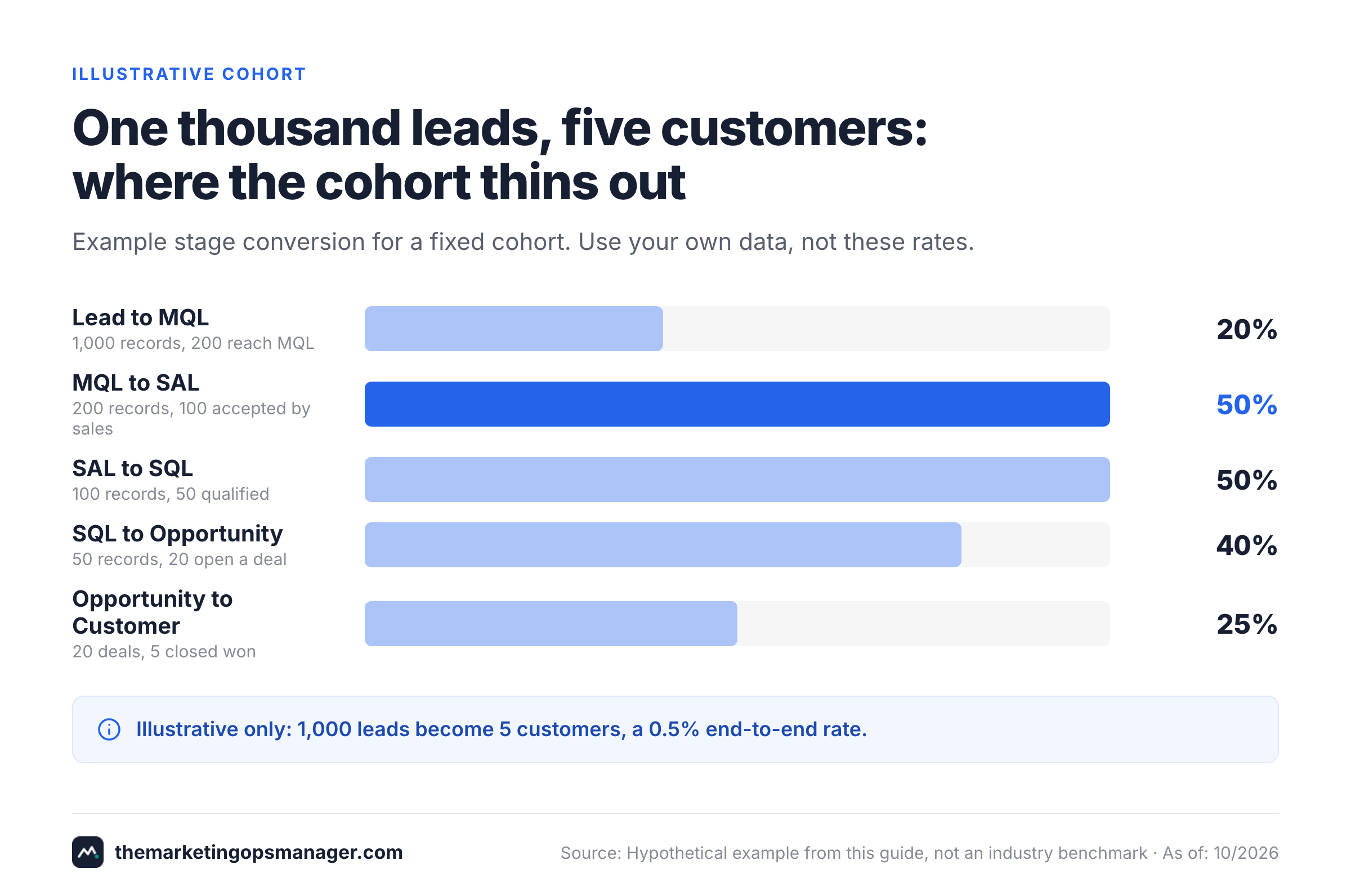
The useful diagnosis isn't that a particular percentage is good or bad. It's whether the numerator and denominator refer to the same records, whether the events are deduplicated and whether the team can identify where records stop moving. An MQL acceptance rate can fall because the sales queue broke, not because demand quality changed. That's why you read it next to time to acceptance.
For stage velocity, store both entered and exited timestamps and decide how to handle re-entry. HubSpot documents stage entry, exit and cumulative time properties, but a team should still validate its own cohort and duration logic. Use a business-hours clock for a response SLA only if the operating agreement specifies it.
How do you implement lead lifecycle stages without breaking your CRM?#
Implement lead lifecycle stages by defining the contract, auditing existing values, mapping system ownership, testing transitions and then turning on monitored automation. Start with a small set of representative records, because that's where surprises show up first. Don't let a new workflow rewrite historical stage data until you've reviewed the impact on reporting and sales queues. It's hard to undo.
Write the stage contract
For every stage, record the entry event, required fields, source system, owner, exit event and allowed exceptions. Decide whether SAL is a stage or a separate acceptance timestamp.
Audit current records and duplicates
Sample records from every lead source and sales territory. Check null stages, impossible transitions, converted lead mappings and customer records that were demoted by imports.
Map each system's field ownership
Assign marketing automation responsibility for campaign qualification and CRM responsibility for sales acceptance and deal outcomes. Define how retries and conflict resolution work.
Test the edge cases
Use test records for direct demo requests, existing customers' inquiries, duplicates, rejected MQLs, out-of-hours routing and missing owners. Inspect both the CRM record and the event log.
Launch with monitoring and a rollback plan
Watch stage update failures, unaccepted MQLs, sync lag and unexpected stage regressions, and don't wait for a rep to report them. Save the previous mapping and know how to pause a faulty automation without losing evidence.
A production release should include a reconciliation query. Compare the marketing platform's qualifying events against CRM stage changes and assignment events. Group failures by source and error type. A broken form integration, a failed field mapping and an absent sales owner require different fixes, even though all three can appear as an MQL that never moved. That's why you group failures first.
Campaign monitoring belongs alongside the CRM, not in place of it. Monitoring a landing page, tracking event, form submission and sales handoff can surface failures before they distort lifecycle reporting. Qualification policy, ownership decisions and CRM records still need their own systems and accountable people.
What does a usable lead lifecycle stage template look like?#
A usable lead lifecycle template is a stage contract with entry and exit conditions, system ownership, timestamps and exception handling. The template should be short enough for marketing, sales and RevOps to approve together, yet precise enough that an engineer can implement it without guessing.
Copy the following columns into a spreadsheet or governance document. Replace the examples with your own agreed rules before enabling automation.
| Lead lifecycle stage | Entry trigger | Owner | System of record | Exit or exception | Evidence to retain |
|---|---|---|---|---|---|
| Lead | Inquiry received | Marketing ops | CRM | MQL or nurture | Source event ID and form ID |
| MQL | Fit plus intent rule passed | Demand generation | Marketing automation | Accepted or rejected | Rule version and qualification time |
| SAL | Assigned rep accepts | Sales development | CRM | SQL or recycle | Owner ID, acceptance time and reason |
| SQL | Sales confirms viable need | Sales development | CRM | Deal or nurture | Qualification notes and next step |
| Opportunity | Sales creates linked deal | Account executive | CRM | Won, lost or stalled | Deal ID and stage history |
| Customer | Won deal confirmed | Sales and customer success | CRM | Onboarding | Won timestamp and handoff owner |
Minimum data dictionary: person_key, account_key, lifecycle_stage, stage_entered_at, qualification_event_id, qualification_rule_version, assigned_owner_id, accepted_at, rejection_reason, crm_record_id and deal_id where applicable.
Define allowed values for rejection reasons so that nobody's typing free text. Require a stage-change event to carry the old and new value, actor or system, event time and correlation ID. Those details make a lifecycle report explainable when a rep asks why a lead moved overnight.
How do you audit lead lifecycle stages every week?#
A weekly lifecycle audit should check data integrity, unowned handoffs and conversion trends before reviewing campaign performance. Start with exceptions that can cause immediate buyer harm, then examine cohort metrics and update the stage contract when teams change how they qualify leads.
- Find qualified records with no sales owner or acceptance timestamp.
- Reconcile form and campaign qualification events against CRM stage updates.
- Check duplicate records and converted lead ID mappings.
- Review rejected MQLs by reason, source and assigned team.
- Inspect stage regressions and unexpected customer-to-lead changes.
- Compare transition rates on a fixed cohort and report the observation window.
- Check records waiting beyond the agreed business-hours SLA.
- Sample direct hand-raisers, existing customers and out-of-territory leads.
- Confirm that the documented routing owner and escalation path still exist.
- Record fixes with a named owner and a verification event.
A clean funnel report doesn't guarantee a working funnel, and it's blind to failures that happen before a record exists. A form can fail before a contact exists, so no missing record appears in the CRM dashboard. Pair lifecycle reporting with synthetic or controlled checks of the capture and routing path. Then verify that the same test event appears at the intended destination without creating a duplicate live prospect.
Frequently asked questions about lead lifecycle stages#
Lead lifecycle stage questions usually concern qualification boundaries, CRM terminology and the handling of exceptions. Each answer is short enough to quote on its own.
What are the main lead lifecycle stages?
The main lead lifecycle stages are Lead, MQL, SQL, Opportunity and Customer. Teams may also track Subscriber, SAL, Evangelist and excluded records when those states support a real process.
Is a sales accepted lead the same as a sales qualified lead?
A sales accepted lead confirms that a rep accepted responsibility for an MQL. A sales qualified lead confirms that sales found enough evidence of a viable buying conversation to advance qualification.
Should a disqualified lead move backward in the lifecycle?
A disqualified lead doesn't always need a backward stage change. Keep the prior milestone and a separate disposition when that preserves reporting history, then define explicit re-entry rules.
What is the difference between lifecycle stage and lead status in HubSpot?
HubSpot's lifecycle stage tracks the contact or company's marketing and sales milestone. Lead Status tracks sales sub-states such as New, In Progress and Connected.
How should lead lifecycle conversion rates be calculated?
Lead lifecycle conversion rates divide distinct records reaching the next stage by eligible records in a defined starting cohort. Specify the observation period and avoid mixing today's stage balances with historical transitions.
Can lifecycle stages be automated?
Lifecycle stages can be automated when the source events, stage rules and field permissions are defined. Automation still needs duplicate handling, monitoring and a manual exception path.