Lead scoring is a method of giving every lead a number, built from how well the person or company fits your target customer and what they have done, so that marketing and sales agree on who gets attention first. Points are added for fit and for engagement, taken away for poor fit or silence, and a threshold decides when a lead is handed to sales as an MQL. A score only helps if sales believes it, so the model below is built from your own won and lost deals and tested before it goes live.
- A lead score is fit points plus engagement points, minus negative points, compared to a threshold.
- Build the criteria from closed-won and closed-lost deals, not from a template.
- Backtest the draft on past leads before it routes a single live lead.
- Set the threshold from sales capacity and win rates by score band.
- Write the rules down, version them and review them monthly with sales.
What is lead scoring?#
Lead scoring is a ranking system that assigns points to each lead based on who they are and what they do, and uses the total to decide the next step. A lead with a high total goes to sales, a lead with a middle total stays in nurture, and a lead with a low or negative total isn't worked at all.
Two things go into the number:
- Fit: how closely the person and company match your best customers, such as industry, company size, role and region.
- Engagement: what the lead did, such as visiting the pricing page, attending a webinar or replying to an email.
The score is a tool for prioritizing, not a prediction that anyone will buy. It turns a vague argument ("this lead feels warm") into a rule that marketing ops can build in the CRM and that sales can inspect. The score usually feeds the MQL decision described in MQL vs SQL, and the stages it moves a lead through are covered in lead lifecycle stages.
How does a lead scoring model work?#
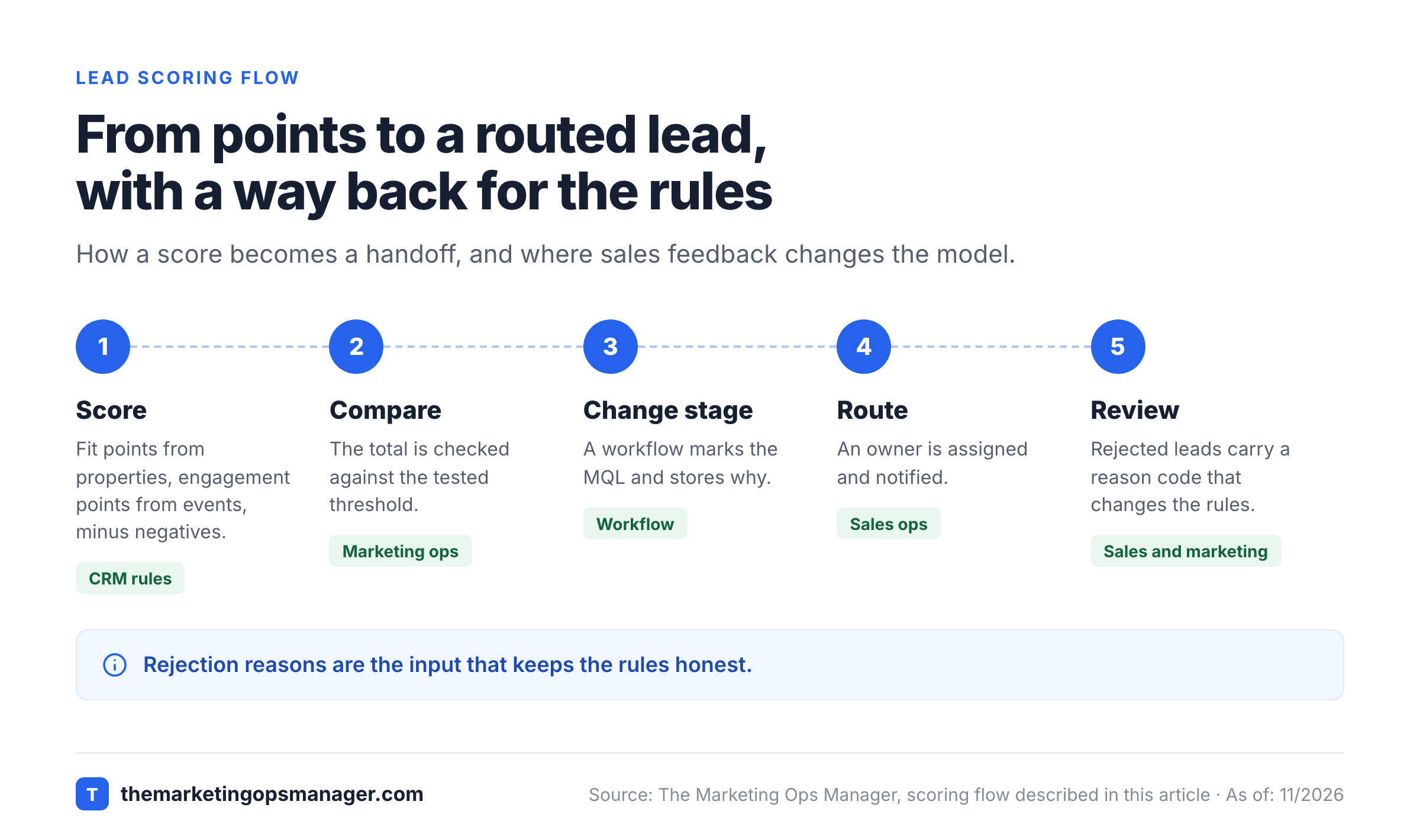
A lead scoring model adds points when a lead matches a fit rule or performs a scored action, subtracts points for negative signals, and compares the running total to a threshold. When the total crosses the threshold, a workflow changes the lead's stage and routes it to an owner. Once a score crosses the threshold, a nurture track decides what happens next, see lead nurturing software.
What are fit and engagement scores?#
Fit is mostly stable and comes from properties on the record. Engagement changes every week and comes from events: page views, form fills, email clicks, meetings. Keeping the two separate is useful, because a perfect-fit lead who never engages needs nurture, and an engaged lead who doesn't fit needs a different answer than a sales call. HubSpot's lead scoring tool builds this in: it offers fit scores, engagement scores, and combined scores that populate a total plus the fit and engagement values separately.
What is negative scoring and score decay?#
Negative scoring subtracts points for signals that a lead is a poor fit or has lost interest. Adobe's person scoring guide gives two examples: no interaction in the last 90 days at minus 10 for behavior, and a company size under 10 employees at minus 10 for demographics. Score decay does something similar over time: HubSpot lets you reduce the points of a scored event by a percentage after a set period, so a pricing page visit from last spring stops counting like one from this week.
| Part of the model | What it adds or removes | Where the data comes from | Typical failure |
|---|---|---|---|
| Fit points | Points for matching your customer profile | Contact and company properties | Fields are empty, so good leads score zero |
| Engagement points | Points for scored actions | Web, email, form and meeting events | Every click counts the same |
| Negative points | Points removed for poor fit or silence | Properties and inactivity | Never turned on, so scores only go up |
| Decay | Older events count for less | Event dates | Old activity keeps stale leads above the threshold |
| Threshold | The line where a lead becomes an MQL | A number agreed with sales | Chosen as a round number, not tested |
How do you build a lead scoring model?#
You build a lead scoring model by learning from past deals: pull closed-won and closed-lost leads, find the traits and actions that separate them, turn those into points, set a threshold, test it on history and only then switch it on.
Pull closed-won and closed-lost leads
Export the last 6 to 12 months of leads with their outcome, source, company properties and recorded activity. Include lost deals, because the model has to explain what wins are not.
Find what separates them
For each property and action, compare how often it appears in won deals and in lost deals. Keep the ones with a clear difference. Ask sales which signals they use to decide who to call, then check those against the data.
Assign points and caps
Give higher points to signals that separate the groups most. Cap repeatable actions such as email opens, so ten opens don't outweigh one demo request. Add negative points for exclusions and inactivity.
Backtest on history
Score the leads from step 1 with the draft rules and compare win rates by score band. The next section shows the table to build.
Set the threshold and the routing
Choose the score where the number of leads matches what sales can work and the win rate is clearly higher than below it. Connect it to routing, see the lead routing workflow.
Launch, then review monthly
Turn on the score, store the rule version, and review rejected leads with sales every month. Change one thing at a time and write down why.
The backtest is the step most guides skip, and it's the one that earns trust. It tells you, before launch, whether leads above the line really won more often.
| Score band | Leads | Won deals | Win rate |
|---|---|---|---|
| 0 to 39 | 500 | 5 | 1.0% |
| 40 to 69 | 350 | 14 | 4.0% |
| 70 and above | 150 | 21 | 14.0% |
These numbers are made up to show the layout. In a real backtest, check two things: that win rate climbs from band to band, and that the top band is a number of leads your reps can actually work. If the bands are flat, the criteria don't separate winners from losers and need to be rebuilt before launch.
What lead scoring criteria should you use?#
Use criteria that you can store in the CRM and that separated won from lost deals in your own data. Most models draw from four groups: firmographic fit, role fit, behavior with buying intent, and negative signals. The point values below are examples to show the shape, not recommendations.
| Group | Example criterion | Example points | Note |
|---|---|---|---|
| Firmographic fit | Target industry | +10 | Use your best-customer industries |
| Firmographic fit | Company size in your sweet spot | +15 | Check against won deals |
| Role fit | Manager level or above in the buying function | +10 | Title matching needs cleanup of free-text titles |
| Behavior | Pricing page visit | +10, cap +20 | Cap repeat visits |
| Behavior | Webinar attended | +8 | Attendance beats registration |
| Behavior | Email link click | +3 | Opens are weak, a click is a choice |
| Behavior | Blog visit | +1, cap +5 | Research interest, not buying interest |
| Negative | Free email address | -15 | Adjust for your market |
| Negative | No activity in 90 days | -10 | Same example value as Adobe's guide |
| Exclusion | Current customer, partner, competitor, student | Not scored | Exclude before scoring |
A demo request or a contact-sales form should skip the points race. Adobe's guide says prospects who request a demo should go straight to sales, and the same logic applies in any CRM: a direct request is already a decision. The marketing to sales handoff checklist lists what a rep needs to see when that happens.
What does a lead scoring example look like?#
A worked example shows how the points add up. Take a lead who is an operations director at a 120-person software company and has been active for three weeks, scored with the example values above and a threshold of 70.
| Lead | Fit points | Engagement points | Negative points | Total | Result |
|---|---|---|---|---|---|
| Ops director, 120-person software company | 35 (industry 10, size 15, role 10) | 37 (two pricing visits 20, webinar 8, three email clicks 9) | 0 | 72 | MQL, routed to sales |
| Student with a free email address | -15 (free email) | 38 (six blog visits 5, five opens 5 capped, webinar 8, two pricing visits 20) | 0 | 23 | Stays in nurture |
The second lead shows why caps and negative points matter: plenty of activity, but a low total, because fit is weak and cheap actions are capped. If the same ops director then goes quiet for 90 days, a minus 10 rule takes the total from 72 to 62 and the lead drops below the threshold until it engages again.
HubSpot's documentation has a real configuration worth knowing. It describes a contact engagement score called MQL handoff score with two groups: a marketing group capped at 40 points that scores email opens at 2 points and a click on a demo page or pricing ad at 15 points, with 50% decay every three months, and a sales group capped at 60 points that scores demo requests, sales form submissions and booked meetings. Its score thresholds are High at 70 to 100, Medium at 40 to 69 and Low at 0 to 39, and a workflow enrolls contacts in the High band, assigns a rep by round robin and sends a notification.
How do you set the MQL threshold?#
Set the MQL threshold from two inputs: how many leads sales can work in a period and the win rate by score band from your backtest. A round number picked because it looks neat doesn't carry either.
Adobe's person scoring guide suggests starting with a threshold of 100 if you're new to scoring, and says the line should be high enough that one email open can't qualify a lead. Your scale may differ, so the safer rule is to pick the line so that a single cheap action can never cross it.
- Leads above the line per month match what reps can work
- Win rate above the line is clearly higher than below it
- No single cheap action, such as an email open, can cross the line
- High-intent requests such as a demo form bypass the score
- Rejected leads get a reason code that marketing reads
- The threshold and rule version are written down
Plan to move the line. If reps ignore most leads, raise it. If strong leads are missed, check whether they were scored low because a field was empty before you lower the line.
How do HubSpot, Salesforce and Marketo handle scoring?#
All three support point-based scoring natively, but they differ in how fit and engagement are stored. The table summarizes what each vendor's documentation says.
| Tool | How scoring is modeled | Behavior to know |
|---|---|---|
 HubSpot Marketing Hub | Lead scoring tool with fit, engagement and combined scores for contacts and companies, and combined scores for deals. | Default maximum is 100 and can be changed to other ranges. Group limits cap a set of rules, decay reduces old event points, and thresholds create labels such as A to C for fit and 1 to 3 for engagement. Available in Professional and Enterprise tiers. |
 Salesforce Marketing Cloud Account Engagement | Score for behavior and a separate letter grade for fit. | Salesforce Help describes scores as driven by actions such as page views and form completions, and grades from A to F based on how many profile criteria a prospect matches, with new prospects starting at D. Default point values can be edited, and up to 50 scoring categories let you score by product or unit. |
 Adobe Marketo Engage | Behavioral and demographic scoring as separate models. | Adobe's guide recommends both, with negative scores for disinterest and poor fit and a starting threshold of 100. |
Check which product version you run before copying values. Salesforce also documents a newer scoring model in Marketing Cloud Next, with separate engagement and fit rules. For a wider view of tools that carry lead data between systems, see lead management software.
Why does sales stop trusting lead scores?#
Sales stops trusting a score when it can't explain why a lead is on the list, or when the list is wrong too often. The causes are usually fixable:
- Opaque rules: reps can't see which actions produced the score. Store the reason with the lead, and HubSpot's score history on the record is one way to do this.
- Scores that only go up: no negative scoring or decay, so old leads stay hot.
- Double counting: a form change fires the same event twice and low-fit leads cross the line.
- One number for two jobs: a single score tries to mean both fit and interest. Keep them separate.
- No feedback loop: reps reject leads and nobody reads why.
Many of these start in the plumbing, not the model. A form field that stops mapping, an owner who left or a sync that fails can change scores without anyone touching the rules. Our product, The Marketing Ops Manager, checks forms, CRM contacts and lead owners on a schedule for teams that run on HubSpot and GA4, and opens an incident with evidence when a step fails.
How do you keep a lead scoring model accurate?#
Keep it accurate by treating it as a rule set with an owner, a version and a review date. Markets, forms and sales motions change, and a model built last year drifts.
- Review monthly with sales: look at the leads sales rejected and the deals that closed from low scores.
- Version every change: record what changed, why and when, so a drop in conversion can be traced.
- Track acceptance and progression: the share of MQLs sales accepts, and how many reach later stages, from a fixed cohort. The MQL to SQL conversion benchmark explains how to read those numbers.
- Re-run the backtest every quarter: if the bands flatten, rebuild the criteria.
What is lead scoring in simple terms?
Lead scoring gives each lead a number based on fit and behavior so that sales works the most promising leads first. Points are added for matching your customer profile and for actions such as visiting the pricing page, and removed for poor fit or inactivity.
What is a good lead score?
There is no universal good score, because each model uses its own scale. A good score is one above a threshold you tested: leads above it should win clearly more often than leads below it, in a volume your reps can work.
What is the difference between lead scoring and lead grading?
Scoring usually measures engagement, what a lead did, while grading measures fit, who the lead is. Salesforce Account Engagement keeps them separate with a numeric score and an A to F grade. HubSpot offers fit, engagement and combined scores.
How do you score leads in HubSpot?
Use the lead scoring tool under Marketing, choose contacts, companies or deals, add score groups with property and event rules, set limits, test records, preview the distribution and turn the score on. It requires a Professional or Enterprise subscription of Marketing Hub or Sales Hub, depending on the object.
How often should you update a lead scoring model?
You should update a lead scoring model monthly with sales and re-run the backtest every quarter. Change one rule at a time and keep a version log.
Can small teams use lead scoring?
Yes, small teams can use lead scoring. A simple model with five or six fit and behavior rules, one negative rule and one threshold is enough to start, as long as it is tested on past deals before launch.