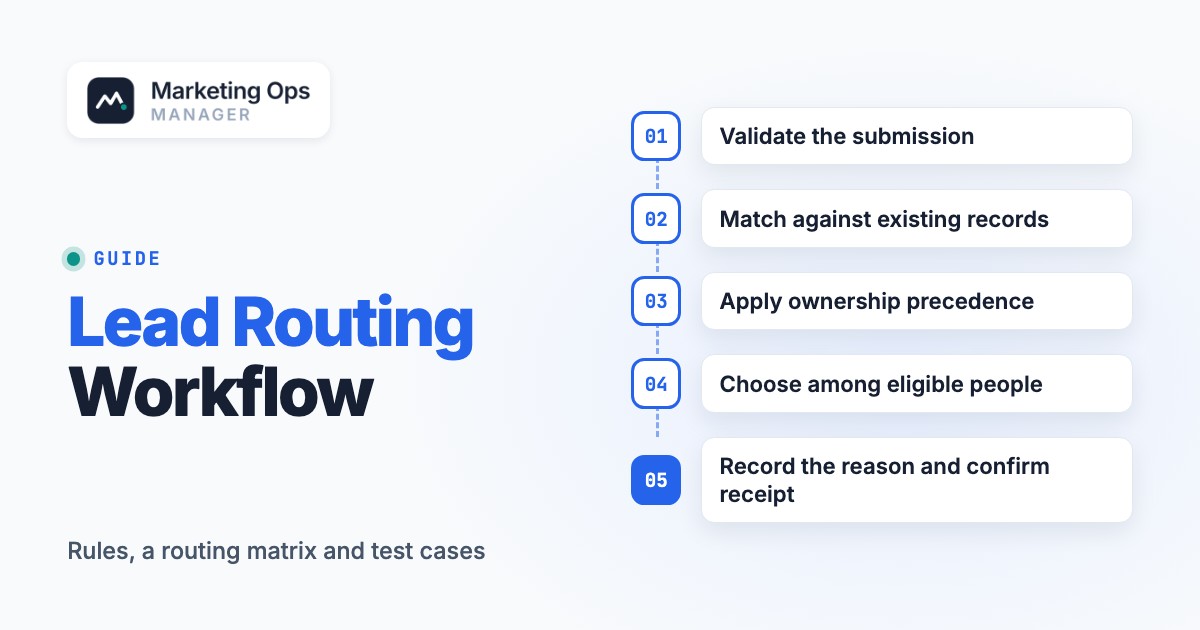
A lead routing workflow is the ordered set of rules and automations that assigns each incoming inquiry to one accountable person or team, records why, and sends the record somewhere monitored when assignment fails. It checks whether the record is valid, whether a relationship already exists, who's eligible and what happens when the first choice can't take it. Round robin is one step inside it. It isn't the whole thing.
- Check validity and existing relationships before you distribute anything. Territory and rotation come last.
- Write ownership precedence as an ordered list, get sales, customer success and ops to sign it, then build it.
- Give every exception a named queue and a person who works it. An unowned catch-all is just a lost lead with extra steps.
- Measure assignment, acknowledgement and follow-up as three separate milestones.
- Test every branch, including duplicates and unavailable reps, and rerun the suite after each rule change.
What is a lead routing workflow?#
A lead routing workflow decides who owns an inquiry the moment it arrives. It reads the record, compares it with what the CRM already knows, applies rules in a fixed order and writes down the result, so nobody's guessing later. A useful one preserves context, makes exceptions visible and gives the assignee what they'll need to act without hunting through three systems.
Without a documented policy, teams make ownership decisions case by case. A demo request lands in a general pool even though the contact has an open opportunity. A customer's question gets treated as new business, and the account team doesn't hear about it. A blank territory field leaves a record with no owner at all, and nobody's told. Each of these is clearly a policy gap, not a tooling failure, and a faster assignment engine won't close it.
The workflow sits between capture and sales follow-up, and it's only as good as the definitions behind it. If you're still defining what a lead is at each stage, start with lead lifecycle stages and the MQL definition examples, because routing rules reference those states constantly.
What should happen before anyone is assigned?#
Routing should run a fixed sequence of checks, and the order matters more than most teams expect. Cheap, certain checks come first. Distribution among reps comes last, because reassigning later confuses the prospect.
Validate the submission
Filter obvious spam and internal test records, but keep legitimate low-priority inquiries. A bad email domain is a reason to review, not to delete.
Normalize the fields you route on
Country, region, segment and product interest should be controlled values, not free text. Keep what the prospect typed separate from what enrichment inferred, because a guessed country isn't a confirmed one.
Match against existing records
Look for an existing contact, account and open opportunity. A match changes who should own the record, so it has to happen before territory logic.
Apply ownership precedence
Open opportunity owner, current customer team and named account owner outrank territory and rotation.
Choose among eligible people
Only now apply territory, segment, language, capacity and rotation to the eligible pool.
Record the reason and confirm receipt
Write the rule that fired, the previous owner if there was one and a timestamp. Notify the owner and track whether they accept the record.
Every step needs a failure path, and it needs one that isn't "do nothing". If matching returns two plausible accounts, the record goes to a review queue with both candidates attached. It doesn't pick one at random, and it doesn't wait for someone to notice.
How do you define ownership precedence?#
Ownership precedence is the ordered rule list that settles conflicts when more than one owner could claim a record. Write it as a numbered policy. Automation executes it literally, and a vague policy doesn't become flexible, it becomes inconsistent configuration.
A common order for B2B teams looks like the list below, though it's one reasonable choice and not a standard.
- An active opportunity's owner keeps new activity from the same contact or account.
- A current customer's inquiry goes to the customer-facing account team, unless it's explicitly a new purchase.
- A named strategic account goes to its designated owner.
- Product-specialist or language routing applies after the relationship checks.
- Territory, then rotation, handles every record that's left.
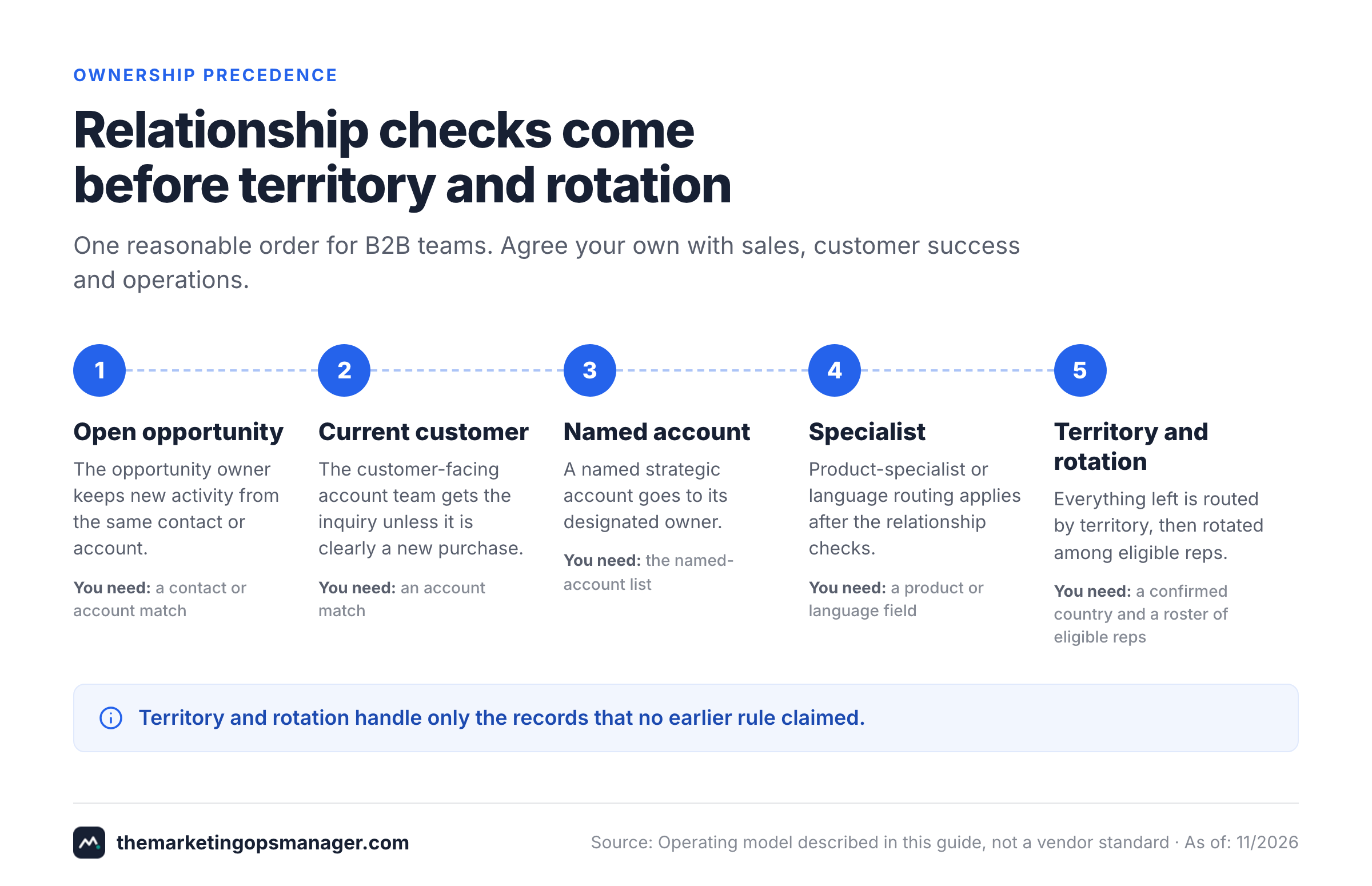
Settle conflicts with sales, customer success and operations before anyone configures a rule, and record who approved the order and when. Disagreements found during a build are expensive. The same disagreement found in a meeting is a ten-minute conversation.
How do you build a routing matrix?#
A routing matrix is a table with one row per condition, in priority order, naming the destination, the fallback and the person who owns the rule. It's the single document that lets a rep, an admin and a manager answer "why did this lead go there?" without opening the automation builder.
Include a test scenario in each row, so the matrix doubles as your acceptance test list. Always end with a catch-all row. Forms, products and fields change, and a record that matches nothing needs somewhere to go.
Lead Routing Matrix
One row per rule, evaluated top to bottom, first match wins. Example values are illustrative.
| Rule | Priority | Condition | Destination | Fallback | Rule owner | Test scenario |
|---|---|---|---|---|---|---|
| Open opportunity | 1 | Contact or account has an open opportunity | Opportunity owner | Opportunity owner's manager queue | Sales operations | Known contact submits a demo request |
| Current customer | 2 | Account is a current customer, request is support or renewal | Customer success account team | Customer success triage queue | Customer success lead | Customer submits the contact form |
| Named account | 3 | Account is on the named-account list | Named account owner | Strategic accounts queue | Sales operations | Named account domain submits a form |
| Ambiguous match | 4 | Account match is ambiguous (two or more candidates) | Manual review queue | Marketing operations | Marketing operations | Two accounts share an email domain |
| Covered territory | 5 | Country confirmed and in a covered territory | Territory rotation pool | Territory manager | Sales operations | Prospect with a complete territory field |
| Missing location | 6 | Country missing or conflicting | Triage queue | Marketing operations | Marketing operations | Submission with a blank country |
| Catch-all | 7 | No rule matched | Monitored catch-all queue | Head of revenue operations | Revenue operations | Record built to match no rule |
Rows 4 and 6 matter most. They're the two places where teams quietly lose leads, but the cause is rarely the tool: the data is ambiguous and nobody wrote down who decides.
How do round robin, territory and ownership rules work in common CRMs?#
Each platform implements these ideas differently, and that's where surprises come from. The details below come from vendor documentation read in November 2026. Check the live page before you commit to a design, because HubSpot in particular labels some of this as beta and plans change.
HubSpot offers a Rotate record to owner workflow action. For leads, HubSpot's documentation lists load balanced, round robin and random distribution, marks lead assignment as beta and requires Sales Hub Professional or Enterprise. Eligible users need an active paid seat, and that's easy to miss, so a rep who's on a core seat can't receive rotated leads. If there's no eligible user, or no team is selected for team-based assignment, no owner is assigned. That last behavior is exactly the silent blank the matrix above warns against. It's why you should pair the action with a follow-up branch that catches unowned records. HubSpot also states that adding or removing owners from the action after the workflow is on resets the assignment counts.
Salesforce uses lead assignment rules made of ordered rule entries, each assigning to a user or a queue. Salesforce's lead administrator cheat sheet recommends one rule per lead creation method, so Web-to-Lead and import may need separate rules, and only one rule can be active at a time. Users entering a lead manually have to select the option to use the active rule, or it isn't applied. The Default Lead Owner receives leads that no rule assigns, and imported leads with no rule or owner column go to the admin doing the import. Round robin isn't a built-in rule type, and Salesforce documents it only as a workaround built on an autonumber field and a formula.
LeanData is a managed package inside Salesforce that matches incoming leads to existing accounts and routes them through a visual flow builder. Its documentation describes round robin that can be weighted and capped. Pricing is quote only, with separate setup, and it centers on Salesforce, so it doesn't help a HubSpot-only team.
| Tool | Round robin | Runs in | Cost model |
|---|---|---|---|
 HubSpot Sales Hub | Workflow action; lead rotation is beta | HubSpot workflows | Needs Sales Hub Professional or Enterprise for leads |
 Salesforce Agentforce Sales | Workaround with autonumber and formula | Salesforce lead assignment rules | Priced per CRM user, rules need an admin to own them |
 LeanData | Built in, weighted, with caps | Salesforce managed package | Quote only, setup billed separately |
What fits depends on where your CRM of record lives, not on routing features alone. There's no universal winner. If HubSpot and Salesforce are both in play, the sync decides which system owns the owner field, and the HubSpot Salesforce integration guide covers the field mapping that routing depends on. For a broader view of the tooling, see our comparison of lead management software.
Should you use round robin?#
Round robin works well for distributing eligible new-business inquiries among reps, but it's a distribution tool, nothing more. It doesn't settle account ownership or territory conflicts, so determine the eligible pool first and rotate second. Reverse that order and you'll hand an existing customer to a stranger.
Then decide the mechanics in writing. Decide whether people on leave are skipped, whether the rotation is weighted for seniority or quota, and what happens to the counter when a rep joins or leaves. As the HubSpot note above shows, changing the pool can reset the counts, which quietly skews distribution. Don't call a rotation fair just because it alternates names, since one rep can still end up with the biggest accounts. Audit the actual workload each person received, and keep one accountable owner even when specialists contribute.
How should territory routing work?#
Use territory rules when geography changes who can follow up. Don't add them if it doesn't. Define the source of the location field and decide which one wins when country, region and account ownership disagree. A location inferred from network data can be wrong, and cross-border companies, subsidiaries and remote employees break simple country rules. Don't treat a guess as a fact. Keep the guess as a hint for the reviewer, though, because it's often close and it's free.
When the evidence is ambiguous, send the record to a monitored review queue instead of guessing. Version the territory map so you'll be able to explain a historical decision after the map changes.
How do you handle duplicates?#
A new inquiry from an existing contact still matters, even though it isn't a new lead. Keep the new message, timestamp and attribution when the record updates an existing one. Define matching criteria and a confidence threshold, and don't merge automatically when two companies have similar names or share a generic email domain. Decide whether the new activity creates a task for the current owner, refreshes the open opportunity or goes to review.
Make processing idempotent, so it doesn't matter how often an event fires. That means the same submission arriving twice, or a webhook retrying, still produces one assignment and one notification, and nobody's inbox fills with repeats.
What should you do with missing or conflicting data?#
Create named exception categories. You'll want these: missing required fields, ambiguous account match, unsupported product request, no eligible representative and integration error. Each needs a destination and a person who resolves it. Give the reviewer the original inquiry and the reason routing stopped. It's the difference between a two-minute fix and a day of digging. After the fix, allow safe reprocessing, and keep the earlier decision and any manual override in an audit trail.
What happens when the assigned person is unavailable?#
Eligibility has to reflect staffing reality, and it isn't static: vacations, departures, role changes and working hours. Some teams use a backup owner, while others use a shared monitored pool. Pick one, document it and name who maintains the roster. It's boring work, but it's what keeps leads moving. If nobody's eligible, route to a monitored fallback and alert the responsible team. Never leave the owner field blank as a silent default, period, and keep the original source and prior owner when you reassign.
What service levels should you set?#
Separate three milestones, because they're not the same thing. Assignment means a destination was selected. Acknowledgement means the responsible person accepted the record. Follow-up means a meaningful action happened. Dashboards that report only the first and call it response time miss what the buyer experiences. Rep activity data from employee monitoring software can add context, but CRM timestamps stay the cleaner source for all three.
Set the limits from your own channel mix, staffing and working hours, not from a benchmark in a blog post. They're yours to defend, and a borrowed number isn't. Decide whether weekends and holidays count, and don't leave it to each manager. Alert on unassigned, unacknowledged and untouched records, and send the escalation to someone who can reassign the work, not just to a channel nobody owns.
Which metrics show whether routing works?#
Here's what to track, and you should split each by source, region, product and inquiry type:
- Share of inquiries with a valid owner after the assignment limit
- Share acknowledged inside the agreed window
- Reassignment rate and the reasons given
- Duplicate outreach incidents
- Age of records sitting in exception queues
- Manual overrides, with reasons
A healthy aggregate can hide a failing channel. Partner referrals or one region's events might break while the total looks fine, so segment before you trust an average. Review individual failures too, and don't just read the average. Classify each root cause as bad data, conflicting policy, an out-of-date roster or an integration fault. The classification tells you what to fix.
How do you implement routing step by step?#
Inventory every inbound source
Forms, events, partner referrals, inbound email, chat and imported lists all create records. Missing one source means missing its leads.
Map the automations that already touch ownership
CRM assignment rules, marketing automation, integrations and admin scripts. Two automations that write the owner field will overwrite each other.
Agree the precedence policy
Get sales, customer success and operations to sign the ordered list.
Audit and normalize input fields
Fix the values you route on before you build, not after the first misroute.
Build the matrix and the exception destinations
Every row gets a fallback and an owner.
Configure the automation and the audit trail
Log the rule that fired, the previous owner and the timestamp on every assignment.
Test every branch
Use the scenarios in the matrix and the test table below.
Pilot one source or segment
Run it next to the old process, compare owners and fix discrepancies before cutover.
Cut over, then watch exceptions daily
Keep a change log. The first two weeks produce most of the surprises.
Which test cases are essential?#
Test each branch with a realistic record, and don't rely on one happy-path run and assert five things: the selected owner, the routing reason, the notification, the fallback and the audit entry.
| Test case | What must be true |
|---|---|
| New prospect with complete fields | Lands in the correct territory pool with a logged reason |
| Known contact with an open opportunity | Goes to the opportunity owner, not the rotation |
| Existing customer inquiry | Reaches the customer team, not new business |
| Duplicate form submission | One assignment, one notification, both submissions preserved |
| Unknown or conflicting country | Triage queue, with the original value shown |
| Ambiguous company match | Review queue with both candidates attached |
| Unsupported product request | Named exception queue |
| Only eligible rep unavailable | Monitored fallback and an alert |
| Integration retry | No second assignment |
| Record matching several rules | The first matching rule in priority order wins and the log says so |
Rerun the whole suite, and don't skip it when the change looks small. after any material rule change, a new form or a CRM field change.
What does an example workflow look like?#
Imagine a prospect submits a demo request with an email already tied to an open opportunity. The workflow validates the submission, finds the contact and opportunity, assigns the opportunity owner, logs "open opportunity" as the reason and alerts that owner. The request is kept as new activity instead of being thrown away as a duplicate. If the match was uncertain, the record would go to the review queue instead, because a wrong owner is worse than a short delay.
A second prospect has complete fields and no relationship match. The workflow doesn't guess. It reads the confirmed country, rotates within the territory pool and skips anyone marked unavailable. If the pool is empty, the fallback queue receives the record and an alert goes to its owner.
How should you document the workflow?#
Keep a short specification. It doesn't need to be long: workflow name, business owner, technical owner, trigger, input fields, precedence order, output fields, exception categories, service levels, escalation path and version history. Record the date and approver of every major change. Add a plain-language decision tree that reps can read without opening the automation builder, and say where to report a misroute. Documentation makes troubleshooting faster, and it's cheap and removes dependence on one admin. It's also what you'll want on the day that admin leaves. The marketing operations audit checklist is a good companion when you review the whole handoff chain.
What common mistakes should you avoid?#
- Competing automations that overwrite the owner field
- Trusting enriched fields as if the prospect had confirmed them
- A catch-all queue that nobody staffs
- Sending known customers' inquiries through new-business rotation
- Calling the workflow healthy because it ran, when nobody responded
- Rules only the original builder understands
Prefer a smaller set of auditable decisions over elaborate branching you can't test. It's the simplest rule here.
How do you keep routing working over time?#
Don't wait for complaints. Review exception trends, reassignment reasons, territory changes, new products, account migrations and staffing every month. Name a business owner for policy and a technical owner for the build. Whoever's in charge should be a person, not a team alias. Keep the regression suite and run it after changes. Use repeated exceptions to fix forms and matching rules rather than triaging the same failure forever, and tell affected teams when rules change.
Rules also break without anyone editing them: a form field gets renamed, a sync starts failing, a user is deactivated. A scheduled end-to-end check that submits a test record and confirms it arrives with the right owner catches those failures. It notices a rule that's silently stopped working, which no edit log will show. The same idea applies to the campaign tracking checklist you run before a launch.
- Ownership precedence is written down and approved by sales, customer success and operations
- Every inbound source is inventoried, including imports and partner referrals
- Routing fields are normalized and have an owner
- The matrix has a fallback and a rule owner on every row
- The catch-all queue is monitored by a named person
- Duplicate submissions produce one assignment
- Unavailable reps are skipped and the roster has a maintainer
- Assignment, acknowledgement and follow-up limits are set and alerting
- A test suite covers every row and passed after the last rule change
- A change log and decision tree exist
What is the takeaway?#
Start with a documented ownership policy, not a tool feature. Validate and normalize inputs, check existing relationships before distributing new inquiries, use explicit eligibility rules and give every exception a monitored home. Measure acknowledgement and follow-up, not just assignment, and keep a traceable decision history. A workflow people can read, test and explain is the one that stays accurate, and that's the goal. It's also the one you'll actually maintain.
What is the difference between lead routing and lead assignment?
Lead assignment is the act of setting an owner. Lead routing is the full decision process around it, including validation, matching, precedence, fallback and logging.
Should every lead go through round robin?
No. Round robin suits eligible new-business inquiries. Records tied to an open opportunity, a customer or a named account should follow ownership rules first.
Where should unroutable leads go?
To a monitored queue with a named owner and an alert. Leaving the owner field blank hides the record, and some CRM features do exactly that when nobody is eligible.
Can HubSpot do round robin lead assignment?
HubSpot's Rotate record to owner action supports round robin, and its documentation marks lead assignment as beta and requires Sales Hub Professional or Enterprise. Check the current documentation before relying on it.
Does Salesforce have built-in round robin?
Salesforce lead assignment rules assign to users or queues by ordered entries. Round robin isn't a built-in rule type, and Salesforce documents it as a workaround using an autonumber field and a formula.
How often should routing rules be reviewed?
Review exceptions and reassignment reasons monthly, and rerun the full test suite after any rule, form or CRM field change.