
Marketing attribution software assigns credit for conversions and revenue to the touchpoints that came before them, such as ad clicks, emails, page visits and calls, so you can see which channels and campaigns produce customers instead of just clicks. The eleven tools below cover four situations: B2B pipeline, e-commerce and subscription stores, lead generation with calls and offline channels, and the analytics platforms many teams already pay for. What separates them is less the model list than how each one collects the data and what its price scales on: pageviews, store revenue, ad spend or a quote.
We read vendor pricing, feature and help pages and review-site summaries, and we haven't run these products ourselves. Six of the nine dedicated tools publish no dollar price for a paid plan, and their price cells say so instead of guessing.
- tools compared in 4 groups
- 11
- dedicated tools publish a dollar price for a paid plan (Ruler Analytics, Wicked Reports, Northbeam)
- 3 of 9
- lowest published paid monthly price among dedicated tools (Ruler Analytics, Small, billed monthly)
- $400
- have a free plan or free product (Dreamdata, Triple Whale, Google Analytics 4)
- 3
What is marketing attribution software?#
Marketing attribution software is a tracking layer plus a reporting model that connects each conversion, such as a purchase or a closed deal, to the marketing touchpoints that preceded it and splits the credit between them. Single-touch models give all credit to one touchpoint, usually the first or last click. Multi-touch models share it across the path, either by a fixed rule (linear, U-shaped, time decay) or by a data-driven algorithm.
The model matters less than the data underneath it, and that's where tools differ most. Tools collect that data in four ways, and many combine them:
- A browser pixel or script records visits, clicks and UTM parameters, and ties them to an anonymous visitor ID. It's easy to install and loses data to ad blockers and cookie limits.
- Server-side events send conversions from your server, so ad blockers and consent flows drop fewer of them.
- A CRM or order join matches the visitor to a contact, deal or order after they identify themselves, which is how touches turn into pipeline or revenue.
- A warehouse or ad-platform feed brings in spend and impression data, and can push conversions back to the ad platforms.
Web analytics shows what visitors did on your site. Attribution software decides which earlier touch deserves the credit and, in most cases, adds revenue from your CRM or store. For the models themselves, see our guides to attribution models and the marketing attribution model comparison.
Our picks by situation#
 Best for B2B teams that want a free startDreamdataA free plan with 5 seats, then a quote-only Advanced plan with data-driven models and warehouse export.
 Best for B2B teams that compare models side by sideHockeyStackSix attribution models plus lift tests on one platform. No public price.
 Best for Shopify-first storesTriple WhaleA free tier with first and last click, paid plans priced by annual GMV.
 Best for larger ad budgets that need long lookbacksNorthbeamSeven models and lookbacks up to 10 years, with plans banded by ad spend.
 Best for repeat purchase and subscription brandsWicked ReportsPublished revenue-based plans from $499 a month and a lifetime lookback.
 Best for sending conversions back to ad platformsCometlyPixel plus server-side events and a Conversion API to Meta, Google and LinkedIn. Quote by pageviews.
 Best for lead generation with calls and formsRuler AnalyticsTies forms, calls and chats to CRM revenue. From $400 a month per domain.
 Best for offline channels and MMM in one placeRockerboxCovers connected TV, linear TV, direct mail and podcasts. Quote only.
 Best for warehouse-first teams with an analystSegmentStreamAn identity graph and BigQuery output with geo-holdout testing. Priced per project.
 Best free starting pointGoogle Analytics 4Data-driven and last click models for ad-driven key events, free in the standard version.
 Our product · for the gaps feeding these toolsThe Marketing Ops ManagerDoesn't attribute anything. It checks that the tracking, form and CRM steps behind your reports still work.
Marketing attribution software compared#
| Tool | Built for | Starting price | G2 rating |
|---|---|---|---|
| Dreamdata | B2B accounts and pipeline | Free plan at $0 per month (5 seats, 2 months of user history, 3 stage models, 2 notifications, 1 sync); Advanced is custom and quote-only with a guided free trial; Activation, Data Warehouse and SCIM are add-ons with no listed price | 4.7 (264) |
| HockeyStack | B2B revenue and product data | No public price list: the pricing page offers custom plans and a demo form, and mentions startup pricing without an amount | 4.5 (82) |
| Triple Whale | E-commerce (Shopify-first) | Free plan; Foundation, Automate and Enterprise are quote-based, priced by annual GMV, 12-month terms | 4.5 (482) |
| Northbeam | E-commerce and DTC paid media | Quote based; site shows Starter from $1,500 (unit label unclear), Professional from $3,500 per month, Growth and Enterprise custom; monthly price informed by pageviews | 4.5 (16) |
| Wicked Reports | E-commerce and subscription | From $499/mo (Measure), $699 (Scale), $999 (Maximize), Enterprise from $4,999 | 4.2 (27) |
| Cometly | Paid ads and conversion feedback | Quote-only, tiered by monthly pageviews | 4.8 (35) |
| Ruler Analytics | Lead generation with calls and forms | Published in USD with a GBP/EUR/USD toggle: Small (up to 10k monthly visits) $400/mo billed monthly or $360/mo billed annually; Medium (up to 50k) $668 or $601; Large (up to 100k) $1,326 or $1,193; Advanced (from 100k) $2,000 or $1,800. Page calls it indicative pricing scaled by traffic, product, data and integration needs. License is per domain, no per-seat fees. | 4.6 (30) |
| Rockerbox | Omnichannel with offline media | Quote only (demo required) | 4.6 (47) |
| SegmentStream | Warehouse-based measurement | Quote-only, per project | 4.7 (26) |
| Google Analytics 4 | Web analytics with attribution reports | Free for the standard version; Analytics 360 needs a contract and Google's help pages state no price. BigQuery streaming export costs $0.05 per GB on the BigQuery side | 4.5 (6,858) |
 HubSpot Marketing Hub | CRM-native attribution | Revenue attribution on Enterprise, from $3,600/mo plus $7,000 onboarding | 4.4 (16,036) |
| The Marketing Ops Manager Our product | Campaign monitoring | Starter $199 per month (up to 10 campaigns, checks every 15 minutes), Growth $499 per month (up to 50 campaigns, checks every 5 minutes); billed monthly in advance through Stripe, card required at checkout, cancel anytime (vendor homepage, as of 2026-11-02) | No reviews yet |
Starting prices as published by each vendor and checked November 10, 2026 (HubSpot October 27, 2026). Quote-only means the vendor publishes no dollar figure.
How to choose marketing attribution software#
Start with what you sell and where the conversion is recorded. A store records it in checkout, a B2B team in the CRM, a lead generation business on a phone call or a form. Then check what the tool's price scales on, because it decides the bill as you grow: pageviews, annual store revenue, ad spend or a negotiated project fee. Finally, check how the data gets in and whether conversions can go back out to Google Ads, Meta and LinkedIn, since that's how attribution changes bidding instead of only reporting.
| Tool | How it collects data | What the price scales on | Models named by the vendor |
|---|---|---|---|
| Dreamdata | Web tracking plus CRM and ad platform connections | Free plan; Advanced by quote | Data-driven and custom models |
| HockeyStack | CRM, ad, website and warehouse data | Custom quote | First, last, linear, position-based, time decay, predictive |
| Triple Whale | Triple Pixel plus store and ad connections | Annual GMV | Eight, including first click, last click and linear variants |
| Northbeam | Storefront pixel, Shopify custom pixel, order sync | Pageviews inform the monthly price; plans are banded by ad spend | Seven, including first, last, linear and clicks-only views |
| Wicked Reports | Tracking code plus order and ad platform connections | Trailing 12-month revenue | Selectable and custom models, lifetime lookback |
| Cometly | Pixel plus server-side events | Monthly pageviews | First, last, linear, U-shaped, data-driven |
| Ruler Analytics | Website tracking of visits, forms, calls and chats, joined to the CRM | Monthly visits per domain | Multi-touch |
| Rockerbox | Ad platform, Shopify and Segment connections | Quote | First touch, last touch, even weight, modeled multi-touch |
| SegmentStream | Identity graph over web, ad and CRM data, output in BigQuery | Quote per project | First-click and multi-touch, plus predictive |
| Google Analytics 4 | Tags and SDK events | Free; Analytics 360 by contract | Data-driven, paid and organic last click, Google paid channels last click |
| HubSpot Marketing Hub | HubSpot tracking code and CRM records | Plan tier (revenue attribution on Enterprise) | Linear, first interaction, last interaction and more |
- Step 1Ad click to landing page
- Google Analytics 4
Breaks when UTM parameters are missing or renamed - Step 2Form or checkout
- HubSpot Marketing Hub
Breaks when the conversion event stops firing - Step 3Contact, deal or order
- Dreamdata
- Triple Whale
Breaks when the source field is blank or overwritten - Step 4Attribution report
- HockeyStack
- Northbeam
- Ruler Analytics
Looks like the report shows a quiet channel, not a broken one - Across allMonitor the journey
- The Marketing Ops Manager
Catches the step that stopped feeding the report, with evidence
Best marketing attribution software for B2B pipeline#
B2B attribution has to follow an account across months and many people before a deal closes, and it only means something once it reaches CRM revenue. Both tools in this group are built around that join, but they differ in price and openness.
Dreamdata: a free plan, then account-level attribution by quote#
Dreamdata
Dreamdata is a B2B attribution platform that ties every touchpoint to accounts and revenue, with an AI analytics agent and audience syncing to ad platforms.
Dreamdata is a B2B attribution platform that ties touchpoints to accounts and revenue. It pulls in ad platforms (Google, Meta, LinkedIn, Microsoft), CRMs (Salesforce, HubSpot, Dynamics, Pipedrive), marketing automation and web tracking, and it can send audiences and signals back to the ad platforms.
- You sell B2B, want to test on real data for free, and run Salesforce, HubSpot, Dynamics or Pipedrive
- You need data-driven and custom models plus warehouse export and audience syncing to Google Ads, LinkedIn, Meta and Bing
- You need a published price for the full product, because Advanced is quote-only
- You want to be productive in days: G2 reviewers list the learning curve as the top complaint, and a Capterra reviewer called it steep for the first one to two months
- Users like
- Insights (47 reviews), analytics (39), marketing metrics
- Users dislike
- Learning curve (20 reviews), missing features (13 reviews)
- Source: G2, 264 reviews
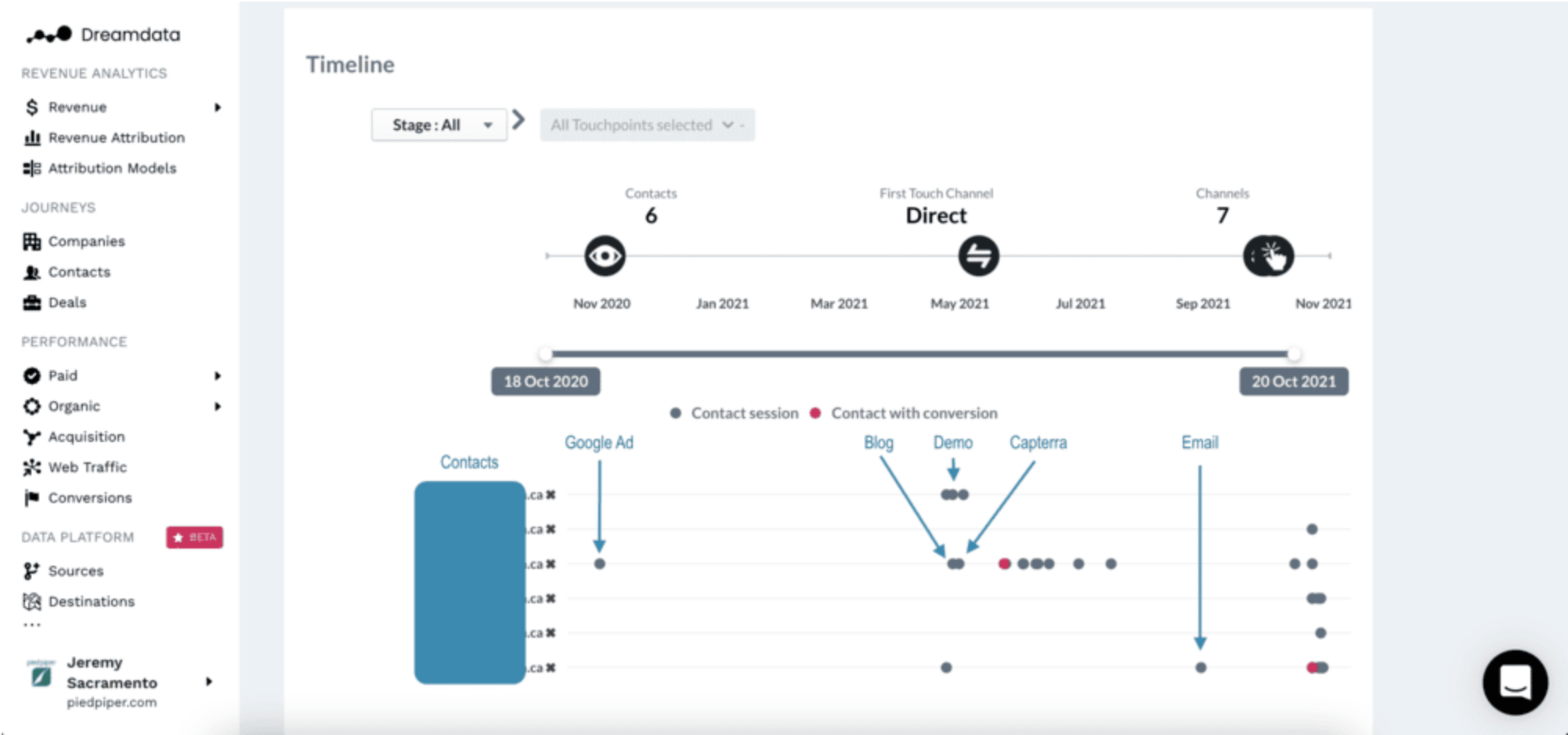
How it works in practice
The free plan is a real way to test: it includes B2B web analytics, company identification and ad spend reports. The limit that bites first is history, because two months of user history is short for a sales cycle that runs six.
Advanced adds the longer history and the custom models. Warehouse export to BigQuery, Snowflake, AWS S3 or Azure Storage is a paid add-on, as are Activation and SCIM, and none of those has a listed price. A Capterra reviewer complained about a one-year contract without a proof of concept, so ask for a trial period in writing.
- Starting price
- Free plan at $0 per month (5 seats, 2 months of user history, 3 stage models, 2 notifications, 1 sync); Advanced is custom and quote-only with a guided free trial; Activation, Data Warehouse and SCIM are add-ons with no listed price
- Free plan
- $0 a month: 5 seats, 2 months of user history, 3 stage models, 1 sync
- Advanced plan
- Quote only, with a guided free trial
- Attribution
- Data-driven, custom models, exclusions, LinkedIn impression attribution
- Data warehouse
- BigQuery V2, Snowflake V3, AWS S3 V2, Azure Storage (Data Warehouse is a paid add-on)
- CRM integrations
- Salesforce, HubSpot, Microsoft Dynamics, Pipedrive
- AI
- Analytics Agent, MCP Server, AI report summaries
HockeyStack: six models and lift tests in one view#
HockeyStack
HockeyStack is a B2B revenue data platform that unifies marketing, product and sales data to show multi-touch attribution across the full buyer journey.
HockeyStack is a B2B revenue data platform that combines marketing, product and sales data. It brings in CRM, marketing automation, ad platform, website and data warehouse data, and it syncs attribution and conversion data back to CRMs, ad platforms and warehouses in both directions.
- You want to compare several models on the same data and also run lift tests
- You want product, marketing and sales data in one view, with scoring on top
- You need to budget before a sales call, because no price is published
- You have no analyst time: G2 reviewers often cite a hard learning curve and confusing reporting from a complex data structure
- Users like
- Ease of use, exceptional support team and the analytics
- Users dislike
- Difficult learning curve; reporting confusing due to complex data structure
- Source: G2, 82 reviews
How it works in practice
The practical draw is comparing models side by side on the same data: a team can see how first touch, position-based and the machine-learning predictive model each credit the same deals. The platform also runs lift tests on events and content, and layers account and lead scoring and AI agents on top.
It targets marketing leaders, RevOps and GTM ops teams, sales leaders and performance marketers. The pricing page shows custom plans and a demo form and mentions startup pricing without an amount, so budget on the sales call, not the page.
- Starting price
- No public price list: the pricing page offers custom plans and a demo form, and mentions startup pricing without an amount
- Pricing model
- Custom plans, demo form
- Attribution models
- First touch, last touch, linear, position-based (40/20/40), time decay, predictive
- Data warehouse
- Snowflake, two-way (read-only or read-write)
- Targets
- Marketing leaders, RevOps/GTM ops, sales leaders, performance marketers
- AI
- AI agents, Forecast Challenger agent, account and lead scoring
- Free tier
- None mentioned on the pricing page
- Warehouse
- Snowflake, read-only or read-write
- Price
- Custom plans and a demo form
Best marketing attribution software for e-commerce and subscription#
Stores see the conversion directly, so these tools differ on how they follow a shopper across ad clicks and devices and what they send back to the ad platforms.
Triple Whale: a pixel, eight models and a free tier#
Triple Whale
Triple Whale pairs a first-party Triple Pixel with eight attribution models (including Total Impact and Clicks & Deterministic Views) and a dashboard suite for ecommerce brands. MMM and incrementality exist only via the Compass add-on or Enterprise.
Triple Whale is an attribution and analytics platform for Shopify-first stores. You install the Triple Pixel, connect the store (Shopify, WooCommerce, BigCommerce or custom) and your ad accounts, and tag ads with the recommended UTMs. At purchase, credit goes back to the UTM-tagged clicks in that visitor's journey.
- You run a Shopify, WooCommerce or BigCommerce store and want one dashboard of channel results
- You want to start free before you commit, with first and last click
- You need a dollar figure up front: Foundation, Automate and Enterprise are priced by annual GMV on 12-month terms
- You rely on marketplace orders, because G2 reviewers report that marketplace attribution did not work for them
- Users like
- Centralized dashboards and attribution that show which ads and channels drive sales; easy Shopify and ad platform integration
- Users dislike
- Support responsiveness and attribution accuracy (reports of data needing manual checks, marketplace order attribution not working), plus price for small teams
- Source: G2, 482 reviews
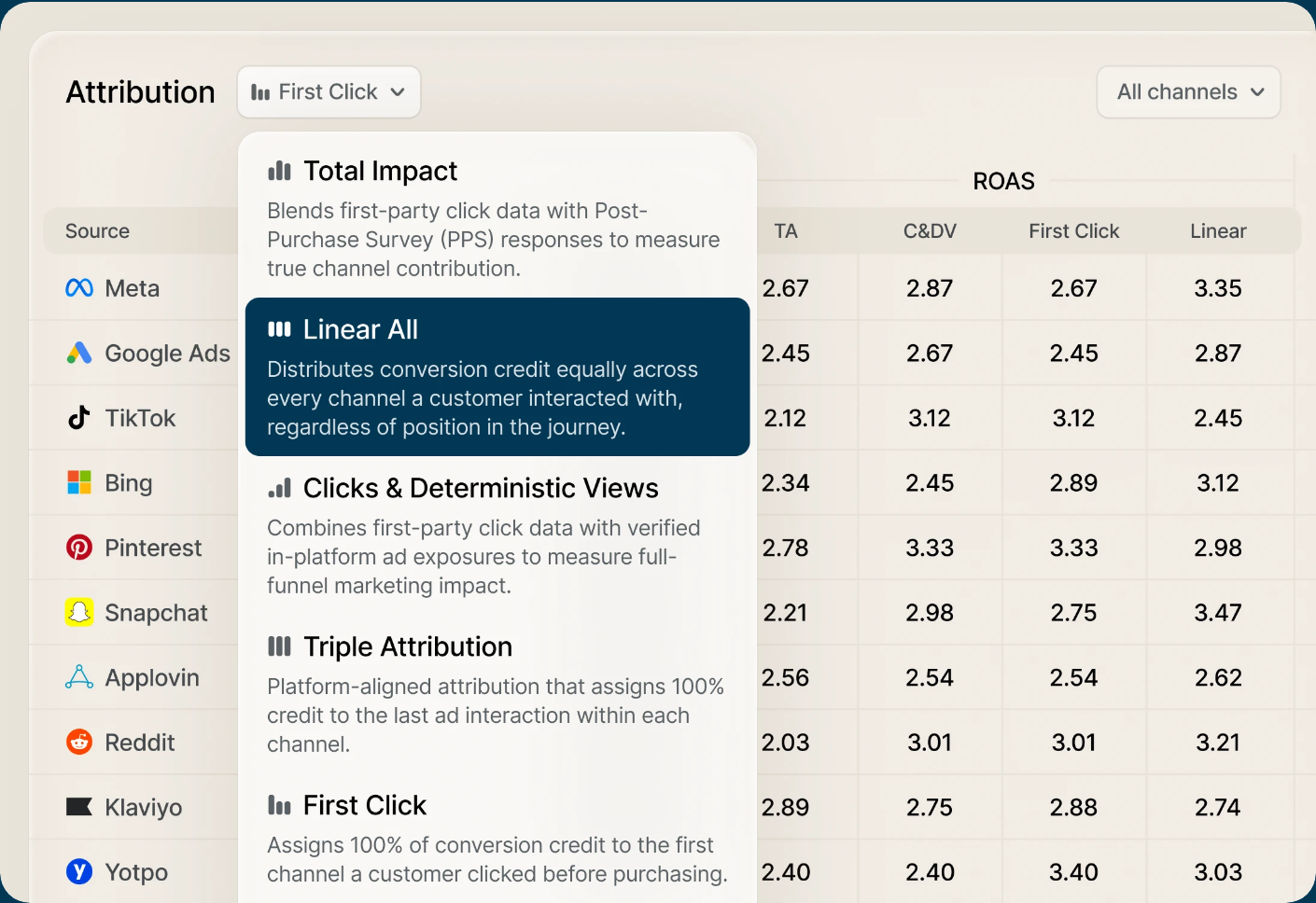
How it works in practice
The marketing page lists eight models: Total Impact, Clicks and Deterministic Views, Triple Attribution, Triple Attribution plus Platform Views, Linear All, Linear Paid, First Click and Last Click. Total Impact blends click data with post-purchase survey answers. The help center counts seven because it groups the linear variants. All models and windows start on Foundation, not on the free tier.
The pixel only sees behavior from the day it is installed, so the help center suggests waiting about one average customer journey before you trust the numbers. There are 60 or more pre-built integrations, including Shopify, ad platforms and Klaviyo, and a data warehouse sync as an add-on. Marketing mix modeling and incrementality come through the Compass add-on or Enterprise.
- Starting price
- Free plan; Foundation, Automate and Enterprise are quote-based, priced by annual GMV, 12-month terms
- Free plan
- First and last click with a lifetime window only
- Paid plans
- Foundation, Automate, Enterprise; unlimited users; no USD price published (quote based)
- Price driver
- Annual GMV plus package; auto-moves tier as revenue grows, annual prepay locks tier for the year
- Billing
- Paid plans are 12-month subscriptions, billed monthly or annually with two months free
- Attribution models
- Eight on marketing page (Total Impact, Clicks & Deterministic Views, Triple Attribution, Triple Attribution + Platform Views, Linear All, Linear Paid, First Click, Last Click); help center lists seven with Linear grouped
- Windows
- 1, 7, 14 or 28 days, or lifetime; default 28 days
- Tracking
- Triple Pixel builds an anonymous visitor identity, appends each UTM-tagged ad click to the journey, credits ads at purchase
- MMM and incrementality
- Compass add-on (MMM, incrementality testing, MTA in one place); included on Enterprise; listed as add-on on the plan comparison for lower tiers
- Integrations
- 60+ pre-built; Shopify, WooCommerce, BigCommerce, custom; ad platforms incl. Facebook, Google, Snapchat, Pinterest, TikTok; Klaviyo listed; data warehouse sync is an add-on
- Setup
- Pricing page says most brands are live in 15 minutes
- Price basis
- Annual GMV; 12-month terms, two months free on annual prepay
Northbeam: seven models, long lookbacks and plans banded by ad spend#
Northbeam
Northbeam is a dedicated multi-touch attribution tool built on first-party data, with seven attribution models including modeled and deterministic view-through, plus MMM+ and incrementality as optional add-ons on higher plans.
Northbeam is a multi-touch attribution tool for e-commerce and DTC brands with optional incrementality and marketing mix modeling. Setup means pasting the Metadata Script and Northbeam Pixel into the storefront head, adding a Shopify custom pixel for the checkout_completed event, syncing orders, connecting each ad channel and adding Northbeam parameters to ad URLs.
- You spend enough on paid media that a long lookback and holdout tests are worth the price
- You want one source of truth for paid channel results across Meta, Google, TikTok and Pinterest
- Your ad budget is small, since the entry price listed is $1,500
- You need CRM-native integrations or documented server-side tracking, which the public docs don't describe
- Users like
- Clear, unbiased multi-touch attribution that becomes the source of truth for paid media; responsive team
- Users dislike
- Difficult onboarding and a complex system to learn
- Source: G2, 16 reviews
How it works in practice
The seven models are First Touch, Last Touch, Last Non-Direct Touch, Linear, Clicks-Only, Clicks plus Modeled Views and Clicks plus Deterministic Views. Channels without a native integration use the Spend API and UTMs. Native integrations include Meta, Google and YouTube, TikTok, Pinterest, Klaviyo, Attentive and Amazon, and a Data Export API sends data to GCS or S3.
The site lists Starter at $1,500 (it shows no billing unit) and Professional at $3,500, with Growth and Enterprise custom. Incrementality tests, which use randomized holdouts or geo tests, are an option on Professional and Enterprise, and MMM+ is an option on Enterprise.
- Starting price
- Quote based; site shows Starter from $1,500 (unit label unclear), Professional from $3,500 per month, Growth and Enterprise custom; monthly price informed by pageviews
- Plans
- Growth (custom, agency-supported, under $200K/month ad spend), Starter ($1,500 shown, under $1.5M/year ad spend), Professional ($3,500 per month, up to $500K/month ad spend), Enterprise (custom, over $500K/month)
- Price driver
- Monthly price informed by data volume measured in pageviews; plan eligibility tied to ad spend bands
- Contracts
- Starter is month-to-month for Shopify brands; Professional and Enterprise are annual terms billed annually or semi-annually
- Free trial
- Not mentioned on the pricing page
- Attribution models
- First Touch, Last Touch, Last Non-Direct Touch, Linear, Clicks-Only, Clicks + Modeled Views, Clicks + Deterministic Views
- Windows
- Lookback window set in Model Settings: 90 days, 180 days (default), 1 year, 10 years; modeled views use a 1-day view-only window
- Tracking
- Storefront pixel plus Metadata Script, Shopify custom pixel on checkout_completed, optional post-purchase script, Spend API and UTMs for non-integrated channels
- MMM and incrementality
- MMM+ optional on Enterprise; Incrementality optional on Professional and Enterprise; randomized holdout or geo test design
- Integrations
- Channels doc lists Meta, Google + YouTube, TikTok, Microsoft, Pinterest, Snapchat, X, Reddit, Klaviyo, Attentive, Amazon, Impact, Rakuten, CTV partners; Shopify install and order sync docs
- Data export
- Data Export API with GCS and S3 export and a warehouse pull use case; BigQuery and Snowflake not named
- Price basis
- Pageviews inform the monthly price; plan band follows ad spend
- Lookback
- 90 days, 180 days (default), 1 year or 10 years
- Billing
- Starter month to month for Shopify brands; Professional and Enterprise annual
Wicked Reports: revenue-based plans and a lifetime lookback#
Wicked Reports
Wicked Reports is a click-level first-party attribution tool for ecommerce brands, tying each order to the originating click and separating new from repeat customers. Plans are priced by trailing 12-month revenue, not ad spend.
Wicked Reports is click-level, first-party attribution for e-commerce and subscription brands. It matches each order to the click that caused it, checks the match against the billing system, and splits revenue into new and repeat customers. Orders come from Shopify, WooCommerce, BigCommerce, Amazon or Stripe, and ad spend from the ad platforms and Klaviyo.
- Repeat purchases and subscriptions matter, so you need to see value past a 7 or 30 day window
- You want pricing set by trailing 12-month revenue, from $499 a month on Measure, before you talk to sales
- You need offline, TV, marketing mix modeling or incrementality, which Wicked Reports' public pages don't mention
- You want a modern interface: G2 reviewers describe it as clunky and slow, with data processing delays
- Users like
- Multi-model attribution and long lookback that exposes true ROI beyond ad platform windows
- Users dislike
- Clunky, slow interface and occasional data processing delays
- Source: G2, 27 reviews
How it works in practice
The site doesn't name fixed models. It describes selectable and custom models, a customizable lookback with unlimited look-forward, and an Attribution Time Machine that re-runs any past period under a different model with a lifetime lookback. The vendor says reports fill in within 24 to 48 hours of setup. Advanced Signal and the Google Ads Conversion API send verified purchase events back to the ad platforms.
The vendor's own 97 percent match figure is a target, not a result we can verify. G2's listing still shows older plan names, so check the current plan against the vendor page.
- Starting price
- From $499/mo (Measure), $699 (Scale), $999 (Maximize), Enterprise from $4,999
- plans
- Measure $499/mo (for $0 to $2.5M annual revenue); Scale $699 (adds API integrations, currency conversion); Maximize $999 (5 Forces AI, Advanced Signal, Custom Conversions, Amazon revenue); Enterprise from $4,999 (aimed at $50M+ brands)
- Price driver
- Gross revenue of the last 12 months; band change applies at next renewal
- Add ons
- Advanced Signal and 5 Forces AI at $199/mo each on Measure or Scale
- Free trial
- none stated on pricing page; Book a Live Demo and a 3x Guarantee link (terms not stated)
- tracking
- First-party, cookieless; API-level order and ad spend sync verified against billing; reports populate in 24 to 48 hours per vendor
- lookback
- Customizable look-back, unlimited look-forward and lifetime lookback in the Attribution Time Machine; no default length published; methodology page suggests 30-day windows for new-customer/TOF and 7-day for retargeting
- Channels and gaps
- Meta, Google, TikTok, Pinterest, email, SMS; offline, MMM and incrementality not mentioned on the vendor pages
- G2 review age
- The G2 reviews visible were dated 2022, so the 4.2 rating rests on older feedback
- Plans
- Measure $499, Scale $699, Maximize $999 a month; Enterprise from $4,999
- Price basis
- Trailing 12-month revenue
- Add-ons
- Advanced Signal and 5 Forces AI at $199 a month each on the lower plans
Cometly: server-side events and conversion feedback to ad platforms#
Cometly
Cometly is a pixel plus server-side attribution tool built for paid media teams that need ad-platform data corrected with CRM and revenue outcomes. It sends enriched conversions back to Meta, Google and LinkedIn.
Cometly installs a one-line, cookieless pixel and adds server-side events so ad blockers and login flows drop fewer conversions. Visitors stay anonymous until they identify themselves in a form or checkout, and earlier sessions are then stitched to the contact.
- Your goal is better bidding: you want paying-customer signals sent back to Meta, Google and LinkedIn
- You sell through a CRM or Stripe and need revenue tied to the first click
- You need marketing mix modeling or incrementality tests, which the public pages don't mention
- You want a trial before talking to sales: Core and Enterprise are quoted by monthly pageviews and no free trial is offered
- Users like
- Support and setup help: quick resolutions, dedicated help during onboarding
- Users dislike
- Documentation described as poor or confusing by one reviewer
- Source: G2 listing summary, 35 reviews
How it works in practice
Revenue comes in through native integrations (Stripe, HubSpot, Salesforce and 70 or more others) or a no-code webhook that maps your app's fields to Cometly fields. The main reason to buy is the Conversion API, which sends paying-customer signals back to Meta, Google and LinkedIn. The homepage claims a Meta match quality of 9.3 out of 10, which is a vendor figure.
Pricing is a quote sized by monthly pageviews, about 1.5 times sessions according to the page. Passing a tier triggers a notice at 90 percent and a move to the next tier at the next billing period. Enterprise adds CRM and warehouse sync, Snowflake and BigQuery support, API access and a dedicated engineer. Docs show warehouse exports as Parquet files to S3 or GCS, daily or hourly.
- Starting price
- Quote-only, tiered by monthly pageviews
- Attribution models
- First, last, linear, U-shaped, data-driven (homepage)
- Tracking method
- Comet Pixel (cookieless, one-line install) plus server-side events; anonymous visitors stitched on identification; fingerprint-based cross-device
- Lookback window
- not published (homepage shows a window dropdown without values)
- Channels
- Meta, Google Ads, LinkedIn, Microsoft Ads, TikTok; organic, direct, email, SMS in sample dashboard
- Integrations
- 70+ native; named: Stripe, HubSpot, Salesforce, Snowflake, Close, HighLevel, Calendly, Webflow, Monday, Slack; webhooks
- Conversion sync
- Conversion API to Meta, Google, LinkedIn; homepage cites Meta match quality 9.3/10 (vendor claim)
- Warehouse export
- Parquet to S3/GCS, or load into Snowflake/BigQuery; daily (up to 90 day window) or hourly (up to 14 days); Enterprise plan lists CRM and warehouse sync
- MMM / incrementality
- not mentioned on vendor pages
- Price basis
- Monthly pageviews; Core and Enterprise tiers
- Billing
- Annual saves 20 percent; no free trial
- Models
- First, last, linear, U-shaped, data-driven
Best marketing attribution software for lead generation and cross-channel measurement#
When the conversion is a phone call, a form or a billboard, a pixel alone doesn't see it. These three tools capture calls and offline channels or put measurement in your own warehouse.
Ruler Analytics: calls, forms and chats tied to CRM revenue#
Ruler Analytics
Ruler Analytics is a marketing measurement platform that ties website visits, calls and form fills to CRM revenue so teams can see which campaigns produce leads and sales.
Ruler Analytics tracks website visits, form fills, phone calls and live chats, joins them to CRM revenue and sends the results back as offline conversions to Google Ads and Bing Ads. Facebook Ads is supported through Zapier.
- You run lead generation and need calls, forms and chats tied to the original source and to CRM revenue
- You want offline conversions sent back to Google Ads, with support included on every plan
- Your site is small or you advertise on one channel, because the price scales with visits from $400 a month
- You want quick setup: G2 reviewers mention a complex initial setup and a slow dashboard
- Users like
- responsive support and customer journey tracking across forms, calls and chat
- Users dislike
- complex initial setup and slow dashboard
- Source: G2, 30 reviews
How it works in practice
The four tiers are Small (up to 10,000 monthly visits), Medium (up to 50,000, $668 or $601), Large (up to 100,000, $1,326 or $1,193) and Advanced (from 100,000). The page calls the prices indicative and scaled by traffic, product, data and integration needs. Every plan includes unlimited logins, phone, email and live chat support, a dedicated customer success manager and onboarding.
Multi-touch attribution is included, and marketing mix modeling sits on the top tier. The case for it is a service or lead generation business where the sale closes on the phone, since call and chat conversions reach the original source and the CRM.
- Starting price
- Published in USD with a GBP/EUR/USD toggle: Small (up to 10k monthly visits) $400/mo billed monthly or $360/mo billed annually; Medium (up to 50k) $668 or $601; Large (up to 100k) $1,326 or $1,193; Advanced (from 100k) $2,000 or $1,800. Page calls it indicative pricing scaled by traffic, product, data and integration needs. License is per domain, no per-seat fees.
- Entry price (USD)
- $400/mo monthly, $360/mo annual (Small, up to 10k visits)
- Pricing basis
- Per domain, scaled by monthly unique visitors; no per-seat fee
- Tiers
- Small, Medium, Large, Advanced (from 100k visits)
- Tracking
- Form, call and live chat tracking plus offline conversions
- Ad platform feedback
- Google Ads (API) and Bing Ads documented; Facebook Ads via Zapier
- Support (all plans)
- Phone, email and live chat, dedicated CS manager, white-glove onboarding
- Price basis
- Per domain, scaled by monthly visits; no per-seat fee
- Small
- $400 a month billed monthly, $360 annual, up to 10,000 visits
- Advanced
- From 100,000 visits, $2,000 monthly or $1,800 annual
Rockerbox: offline channels, MMM and incrementality in one platform#
Rockerbox
Rockerbox is a unified measurement platform that combines multi-touch attribution, marketing mix modeling and managed incrementality testing on one first-party data foundation. It targets consumer brands that spend across digital and offline channels such as CTV, linear TV and direct mail.
Rockerbox is a measurement platform that combines multi-touch attribution, marketing mix modeling and managed incrementality testing on one first-party data foundation. G2 lists DoubleVerify as the vendor. It connects ad platforms (Meta, Google, TikTok, Pinterest, Bing, LinkedIn), Shopify and Segment and builds de-duplicated user-level journeys.
- You buy TV, connected TV, direct mail or podcasts and need them next to digital in one view
- You want attribution, MMM and incrementality from one vendor
- You want a self-serve start: Rockerbox sells by quote through a Talk to an Expert button on its Plans page
- Your stack is digital-only and lean, because you'd pay for breadth you won't use
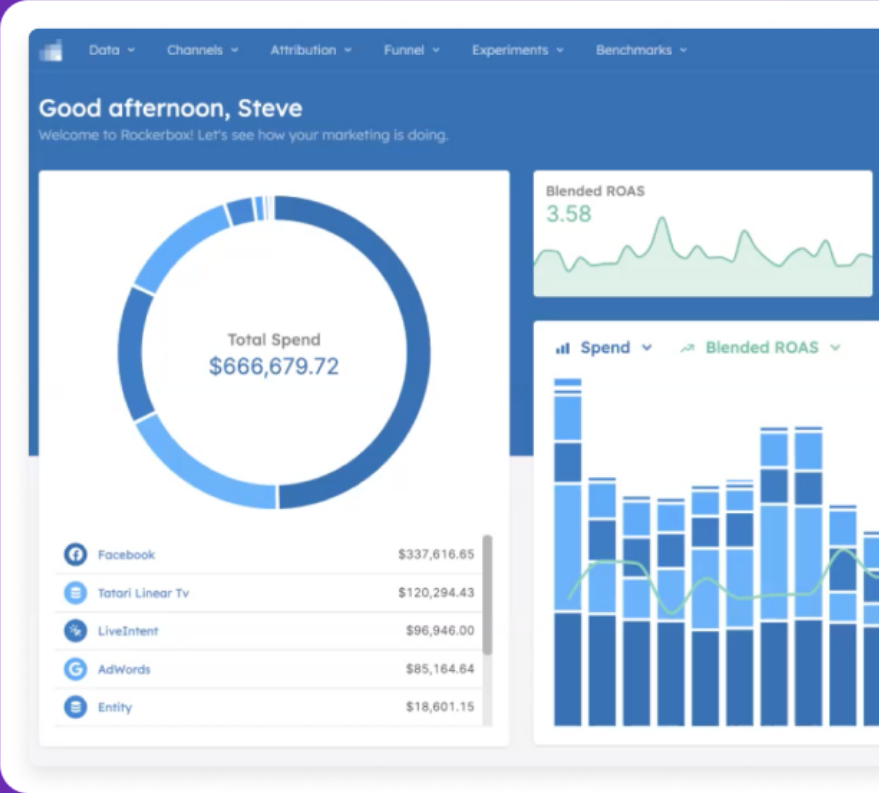
How it works in practice
Default windows are long: 150 days for clicks, 90 for deterministic views, 200 for direct mail, 14 for linear TV and 7 for OTT. The help article doesn't show a setting for customers to change them. MMM and incrementality testing are add-ons, and test results can calibrate the MMM. The vendor's FAQ gives six to eight weeks to implement attribution or MMM and one to two weeks to get a test running.
Exports include scheduled reports, Google Sheets and warehouses such as Snowflake, Redshift and BigQuery. The plans page lists products and a Talk to an Expert button with no prices.
- Starting price
- Quote only (demo required)
- ownership
- DoubleVerify is listed as vendor on the G2 profile; the DV Synergy section on rockerbox.com ties DV media quality data to Rockerbox performance data
- Attribution models
- First touch, last touch, even weight and a modeled multi-touch view (UI default), per help center
- Default lookback windows
- Clicks 150 days; deterministic views 90 days; direct mail 200 days; Meta/TikTok/Snapchat direct partnerships 7-day click / 1-day view; linear TV 14 days; OTT 7 days
- Lookback configurability
- Help article does not describe customer-adjustable windows
- Offline channels
- CTV, linear TV, direct mail, podcasts, influencer, plus promo codes and post-purchase surveys
- Mmm and incrementality
- MMM and managed incrementality testing sold as add-ons; test results can calibrate MMM; tests can run in 1 to 2 weeks per vendor FAQ
- Integrations and export
- 100+ integrations (Shopify, Segment, Impact, Rakuten, Google, Meta, TikTok, Pinterest, Bing, LinkedIn); scheduled and ad hoc exports plus data warehousing
- Attribution types
- First touch, last touch, even weight, modeled multi-touch (default)
- Offline coverage
- Connected TV, linear TV, direct mail, podcasts, promo codes, post-purchase surveys
- Price
- Quote only; demo required
SegmentStream: an identity graph and warehouse-first measurement#
SegmentStream
SegmentStream is a measurement engine built on an identity graph, offering first-click and multi-touch attribution, geo-holdout incrementality and budget allocation. The company has repositioned: segmentstream.com now sells a custom software and AI agent platform, and marketing measurement moved to measure.segmentstream.com.
SegmentStream is a measurement engine built around an identity graph that links sessions across devices, browsers and the CRM using deterministic and probabilistic matching. Attribution output lands in your BigQuery warehouse and is described as deterministic and auditable.
- You have a data or analytics lead and want attribution in your own BigQuery warehouse
- You want geo-holdout incrementality tests next to attribution
- You want self-serve pricing or a plug-and-play pixel
- You need conversions sent back to ad platforms, which the public pages don't describe
- Users like
- Customer support, integrations, attribution accuracy
- Users dislike
- Learning curve and setup/manual data effort
- Source: G2 listing summary, 26 reviews
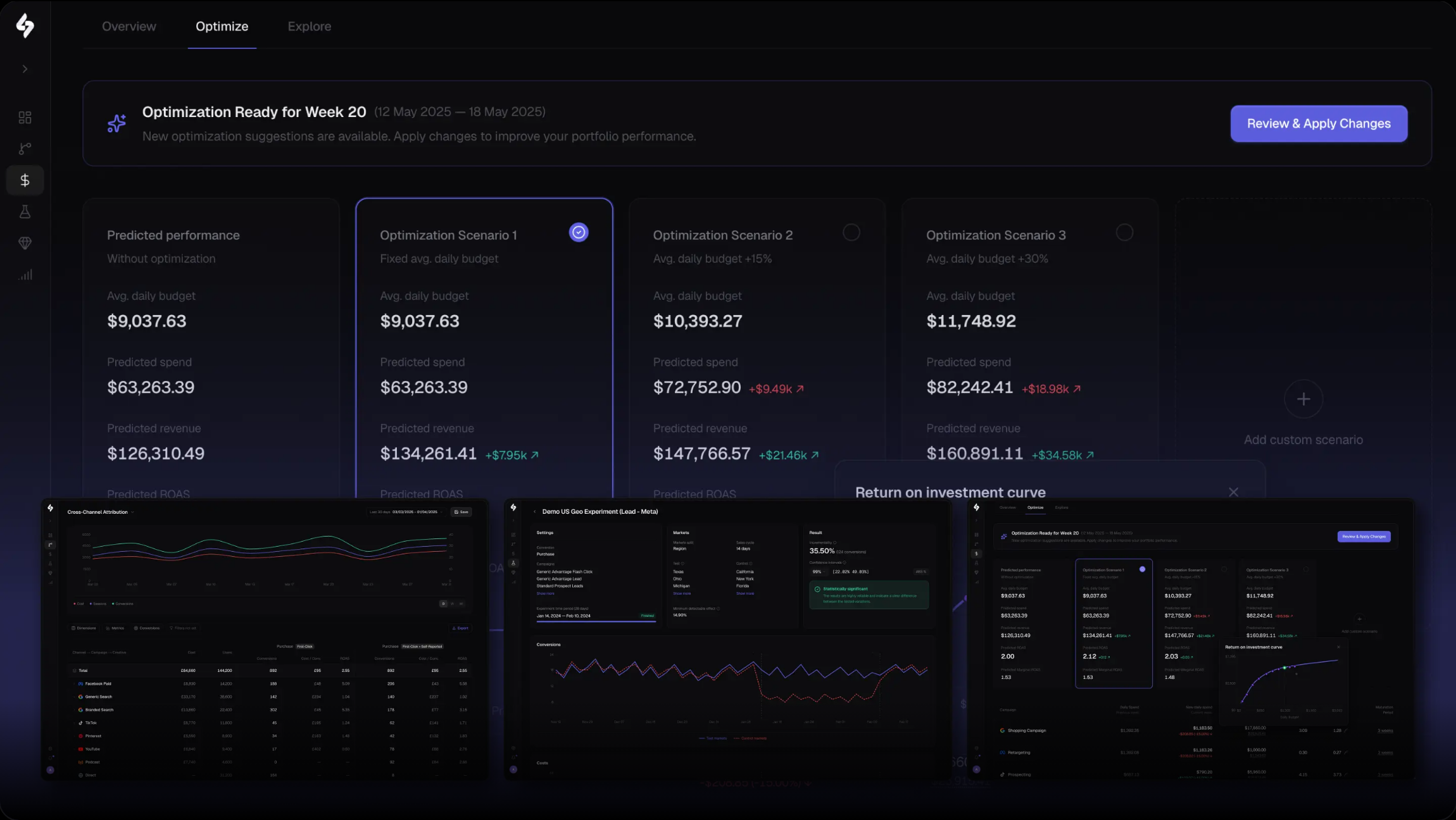
How it works in practice
Its first-click page reports revenue by click date and projects recent periods to account for conversions still maturing. Users who don't consent are modeled at bucket level without individual journeys. Other modules are predictive attribution, self-reported re-attribution and CRM funnel attribution. Access is through a web dashboard or an MCP server.
The company's main site now sells a custom software and AI agent platform with usage prices, and the marketing measurement product has its own site. Pricing there is per project with no seat cap and no published figures.
- Starting price
- Quote-only, per project
- Attribution models
- First-Click, Last Paid Click, Multi-Touch plus unlisted models; predictive attribution, self-reported re-attribution, CRM funnel attribution
- Tracking method
- Identity Graph stitching sessions, devices, browsers and CRM with deterministic and probabilistic matching; non-consenting users modeled at bucket level
- Lookback window
- Default 30 days, maximum 90 days (first-click page)
- Channels
- Google, Meta, TikTok, LinkedIn, Microsoft, X, Pinterest, Snapchat, 16 more
- Integrations
- GA4, BigQuery, Redshift, ClickHouse, HubSpot, Salesforce, Heap, Klaviyo, Marketo, Adobe Analytics, AppsFlyer, Amplitude, PostHog, Adjust, Criteo, Impact, Awin
- Incrementality
- Geo-holdout with synthetic control, typically 2 to 4 weeks
- MMM
- not mentioned on vendor pages
- Conversion sync to ad platforms
- not found as a described feature; budget changes applied automatically across connected platforms
- Lookback
- 30 days default, 90 days maximum (first-click page)
- Price
- Per project, scoped on a discovery call
Platforms you may already own#
Two platforms most marketing teams already pay for include attribution. They're worth checking before you buy a dedicated tool, mainly for what they exclude.
Google Analytics 4: data-driven and last click for ad-driven key events#
Google Analytics 4
Google Analytics 4 is Google's event-based analytics product for measuring customer behavior across websites and apps, available as a free standard version and a paid Analytics 360 version.
Google Analytics 4 offers three attribution models in its attribution reports: data-driven attribution, paid and organic last click, and Google paid channels last click. Google's help says data-driven attribution uses machine learning on converting and non-converting paths, and conversions can be reattributed for up to 7 days after they happen.
- You want a free baseline of which ad-driven channels lead to key events
- You want raw event data in BigQuery to build your own model
- You need first-touch, linear or position-based views, which GA4 no longer offers
- You need pipeline or revenue by channel without importing CRM data
- Users like
- depth of insight into traffic and behavior, free price, integrations
- Users dislike
- steep learning curve and confusing interface
- Source: G2, 6,858 reviews
How it works in practice
GA4 is free in the standard version and Analytics 360 is by contract. It stays inside what GA4 tracks: it has no CRM revenue unless you import it, and standard limits include 2 or 14 months of event retention and sampled explorations above 10 million events. BigQuery export is available if you want to build your own model, with daily export capped at 1 million events a day on standard properties.
- Starting price
- Free for the standard version; Analytics 360 needs a contract and Google's help pages state no price. BigQuery streaming export costs $0.05 per GB on the BigQuery side
- Standard price
- Free (positioned as free by Google)
- Analytics 360 price
- Contract, no price published
- Data retention
- Standard: 2 or 14 months selectable; 360: 2, 14, 26, 38 or 50 months
- BigQuery export
- Daily: 1 million events/day standard, 20 billion/day 360; streaming has no volume limit, $0.05 per GB
- Sampling quota
- 10 million events per query standard; 360 up to 1 billion (default 100 million)
- Data thresholds
- System defined, cannot be adjusted; can hide rows using demographic or search query data
- Models
- Data-driven; paid and organic last click; Google paid channels last click
- Removed
- First click, linear, time decay and position-based, since November 2023
- Direct visits
- Excluded from credit unless the whole path is direct
HubSpot Marketing Hub: attribution on CRM records, with revenue gated to Enterprise#
HubSpot Marketing Hub
Marketing automation integrated with HubSpot CRM. Its shared-record model can reduce separate marketing-to-CRM handoffs for teams that also use HubSpot CRM.
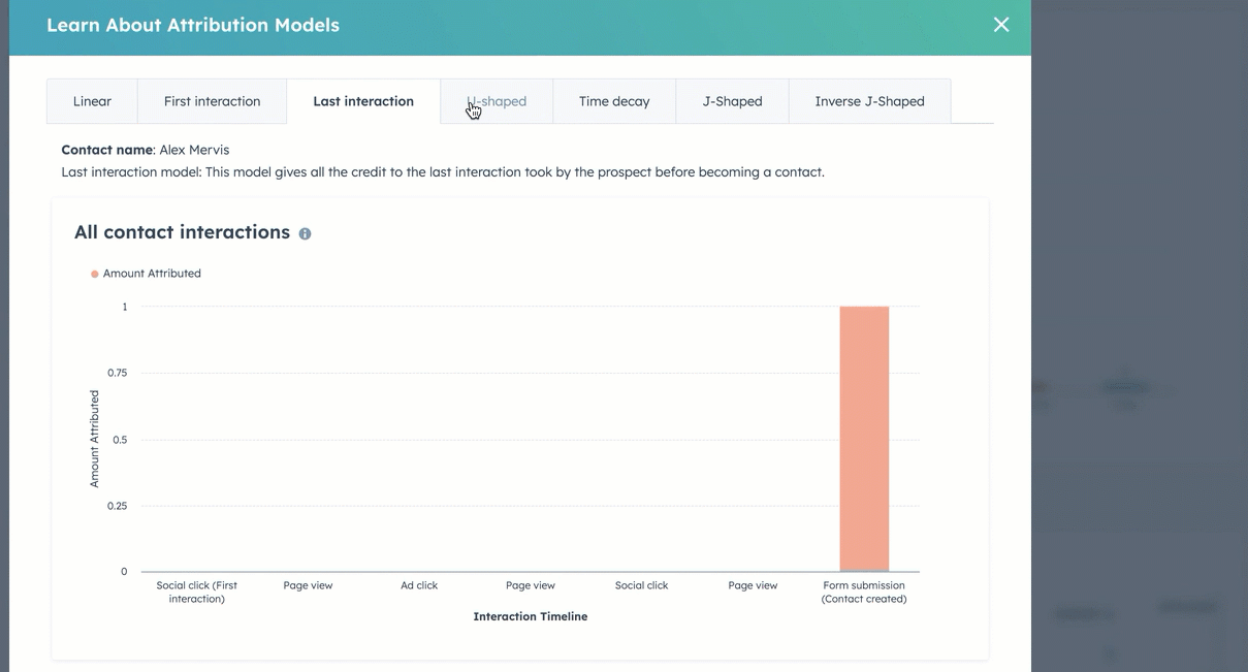
HubSpot builds attribution reports in its report builder on CRM records. Contact-create attribution is available on Marketing Hub Professional and Enterprise, while deal-create and revenue attribution are Enterprise only. Models include linear, first interaction and last interaction.
- Marketing and sales already share HubSpot CRM and you want attribution without a second tool
- Your revenue attribution can wait for, or already sits on, the Enterprise plan
- You aren't on HubSpot CRM, because the reports read HubSpot records
- You need offline channels, server-side conversion feedback or a warehouse-first model
- Users like
- Ease of use with built-in integration and automation (2,525 mentions)
- Users dislike
- Steep learning curve (808 mentions), missing features for smaller teams (786) and cost as the contact list grows (667)
- Source: G2, 16,036 reviews
How it works in practice
Interaction types include ad clicks, form submissions, CTA clicks, marketing email clicks, attended events and connected calls. A call only earns credit if it's logged to the contact. HubSpot samples up to 100,000 associations or activities per deal to keep outliers from skewing the result.
The case for it's simple: if sales and marketing already work in HubSpot CRM, there is no sync to build. The cost is that the revenue report needs the Enterprise plan. Our HubSpot Marketing Hub pricing guide covers the tiers.
- Starting price
- Free tools for up to 2 users; Starter $20 per seat per month list ($7 for new customers in a limited promotion); Professional from $800 per month ($890 struck through on the page) plus required $3,000 onboarding; Enterprise from $3,600 per month plus required $7,000 onboarding
- Professional includes
- 3 seats, 2,000 marketing contacts
- Workflows
- Up to 300 (Professional), 1,000 (Enterprise)
- Lead scoring
- Up to 5 scores (Professional), 50 (Enterprise)
- Attribution
- Multi-touch revenue attribution is Enterprise only
- Onboarding
- Required: $3,000 Professional, $7,000 Enterprise
- Billable contacts
- Only marketing contacts count; contacts imported without a status default to non-marketing unless you tick the marketing option in a single-file import
- Campaigns and budget
- Marketing Hub Professional or Enterprise only
- Campaign cap
- 5,000 (Professional), 10,000 (Enterprise)
- Budget tab
- Budget and spend items per campaign; ad spend syncs for ads with a lifetime budget
- Professional
- From $800 a month plus a required $3,000 onboarding
- Enterprise
- From $3,600 a month plus a required $7,000 onboarding
- Ad clicks
- Counted only when the ad accounts are connected to HubSpot
What breaks the data an attribution tool depends on#
An attribution report only reflects what reached it. When a tag, a UTM or a CRM field fails, the report doesn't show an error. It shows a channel that seems to have gone quiet.
- UTMs go missing or change. Triple Whale asks you to tag ads with its recommended UTMs, and Northbeam uses UTMs for channels without an integration. A renamed campaign parameter splits one channel into two. Our UTM naming convention and UTM parameters guides cover the format.
- The conversion event stops firing. A removed tag or a renamed form field leaves the page loading and the ads spending while conversions vanish, and nobody gets an alert. Server-side events, which Cometly adds to its pixel, reduce the loss from ad blockers but not from a broken form.
- The pixel only knows what happened after it was installed. Triple Whale's help center warns that its pixel sees behavior from the install date onward, so early reports are incomplete.
- Source fields are blank or overwritten in the CRM. HubSpot only counts ad clicks if the ad accounts are connected and only credits calls logged to the contact. Check which fields your tool reads before you change workflows.
- The lookback window doesn't match your sales cycle. Northbeam defaults to 180 days, Triple Whale to 28 and GA4 reattributes for 7. See our guide to the marketing attribution window before you compare numbers across tools.
- Every live ad URL carries the agreed UTM parameters
- The conversion event fires on each form and checkout
- The CRM record keeps the original source and campaign fields
- Ad accounts are connected in each tool that reads them
- The lookback window matches the sales cycle
- Test and internal traffic is excluded
- Pixel and server-side events agree on conversion counts
For the tracking side in more depth, see our campaign tracking checklist.
Where The Marketing Ops Manager fits#
The Marketing Ops Manager doesn't do attribution and isn't an alternative to the tools above. It sits one layer earlier, where the data comes from: it checks landing pages, tracking, forms and CRM contacts for teams that run campaigns on HubSpot and GA4, and it opens an incident with evidence when a step stops working. That's the failure that leaves an attribution report quietly wrong. You can see how it works at The Marketing Ops Manager.
Which marketing attribution software fits your business#
| If this describes you | Look at | Because |
|---|---|---|
| B2B, long sales cycle, CRM-based | Dreamdata, HockeyStack | Both join touches to accounts and revenue |
| Store with orders and a Shopify-style platform | Triple Whale, Northbeam, Wicked Reports | They read orders directly and differ on price basis and lookback |
| Heavy paid ads, bidding matters | Cometly | Sends paying-customer signals back to Meta, Google and LinkedIn |
| Sales close by phone or form | Ruler Analytics | Ties calls and forms to CRM revenue |
| TV, direct mail, podcasts or connected TV | Rockerbox | Covers offline channels next to digital |
| Analyst on staff, data in BigQuery | SegmentStream | Warehouse output and geo-holdout testing |
| Small budget, one or two channels | GA4, then HubSpot reports | Free or already paid for, with the limits above |
If you also need to know who is on your site before they convert, see our guide to website visitor identification software and the broader marketing intelligence software roundup.
Marketing attribution software FAQ#
What are marketing attribution tools?
Marketing attribution tools assign credit for conversions and revenue to the ad clicks, emails, visits and calls that came before them. They collect touchpoints with a pixel or server-side events, join them to orders or CRM records and report which channels and campaigns produced customers.
What attribution model does GA4 use?
GA4's attribution reports offer data-driven attribution, paid and organic last click, and Google paid channels last click. First click, linear, time decay and position-based were removed in November 2023, and direct visits get no credit unless the whole path is direct.
What is the difference between single-touch and multi-touch attribution?
Single-touch models give all credit to one touchpoint, usually the first or last click. Multi-touch models share credit across the path, either by a fixed rule such as linear or U-shaped, or by a data-driven algorithm.
How much does marketing attribution software cost?
Marketing attribution software ranges from free to several thousand dollars a month. Ruler Analytics starts at $400 a month, Wicked Reports at $499, and Northbeam's site lists $1,500 and $3,500. HockeyStack, Cometly, SegmentStream and Rockerbox publish no dollar price, and Triple Whale prices its paid plans by annual GMV.
Do I need dedicated attribution software if I use GA4 and HubSpot?
You don't always need dedicated attribution software. If you run a few channels and want to know which ads lead to key events, GA4 may be enough. A dedicated tool starts to pay off when you need revenue from the CRM or store tied to channels, offline channels, longer lookbacks or conversions sent back to ad platforms.
Why do attribution numbers differ between tools?
Each tool uses a different model, lookback window and data source, and ad platforms count conversions by their own rules. Pick one reference tool, keep its model and window fixed, and compare changes over time rather than comparing totals across tools.