A marketing attribution window is the period before a conversion in which an earlier marketing interaction can qualify for credit. A shorter window can exclude early research touches; a longer one can include them. Neither setting proves a campaign's influence on the conversion.
For a demand generation team, the practical question isn't whether a longer window produces a bigger number. It's whether the window matches the decision being made, the conversion being measured and the touchpoints your systems can actually connect.
- An attribution window decides which earlier touches are eligible; an attribution model decides how eligible touches share credit.
- GA4 key event lookback defaults differ from Google Ads conversion windows, and GA4 conversion settings are a separate control.
- Choose windows from observed conversion lag, then test how channel credit changes before changing live settings.
- Keep a dated settings register so marketing, paid media and finance compare reports on the same basis.
What's a marketing attribution window?#
A marketing attribution window sets a time boundary around the touchpoints that may receive credit for a conversion. The attribution model then allocates credit among eligible interactions. A reporting date range, by contrast, decides which dates appear on the screen.
Imagine a buyer discovers a webinar, later clicks a search ad and eventually submits a demo request. The demo request is the buyer's conversion. The window looks backward from that request and decides whether the webinar and search interaction are still eligible. The attribution model might assign the last eligible touch all the credit or divide credit across multiple touches.
A window doesn't establish causality, and it's not a verdict on any campaign. A tracked ad interaction can be eligible for credit even when the buyer would have converted without that ad. Marketing ops should keep that distinction visible in executive reporting.
| Measurement concept | What it controls | Marketing attribution window example |
|---|---|---|
| Attribution window | Which earlier touches qualify | An older webinar touch isn't eligible once it's past the cutoff |
| Attribution model | How qualified touches share credit | Last click assigns credit to the last eligible channel |
| Reporting date range | Which dates appear in the report | A dashboard shows only the selected calendar period |
| Conversion counting | How repeated outcomes are counted | Multiple submissions may be counted differently by configuration |
| Identity and tracking coverage | Which touches can be joined to an outcome | An anonymous visit can't always connect to a later CRM deal |
The last row matters most in complex stacks. Extending the window can't recover an untagged campaign, a lost click identifier or a CRM record that never joined to the web event.
What are the default attribution windows in GA4 and Google Ads?#
GA4 key event lookback windows and Google Ads conversion windows have different defaults and purposes. Google Analytics' documentation lists a 30-day default for acquisition key events and a 90-day default for other key events. Google Ads' documentation lists a 30-day default for click-through conversions, with shorter defaults for video engagement and impressions.
The settings below reflect official Google documentation checked October 29, 2026. They're defaults, not proof of the configuration in your own account.
| Setting | Documented default | Where to verify | Marketing attribution window implication |
|---|---|---|---|
GA4 acquisition key events (first_open, first_visit) | 30 days | Admin, Events, Attribution settings | Earlier touches aren't always inside the key event lookback |
| GA4 other key events | 90 days | Admin, Events, Attribution settings | A longer lookback may retain more of the recorded journey |
| Google Ads click-through conversion | 30 days | Goals, Conversions, conversion action | A later outcome can miss an ad click's conversion window |
| Google Ads engaged-view conversion | 3 days | Conversion action settings | A video engagement's clock is separate |
| Google Ads view-through conversion | 1 day | Conversion action settings | An impression's clock is short and separate |
Google Analytics also has conversion attribution settings, distinct from the key event lookback window. Google's August 11, 2026 announcement introduced custom integer conversion windows: 1 to 90 days for click-through conversions and 1 to 30 days for engaged-view conversions. Google places those controls under Advertising, then Conversion management in Google Analytics, with the same settings reachable from the linked Google Ads conversion management view. Don't confuse that update with the separate GA4 key event lookback presets.
Does the GA4 key event lookback affect session attribution?#
The GA4 key event lookback also affects session attribution, according to Google's attribution settings documentation. Changing that setting can influence more than the advertising reports a team initially had in mind.
GA4's reporting attribution model is another independent choice. Google's documentation says model changes can affect historical and future event-scoped reports, while lookback changes apply going forward. That's a reason to record the exact setting and effective date rather than silently changing it before a board report.
Is the Google Ads report lookback the same as its conversion window?#
The Google Ads attribution report lookback isn't the same as the conversion action's conversion window. Google's troubleshooting documentation explicitly distinguishes the report control from the setting that governs whether a conversion is recorded after an ad interaction.
A team can therefore disagree about an apparent window even though nobody's touched the underlying conversion action. Record the conversion action, the report's selected lookback and the reporting column before comparing screenshots.
How does the attribution window change which channels get credit?#
An attribution window changes eligibility before an attribution model assigns credit. A short window can remove an early discovery touch while retaining a later branded search touch. A long window can make both eligible, assuming both were recorded and joined to the same outcome.
Here's an illustrative journey, not a measured customer or a claim about any platform's actual allocation.
The prospect visits through an educational campaign 75 days before converting. They click a nonbrand search ad 21 days before, return through a branded search 2 days before and submit a demo request on day zero.
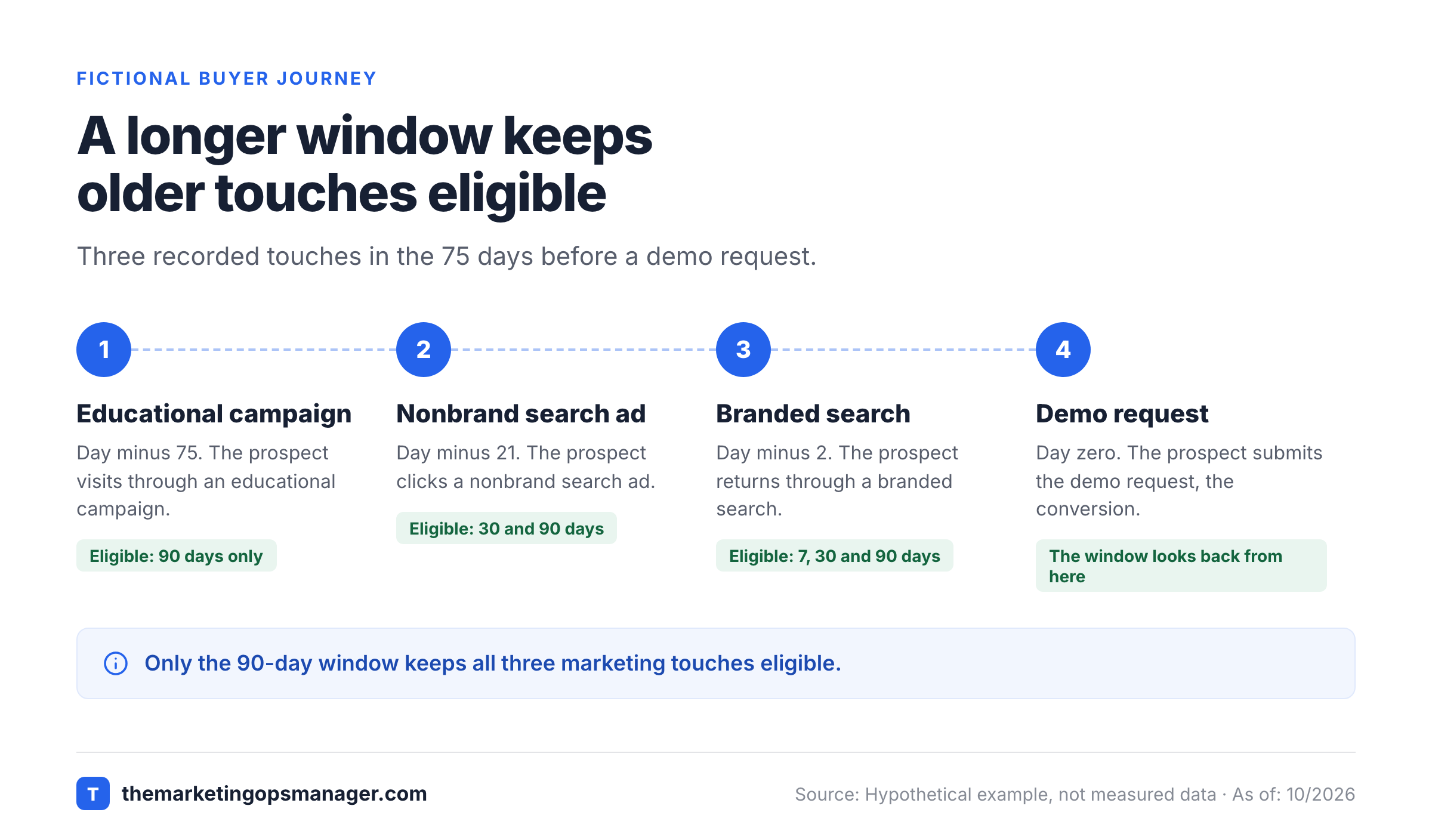
The comparison assumes all three touches are recorded and uses a hypothetical cross-channel attribution system that can evaluate the listed windows. It doesn't claim that GA4, Google Ads or a CRM can use every window in every context.
| Illustrative marketing attribution window | Eligible recorded touches | Excluded recorded touches |
|---|---|---|
| 7 days | Branded search | Educational campaign and nonbrand search |
| 30 days | Nonbrand search and branded search | Educational campaign |
| 90 days | Educational campaign, nonbrand search and branded search | None of these recorded touches |
A last-click model could still give the branded search all credit in each scenario. A multi-touch model could distribute credit differently when more interactions qualify. That's why a window change and a model change must never be described as the same experiment.
A longer window isn't automatically more accurate. The educational visit might have mattered, or it might have been incidental. Attribution estimates which recorded interactions qualify for reporting credit, not what would have happened without the campaign.
How should a B2B team choose an attribution window?#
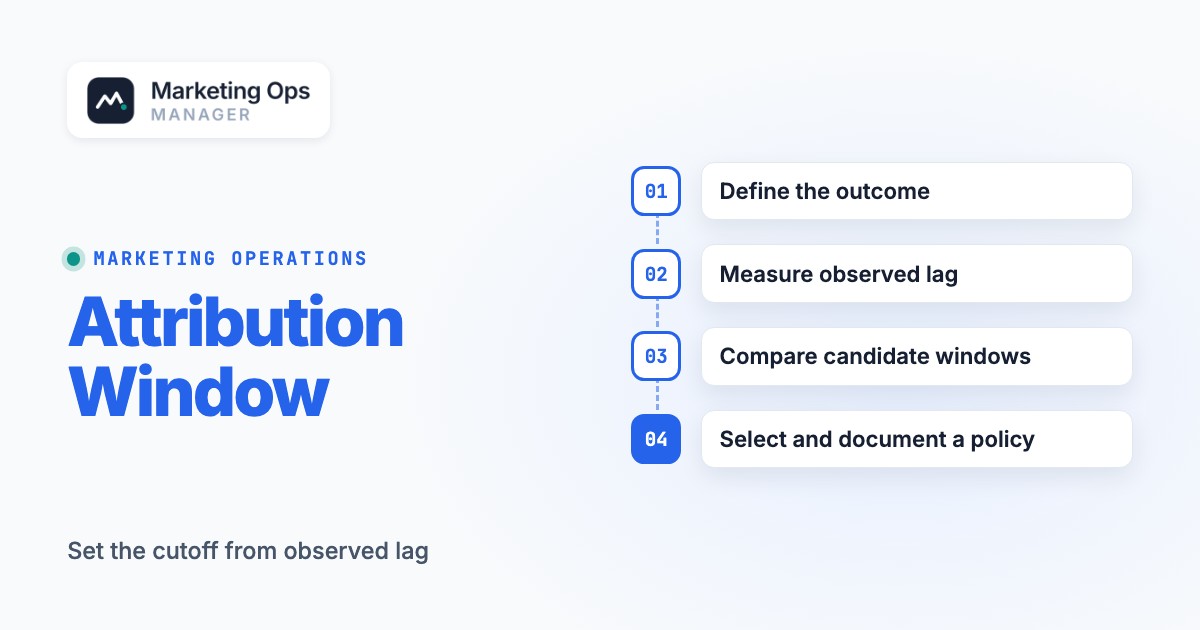
A B2B team should choose an attribution window from observed conversion lag, the outcome being measured and the platform's available controls. Start with the distribution of time from a recorded marketing touch to the chosen outcome, then compare plausible windows on the same cohort. Don't pick a number just because it's a vendor's default.
Define the outcome
Separate newsletter signup, demo request, sales-qualified opportunity and closed-won revenue. The same buyer may reach each milestone at a different time. Document which event the report calls a conversion.
Measure observed lag
Use GA4's key event attribution paths and Google Ads time lag information where relevant. For CRM outcomes, calculate lag from the earliest reliably joined touch to the outcome date. Don't substitute sales-cycle duration for observed marketing touch lag.
Inspect missing paths
Check whether UTMs, click identifiers, form hidden fields and CRM campaign associations survive the handoffs. A long window won't repair missing evidence. Segment unknown first touch rather than treating it as organic or direct by default.
Compare candidate windows
Run the same conversion cohort through short, medium and long candidate windows. Compare eligible conversions, channel allocation, lag coverage and the share with no attributable touch. Label the result a sensitivity analysis, not a causal experiment.
Select and document a policy
Pick the shortest window that covers enough reliably observed journeys for the decision at hand, within the platform's supported controls. Name the owner, model, counting rule, reporting clock and change date. The default windows of the tools in our marketing attribution software comparison differ widely.
Review without moving the goalposts
Reassess after material funnel changes, but preserve a stable reporting policy for trend comparisons. When a change is necessary, annotate the break and keep a comparison view for stakeholders.
How can a team test candidate windows with its own data?#
A team can test candidate windows by calculating the share of known conversion journeys whose earliest relevant touch falls inside each cutoff. That reveals measurement sensitivity, not the true causal value of the channel.
For a transparent fictional sample, suppose the observed lag in days for 12 converted journeys is 1, 2, 3, 4, 5, 8, 12, 17, 21, 28, 40, 65. A 7-day cutoff covers 5 of 12 journeys, a 30-day cutoff covers 10 of 12 and a 90-day cutoff covers all 12. The coverage rates are 41.7%, 83.3% and 100% after rounding.
| Illustrative marketing attribution window | Fictional journeys within cutoff | Coverage of fictional sample (%) |
|---|---|---|
| 7 days | 5 of 12 | 41.7% |
| 30 days | 10 of 12 | 83.3% |
| 90 days | 12 of 12 | 100% |
The sample's deliberately small and artificial. Don't adopt its percentages as a B2B benchmark. In real data, inspect the full lag distribution, long-tail journeys, the cohort's maturity and the share of conversions with no connected marketing touch.
Use the same denominator. If a recent cohort hasn't had time to complete long-lag conversions, its observed distribution will look artificially fast. Compare mature cohorts or mark the newest ones as incomplete. A longer window also needs a dependable identity chain, and that chain's only as good as its weakest handoff.
How do I set the GA4 attribution window?#
You can set the GA4 key event lookback window in Admin under Events and Attribution settings. Google also exposes separate conversion attribution controls in Advertising, Conversion management, so check which outcome and report you're changing before you save.
Open the GA4 property
Use the correct property and confirm that you have the required permissions. Google's help page says Marketer access or above is needed to select attribution settings.
Find key event attribution settings
Go to Admin, then Events under Data display, then Attribution settings. Record the existing reporting model, eligible channels and key event lookback window before editing.
Choose the key event lookback
Review the acquisition key event and other key event options shown in your property. Google documents 30 days by default for acquisition events and 90 days by default for other key events.
Inspect conversion settings separately
For conversions used with Google Ads, open Advertising, Conversion management and the relevant conversion attribution settings. Google's August 2026 update supports custom integer click-through and engaged-view conversion windows, subject to feature availability.
Save and log the change
Record the old value, new value, conversion or event scope, owner, effective date and reason. Annotate the report because lookback changes apply going forward.
Don't change a property-wide key event setting to fix a single paid campaign discrepancy without first checking the conversion-specific setting. The two controls answer different questions, and the linked Google Ads account may use different attribution-channel eligibility.
How do I change the Google Ads conversion window?#
You can change a Google Ads conversion window in Goals, Conversions, Summary, then the selected conversion action's settings. Google says the setting can differ by conversion action and that changes apply to future conversions rather than retroactively recounting old ones.
Select the conversion action
In Google Ads, open Goals, Conversions and Summary. Choose the specific lead, purchase or imported conversion action whose window you need to audit.
Open the settings
Choose Edit settings, then inspect click-through, engaged-view and view-through conversion windows as applicable. Write down the current values before changing them.
Check the channel control
If conversion credit uses Google paid channels, Google's documentation says conversion window changes can be managed in Google Ads. If paid and organic channels are selected, Google says to manage the window in Google Analytics.
Save and compare later cohorts
Record the change date and compare reports using the same conversion action and date basis. Google's documentation says a changed conversion window applies to future conversions.
Google's documentation recommends reviewing the time lag report when choosing a window. That's more defensible than matching a competitor's setting, because your own customers' observed delay is the relevant input.
Why do GA4, Google Ads and CRM attribution reports disagree?#
GA4, Google Ads and CRM attribution reports can disagree because they observe different interactions, apply different eligibility rules and place conversions on different dates. A window mismatch is only one cause. The fastest reconciliation starts by matching the conversion definition, reporting clock and channel scope before investigating missing tags.
| System or handoff | Typical mismatch | First check for marketing attribution window audits |
|---|---|---|
| GA4 key event reports | Key event lookback differs from paid conversion settings | Property attribution settings and event scope |
| Google Ads conversion actions | Click, engaged-view or view-through clocks differ | Each action's conversion window |
| Google Ads reporting columns | Default columns use ad interaction timing | Compare a by-conversion-time column |
| CRM opportunities | Opportunity dates and lead identities differ from web events | Outcome stage, deduplication and join key |
| Landing page to form | Tracking parameters disappear before submit | UTM and click identifier capture |
| Form to CRM | Lead or contact record lacks campaign evidence | Field mapping, overwrite rules and sync errors |
| Reporting dashboard | A filter or model changes the displayed result | Date range, channel eligibility and model |
Google Ads' documentation explains that its primary conversion columns are based on ad interaction time, while by-conversion-time columns support a different view. A CRM dashboard commonly groups opportunities by each opportunity's stage date. The totals won't necessarily align just because every system uses a similarly named metric.
The safest comparison is a reconciliation worksheet with one row per outcome. Include a stable outcome ID, conversion timestamp, first recorded marketing touch, last recorded touch, available click identifier, source system and whether the outcome was eligible under the chosen window. A separate column should mark an unresolved identity join instead of silently dropping the row.
What should I investigate before blaming the attribution model?#
Before blaming the attribution model, investigate whether the same conversion action and cohort exist in both systems. Check the date basis, attribution window, conversion counting, channel eligibility and identity joins. Only then compare how models distribute credit.
A paid media dashboard can look stronger than a CRM dashboard because it attributes a later conversion to an earlier ad interaction. A CRM can look stronger than web analytics because offline sales stages aren't reliably tied to the original browser. Neither difference proves a tag's failure.
If the numbers changed after a form redesign, start with the form and CRM handoff. If the numbers changed immediately after a conversion setting edit, start with the settings register. These are different incident classes and deserve different owners.
What attribution window should demand generation use for reporting?#
Demand generation should use an attribution window suited to each reporting decision, while maintaining a consistent definition within each time series. Short-cycle campaign optimization and long-cycle pipeline analysis may need different views. They shouldn't be presented as interchangeable; neither is a final measure of marketing's contribution.
A practical reporting policy separates operational optimization from executive pipeline interpretation, as the table shows.
| Reporting view | Decision it supports | Marketing attribution window policy |
|---|---|---|
| Paid campaign optimization | Where to adjust spend or creative | Use the ad conversion action's own documented window |
| Cross-channel lead generation | Which recorded channels assist qualified leads | Use a stable GA4 key event definition and documented lookback |
| CRM pipeline influence | Which connected campaigns preceded opportunity creation | Use a documented CRM attribution policy and report missing joins |
| Executive performance review | How measurement assumptions affect channel conclusions | Show a sensitivity comparison, not one unqualified winner |
For example, a demand gen manager might review Google Ads conversions using the conversion action's own window and review qualified opportunities using a separately defined CRM lookback. Both figures can be useful, and neither's wrong. Label the outcome, window, model and date basis in each chart so the difference is explicit.
A window doesn't substitute for campaign QA. Broken forms, lost UTMs, missing CRM mappings and failed sales handoffs create attribution gaps that no lookback change can repair. Teams that maintain a campaign tracking checklist and a UTM governance template have a clearer path to diagnosing those gaps.
How do attribution windows interact with campaign tracking and CRM handoffs?#
Attribution windows only work on interactions that your measurement systems can connect to an outcome. A wider cutoff won't create missing touchpoints. In B2B marketing, the fragile part is often the journey from an anonymous campaign visit through a form submission to a known CRM contact and later opportunity.
A campaign URL might carry valid UTM parameters while the landing page records them correctly. The form could then omit those values from its hidden fields. The CRM would receive a lead without campaign context, even though analytics saw the session. Extending the attribution window wouldn't fix that handoff failure.
The reverse can happen too, and it's just as common. A CRM contact might have a campaign association from an earlier email, but analytics can't join the later demo request to that contact because consent, identity or event coverage differs. The two systems would then describe different subsets of the journey. Don't force their totals to match by assigning unknown touches to the most convenient channel.
Which evidence should marketing ops preserve across the funnel?#
Marketing ops should preserve campaign identifiers, event timestamps, form evidence and the relationship between leads, contacts and opportunities. The exact schema depends on the CRM and consent design, but the goal is consistent: make each handoff inspectable without inventing a touch that was never recorded.
A practical evidence chain includes the campaign URL as captured, the landing page event, the form submission ID, the CRM lead or contact ID and the opportunity association when one exists. Store event timestamps with a clear time zone and keep the original event date separate from the date the record was synchronized.
When an opportunity is created from multiple contacts, define whose marketing touches qualify. A person-based window and an account-based influence policy aren't interchangeable. The first evaluates a connected person's recorded path. The second needs explicit rules for which contacts, roles and associations belong to the account's buying group.
Treat unknown as a data-quality state. A blank first-touch field doesn't prove there was no earlier campaign. It means the evidence chain is incomplete. Report the unknown share next to attributed results, and investigate whether the gap clusters around a form, channel, browser or CRM integration.
What mistakes show up most often?#
Many attribution disputes don't need a new window; they need a clearer record of the one a team already has. Three mistakes are common. Someone changes a window to explain a dip that's really a tagging problem. Someone compares a 30-day GA4 view with a 90-day CRM view and calls the gap "lost credit." Or nobody writes down who changed what, so the next analyst can't tell whether last quarter's trend reflects buyers or settings. You'll avoid all three by keeping the register, comparing like with like and fixing handoffs before touching a cutoff.
How should an attribution incident be triaged?#
An attribution incident should be triaged at the first failed handoff rather than by changing the window immediately. Compare a known test journey from campaign click to form to CRM, then isolate where the identifier or timestamp stops matching.
For a suspected paid search issue, verify that the click identifier survives landing page redirects and the form submission. For a webinar issue, verify that registration and attendance events use consistent identities and that the intended CRM association is populated. For a sales handoff issue, verify that lead conversion or contact merging didn't overwrite the original source evidence.
Only after those checks should the team compare attribution models or windows. Otherwise, a new setting may hide the symptom while leaving the broken data flow in place.
How do I audit attribution windows without disrupting reporting?#
You can audit attribution windows safely by inventorying current settings, measuring lag and testing candidate windows before editing live controls. The audit should produce a signed-off policy and a dated change log, not just a new default. Keep the existing trend view available when the policy changes.
The checklist below is designed for a marketing ops owner coordinating paid media, analytics and RevOps.
- Name the business outcome and its exact event or CRM stage.
- Record the GA4 key event lookback and reporting attribution model.
- Record Google Analytics conversion settings separately, where available.
- Record each Google Ads conversion action's click, engaged-view and view-through windows.
- Capture the attribution report's own lookback and reporting date basis.
- Export observed conversion lag from mature, consistently defined cohorts.
- Audit UTM, click identifier, form and CRM joins for missing touchpoints.
- Compare candidate windows on the same cohort without changing production settings.
- Write down the chosen policy, owner, reason and effective date.
- Annotate dashboards and schedule a post-change reconciliation.
Owner and evidence matter. The settings inventory and change log are marketing ops' job. Verifying the Google Ads action settings is paid media's. The CRM outcome definition and the join from form submission to opportunity are RevOps' call. Analytics should review the lag distribution and whether recent cohorts are mature enough to compare.
A useful register has these columns: system, property or account, conversion name, outcome definition, window type, old value, new value, attribution model, reporting clock, effective date, owner, approval and evidence link. Keep a screenshot or export of each pre-change setting, then recheck the same configuration after saving.
The audit can sit alongside a marketing attribution model comparison. Model selection becomes more meaningful once the eligible path, event scope and data handoffs are documented.
Marketing attribution window FAQ#
Marketing attribution window questions usually come down to definitions, defaults, timing and whether a longer lookback is more accurate. The answers below separate platform settings from reporting policy so teams don't change one control while expecting another to move.
Is a 30-day attribution window enough for B2B marketing?
A 30-day attribution window may be enough for a short observed lead cycle, but it can exclude earlier recorded touches in a longer journey. Compare the actual lag distribution before choosing a policy.
Does changing an attribution window change past GA4 results?
Google's documentation says GA4 key event lookback changes apply going forward. Its reporting attribution model is a separate control whose changes can affect historical and future event-scoped reports.
Are attribution windows and attribution models the same?
An attribution window determines which touches qualify for credit. An attribution model decides how the eligible touches share that credit.
Why are Google Ads and GA4 conversions different?
Google Ads and GA4 conversions can differ because of conversion windows, eligible channels, counting settings, attribution models and reporting time. Compare the same outcome and date basis before treating a gap as a tracking error.
Does a longer attribution window prove an ad worked?
A longer attribution window doesn't prove an ad caused a conversion. It makes older recorded interactions eligible for attribution under the selected rules.