A UTM governance template is a shared campaign register that controls who may create tracking links, which source and medium values are allowed, who approves each link and how the final URL is tested. It's different from a UTM builder: a builder assembles parameters, while governance puts a review step in front of inconsistent parameters before they reach a live campaign.
Use the copyable register below for email, paid social and partner campaigns. Assign one taxonomy owner, keep one approved list of values and require a working landing-page test before a link is released. The goal isn't to make longer URLs. It's to make campaign data reliable enough for marketing, analytics and CRM teams to reconcile, and plainly that's what reporting depends on.
- Use one shared campaign register with approved values, a named owner and an approver.
- Control source, medium and campaign before building a URL. Use content and term only when they add a useful distinction.
- Test the final click path, then compare the received values with the approved row.
- Log exceptions and review new values rather than silently creating new spellings.
Copy the UTM governance template into your campaign register#
The UTM governance template below is a practical approval log, not just a list of parameter definitions, and it's built for people who share one spreadsheet. Each row's job is one external campaign link, with the destination, naming fields, owner, approver, status and test evidence stored together. Download the spreadsheet or copy the register as text, replace the example values and keep it available to every person who distributes campaign links.
UTM Governance Campaign Register
One row per external campaign link. Example values are illustrative.
| Campaign ID (utm_id) | Campaign name (utm_campaign) | Destination URL | Source (utm_source) | Medium (utm_medium) | Content (utm_content) | Term (utm_term) | Owner | Approver | Launch date | Status | Exception note | Approved URL | QA evidence |
|---|---|---|---|---|---|---|---|---|---|---|---|---|---|
| cmp-1042 | 2026q4-demo-ops | https://example.com/demo | newsletter | hero-cta | Demand Gen | Marketing Ops | 2026-11-03 | Draft | Pending click test | ||||
| cmp-1043 | 2026q4-demo-ops | https://example.com/demo | paid-social | single-image-a | Paid Media | Marketing Ops | 2026-11-04 | In review | Pending redirect test | ||||
| cmp-1044 | 2026q4-partner-kit | https://example.com/resources | partner-hub | referral | resource-page | Partnerships | Marketing Ops | 2026-11-05 | Approved | Partner source added to list | https://example.com/resources?utm_source=partner-hub&utm_medium=referral&utm_campaign=2026q4-partner-kit&utm_id=cmp-1044&utm_content=resource-page | Final URL and form tested |
The rows are illustrative, not real campaigns or reported performance. The Approved URL field stays empty until the row's status is Approved or Live; the approver should confirm the QA evidence before changing the status. The XLSX download uses the same fields, with dropdowns for source, medium and status and the Approved URL formula described below already in place.
What each register column controls#
Campaign ID (utm_id) is a stable internal identifier. Google documents utm_id as a campaign ID and recommends matching it to IDs used for campaign-data uploads. Treat the field as optional when your organization has no campaign-ID workflow, but don't recycle an identifier for an unrelated campaign. Reuse merges two initiatives in reports.
Campaign name (utm_campaign) is the reporting label shared by all placements that belong to the same initiative. Use the same value for the email and LinkedIn rows above if you'd like to inspect the same initiative across channels. Change the content value to separate placements rather than inventing a different campaign name for each button.
Destination URL is the clean landing-page address. Store it without old UTMs and without a fragment, since they'd break the formula below. If a page already has a legitimate query string, preserve those parameters when you assemble the final URL; they're often business-critical.
Source (utm_source) identifies where the click comes from. Medium (utm_medium) identifies the channel type. Google Analytics uses manual source, medium and campaign values to populate corresponding traffic-source dimensions. These fields aren't interchangeable: linkedin is a source and paid-social is a medium in this sample policy.
Content (utm_content) distinguishes creative variants or placements, such as hero-cta and footer-link. Term (utm_term) is intended for a paid keyword. Keep term blank when it adds no useful distinction. Don't put email addresses or audience-member names in it; that's a privacy problem, not a naming choice.
Owner is the person accountable for creating and testing the link. Approver is the person accountable for the naming rule and exception decision. Launch date is the intended release date. Status moves through Draft, In review, Approved and Live. Exception note documents deviations. Approved URL is the controlled output. QA evidence records what was checked, where and by whom.
Set the UTM naming policy before anyone creates links#
A UTM naming policy needs a controlled vocabulary, a case rule and a campaign pattern. Without those decisions, a spreadsheet records inconsistencies instead of preventing them. Start with a small source list, a medium list that aligns with your analytics reporting and a naming pattern that another marketer can apply without asking for clarification.
Source and medium: publish allowed values#
Use the following as a starter policy, not as a claim that Google requires these exact names. Your team can adopt different labels if they're consistent and the analytics reporting rules have been checked. A source names the publisher or sending system; a medium describes how the visitor arrived.
| Source (utm_source) | Allowed medium (utm_medium) | Intended use | Owner of exceptions |
|---|---|---|---|
newsletter | email | Owned email campaigns | Lifecycle Marketing |
linkedin | paid-social | Paid LinkedIn placements | Paid Media |
linkedin | social | Unpaid LinkedIn posts | Social Team |
partner-hub | referral | Approved partner placement | Partnerships |
google | cpc | Manually tagged paid search only when appropriate | Paid Media |
Don't automatically assume every medium label maps to your intended Google Analytics default channel. Google's channel rules evaluate combinations of source, medium and other available signals. The default group includes Email, Paid Search, Paid Social, Organic Social and Referral, but a custom label can land somewhere you didn't expect. Check the relevant reporting dimension before approving a new medium.
Case matters at the parameter-value level. Google's auto-tagging guidance explicitly contrasts utm_source=Google with utm_source=google. Adopt lowercase values, hyphens between words and a rule against free-text aliases. For example, accept linkedin, reject LinkedIn, li and linkedin-ads unless the taxonomy owner formally changes the policy.
Campaign names: encode the initiative, not the placement#
A useful pattern is year-quarter-offer-audience, such as 2026q4-demo-ops, and you can drop the audience part when the offer is for everyone, as in 2026q4-partner-kit. The pattern is a recommendation for this template, not a Google requirement. It's what makes it easier to compare email and paid-social activity for the same offer without creating separate campaign labels for every creative.
Keep campaign names short enough to read in a report. Avoid team-member initials, temporary ticket numbers and launch-day guesses. If the campaign's audience or offer changes substantially, request a new campaign name. If the creative changes within the same initiative, change utm_content instead.
A controlled pattern also means the analytics team doesn't have to interpret three names for the same launch. Document the cutover date and retain an alias map for historical data. Don't rewrite old campaign values in an export and present the edited sheet as if Analytics collected them that way.
Optional fields: add them only for a reporting reason#
Google's URL-builder guidance documents utm_id, utm_source_platform, utm_term and utm_content alongside the main campaign fields. utm_content is useful when links in the same email lead to the same destination but represent different calls to action. utm_term is a paid keyword field, not a generic place to hide an internal CRM identifier.
Google also documents utm_creative_format and utm_marketing_tactic, but it says those parameters aren't currently reported in Analytics properties. Don't add them to a governance sheet on the assumption that they will automatically appear as standard report columns. If a team needs more dimensions, first specify which report or downstream data model will use them. If nobody can name one, don't add the field.
Assign approval ownership and run the release workflow#
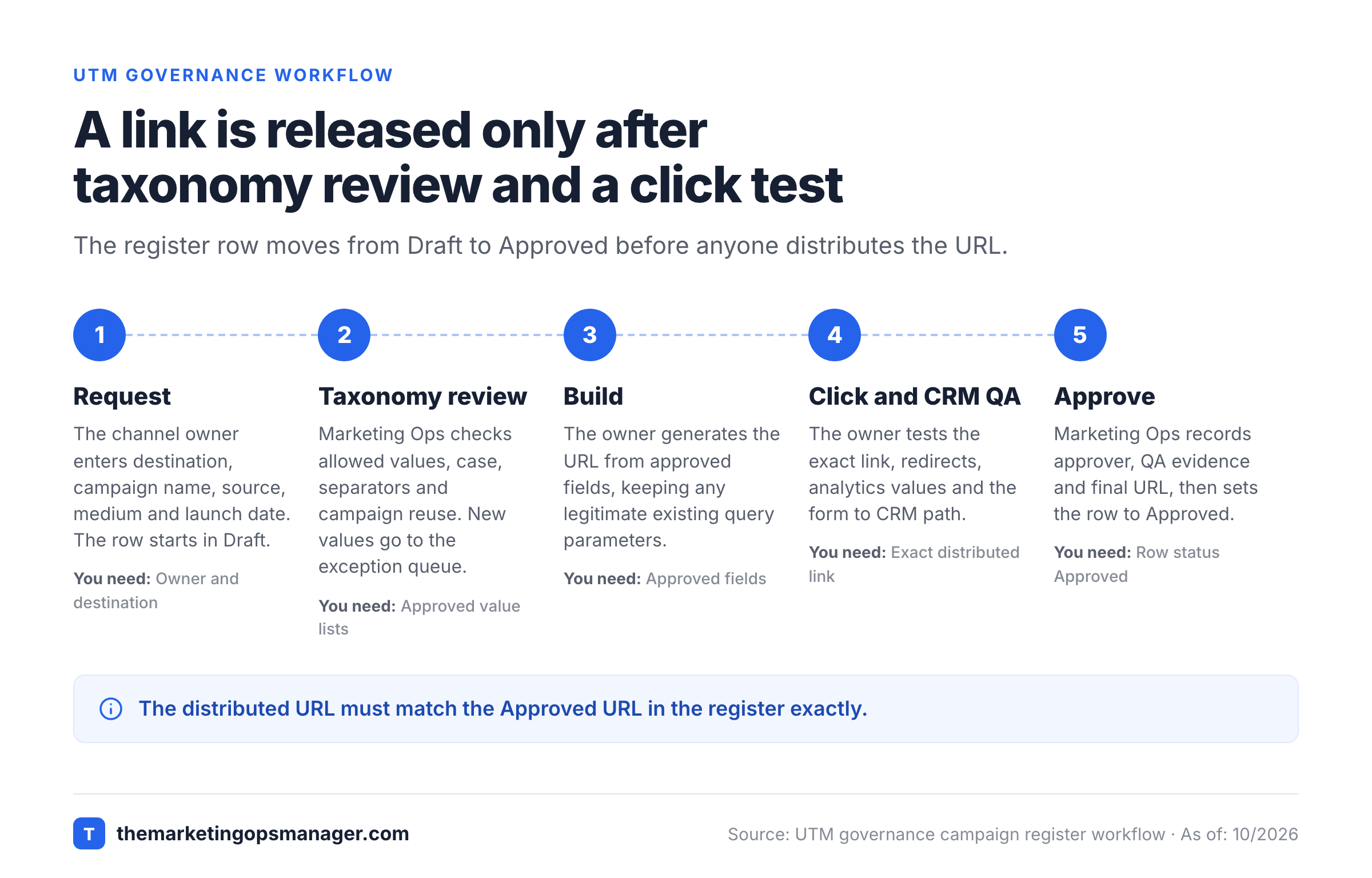
UTM governance works when one person can request a link and a different person can approve its naming and test evidence. That separation's what makes the approval meaningful. The process below separates taxonomy ownership from campaign execution, with a clear exception path for a new publisher or channel. It's designed for a marketing operations team coordinating demand generation, paid media, lifecycle marketing and CRM operations.
Request the campaign row
The channel owner enters the destination, campaign name, source, medium, content, intended launch date and a named owner. The row starts in Draft.
Validate against the taxonomy
Marketing Ops checks allowed source and medium values, case, separators and whether the campaign name's already in use. A new value goes into the exception queue instead of being typed directly into the approved list.
Build the final URL
The owner generates a URL from the approved fields; it's never typed by hand. The builder must preserve legitimate existing query parameters and encode special characters in parameter values.
Test the click and handoff
The owner clicks the exact URL that will be distributed, checks redirects, confirms the landing page loads and verifies the intended campaign values in Google Analytics. If the landing page has a lead form, also test the agreed CRM capture path.
Approve, distribute and monitor
Marketing Ops records the approver, QA evidence and final URL, then changes the row to Approved. The channel owner publishes that exact URL and moves the row to Live once it's launched.
A RACI table names a person or team for each task, so someone in marketing doesn't end up owning every exception. Adjust the roles to your organization, but keep the distinction between making a link and authorizing a naming change.
| Task | Responsible | Accountable | Consulted |
|---|---|---|---|
| Draft the campaign row | Channel owner | Campaign lead | Marketing Ops |
| Maintain allowed values | Marketing Ops | Marketing Ops lead | Analytics |
| Approve a new medium | Marketing Ops | Marketing Ops lead | Analytics and Paid Media |
| Verify redirect and landing | Channel owner | Campaign lead | Web team |
| Verify form to CRM handoff | CRM Ops | CRM Ops lead | Marketing Ops |
| Review post-launch drift | Analytics | Marketing Ops lead | Channel owners |
The taxonomy owner shouldn't approve their own unexplained exception by changing the list silently; that's the loophole this rule closes. Record the request, the reason, the approving person and the date. That's the audit trail. When an exception becomes common, promote it to an allowed value and tell the people who build links. Otherwise they'll keep requesting it.
Generate URLs without losing existing query parameters#
A governed UTM URL is assembled from approved fields, not typed by hand into a campaign brief. The builder should add a question mark only when the destination has no query string, use an ampersand when one exists and encode each parameter's value. Keep the final URL in the same row as its approval evidence, so there's one place to look.
For the email sample, the finished URL would be:
https://example.com/demo?utm_source=newsletter&utm_medium=email&utm_campaign=2026q4-demo-ops&utm_id=cmp-1042&utm_content=hero-ctaIn Google Sheets or Excel, put this formula in M2, the Approved URL column. It only produces an output once the row's status in K is Approved or Live and the required fields are filled in. It assumes that C contains an HTTPS destination without a fragment and that the destination doesn't already contain UTM parameters; it can't check either one for you.
=IF(OR(AND(K2<>"Approved",K2<>"Live"),B2="",C2="",D2="",E2=""),"",C2&IF(ISNUMBER(SEARCH("~?",C2)),"&","?")&"utm_source="&ENCODEURL(D2)&"&utm_medium="&ENCODEURL(E2)&"&utm_campaign="&ENCODEURL(B2)&IF(A2<>"","&utm_id="&ENCODEURL(A2),"")&IF(F2<>"","&utm_content="&ENCODEURL(F2),"")&IF(G2<>"","&utm_term="&ENCODEURL(G2),""))The formula doesn't validate the taxonomy or the destination. Protect the formula column, use data validation on D and E and add a separate review for existing UTM parameters, URL fragments and malformed destinations. The example URL is a pattern for manual campaigns. It isn't a recommendation to override Google Ads auto-tagging.
Google recommends Google Ads auto-tagging where available. With auto-tagging and manual UTMs together, Google says auto-tagged values are used for traffic classification while manually tagged content and term values populate their manual dimensions. A team shouldn't assume that a manually added utm_campaign will override a linked Google Ads campaign in every report. Check the report you rely on. Record whether a channel uses auto-tagging in the channel policy before generating a manual URL.
Test the landing page, analytics data and CRM handoff#
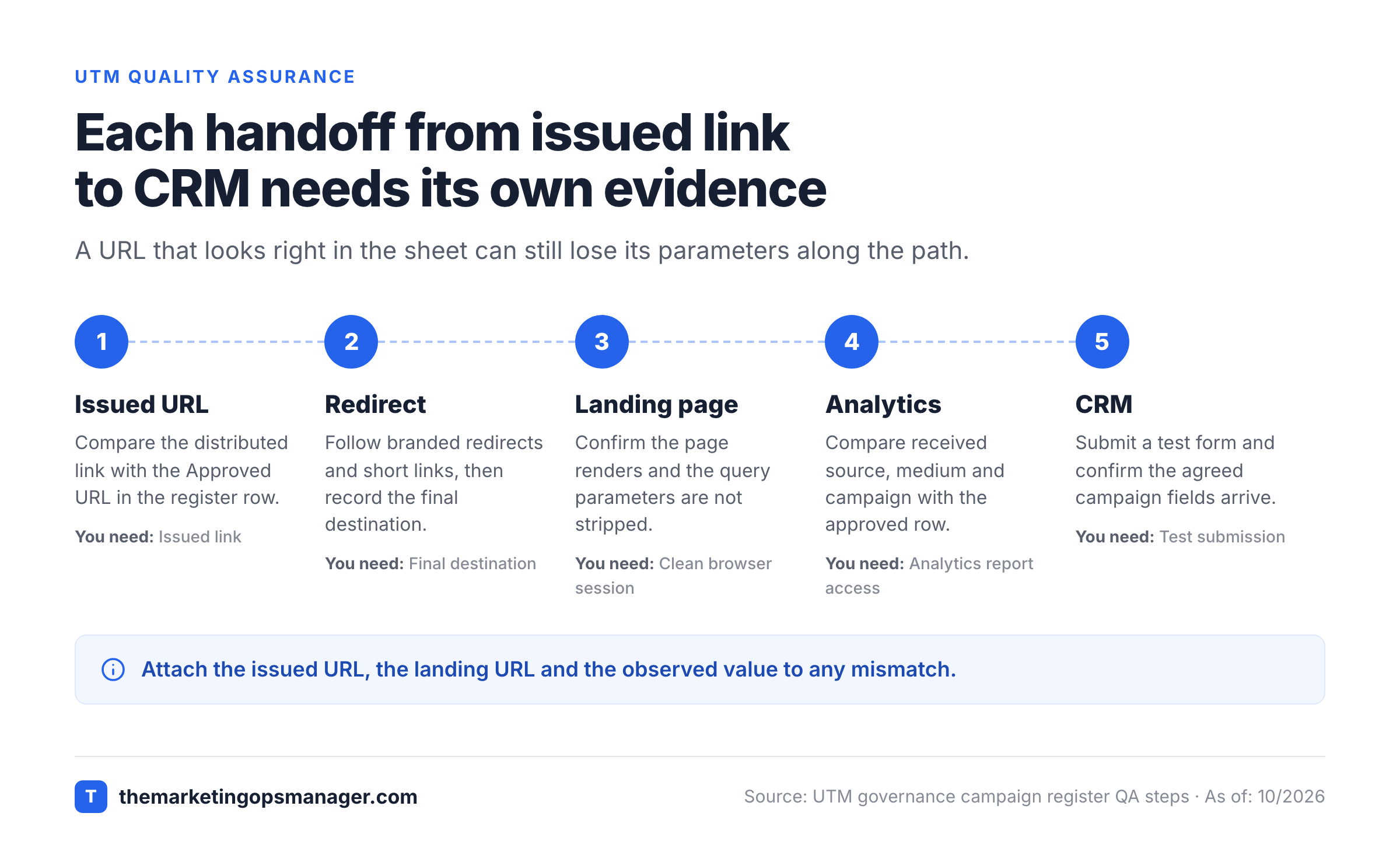
A UTM link passes QA only when the visitor can reach the intended page and the approved campaign information survives the path. A URL that looks correct in a spreadsheet can still fail after a redirect, a short link, a form submission or a CRM mapping change. Test the actual distributed link, not a reconstructed approximation.
Test the exact link a visitor will click#
Open the full URL in a clean browser session and follow the redirects. That's the click your visitor makes. Confirm the landing page renders, the query parameters aren't stripped before measurement and the intended form or call to action works. Google's guidance on direct traffic identifies redirects and shorteners as possible causes of missing traffic information, so record the final destination and the test outcome.
When a URL passes through a branded redirect or a partner's tracking system, capture both the issued link and the landing URL. If a destination has an existing query string, verify that its business-critical parameters still work. Don't approve a link solely because the browser shows a page.
Verify Analytics and CRM separately#
Google Analytics exposes manually tagged campaign values through traffic-source dimensions and the Traffic acquisition report. Compare the received source, medium and campaign with the approved row. Choose the session-level or manual dimensions that match the question you're checking, rather than mixing first-user and session reporting in one reconciliation.
For lead-generation campaigns, run a separate form-to-CRM check. Capture a test submission, confirm that the agreed first-touch or latest-touch fields receive the expected values and verify that lead assignment still follows the intended route. The governance sheet doesn't guarantee CRM capture. That's up to the form, hidden fields, consent behavior, integration mapping and CRM configuration.
Treat a mismatch as a named incident. Attach the issued URL, the final landing URL, the approved row, the observed value and the system where the value changed. That gives the responsible team evidence to fix the handoff rather than a vague request to investigate attribution.
Audit UTM compliance after campaigns go live#
UTM governance needs a recurring comparison between approved rows and observed campaign data. A lightweight audit checks casing, unknown source and medium values, missing campaign labels, duplicate initiatives and links that bypassed approval. Review exceptions with the taxonomy owner and make a change only after you've understood the reporting impact.
| Failure in the data | Likely control gap | Immediate action | Long-term owner |
|---|---|---|---|
LinkedIn and linkedin both appear | Free typing or missing lowercase validation | Trace issued links to owners | Marketing Ops |
newsletter / cpc appears | Source and medium combination not reviewed | Check the original campaign row | Analytics |
| Campaign appears under several names | No campaign register or alias policy | Group the known names in an audit view | Campaign lead |
(not set) appears for a manual campaign | Missing or unusable parameter | Inspect the exact landing URL | Web Analytics |
| Form lead lacks campaign fields | Form or CRM mapping not tested | Reproduce a test submission | CRM Ops |
| Partner link redirects without parameters | External handoff not tested | Reissue and retest the link | Partnerships |
For a simple compliance measure, divide the Live rows with no open naming exception by all Live rows reviewed in the same period. It's a process metric, not an attribution-accuracy score. It doesn't tell you whether a campaign generated incremental demand, whether conversions were correctly attributed or whether every visitor consented to measurement.
Track the numerator and denominator, not just a green percentage. A small team can look compliant because it's registered very few links while unregistered links circulate in sales decks or partner emails. Compare the register with channel inventories and ask each campaign owner to account for every external placement. Include partners, whose links are the hardest to see.
Google's privacy guidance says not to include personally identifiable information in custom campaign parameters. Keep customer emails, phone numbers and names out of UTMs; they're personal data. Review exception notes too, since those can be copied into downstream systems by accident. Use internal non-personal identifiers when you need to join campaign records across systems; that's what utm_id is for.
Handle naming exceptions without rewriting history#
A naming exception is a controlled decision, not a license to create a one-off label. It's temporary by design. Ask the requester for the business reason, the proposed source or medium, the campaigns affected, the reporting impact and the approver. An approved exception should have an effective date and a clear path back into the main taxonomy, so it doesn't linger.
If a partner changes its brand name, retain the historical mapping in an alias reference and decide whether new campaigns should use the partner's new name as the canonical source. If a channel team wants a medium such as webinar to make dashboards easier, ask whether that is really a medium or a campaign attribute. A custom medium may change default-channel grouping, so test it before it's approved.
Don't silently rename historical data in a report and call it raw GA4 data. Create an explicit reporting normalization layer when old values must be grouped. Keep the original observed values available for reconciliation and document the mapping's effective date.
A shared sheet is enough when people follow its approval path. Once multiple teams can publish links without passing through the register, the next investment should be enforcement at link creation, not a more elaborate spreadsheet dashboard.
UTM governance template FAQ#
A UTM governance template should answer the operational questions that arise before a campaign goes live. The questions below cover the template, required parameters, ownership, Google Ads tagging and privacy without assuming that every team uses the same marketing stack.
What is the difference between a UTM template and a UTM governance template?
A UTM template stores or builds tagged URLs. A UTM governance template also controls approved values, ownership, approval status, exceptions and test evidence before a URL is released.
Which UTM parameters should every manual campaign link include?
Google recommends using utm_source, utm_medium and utm_campaign together. Add utm_id, utm_content or utm_term when they support a defined reporting or campaign-data workflow.
Who should own UTM naming conventions?
Marketing Operations should usually own the taxonomy and approval rules, while channel owners create and test their links. Analytics and CRM Operations should review changes that affect reporting or lead handoffs.
Should Google Ads links use manual UTM tagging?
Google recommends auto-tagging where available. If you also use manual parameters, verify how your linked Analytics property handles the auto-tagged dimensions and the manual content and term fields.
Can UTM parameters contain email addresses?
No. Google's Analytics privacy guidance says not to include personally identifiable information in custom campaign parameters. Use non-personal campaign identifiers instead.
Final UTM governance checklist before launch#
A UTM governance checklist should confirm that the campaign register, naming policy and final click path agree. Release the exact URL that passed QA, retain the approved row and record any exception for the next taxonomy review. That makes the handoff repeatable between the campaign owner, Marketing Ops, analytics and CRM teams.
- The campaign name exists in the shared register and follows the approved pattern.
- Source and medium are approved values with the intended reporting behavior.
- The destination is correct and doesn't contain stale UTMs or a URL fragment.
- Content and term values are present only when they serve a reporting purpose.
- The generated URL preserves legitimate query parameters and survives redirects.
- The analytics test shows the intended campaign dimensions.
- The form-to-CRM handoff has been tested when the campaign collects leads.
- An approver, launch date, exception note and QA evidence are recorded.
- The distributed URL matches the approved URL exactly.
A naming convention keeps campaign labels consistent. The release checklist keeps the path from click to lead handoff from breaking. For the related operational controls, see the UTM naming convention guide and the campaign tracking checklist.