Lead management software captures every new lead, scores it, routes it to the right owner and tracks it until it converts or drops out. The nine tools below split into CRMs that own the lead record and layers that score, match or route leads around them, and the useful question is which handoffs each one removes and which it leaves for you to watch.
We judged each tool on the job a marketing ops team actually owns: how a lead gets in, how it's scored, who it goes to and what happens when nobody acts on it. Prices come from vendor pricing pages and ratings from G2, both checked in October 2026.
- tools compared
- 9
- publish a price
- 7
- include a free tier or plan
- 4
- G2 reviews behind the ratings, roughly
- 59,800
Our picks by team#
 Best for teams that want one databaseHubSpot Sales HubForms, scores and owner assignment run on the same contact records, and the free CRM covers two users.
 Best for complex ownership rulesSalesforce Sales CloudOrdered assignment rules, Web-to-Lead and a conversion step that creates account, contact and opportunity.
 Best low-cost routing and scoringZoho CRMRound-robin assignment rules and scoring rules in a CRM that starts at $14 per user and has a free edition for three users.
 Best for phone-first inbound teamsCloseA form fill can assign the lead and create a call task due within minutes, on the Growth plan and above.
 Best for a hand-qualified pipelinePipedriveA Leads Inbox keeps unqualified leads out of the pipeline until a rep converts them to deals.
 Best for built-in scoring on a small budgetFreshsalesA Freddy contact score and round-robin territories at $9 to $59 per user.
 Best for scored, rule-heavy B2B lifecycleAdobe Marketo EngageSmart Campaigns score leads and sync them to Salesforce, Dynamics or Veeva.
 Best routing layer for SalesforceLeanDataMatches leads to accounts and runs weighted round robin with caps and SLA reroutes.
 Best glue between lead sources and your CRMZapierConnects forms and ad leads to a CRM, and its Lead Router beta adds rules and round robin.
 Our product · for the gaps between toolsThe Marketing Ops ManagerChecks that the forms, tracking and CRM handoffs around your lead tools still work.
Lead management software compared#
| Tool | Category | Lead handoff | Starting price | G2 rating |
|---|---|---|---|---|
| HubSpot Sales Hub | CRM with built-in lead capture | Form, chat and email leads in; scored leads assigned to a rep out | Free CRM for up to 2 users; Sales Hub Starter from $7 per seat per month billed annually ($20 billed monthly); Professional from $90 and Enterprise from $150 per seat per month billed annually, with a one-time onboarding fee of $1,500 and $3,500 | 4.4 (14,365) |
| Salesforce Sales Cloud | Enterprise CRM | Web-to-Lead and imported leads in; owned leads converted to account, contact and opportunity out | Per user per month: Free Suite $0, Starter Suite $25, Pro Suite $100 (annual), Core $195, Advanced $395, Max $550 (annual) | 4.4 (27,575) |
| Zoho CRM | Full CRM with a leads module | Web form, import and API leads in; assigned, scored leads converted to account, contact and deal out | Free for up to 3 users; Standard $14, Professional $23, Enterprise $40, Ultimate $52 per user per month per Zoho's G2 listing; Zoho's own page showed euro prices when we checked | 4.1 (2,953) |
| Close | Sales CRM for inside sales | Form and inbound leads in; assigned, contacted leads and opportunities out | Per user per month billed annually: Solo $9, Essentials $35, Growth $99, Scale $139; calling and SMS billed at usage | 4.7 (2,113) |
| Pipedrive | Sales CRM | Web form, chat and imported leads in; qualified leads converted to deals out | Lite from $24 per seat per month billed monthly according to Pipedrive's G2 listing; Pipedrive's own page showed euro prices (€14 Lite billed annually) when we checked; LeadBooster add-on from €32.50 | 4.3 (5,086) |
| Freshsales | Sales CRM with lead scoring | Web form, embed code and social leads in; scored, auto-assigned contacts out | Growth $9, Pro $39, Enterprise $59 per user per month billed annually; 21-day trial | 4.5 (1,236) |
| Adobe Marketo Engage | Marketing automation platform | Form fill to scored lead synced to the CRM | Quote only (Growth, Select, Prime, Ultimate) | 4.1 (3,296) |
| LeanData | Lead routing and matching for Salesforce | Salesforce leads in; matched, assigned and SLA-tracked records out | Quote only (Standard, Advanced, Premium editions); setup billed separately | 4.6 (1,069) |
| Zapier | Integration and automation | Event in one app to a record in another | $19.99 per month for 750 tasks (Professional) | 4.5 (2,089) |
| The Marketing Ops Manager Our product | Campaign monitoring | Checks every handoff in the campaign journey on a schedule | Starter $159/month billed annually ($199 monthly), Growth $399/month billed annually ($499 monthly), Enterprise custom; every plan starts with a 14-day trial, no credit card | No reviews yet |
Starting prices as published by each vendor, checked October 19, 2026. Zoho and Pipedrive showed euro prices on their own pages from our location, so their dollar figures come from each vendor's G2 listing. Quote only means the vendor publishes no price.
What is lead management software, and how does it differ from a CRM?#
Lead management software handles the stretch between "someone showed interest" and "a rep owns a qualified opportunity": capture, scoring, routing, follow-up and conversion. A CRM stores the account, contact and deal record that follows. Marketing automation scores and nurtures leads before sales sees them. In practice the three overlap, and most of the tools below do two of the jobs.
| Type | Main job | Where it stops | Examples in this list |
|---|---|---|---|
| Sales CRM | Owns the lead record, the rep's work queue and conversion to a deal | Weak at pre-sales nurture and at routing across systems | HubSpot Sales Hub, Salesforce Sales Cloud, Zoho CRM, Close, Pipedrive, Freshsales |
| Marketing automation | Scores and nurtures leads, then hands them to sales | Doesn't run the rep's daily work | Adobe Marketo Engage |
| Routing and automation layer | Matches, assigns or moves leads between tools | Doesn't store the lead or work it | LeanData, Zapier |
Lead management sits inside the CRM when one system owns the lead from form fill to deal. A separate layer pays off in three cases: leads arrive from several sources, marketing scores in one tool while sales works in another, or ownership rules grow past what the CRM's assignment feature can express.
How does a lead move through your stack?#
A lead moves through the same five handoffs in every tool in this guide. The tools rarely fail inside a step. The losses sit at the joins, where one system hands a record to the next and nobody checks that it arrived intact.
- Step 1Capture
- Zapier
- Close
Breaks when a form field arrives empty and the lead is created with no source - Step 2Match
- LeanData
Breaks when two records exist for one person, so the lead is routed as new - Step 3Score
- Adobe Marketo Engage
- Freshsales
- Zoho CRM
Breaks when the threshold changes and sales isn't told what a hot lead means now - Step 4Route
- HubSpot Sales Hub
- Salesforce Sales Cloud
Breaks when the lead goes to a rep who is away, and nobody notices for a day - Step 5Work and convert
- Pipedrive
- Close
Breaks when the lead waits in an inbox that nobody opens - Across allMonitor the path
- The Marketing Ops Manager
Catches broken forms, tracking and CRM handoffs, with evidence
- Capture. A web form, chat, ad lead form, import or API call creates the lead with its source, campaign and consent fields.
- Match. The system checks whether the person or account already exists, so a repeat visitor isn't treated as a new lead.
- Score. Fit rules (company size, role) and behavior rules (visits, clicks, replies) turn the record into a number or a label.
- Route. An assignment rule picks an owner by territory, round robin or capacity and tells that person.
- Work and convert. The rep contacts the lead, and a qualified lead becomes an account, contact and opportunity, or drops out with a reason.
The reviews below follow that path for each tool: what happens to a lead inside it, what the plan unlocks, what reviewers complain about and who should look elsewhere.
Sales CRMs that own the lead record#
HubSpot Sales Hub#
HubSpot Sales Hub
HubSpot Sales Hub keeps captured leads in one CRM database, so forms, lead scores and owner assignment run on the same contact and company records and there is no sync between capture and routing.
HubSpot keeps the lead in the same database as the contact, company and deal, so there is no sync between capture and routing.
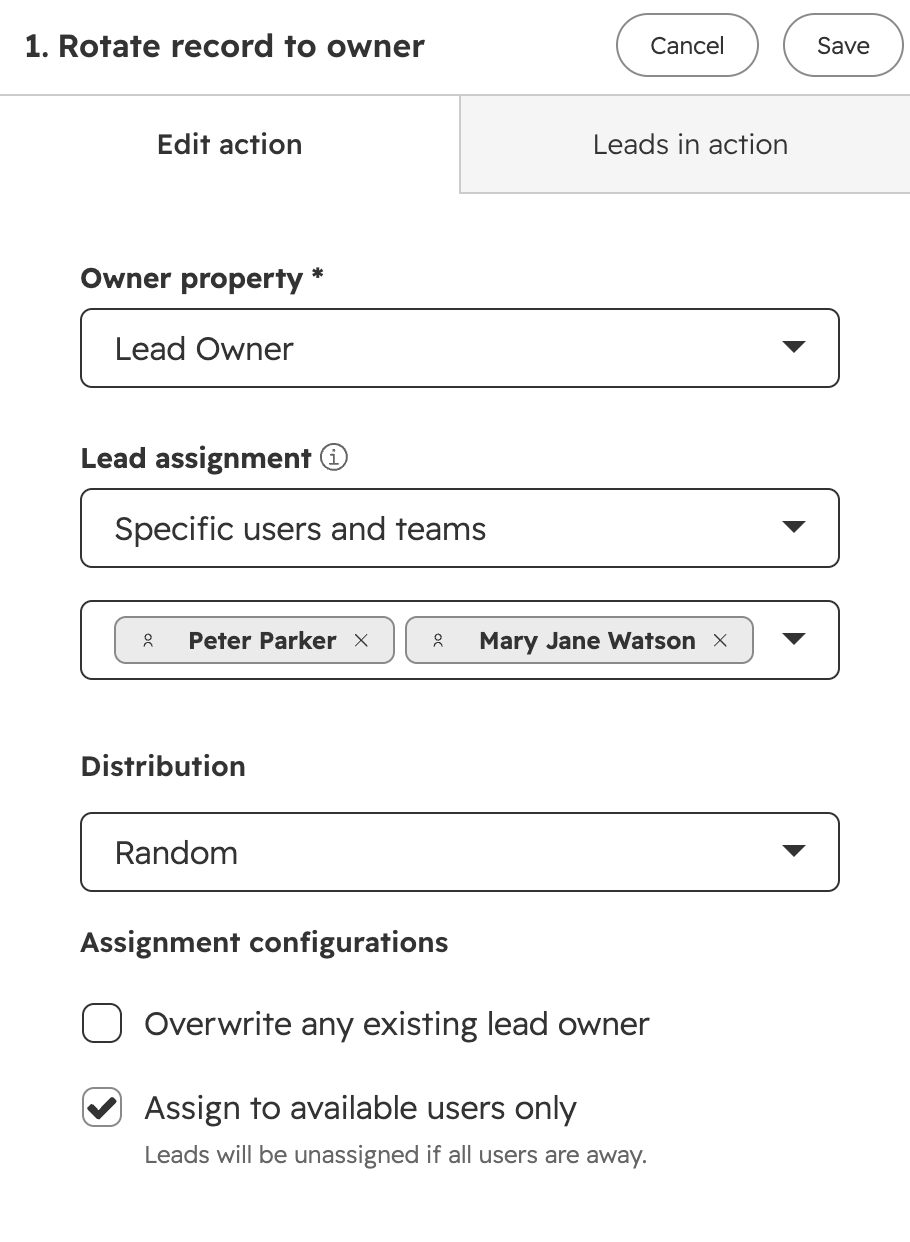
A visitor submits a HubSpot form, chat or email and the contact is created with its source and activity timeline. An admin builds a lead score from fit properties, engagement events or both. A workflow then enrolls the record when, for example, the score crosses a threshold, and the Rotate record to owner action hands it to a user or team by round robin, random or load-balanced distribution. The rep sees the full activity history on the record and works it with tasks and sequences. Because reporting reads the same records, nothing needs to be reconciled between the capture tool and the routing tool.
- a small or mid-size team wants capture, scoring and assignment in one database with nothing to sync.
- you start on the free CRM and can add Sales Hub Professional when you need lead rotation.
- you need territory rules, lead-to-account matching and multi-step routing: the documented rotation action offers round robin, random and load-balanced distribution only.
- you need a predictable bill at scale: Professional and Enterprise add a one-time onboarding fee on top of seat prices.
- Users like
- Ease of use
- Users dislike
- Limited customization
- Source: G2, 14,365 reviews
What the plans unlock
Lead scoring is where the plan details matter. The Sales Hub pricing page lists up to 5 scores on Starter and up to 10 on Professional, while HubSpot's lead scoring help article names Professional and Enterprise, so check what your plan includes before you build on it. The documented rotation action marks Away users as skippable and leaves the lead unassigned if everyone is away, which is worth testing before you rely on it. HubSpot also warns that rotation can clash with a synced owner field when you run a two-way Salesforce sync. Workflow limits grow by plan: 50 on Starter, 300 on Professional and 1,000 on Enterprise. If you already use HubSpot for campaigns, our guide to the HubSpot Salesforce integration covers what breaks when the CRM is Salesforce.
- Starting price
- Free CRM for up to 2 users; Sales Hub Starter from $7 per seat per month billed annually ($20 billed monthly); Professional from $90 and Enterprise from $150 per seat per month billed annually, with a one-time onboarding fee of $1,500 and $3,500
- Free tier
- CRM for up to 2 users
- Lead rotation
- Professional and Enterprise
- Workflows
- 50 Starter, 300 Professional, 1,000 Enterprise
- Onboarding fee
- $1,500 (Professional), $3,500 (Enterprise)
Salesforce Sales Cloud#
Salesforce Sales Cloud
Sales Cloud treats a lead as its own object: captured through Web-to-Lead or import, assigned by ordered rules, worked by a rep and converted into account, contact and opportunity records.
Sales Cloud treats a lead as its own object, with ordered assignment rules and a conversion step that creates the account, contact and opportunity.
A prospect submits a Web-to-Lead form, or an admin imports leads, and Salesforce creates a Lead record. If an assignment rule applies, Salesforce checks the rule entries in order, stops at the first match and sets the owner to the user or queue in that entry, optionally emailing the new owner. Leads that match nothing fall back to the default owner, so an admin should end the rule with a catch-all entry. The rep works the lead and converts it, choosing a new or existing account, a contact and an optional opportunity. Duplicate matching runs during conversion, and conversion can't be undone.
- you already run on Salesforce, or expect account, territory and approval logic, and you have an admin to own the assignment rules.
- you want one platform from lead capture to opportunity and forecast with a large partner marketplace.
- you are a small team without a Salesforce admin: Salesforce documents round robin only as a workaround with an autonumber field and a formula.
- you want lead scoring on a low plan: the pricing page does not include it on Free, Starter or Pro Suite.
- Users like
- Ease of use and one place for customer data
- Users dislike
- Steep learning curve and cost
- Source: G2, 27,575 reviews
Routing limits and plan details
Lead assignment, Web-to-Lead and duplicate blocking are listed on every edition of the pricing comparison, from Free Suite to Max. Lead scoring is not part of the three lowest editions and appears from Core upward. The routing gap is round robin: Salesforce's help center documents it as a workaround built from an autonumber field, a formula and one rule entry per user, which is why teams with many reps often add a routing layer such as LeanData. Salesforce renamed its edition tiers recently, so older help articles still mention Enterprise and Unlimited. The product is now also marketed under the Agentforce name, and G2 lists it that way.
- Starting price
- Per user per month: Free Suite $0, Starter Suite $25, Pro Suite $100 (annual), Core $195, Advanced $395, Max $550 (annual)
- Web-to-Lead
- Up to 500 leads per day
- Assignment rules
- Ordered entries, first match wins, owner is a user or queue
- Conversion
- Cannot be undone
- Rule entries
- Up to 25 filter criteria each
- Lead scoring
- Not on Free, Starter or Pro Suite
Zoho CRM#
Zoho CRM
Zoho CRM has a dedicated leads module with rule-based assignment, scoring rules and a conversion screen, at some of the lowest per-seat prices in this list.
Zoho has a dedicated leads module with rule-based assignment, scoring rules and a conversion screen, at a lower per-seat price than the other CRMs here.
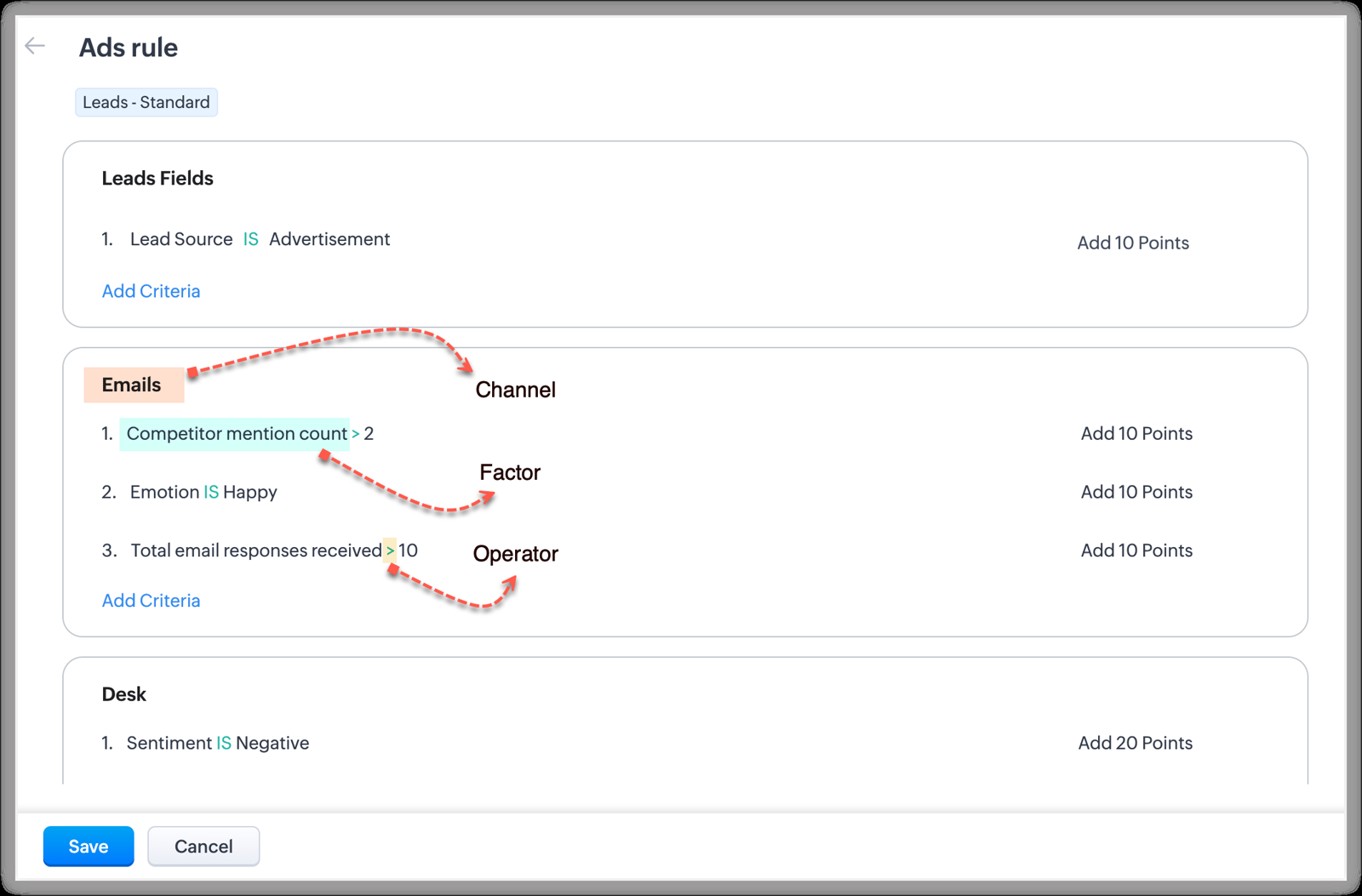
A lead arrives by web form, import or API. An assignment rule under Setup evaluates up to 25 criteria per rule entry in a set order and picks the owner by category, with round robin when you choose several users, or by a condition such as country. It can check availability by online status or shift timing and add a follow-up task. Scoring rules then rate the lead from field and activity criteria. When sales accepts the lead, Convert opens a page where the rep creates or merges an account and contact and optionally a deal. Duplicate checks run on unique fields, then email, company and name.
- you want rule-based round robin, lead scoring and conversion in one low-cost CRM.
- you already use Zoho SalesIQ, Forms or Flow and want those leads to land in the same system.
- you create leads by hand and expect them to be routed: assignment rules only apply to imported, web-form and API leads.
- you are on Standard and want real scoring: scoring there covers the Calls channel only.
- Users like
- Customization and lead management
- Users dislike
- Cluttered interface and learning curve
- Source: G2, 2,953 reviews
Limits to know
Two details catch teams out. Assignment rules apply only to imported, web-form and API leads, so a lead a rep creates by hand isn't routed. And on the Standard edition, scoring criteria cover the Calls channel only, so real scoring means Professional or above. Conversion can't be reverted, and lead status isn't mapped to the deal, so the rep picks the deal stage at conversion. Zoho shows euro prices on its own page from some locations, so confirm the dollar price at checkout.
- Starting price
- Free for up to 3 users; Standard $14, Professional $23, Enterprise $40, Ultimate $52 per user per month per Zoho's G2 listing; Zoho's own page showed euro prices when we checked
- Free tier
- 3 users
- Assignment rules
- Up to 25 criteria per rule entry
- Scoring rules
- Ten per layout, five active
- Standard scoring
- Calls channel only
Freshsales#
Freshsales
Freshsales combines a Freddy-based contact score with auto-assignment rules that rotate records round robin within a territory.
Freshsales combines a contact score out of 100 with auto-assignment rules that rotate records round robin within a territory.
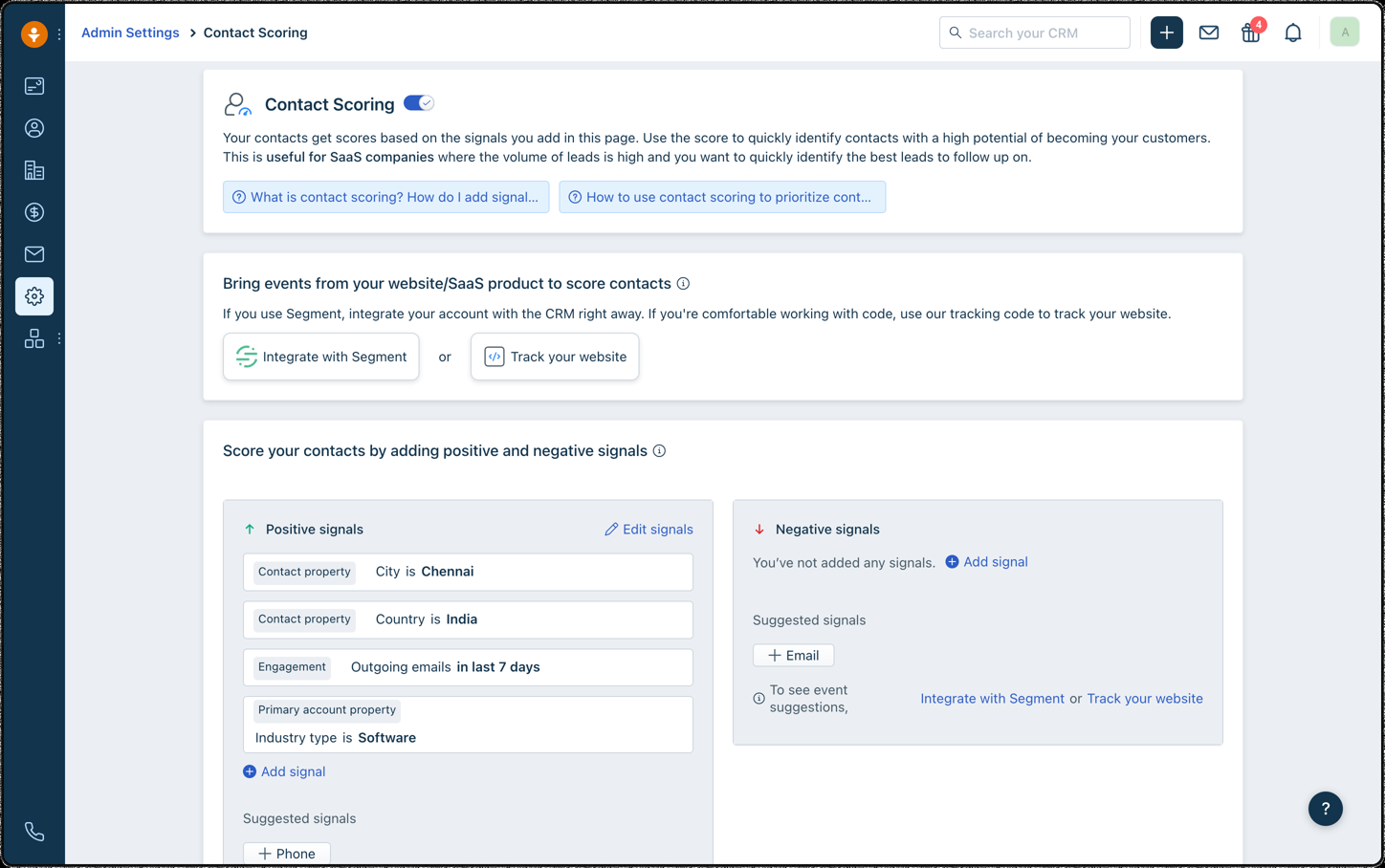
Leads come in through the website embed code, web forms, social lead capture or import and land as contacts with a lifecycle stage. An admin adds positive and negative signals from contact properties, account properties, sales engagement and web or product events (fed in through Segment or the CRM tracking code), and Freddy combines them with learned patterns into a score. Auto-assignment rules fire when a record is created, imported or updated: you set AND/OR conditions, pick a territory and its users, and matching records rotate among them in priority order. A rule with no conditions acts as the catch-all.
- a small or mid-size team wants scoring, round-robin territories and a pipeline in one per-seat CRM.
- you already send web or product events through Segment and want them to move a contact score.
- you want weighted or capacity-based routing: we found only round robin in the help docs.
- you need a standalone score-and-route layer over another CRM: scoring and rules live inside Freshsales ownership.
- Users like
- Ease of use and value
- Users dislike
- Reporting and feature depth
- Source: G2, 1,236 reviews
Plan gates and limits
Confirm the plan gate first: Freshworks' help article says scoring is on by default for every account, but its pricing page puts contact scoring and territories under Pro at $39 per user. The assignment article names contacts, accounts and deals, and no weighted or capacity-based option appeared in the docs. The G2 rating comes from G2's published summary, because the review page itself was behind a bot check when we looked.
- Starting price
- Growth $9, Pro $39, Enterprise $59 per user per month billed annually; 21-day trial
- Scoring
- Freddy score out of 100
- Assignment
- Round robin within a territory
- Territories
- Pro and above
- Trial
- 21 days
Close#
Close
Close puts calling, email and SMS inside the lead record and uses workflows to assign new leads and schedule the first call within minutes.
Close puts calling, email and SMS inside the lead record, and a workflow can assign a new form lead and schedule the first call within minutes.
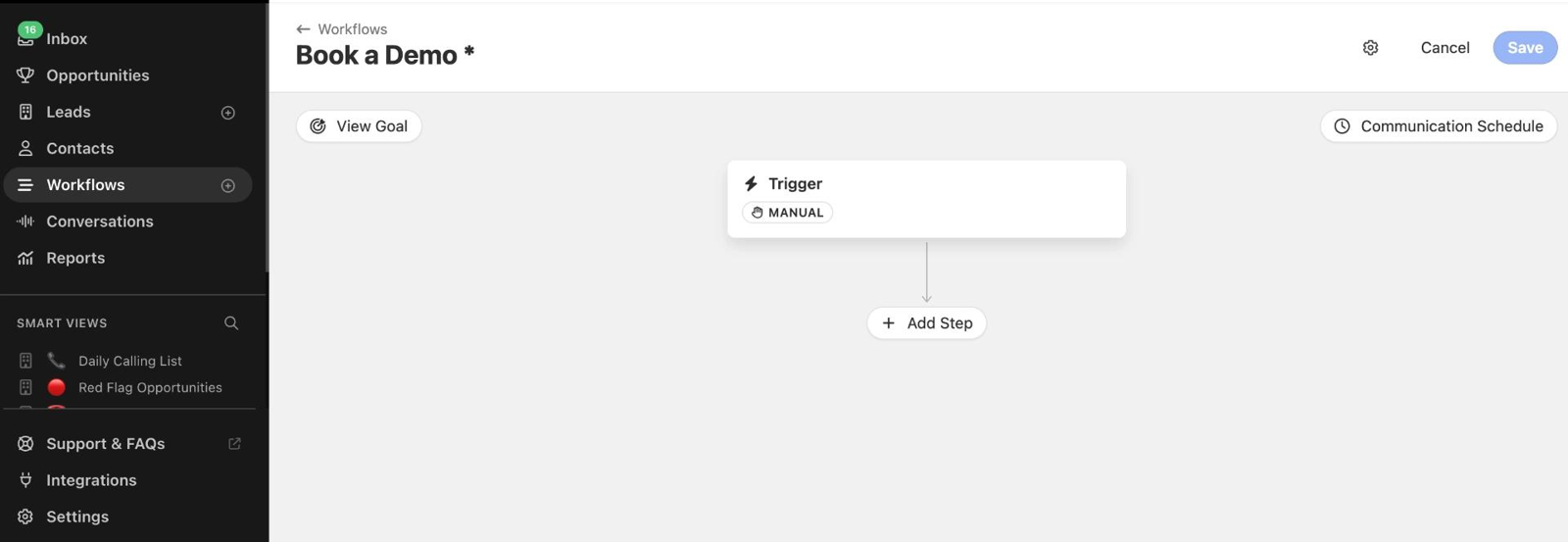
A visitor submits a Close Form and Close creates or updates the lead with built-in duplicate safeguards. A workflow with a Form Submitted trigger enrolls the lead, usually filtered to pre-customer status and no owner. The first step assigns a user, a group or round robin, followed by a call task due in minutes, then email or SMS steps with merge fields and delays that follow the lead's inferred time zone. An incoming email, SMS or call pauses the run and counts as a goal met. Reps work leads from Smart Views and contact them without leaving Close.
- your reps work inbound leads by phone and want calling, SMS, email and follow-up tasks in one record.
- you want form leads called within minutes through auto-assigned call tasks on Growth or above.
- marketing needs native lead scoring: we found no scoring feature in the pricing page or workflow docs.
- you are on Solo or Essentials and need automated routing: workflow assignment is Growth and Scale only.
- Users like
- Ease of use and calling in one place
- Users dislike
- Missing features and customization
- Source: G2, 2,113 reviews
What the plan decides
Workflows are the dividing line: assigning leads and tasks through a workflow is available on Growth and Scale only, and lead visibility rules are Scale only. We didn't find a native lead scoring feature in the pricing page or the workflow docs, and Close's own help guide points to a third-party app or Zapier for round robin in one place while a blog post describes it as a workflow step, so test the assignment step on a trial before you buy.
- Starting price
- Per user per month billed annually: Solo $9, Essentials $35, Growth $99, Scale $139; calling and SMS billed at usage
- Workflows
- Growth ($99) and Scale ($139)
- Smart Views
- All plans
- Solo plan
- 1 user, 10,000 leads
- Calling and SMS
- Billed at usage
Pipedrive#
Pipedrive
Pipedrive is a pipeline-first sales CRM where leads wait in a Leads Inbox until a rep qualifies them and converts them into deals.
Pipedrive holds new leads in a Leads Inbox, outside the pipeline, until a rep qualifies them and converts them to deals.
Leads enter the inbox by manual entry, spreadsheet import or the LeadBooster channels (live chat, chatbot, web forms and prospector). Every lead links to a person or organization and has an owner and a visibility setting. Reps filter by label such as Hot, Warm or Cold, edit owners or labels in bulk, then convert a lead to a deal, choosing the pipeline and value. The person, organization, notes and files move onto the deal, and the lead leaves the inbox.
- a small sales team wants a visual pipeline and a clean inbox and qualifies leads by hand before converting them.
- your site already runs forms or chat that can feed one inbox through the LeadBooster add-on.
- marketing needs lead scoring before conversion: Pipedrive's scores apply to deals, not leads.
- you run territory-based round robin: the pricing page lists lead routing under Premium, and we found no documented routing rules.
- Users like
- Easy visual pipeline
- Users dislike
- Advanced features locked to higher plans
- Source: G2, 5,086 reviews
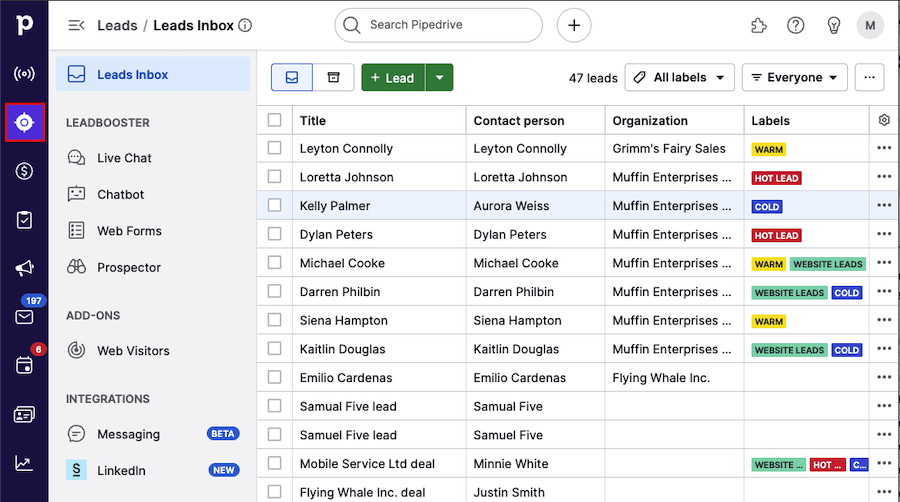
Before conversion
The limits sit before conversion. Pipedrive's scores rate deals, not leads, so any MQL logic has to be built with labels, filters and custom fields. Web forms belong to the LeadBooster add-on, and the web forms docs don't describe routing or owner-assignment rules. The pricing page lists lead generation and routing under Premium, but we couldn't confirm which routing rules exist. Pipedrive's own page showed euro prices when we checked (€14 for Lite billed annually), so the dollar figure here is the monthly price from its G2 listing.
- Starting price
- Lite from $24 per seat per month billed monthly according to Pipedrive's G2 listing; Pipedrive's own page showed euro prices (€14 Lite billed annually) when we checked; LeadBooster add-on from €32.50
- Lead holding area
- Leads Inbox
- Scoring
- Deals only, Premium and above
- Capture add-on
- LeadBooster
- Scores
- Deals only, Premium and above
- Lite price
- $24 per seat, billed monthly
Layers that sit around the CRM#
Adobe Marketo Engage#
Adobe Marketo Engage
Adobe Marketo Engage is Adobe's B2B marketing automation platform, and it's built for teams with a dedicated marketing ops function. Our guide to the best marketing automation software compares it with eight other platforms on price, plan limits and CRM sync.
Marketo scores and routes leads with Smart Campaigns, then syncs them into Salesforce, Dynamics or Veeva.
A visitor is tracked by the Munchkin script and becomes a known person when they submit a Marketo form or sync from the CRM. A Smart Campaign with a trigger such as Lead is Created runs a flow: a Change Score step adds, subtracts or sets points, and a Change Owner step assigns the record. The Sync Person to SFDC step inserts the person as a Salesforce lead immediately, using Salesforce's own assignment rules by default or a named user or queue. Salesforce rejects the record if Company or Last Name is missing, so the form has to collect both.
- you run B2B programs at volume across regions or business units and have at least one dedicated Marketo admin.
- your CRM is Salesforce, Dynamics or Veeva and you'd rather rely on a mature, documented sync.
- marketing is two or three generalists who don't have time for an admin role: Smart Campaign logic and the sync need ongoing admin time.
- you want a CRM and marketing tool in one system, which is HubSpot's strength.
- Users like
- Ease of use
- Users dislike
- Learning curve
- Source: G2, 3,296 reviews

Routing and limits
Adobe's own knowledge base says Marketo distributes leads randomly, so round robin is approximated with Random Sample choices: for N reps you build N-1 choices plus a default. That works, and it also means capacity-based routing belongs in the CRM or a routing layer. Scoring, routing and alerts, forms and the native CRM sync are listed in all four packages (Growth, Select, Prime, Ultimate), and none of them has a published price. TrustRadius reviewers, 2,845 of them, rate it 8 out of 10, praising scoring and Salesforce sync and complaining about a dated interface, admin complexity and cost.
- Starting price
- Quote only (Growth, Select, Prime, Ultimate)
- Scoring and routing
- All four packages
- Users
- 10 on Growth, 25 on the others
- API calls per day
- 20,000 Growth, 50,000 others
LeanData#
LeanData
LeanData runs as a managed package inside Salesforce, matches incoming leads to existing accounts and routes them with a visual flow builder. It does not capture or enrich leads itself.
LeanData matches an incoming lead to an existing account and routes it with a visual flow builder, inside Salesforce.
A lead is created or updated in Salesforce by a form, import or marketing tool. LeanData matching links it to an account and any open opportunity by domain and fuzzy name logic. An ops admin builds the route in a graph of conditions and actions: assign the owner, send the record to a round robin pool or apply territory rules. Pools can be order based or count based, with weighting, hourly, daily or weekly caps and credits for fairness. Time-based nodes add speed-to-lead accountability and reroute when nobody acts, and reps are alerted in Slack, email or Teams.
- you run Salesforce with several lead sources, territories and account-based coverage and need matching before routing.
- revenue ops wants auditable round robin, caps and SLA reroute without writing Flow or Apex.
- you are on HubSpot or another CRM: the documentation we read centers on Salesforce.
- you have one or two reps: pricing is quote-based with separate setup, and reviewers mention a steep learning curve.
- Users like
- Routing efficiency and flexibility
- Users dislike
- Learning curve and complexity
- Source: G2, 1,069 reviews
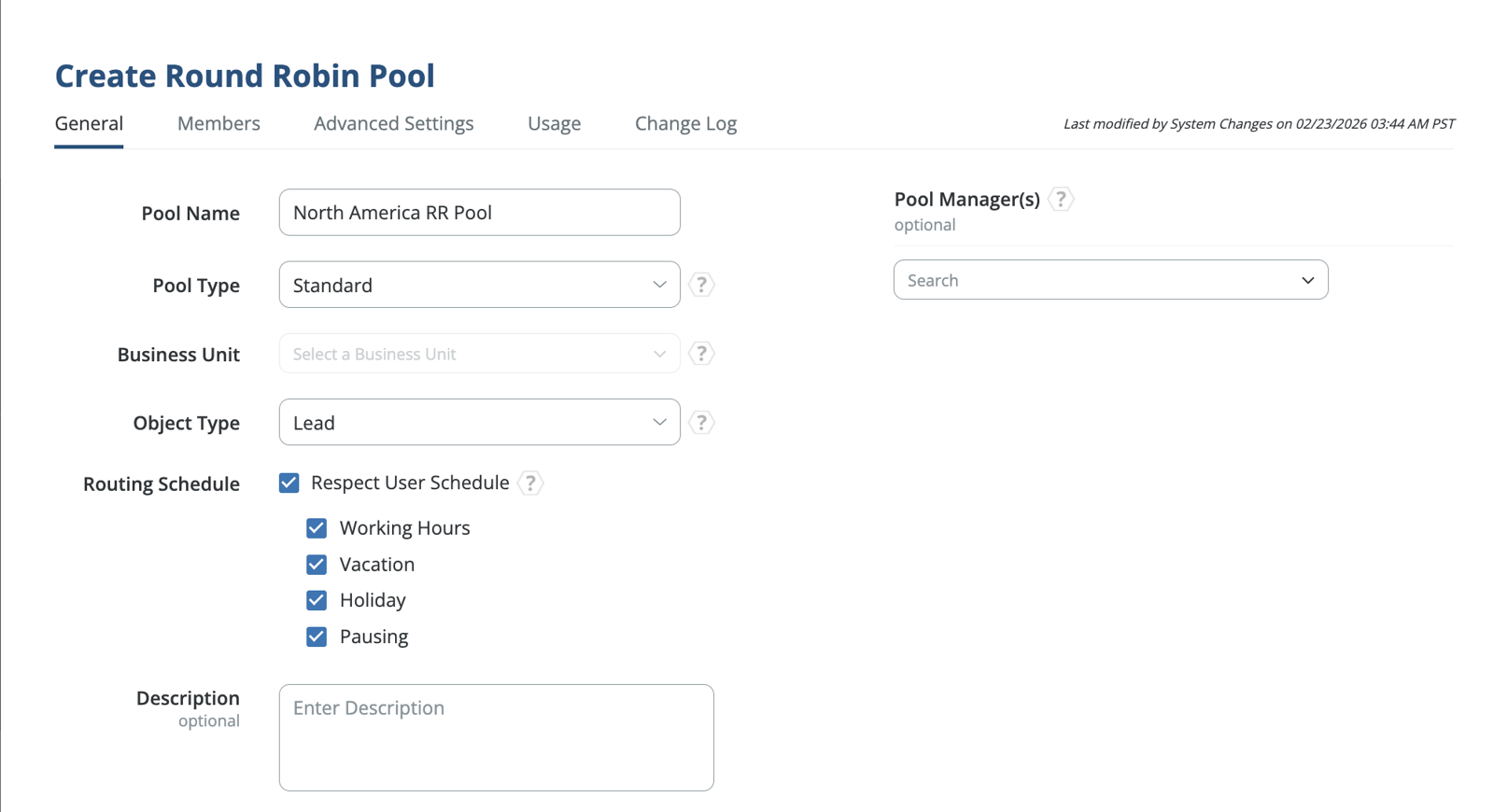
Editions and limits
Scope is the catch: LeanData neither captures nor enriches, so forms and enrichment tools still feed Salesforce first. Standard covers lead-to-account matching and basic routing, Advanced adds contact and account routing, and Premium routes any standard or custom Salesforce object. Conditional pool membership through SOQL queries needs a manual sync and doesn't support queues, and weighted distribution can't be combined with conditional membership. We couldn't confirm routing support for HubSpot from the documentation we read.
- Starting price
- Quote only (Standard, Advanced, Premium editions); setup billed separately
- Round robin
- Order or count based, weighted, with caps
- Runs on
- Salesforce managed package
- Editions
- Standard, Advanced, Premium
- Setup
- Billed separately
Zapier#
Zapier
Zapier is a no-code automation platform that connects 9,000+ apps, and it's the quickest integration layer to set up without engineering help.
Zapier wires lead sources to your CRM, and its Lead Router beta adds rules, round robin and rep capacity limits as a single step.
A trigger from a form tool, an ad lead form or a CRM starts the Zap. The Route Lead action sends the lead into a router where an admin has defined fields, reps, queues and AND/OR rules, plus a required fallback rep for leads that match nothing. Queues distribute by strict or weighted round robin, and per-rep capacity caps stop new assignments once a rep is full. The decision passes to the next step, which creates or updates the CRM record, pings Slack or creates a task.
- marketing ops wants to own its integrations and doesn't have engineering help.
- volumes are moderate and the logic is a trigger, a filter and a few actions.
- you're syncing large record volumes between your automation platform and CRM, where per-task pricing and per-record runs add up.
- IT requires separate development, test and production environments for every integration.
- Users like
- Ease of use
- Users dislike
- Expensive
- Source: G2, 2,089 reviews
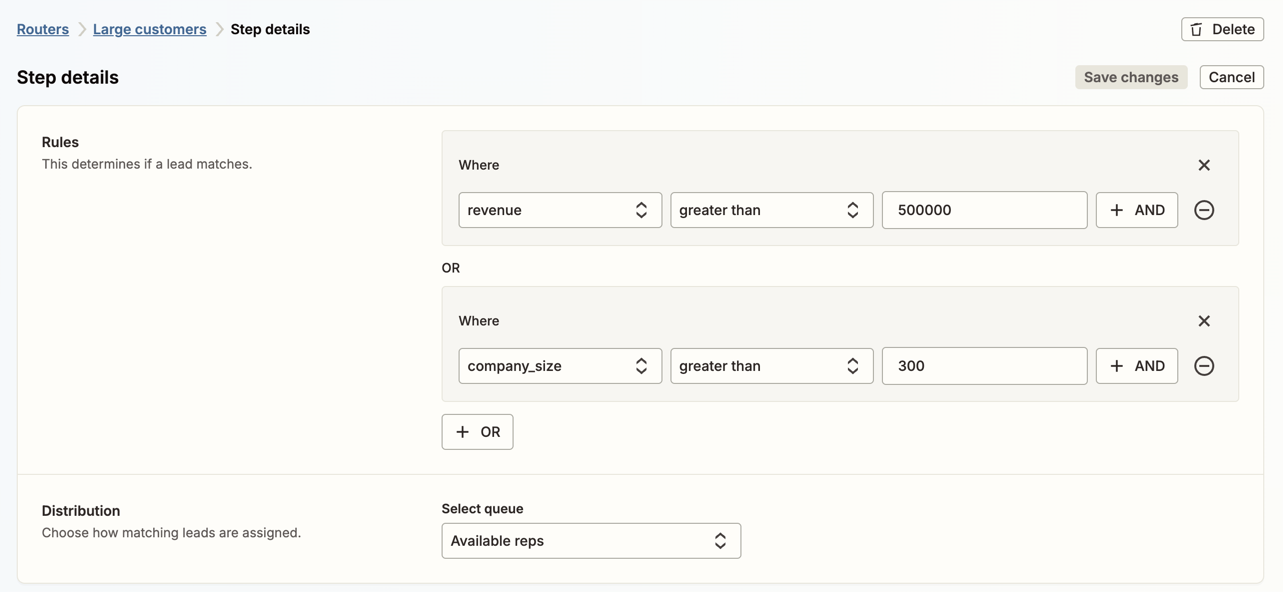
What it costs per lead
Pricing is the thing to model. Every successful action step costs a task, the Route Lead step costs a flat 5 tasks per lead, and multi-step Zaps, which a capture, route and CRM write needs, start on Professional. Polling runs every 15 minutes on Free, 2 on Professional and 1 on Team. We found no native lead scoring in Zapier, and Lead Router is still in beta.
- Starting price
- $19.99 per month for 750 tasks (Professional)
- Free plan
- 100 tasks a month, two-step Zaps
- Professional
- $19.99 a month billed annually, 750 tasks
- Route Lead step
- 5 tasks per lead
Which plan unlocks lead scoring and routing?#
Scoring and routing are where plan tiers bite. The table lists what each vendor's own pages say, so check the plan you're on before you design a process around either feature.
| Tool | Lead scoring | Lead routing or assignment |
|---|---|---|
| HubSpot Sales Hub | Pricing page lists up to 5 scores on Starter and 10 on Professional; the help article names Professional and Enterprise | Rotate record to owner needs Professional or Enterprise |
| Salesforce Sales Cloud | Not on Free, Starter or Pro Suite; Core upward | Assignment rules and Web-to-Lead on every edition; round robin is a workaround |
| Zoho CRM | Scoring rules; Standard covers the Calls channel only | Assignment rules with round robin; imported, web-form and API leads only |
| Close | No native scoring found | Workflow assignment on Growth and Scale only |
| Pipedrive | Scores rate deals only, Premium and above | Routing listed under Premium; rules not documented in what we read |
| Freshsales | Help article says on by default; pricing page lists it under Pro | Round-robin auto-assignment in territories, Pro and above |
| Adobe Marketo Engage | Included in all four packages | Random distribution; round robin by workaround |
| LeanData | Not a scoring tool | Core product; edition sets which objects it routes |
| Zapier | None found | Lead Router beta, 5 tasks per lead |
What does lead management software cost per seat?#
Entry seat prices in this list run from $9 (Freshsales Growth) to $100 (Salesforce Pro Suite) per user per month on annual billing, and the cheapest plans often lack scoring or workflow assignment. Seat count, onboarding fees and per-task billing decide the real bill, so use the calculator to see seat cost at your team size.
Monthly seat cost on annual billing, from vendor pricing pages checked October 19, 2026. Excludes onboarding fees, calling and SMS usage and add-ons.
How do you choose lead management software?#
Ownership beats features here. Five questions cut the shortlist fast:
- Where do leads get scored today? If marketing scores them in one tool and sales works them in another, the sync between the two is your biggest risk, and a CRM that scores natively removes it.
- How many handoffs does a lead cross? One system from form to deal points to a CRM such as HubSpot, Zoho or Close. Several systems point to a routing layer such as LeanData or Zapier.
- How complex is ownership? Territories, account matching and capacity caps outgrow most CRM assignment features, and that's when a routing layer pays off.
- Who administers it? Salesforce, Marketo and LeanData reward a dedicated admin. HubSpot, Close and Pipedrive are built for teams without one.
- What do you pay at your seat count? Use the calculator above, then add onboarding fees, usage billing and the add-on you need for scoring or routing.
For teams under five reps, a CRM with a free or low-cost tier and a human on the routing rule is usually enough. As volume and sources grow, the cost of a lead that sits unworked grows faster than the cost of the routing layer. Our guide to marketing operations software shows where these tools sit in the wider stack, and what marketing operations is explains who should own the lead path. If your leads arrive through campaign links, check that UTM parameters survive the form so the source reaches the CRM. Referral links add one more source to track, and our comparison of referral marketing software shows how eight tools tie a referral to the advocate. Reviews are another source that reaches the lead record, and our comparison of online reputation management software shows which tools connect to HubSpot and Salesforce.
- Every form writes source, campaign and consent fields to the lead record
- A test lead from each form reaches the CRM with those fields filled
- Duplicates are matched before routing, not after
- Each lead has an owner within a set number of minutes, and a fallback owner exists
- Away and over-capacity reps are skipped, and someone checks the result weekly
- The score threshold for a sales-ready lead is written down and agreed by marketing and sales
- Leads with no activity after the agreed window are reassigned or recycled
- One person owns a weekly review of leads with no owner or no first touch
FAQ#
Is lead management part of CRM?
Lead management is part of the CRM in most of these tools. HubSpot, Salesforce, Zoho, Close, Pipedrive and Freshsales all hold the lead record, an owner and the conversion step. LeanData and Zapier exist for the cases where one CRM's assignment feature isn't enough.
Which CRM is best for managing leads?
The best CRM for managing leads depends on who owns the lead. HubSpot Sales Hub fits teams that want one database, Salesforce Sales Cloud fits complex ownership rules, Zoho CRM fits a low budget, Close fits phone-first inbound teams and Pipedrive fits teams that qualify leads by hand before creating deals.
What is the best free software for lead management?
Four options in this list have a free tier or plan: HubSpot's free CRM for up to 2 users, Zoho CRM's free edition for up to 3 users, Salesforce's Free Suite and Zapier's free plan with 100 tasks a month. The free tiers mostly lack scoring and routing, so check the plan table above.
Which tools should I look at first?
The first tools to look at for a CRM-led setup are HubSpot Sales Hub, Salesforce Sales Cloud and Zoho CRM. If you already have a CRM and the gap is scoring or routing, look at Marketo Engage for scoring, LeanData for Salesforce routing and Zapier for connecting sources.
How much does lead management software cost?
Lead management software costs $9 to $35 per user per month for entry CRM plans on annual billing. Workflow assignment or scoring moves you up: Close Growth is $99 and Salesforce Pro Suite $100. Marketo and LeanData are quote only, and HubSpot Professional and Enterprise add a one-time onboarding fee.