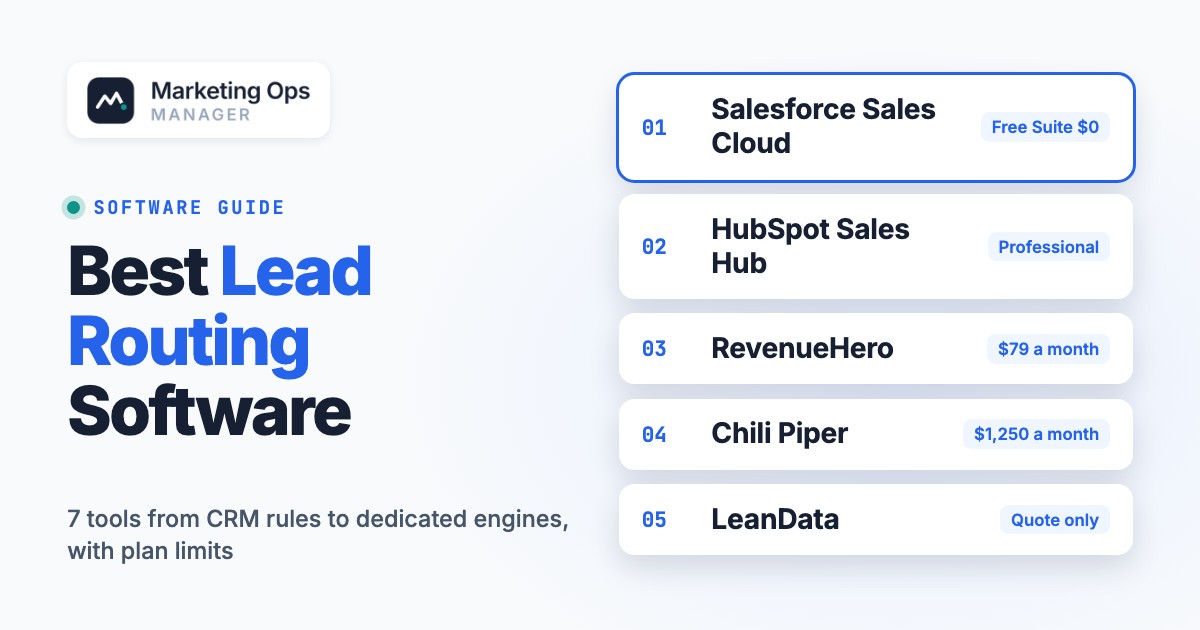
Lead routing software assigns each new lead to the right rep, team or queue by rules such as existing owner, territory, round robin or capacity. It runs between the form and the owner field in your CRM, which is where marketing hands work to sales and where leads quietly go missing.
This guide covers seven tools, sorted from the lightest setup (rules inside Salesforce or HubSpot) to the heaviest (a dedicated matching engine). Each entry says what the tool routes on, where it runs, what it hands off, which plan unlocks it and who should skip it. We read vendor material and didn't run these products.
- tools compared, from CRM-native rules to dedicated engines
- 7
- publish a USD price (LeanData is quote only)
- 6 of 7
- tie routing features to a plan, edition or seat type
- 6 of 7
- per user per month, the lowest published dedicated-router seat price (Distro Essentials, plus a $79 monthly platform fee)
- $22
Our picks by situation#
 Best for a few ordered rules inside SalesforceSalesforce Agentforce SalesAssignment rules send a lead to a user or a queue and cost nothing beyond the CRM, but round robin is a formula workaround.
 Best for even rotation on HubSpot ProfessionalHubSpot Sales HubThe Rotate record to owner action splits records evenly or by round robin, and skips users who are Away.
 Best for published entry pricing on Salesforce or HubSpotRevenueHeroA $79 platform fee plus $25 per seat on Essentials, with ownership checks and weighted round robin on both plans.
 Best for form-to-meeting routing with SLA reassignmentChili PiperMatches the account owner first, books the meeting at form submit and reassigns when the follow-up window passes.
 Best for complex Salesforce routing across objectsLeanDataAccount matching, pools with caps and schedules, and a visual flow, with quote-only pricing.
 Best for forms, enrichment, routing and scheduling in one platformDefaultQueues with fairness or availability logic that respect vacations and calendars, with public annual pricing.
 Best for catching leads that arrive without an ownerThe Marketing Ops ManagerIt doesn't route leads. It checks on a schedule that the form, tracking and CRM owner still work after launch.
Lead routing software compared#
| Tool | Category | What it hands off | Starting price (USD unless noted) |
|---|---|---|---|
| Salesforce Agentforce Sales | CRM-native assignment rules | Web-to-Lead and imported leads in; owned leads converted to account, contact and opportunity out | Free Suite $0; Starter Suite $25 per user per month; Pro Suite $100 (annual) |
| HubSpot Sales Hub | CRM-native rotation | Form, chat and email leads in; scored leads assigned to a rep out | Professional from $90 per seat per month billed annually, plus $1,500 onboarding |
 Distro | Inbound router and scheduler | Form, click or CRM record in, then CRM owner matched or round robin host, meeting booked and owner written back to the CRM | Essentials $22 per user per month billed annually, plus $79 per month platform fee |
| RevenueHero | Inbound router and scheduler | Form, CRM record or enrichment in, rep assigned and meeting booked out | Essentials $79 per month plus $25 per seat (yearly billing) |
| Default | Forms, enrichment, routing and scheduling | Form submit, enrichment, then queue or territory owner in Salesforce or HubSpot, with a meeting booked on the rep's calendar | Growth $12,000 a year plus $540 per routing seat per year |
| Chili Piper | Router and scheduler | Salesforce record or web form in, owner assigned or meeting booked out | Growth $1,250 per month, billed annually, 15 seats |
| LeanData | Matching and routing engine for Salesforce | Salesforce leads in; matched, assigned and SLA-tracked records out | Quote only; setup billed separately |
| The Marketing Ops Manager Our product | Campaign monitoring | Checks every handoff in the campaign journey on a schedule | Starter $199 per month (up to 10 campaigns, checks every 15 minutes), Growth $499 per month (up to 50 campaigns, checks every 5 minutes); billed monthly in advance through Stripe, card required at checkout, cancel anytime (vendor homepage, as of 2026-11-02) |
Prices and limits come from vendor pages read in November 2026. Prices for Default, Chili Piper and Distro are annual. RevenueHero lists monthly billing too, at higher prices.
What is lead routing software?#
Lead routing software is a tool that decides who owns a new lead and hands the lead to that person, based on rules you set. A rule can look at an existing account owner, a region, a company size, a queue of available reps or a per-rep limit. The output is an owner on the CRM record, and in several tools a booked meeting or an alert as well.
It's narrower than lead management software, which also covers capture, scoring and follow-up. Routing answers one question: who gets this lead, right now. Where a lead sits afterward is a matter of lead lifecycle stages.
The first decision is where the routing runs.
| Where routing runs | Examples here | What you get | What you give up |
|---|---|---|---|
| Inside the CRM | Salesforce assignment rules, HubSpot Rotate record to owner | No extra vendor, rules live next to the records | Round robin is a workaround in Salesforce, and HubSpot's rotation needs Professional seats |
| In a dedicated router | Distro, RevenueHero, Chili Piper, LeanData | Owner matching, weights, caps, scheduling or SLA rules | A second contract, and a second place where rules can break |
| In a platform that includes routing | Default | Forms, enrichment, routing and scheduling in one workflow | A platform fee before the first seat |
How do lead routing rules work?#
Lead routing rules are checked in order, and the first rule that applies decides the owner. Salesforce says it directly: the first matching entry assigns the lead and the check stops. Distro runs its ownership rules before its distribution rules and runs each list from top to bottom, so specific rules belong above broad ones.
Seven rule types cover most setups.
| Rule type | What it decides | Example from the tools |
|---|---|---|
| Existing owner | Whether a known account keeps its rep | Distro, RevenueHero and Chili Piper check ownership before they rotate |
| Round robin | Who gets the next lead in a pool | LeanData offers order-based and count-based pools; HubSpot rotates evenly or by round robin |
| Weights | How large each rep's share is | Distro gives a weight of 2 a larger share than 1; RevenueHero's examples are 3 to 1 and 5 to 1 |
| Territory | Which region or segment owns the lead | RevenueHero uses zip-code collections; Default has territory and segment routing in beta |
| Caps | How many leads a rep can take in a period | LeanData caps hourly, daily or weekly; Chili Piper sets limits per rep over a day or custom period |
| Availability | Whether a rep is skipped today | Default's Vacation Mode, HubSpot's Away status, LeanData's Respect User Schedule |
| Fallback | Where a lead goes when nothing matches | Salesforce's default owner; LeanData's End of Flow unless you connect a backup node |
The fallback row is the one teams skip. HubSpot assigns no owner when no eligible user exists. LeanData's round robin exits all default to End of Flow. Distro says a redirect for unqualified prospects isn't a fallback team. Write the fallback rule first, then the rules above it.
Lead routing software, from lightest to heaviest setup#
The seven entries run from rules you already own to engines you configure. The order is by setup weight, not by quality, and no entry is sponsored.
Salesforce Sales Cloud#
Salesforce routes leads with assignment rules: ordered entries that send a lead to a user or a queue. The rules are part of the CRM, so the first question is whether your routing is simple enough to stay there.
Salesforce Agentforce Sales
Agentforce Sales, formerly Sales Cloud, treats a lead as its own object: captured through Web-to-Lead or import, assigned by ordered rules, worked by a rep and converted into account, contact and opportunity records.
Salesforce's built-in assignment rules send a lead to a user or a queue by ordered criteria, with no extra product to buy.
Each rule entry has an order number. Salesforce checks the entries from the top, the first entry that matches assigns the lead, and the check stops there. The target is a user or a queue. A lead that matches nothing goes to a default owner, so a catch-all entry with no criteria at the end of the list is the usual safeguard.
Web-to-Lead forms have a hard limit: you can capture up to 500 leads in a 24-hour period. Overflow waits in a pending queue that Web-to-Case shares, up to 50,000 requests combined, and new requests are rejected once that queue is full.
Prices are per user per month: Free Suite $0, Starter Suite $25, Pro Suite $100, Core $195, Advanced $395 and Max $550, with Pro and above billed annually. Starter Suite lists built-in sales flows and lead routing. Salesforce notes that the page is for information and that detailed pricing comes from sales.
- you already run Salesforce and a handful of ordered rules by region, product or company size cover your routing
- you want the routing rules maintained by the same admin who owns the rest of the CRM
- you need even distribution, because round robin here is a formula workaround that someone has to maintain as reps change
- you expect more than 500 form leads a day, since Web-to-Lead stops capturing past that limit
- Users like
- Ease of use and one place for customer data
- Users dislike
- Steep learning curve and cost
- Source: G2, 27,597 reviews
How it works in practice
Salesforce's help center documents round robin as a workaround, not a setting. It uses an auto-number field on the lead, a formula that turns that number into a rep number, and one rule entry per rep. When a rep joins or leaves, someone edits the formula and the entries by hand.
Tools such as LeanData and Chili Piper work on top of Salesforce to add matching, weights and caps.
- Starting price
- Per user per month: Free Suite $0, Starter Suite $25, Pro Suite $100 (annual), Core $195, Advanced $395, Max $550 (annual)
- Web-to-Lead
- Up to 500 leads per 24 hours
- Routes on
- Lead fields, in ordered rule entries
- Runs in
- Salesforce
- Hands off
- Owner set to a user or a queue
- Round robin
- Formula workaround, no setting
HubSpot Sales Hub#
HubSpot routes with a workflow action inside the CRM, so there's nothing to sync, but the action has plan and seat requirements that surprise teams on lower tiers.
HubSpot Sales Hub
HubSpot Sales Hub keeps captured leads in one CRM database, so forms, lead scores and owner assignment run on the same contact and company records and there is no sync between capture and routing.
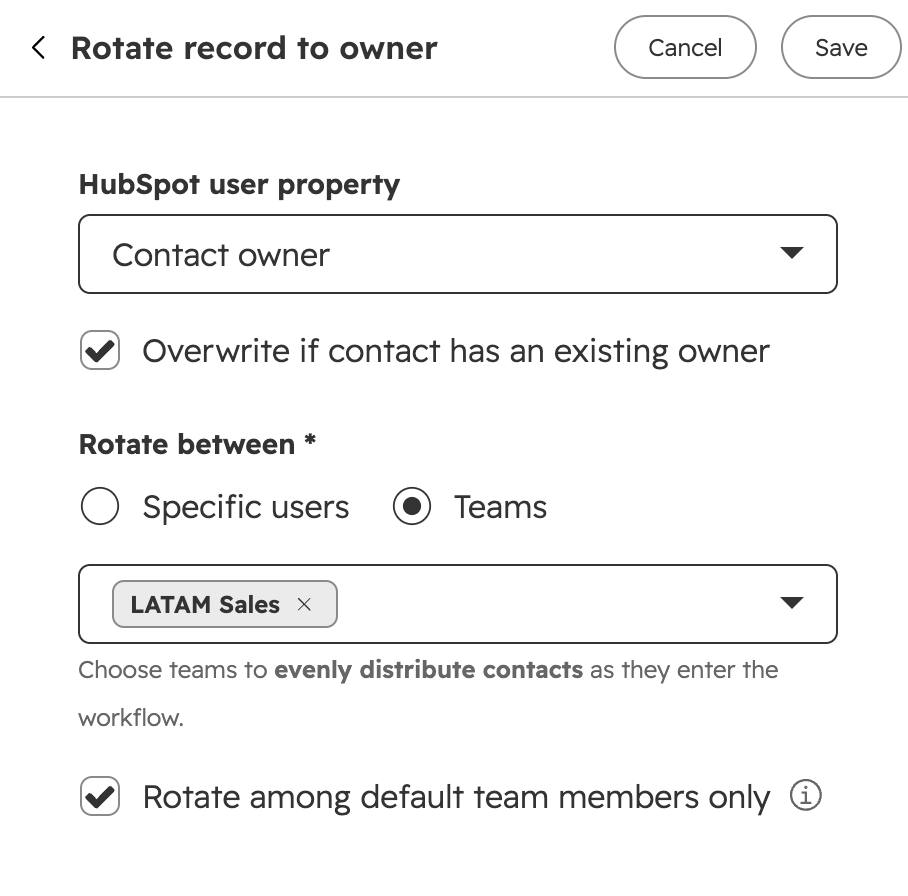
HubSpot routes records with the workflow action Rotate record to owner, which needs Sales Hub Professional or Enterprise.
In a workflow you add the action under CRM, pick the owner property, choose whether to overwrite an existing owner and rotate between specific users or teams. The default rotation splits records evenly. Round robin, load balanced and random options exist for leads and deals (both marked beta) and for tickets. With "assign to available users only" switched on, users set to Away are skipped.
HubSpot's documentation lists limits that matter in practice. If no eligible user is available, no owner is assigned. If all users are Away, the owner is set to "(No owner)". Changing the list of owners after you activate the workflow resets the assignment counts. Only one object type rotates at a time, and the others wait. Assignees need paid Sales Hub or Service Hub Professional or Enterprise seats.
Sales Hub is free for up to 2 users. Professional starts at $90 per seat per month billed annually with a one-time $1,500 onboarding fee, and Enterprise starts at $150 with a $3,500 onboarding fee. Workflows are capped at 300 on Professional and 1,000 on Enterprise.
- your sales team works in HubSpot and an even split, round robin or load balanced rotation is enough
- you already pay for Professional seats and want routing without another vendor
- you are on Starter or Free, because the rotation action starts at Professional
- you need weights, caps per rep or territory rules, which the rotation options in the docs don't include
- Users like
- Easy daily use
- Users dislike
- Cost at scale and advanced features behind higher tiers
- Source: G2, 14,407 reviews
How it works in practice
For lead assignment, HubSpot recommends setting a fallback user, and it says to turn off "Sync lead owner with contact or company owner". If you sync the HubSpot owner property to Salesforce, the rotation action may not work as expected, because Salesforce can restore the previous owner. The routing documentation describes no territory rules, no account matching and no caps per rep.
The rotation itself sends no notification. Add an email or Slack step to the workflow so the new owner hears about the lead.
- Starting price
- Free CRM for up to 2 users; Sales Hub Starter from $7 per seat per month billed annually ($20 billed monthly); Professional from $90 and Enterprise from $150 per seat per month billed annually, with a one-time onboarding fee of $1,500 and $3,500
- Routes on
- Even split, round robin, load balanced or random, by user or team
- Runs in
- HubSpot workflows
- Hands off
- Record owner set
- Plan needed
- Sales Hub Professional or Enterprise
Distro#
Distro is a dedicated router for inbound forms, with public per-user pricing and an owner-first rule order.
Distro
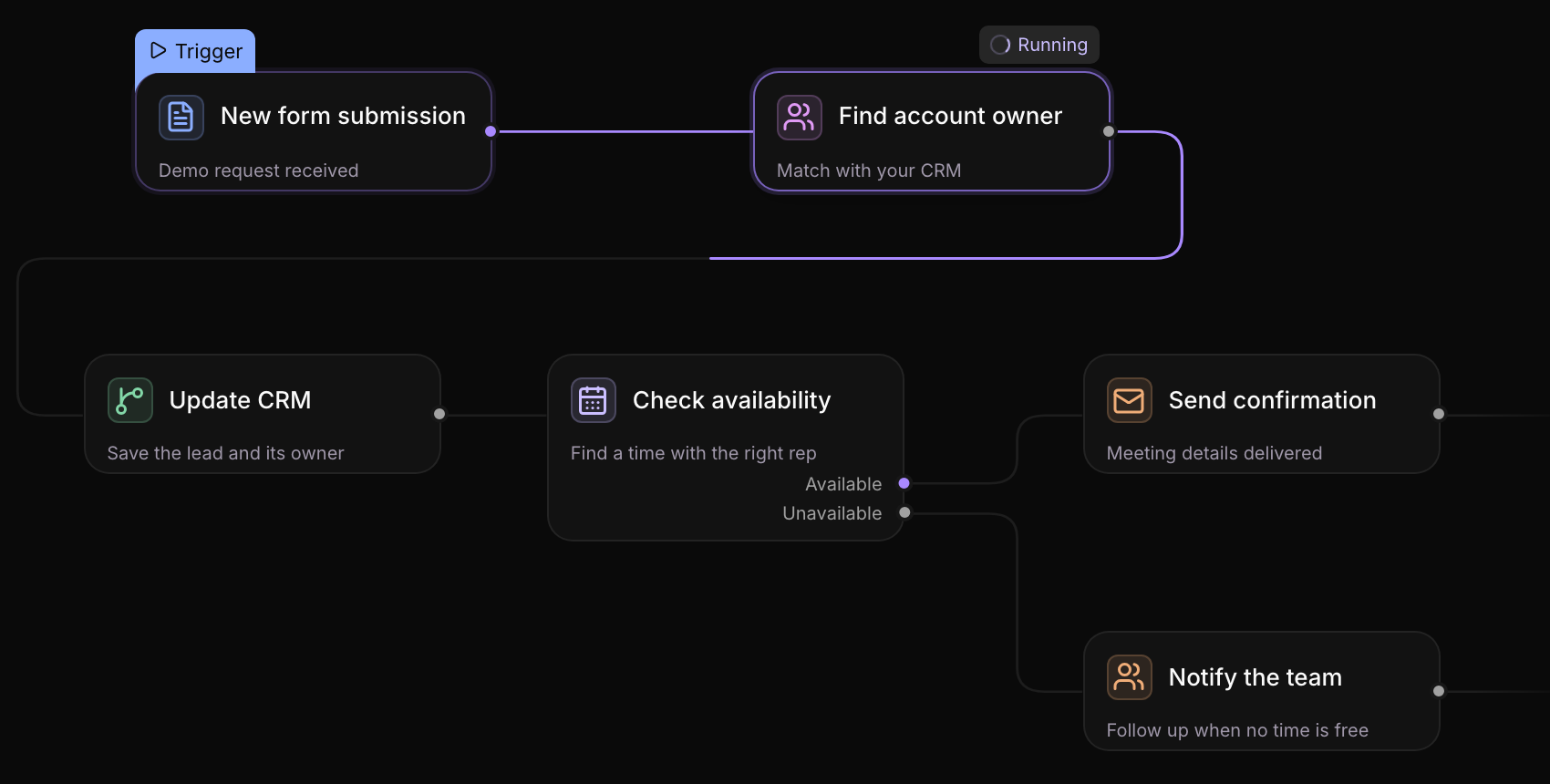
Distro routes inbound form submissions, email clicks and SDR handoffs to the right owner and books the meeting. It matches existing CRM owners first, then distributes with strict or flexible round robin and weights. It works with Salesforce, HubSpot and Google or Outlook calendars.
Distro routes form fills, email clicks and SDR handoffs, honors the existing CRM owner first and books the meeting.
Distro (distro.so) matches the CRM record and company domain to an existing owner before it touches the team rotation. If no owner is found, a territory rule can assign by region, company size or custom conditions built from form answers, CRM fields and enrichment, and distribution rules run in priority order. Round robin runs in a strict or a flexible mode, with weights. Strict picks the host before times are shown. Flexible shows times across eligible teammates and picks the host for the chosen slot.
Pricing is public and per user: Essentials is $22 per user per month billed annually and Enterprise is $32, both with a $79 monthly platform fee. Admin seats are free, and only people who receive meetings need a license. Essentials has CRM matching, weighted round robin, exact account matching and a standard fallback owner. Enterprise adds collective and balanced round robin, fuzzy owner and account matching, matching on custom properties, fallback redistribution and SSO, and it's sold through a sales call. Distro says setup takes about an hour.
- you want existing account owners honored first and weighted round robin for everyone else
- you want per-user pricing with free admin seats, where only meeting receivers pay
- you need fuzzy account matching or collective round robin, which sit in the Enterprise plan
- you need documented caps per rep or SLA reassignment, because the documentation doesn't describe them
How it works in practice
Distro's documentation is specific about order. In the form router, ownership rules run first and distribution rules second, each list runs top to bottom, and specific rules belong before broad ones. An "unqualified" redirect isn't a fallback team: a qualified prospect needs a matching distribution rule. A test route simulates the result without creating records, and you publish a version before installing the snippet on the page.
Two behaviors are easy to miss. A prospect who resubmits the same email within two hours can keep the previous eligible host, and a reschedule uses the original host's availability. Chili Piper also uses the name Distro for its Salesforce routing module, and neither vendor's pages mention the other.
- Starting price
- Essentials $22/user/mo
- essentials
- $22 per user/month, annual billing
- enterprise
- $32 per user/month, annual billing, talk to sales
- platform fee
- $79/month on both plans, admin seats free
- round robin
- Strict and flexible, with weights
- Routes on
- Existing owner, then region, size and form answers
- Runs in
- Salesforce or HubSpot
- Hands off
- Owner written to the CRM, meeting booked
- Round robin
- Strict or flexible, weighted
- Setup
- About one hour (vendor)
RevenueHero#
RevenueHero is a router and scheduler that works with both Salesforce and HubSpot. Its public price has a low floor, and its plan split decides which matching features you get.
RevenueHero
RevenueHero routes inbound leads in Salesforce and HubSpot by checking account ownership first, then rules, territory and weighted round robin, and books the meeting with the right rep.
RevenueHero checks account ownership first, then applies distribution rules, territory and round robin before it books the meeting.
RevenueHero works with Salesforce and HubSpot. It looks up existing ownership across lead, contact, account and custom objects, and it matches contact to domain to company with fuzzy logic. Accounts with no activity in 90 days count as net-new. Territory rules can use zip-code collections, language or book of business, and caps hold across queues, so a limit of five means five in total.
Pricing is public and has two parts. Essentials is $79 a month plus $25 per seat per month on yearly billing ($99 and $35 monthly). Advanced is $159 plus $35 per seat ($199 and $45 monthly). There is no seat minimum, admins are free, and meetings and form submissions are unlimited. Both plans include the routing log, round robin, custom rules, domain matching, rep weights and meeting limits per rep. Fuzzy matching, matching on any CRM property, custom lists, balanced and collective round robin and fallback redistribution are Advanced only.
- you want published pricing with a flat platform fee plus per-rep seats and no seat minimum
- you need balanced or collective round robin and a routing log that shows why each rep got the meeting
- you need documented SLA reassignment or Slack alerts, which the product pages don't describe
- you want advanced matching on the lower plan, since fuzzy and any-property matching are Advanced only
- Users like
- support, ease of use, HubSpot integration
- Users dislike
- complex routing setup, learning curve, missing no-show detection
- Source: G2, 167 reviews
How it works in practice
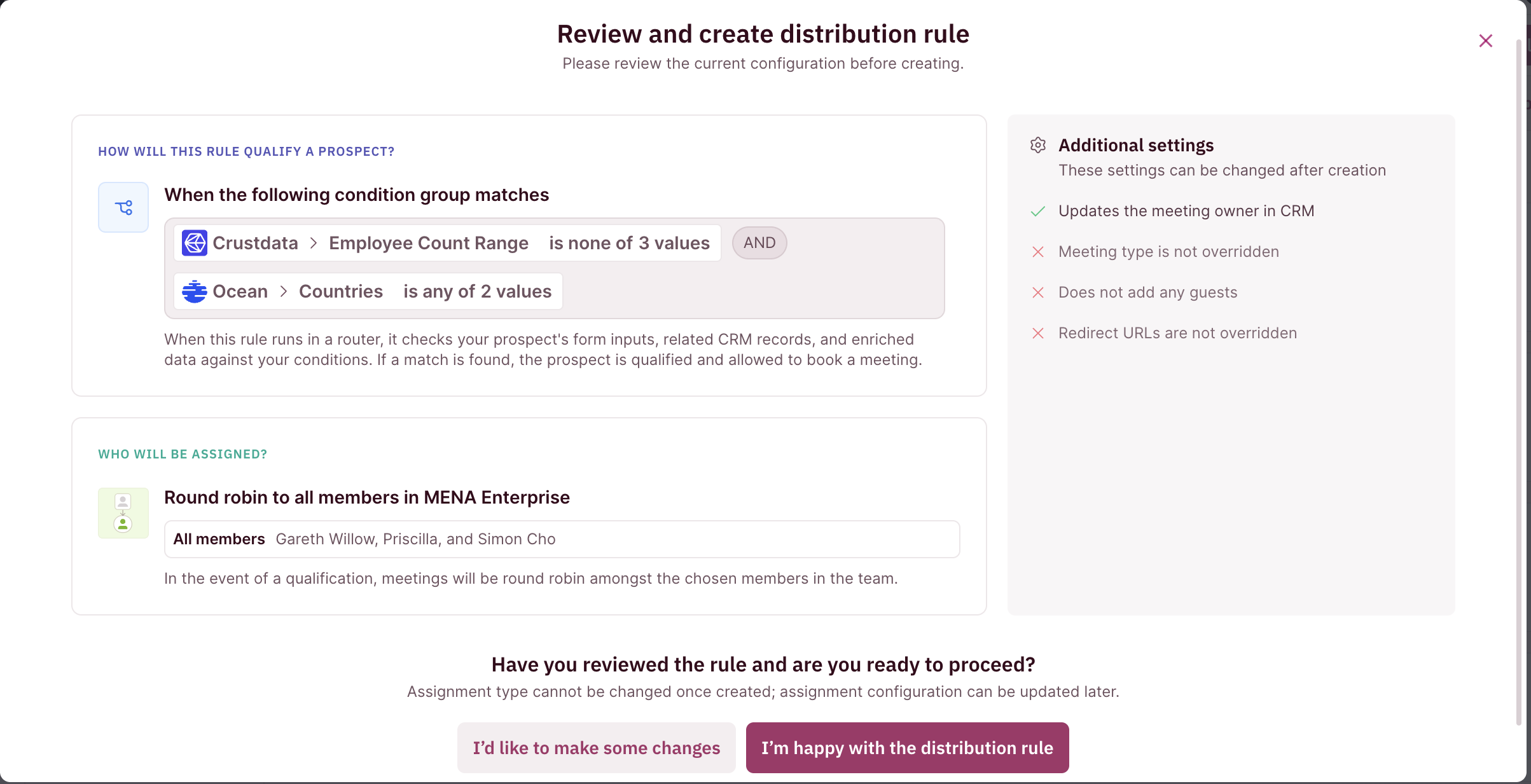
To create a rule, you go to Inbound, then Distribution Rules, and choose round robin with one team or collective round robin, which needs at least two participant groups. Conditions come from a form field, a CRM field or enrichment, combined with AND and OR, and you preview the rule before naming it. A rule then plugs into an inbound or campaign router, which needs a CRM connection and a team.
Balanced round robin is an account-wide setting: you switch it on under Settings, Distribution, and it applies to every rule. Weights are set per member in the rule, with examples such as 3 to 1 or 5 to 1, and credits can be adjusted in the round robin history. Disqualified prospects can be redirected to a self-serve page, a webinar or another team.
- Starting price
- From $79/month plus seats
- billing
- platform fee plus per seat
- round_robin
- strict, flexible, balanced
- limits
- meeting limits per rep on both plans
- crm
- Salesforce and HubSpot
- Routes on
- Account ownership, rules, zip-code territory, weighted round robin
- Runs in
- Salesforce or HubSpot
- Hands off
- Meeting booked, rule and assignee written to the CRM
- Round robin
- Strict, flexible or balanced
Default#
Default treats routing as one step in a workflow that starts at the form. That makes it broader than a pure router and priced like a platform.
Default
Default is a go-to-market platform that combines inbound forms, enrichment, lead routing and meeting scheduling, syncing both ways with Salesforce and HubSpot. Routing uses queues with fairness or availability logic, honors out-of-office and calendar limits, and can route by territory and segment.
Default combines forms, enrichment, routing and scheduling in one platform that syncs both ways with Salesforce and HubSpot.
Default (default.com) is a go-to-market platform, so routing is one part of a workflow that starts at the form. A lead is enriched and scored against your ideal customer profile, then goes to the owner directly or into a queue. Queues come in two types. Max fairness spreads leads evenly among qualified members using priority, meeting count and a calibration value. Max availability shows all open slots first and then assigns by the same fairness logic. A member below 100 percent priority gets fewer leads, which suits a ramping rep, and a negative calibration value gives a rep an extra turn.
Pricing is public, in dollars and billed annually. Growth is $12,000 a year with 24,000 enrichment credits and 200,000 workflow runs. Enterprise is $25,000 a year with 60,000 credits and 600,000 runs. On top of that, a Routing plus Scheduling seat costs $540 per user per year, and a Scheduling-only seat costs $240. Object routing and round robins sit in the first seat type, so routing is gated by seat, not by plan.
- you want forms, enrichment, routing and scheduling in one platform instead of four tools
- you need queue logic that respects out-of-office time, calendars and ramping reps
- you only need simple routing, since the $12,000 platform fee applies before any seat costs
- you need documented caps and no-match fallback rules, because the help center doesn't cover them

How it works in practice
Setup runs through Scheduler, then Queues, then Create a Queue: add members and priorities, then place the queue in a workflow with a Round Robin node. Members on Vacation Mode or disabled can't be assigned, members must accept the invite and connect a calendar, and a canceled or no-show meeting repositions the member in the queue.
Territory and segment routing is a separate feature that Default's documentation labels a premium beta. It needs at least one territory and one segment, each segment maps to exactly one queue, and segments are defined in plain text. A "test lead routing" function checks a lead by email. The routing documentation doesn't describe caps per rep or what happens when no segment matches.
- Starting price
- Growth $12,000/yr plus seats
- plans
- Growth $12,000/yr, Enterprise $25,000/yr
- routing seat
- $540 per user per year (scheduling-only seat $240)
- queue types
- Max fairness and Max availability
- crm
- Salesforce and HubSpot, two-way sync
- Routes on
- Owner, queue fairness or availability, territory and segment (beta)
- Runs in
- Salesforce or HubSpot, two-way sync
- Hands off
- Owner assigned, meeting booked on the rep's calendar
- Queue types
- Max fairness, Max availability
Chili Piper#
Chili Piper pairs routing with meeting booking at form submit. Its pricing page shows a high floor, and its routing pages center on Salesforce.
Chili Piper
Chili Piper routes and schedules inbound leads, matching leads to account owners first and then using weighted round robin with per-rep limits, vacation handling and SLA reassignment.
Chili Piper matches a lead to its account owner, falls back to weighted round robin and can book the meeting at form submit.
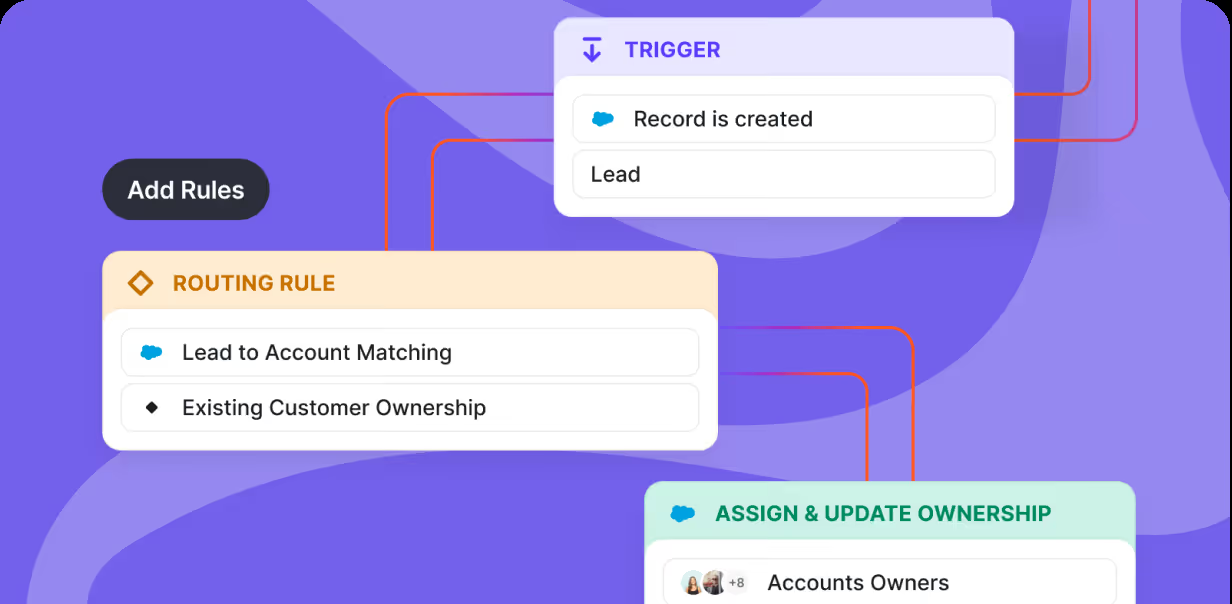
For Salesforce, Chili Piper routes leads, contacts, accounts, opportunities and cases with AND and OR conditions on any field, and triggers on new records, updates or both. It looks for the existing owner first. Records without one go to weighted round robin across eligible reps, with credits and skips for no-shows and cancellations. It reads rep calendars to remove people who are out of office, reassigns a lead when an SLA follow-up window passes without action, and offers a preview mode against real records plus an audit log of each routing decision. Form Concierge qualifies, routes and schedules from a web form so the buyer books on the spot.
Pricing is public and annual only. Growth is $1,250 a month (about $15,000 a year) with 15 seats and $45 for each extra seat. Scale is $3,500 a month with 30 seats and adds routing for visitors by company. Enterprise is by quote with a 250-seat minimum. ChiliCal alone is $12 per user per month and has no routing.
- you route Salesforce leads and contacts and want lead-to-account matching, SLA reassignment and an audit log
- you want form submissions to turn into booked meetings with the right rep on the spot
- your budget is under roughly $15,000 a year, since every plan is billed annually
- you run mainly on HubSpot and need documented HubSpot routing, which the Salesforce routing page doesn't cover
- Users like
- ease of use, scheduling, support
- Users dislike
- price, learning curve, setup troubleshooting
- Source: G2, 749 reviews
How it works in practice
Chili Piper's help center describes three distribution types: meetings, records and conversations. Meeting distributions can be Strict, which always shows the calendar of the rep with the fewest meetings and may limit slots, or Flexible, which shows the combined availability of the team. Limits are set per team member, for example 10 for one rep and 20 for another, over a daily or custom period with a reset time. Once a rep hits the limit, they get nothing until it resets.
The Salesforce routing page doesn't mention HubSpot. Chili Piper's G2 listing shows HubSpot integrations, but if HubSpot routing is your use case, ask for the exact feature list before you sign.
- Starting price
- From $15,000/year
- billing
- annual only
- round_robin
- strict or flexible, weighted
- rep_limits
- per rep, daily or custom period
- standalone_calendar
- ChiliCal $12/user/mo, no routing
- Routes on
- Account owner first, then CRM fields, weighted round robin
- Runs in
- Salesforce (routing page); HubSpot integrations listed on G2
- Hands off
- Owner set or meeting booked, audit log entry
- Round robin
- Strict or flexible, weighted, per-rep limits
LeanData#
LeanData is the heavy end of the list: a matching and routing engine built for Salesforce teams with several objects, territories and account hierarchies.
LeanData
LeanData runs as a managed package inside Salesforce, matches incoming leads to existing accounts and routes them with a visual flow builder. It does not capture or enrich leads itself.
LeanData is a Salesforce-native engine that matches leads to accounts and routes any object through a visual flow builder.
LeanData describes itself as native to Salesforce, installed as a managed package with no external data sync, and it names only Salesforce as its CRM. Its FlowBuilder is no-code and routes leads, contacts, accounts, opportunities and cases with round robin, territory, capacity and fallback logic, plus audit logs. Time-based routing can reroute a record if nobody acts in a set window, with notifications through Slack, email and Microsoft Teams. BookIt handles meeting booking.
Round robin is where the detail is. Pools are order-based, which supports weights and Next-Up, or count-based, where the member with the lowest net count gets the next record. Weights work only on order-based pools. Caps can be hourly, daily or weekly, and a Respect User Schedule setting skips members outside their working hours, vacations and holidays.
Pricing has three editions (Standard, Advanced and Premium) with no public price. Standard covers basic lead routing, Advanced adds contact and account matching and Premium covers any standard or custom Salesforce object. LeanData says package pricing depends on features, objects and the number of Salesforce users or queues, and setup is billed separately.
- you run Salesforce at scale and need account matching, territories and routing across several objects
- you want a visual flow with audit logs that an ops team can change without code
- you run HubSpot as your CRM, since LeanData presents itself as native to Salesforce
- you want a public price, because every edition is quote only and setup is billed on top
- Users like
- Flexible routing and responsive support
- Users dislike
- Complex workflows to maintain and limited testing visibility
- Source: G2, 1,072 reviews
How it works in practice
The Round Robin node in a flow has four named exits: no members available, capping conditions unmet, invalid group and, for best-fit pools, no match. All four default to End of Flow, so a record stops there unless you connect a backup node. Test those exits first.
Other limits from the documentation: queues aren't supported for conditional membership, count-based counts reset on a cadence (the first of the month by default), weight changes don't rebalance past assignments and conditional membership changes apply only on sync. On G2, reviewers put the typical implementation at one to three months.
- Starting price
- Quote only (Standard, Advanced, Premium editions); setup billed separately
- Editions
- Standard, Advanced, Premium
- Routes on
- Account match, territory, capacity, order-based or count-based pools
- Runs in
- Salesforce (managed package)
- Hands off
- Owner set, Slack, Teams or email alert, optional booked meeting
What breaks between a form fill and an owner?#
A routed lead passes through five handoffs. Each one has a failure that doesn't throw an error, which is why it takes days to notice.
- Step 1Form submit
- Distro
- RevenueHero
- Chili Piper
Breaks when a field is renamed or left blank, so the rule that reads it matches nothing - Step 2Enrich and match
- LeanData
- Default
- RevenueHero
Breaks when the lead matches the wrong account or none, and an existing customer's lead enters the rotation - Step 3Assign
- Salesforce Agentforce Sales
- HubSpot Sales Hub
- LeanData
Breaks when no rule matches, so the record lands on a default owner, gets no owner or stops at the end of a flow - Step 4Notify or book
- Chili Piper
- Distro
- Default
Breaks when the owner isn't alerted, or the rep's calendar has no open slot for the buyer - Step 5Check the journey
- The Marketing Ops Manager
Catches a live form still submits but the lead reaches HubSpot with no owner, with the evidence attached
Steps 1 to 4 are the routing tool's job. Step 1 depends on field names, so keep them stable and follow your UTM naming convention for the hidden fields that carry campaign data. Step 3 depends on the owner field, and in a HubSpot and Salesforce setup it also depends on which system owns that field. HubSpot's docs warn that a synced owner property can cause Salesforce to restore the previous owner, so read the HubSpot Salesforce integration guide before you turn on rotation.
Step 5 sits outside all seven tools. The Marketing Ops Manager isn't a router. It checks each journey from the ad to the CRM handoff on a schedule, including the CRM record and the lead owner, and it connects to HubSpot, GA4, Google Ads, Slack, Jira and Asana. Treat it as the check that the routing you built still gets leads to a person, not as a replacement for any tool above.
How do you choose lead routing software?#
Choose by your CRM first, then by the rule that fails today, then by what the routing feature costs on your plan. Four questions separate the seven tools.
- Which CRM owns the lead? Distro, RevenueHero and Default list both Salesforce and HubSpot. LeanData presents itself as native to Salesforce, and Chili Piper's routing page covers Salesforce. HubSpot and Salesforce have their own native routing.
- Which rule is missing? If the gap is even distribution, HubSpot's rotation covers it from Professional. If it's existing-owner matching, weights or caps, look at the dedicated routers. If it's account hierarchies and several objects, look at LeanData.
- What does the feature cost on your plan? Distro keeps fuzzy matching and collective round robin on Enterprise. RevenueHero keeps fuzzy matching, any-property matching and balanced round robin on Advanced. Default prices routing by seat. HubSpot's action starts at Professional.
- Who maintains the rules? LeanData reviewers on G2 point to complex workflows that are hard to maintain, and RevenueHero and Chili Piper reviewers mention a learning curve on setup. Budget admin time, not just license cost.
Start with native routing when your rules fit in a short ordered list and an even split is enough. Add a dedicated tool when you need owner matching, weights, caps or SLA reassignment that your CRM plan can't hold.
| Your situation | Start with | Why |
|---|---|---|
| Salesforce, a few rules by region or size | Salesforce assignment rules with a catch-all entry | Ordered entries to a user or queue, no extra cost |
| HubSpot Professional, even split across reps | HubSpot Rotate record to owner | Round robin, load balanced or random, Away users skipped |
| Salesforce or HubSpot, small team, public pricing wanted | Distro or RevenueHero | $22 per user plus $79 a month, or $79 a month plus $25 per seat |
| Forms, enrichment and scheduling in one tool | Default | Queues with vacation and calendar rules, priced from $12,000 a year |
| Salesforce, form-to-meeting booking and SLA reassignment | Chili Piper | Owner match, weighted round robin and reassignment, from about $15,000 a year |
| Salesforce, many objects, territories and account matching | LeanData | Pools with caps and schedules, visual flow, quote only |
What should you test before routing goes live?#
Seed the router with test leads before real traffic arrives. A routing rule that looks right in the builder can still fail on a blank field or a duplicate account.
- A lead with a known account owner reaches that owner, not the rotation
- A lead from an unmatched company reaches the fallback owner, and someone is alerted
- A lead with a blank or misspelled field still lands on a person
- Two leads in a row go to two different reps when the rule says round robin
- A rep on vacation or set to Away receives nothing for the day
- A rep at their cap is skipped until the limit resets
- The owner field matches in both systems when HubSpot and Salesforce sync
- The new owner gets an alert or a booked meeting without a manual step
- Someone owns a weekly check for leads with no owner
For the wider stack around routing, see marketing operations software, and run the campaign tracking checklist before a launch that sends leads to a new router.
What is lead routing software?
Lead routing software assigns each new lead to a rep, team or queue by rules such as existing owner, territory, round robin or capacity. It runs between the form and the CRM owner field, and some tools also book the meeting or alert the owner.
Do I need lead routing software if I already use HubSpot or Salesforce?
You don't always need lead routing software on top of HubSpot or Salesforce. Salesforce assignment rules send leads to a user or queue by ordered criteria, and HubSpot's Rotate record to owner action rotates evenly or by round robin from Sales Hub Professional. Add a dedicated tool when you need existing-owner matching, weights, caps, scheduling or SLA reassignment.
How much does lead routing software cost?
Lead routing software prices range widely. Distro starts at $22 per user per month plus a $79 monthly platform fee, RevenueHero at $79 a month plus $25 per seat, Default at $12,000 a year plus seats and Chili Piper at $1,250 a month billed annually. HubSpot's rotation needs Professional seats from $90 per month. LeanData is quote only.
What happens when no routing rule matches a lead?
What happens when no routing rule matches depends on the tool. Salesforce sends the lead to a default owner. HubSpot assigns no owner when no eligible user exists. In LeanData's round robin node, the no-match exits end the flow unless you connect a backup node. Test this case before launch.
Which lead routing software works with HubSpot?
HubSpot has native rotation on Professional and Enterprise. Distro, RevenueHero and Default list HubSpot alongside Salesforce. LeanData presents itself as native to Salesforce, and Chili Piper's Salesforce routing page doesn't mention HubSpot.
What is round robin lead routing?
Round robin gives each rep the next lead in a fixed rotation. Variants add weights so one rep gets a larger share, caps so nobody exceeds a limit and availability rules that skip reps who are away.