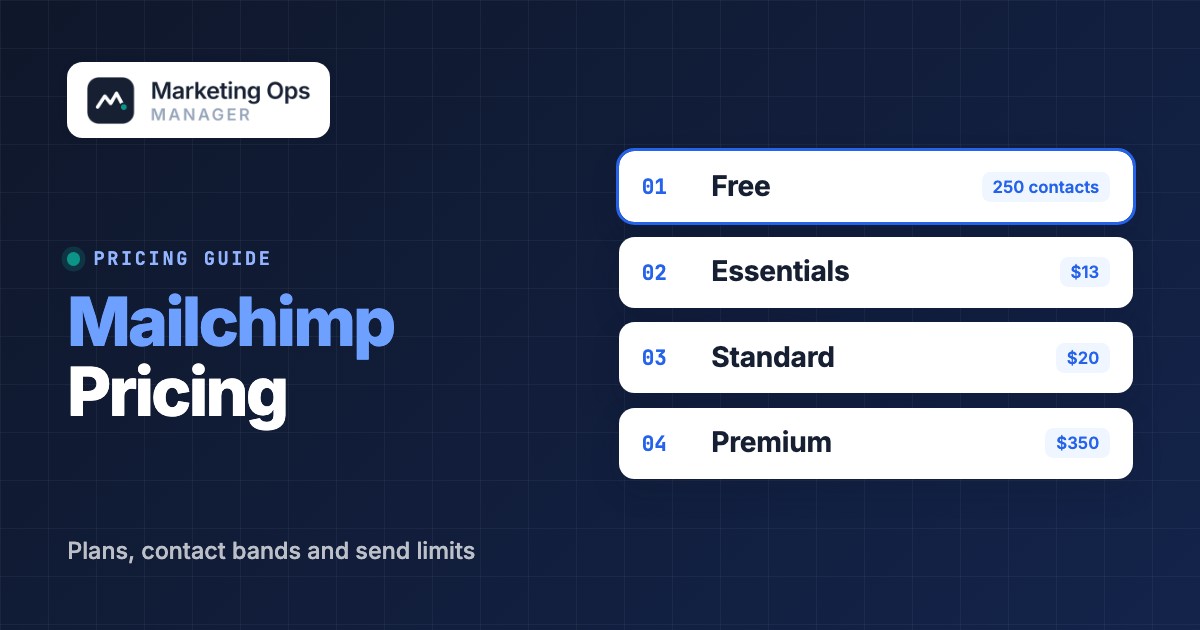
Mailchimp pricing starts at $0 for the Free plan (up to 250 contacts and 500 emails a month). The paid plans start at $13 per month for Essentials, $20 for Standard and $350 for Premium, all quoted for the smallest contact band in US dollars on November 20, 2026. Every paid price rises with your contact count: at 10,000 contacts the same three plans cost $110, $135 and $350 per month, and at 50,000 contacts $385, $450 and $815.
For a marketing operations team the sticker price is the easy part. The harder questions are which contacts count toward the band, what Mailchimp bills when you pass a limit, and whether the 15% offer on larger audiences lasts beyond the first year. It doesn't, and that's where budgets go wrong. This guide answers those with the figures Mailchimp publishes.
- Free covers 250 contacts and 500 emails a month; Essentials starts at $13, Standard at $20 and Premium at $350 per month.
- Price follows the contact band you pick, and the monthly send limit is a multiple of it: 10 times on Essentials, 12 times on Standard, 15 times on Premium.
- Branching automations, send time optimization and custom reports start on Standard. Essentials flows stop at 4 steps.
- Going over a limit on a paid plan doesn't stop sending. Mailchimp bills extra contact blocks instead.
- Essentials tops out at 50,000 contacts for $385 a month and Standard at 100,000 for $800. Above 200,000 contacts you talk to sales.
How much does Mailchimp cost?#
Mailchimp sells four marketing plans. The table shows the price for the smallest paid band (up to 500 contacts), the contact ceiling and the send limit of each plan.
| Plan | Price per month at 500 contacts | Highest contact count | Emails per month | Seats |
|---|---|---|---|---|
| Free | $0 | 250 | 500, and 250 a day | 1 |
| Essentials | $13 | 50,000 ($385) | 10 times the contact limit | 3 |
| Standard | $20 | 100,000 ($800) | 12 times the contact limit | 5 |
| Premium | $350 | Custom above 200,000 | 15 times the contact limit | Unlimited |
- Free$0 /mo, up to 250 contacts
- 500 emails a month, 250 a day
- 1 seat and 1 audience
- Email support for the first 30 days
- No scheduling and no Mailchimp branding removal
- Essentials$13 /mo at up to 500 contacts
- Emails at 10 times the contact limit
- 3 seats and 3 audiences
- Automation flows up to 4 steps
- A/B testing and email scheduling
- Standard$20 /mo at up to 500 contacts
- Emails at 12 times the contact limit
- 5 seats and 5 audiences
- Branching points and multiple flow starting points
- Custom reports, send time optimization, dynamic content
- Premium$350 /mo at up to 10,000 contacts
- Emails at 15 times the contact limit
- Unlimited seats and audiences
- Enterprise SSO and 5 user roles
- Phone and priority support, 4 onboarding sessions
USD prices from Mailchimp's pricing selector and compare-plans page, read on November 20, 2026. Standard and Essentials show their price for the smallest band; the Premium price of $350 holds for every band up to 10,000 contacts.
Mailchimp additionally lists a 14-day free trial of Standard or Essentials, and there's a one-month Premium trial that you'll request through sales. Billing needs valid payment details at sign-up, but cancelling during the trial means no charge.
What does the Mailchimp Free plan include?#
Free is capped at 250 contacts and 500 emails a month, with a daily limit of 250. It's got one seat, one audience and no email scheduling, and the Mailchimp logo stays in your emails. Pre-built templates are limited, A/B testing isn't available and reporting is basic. Email support runs for the first 30 days only.
The cap is clearly a hard one. On the Free plan, going over 250 contacts doesn't produce a bill, but sending is held until you upgrade or reduce the contact total. That makes Free a sandbox: build a signup form, a welcome email and a first campaign, not a production setup.
What do Essentials, Standard and Premium cost at different list sizes?#
Mailchimp's selector offers 20 contact bands, from 0 to 500 up to more than 1,000,000. The prices below are the monthly list prices for the bands up to 50,000 contacts, in USD. Each count rounds up to the next band.
| Contacts | Essentials | Standard | Premium |
|---|---|---|---|
| Up to 500 | $13 | $20 | $350 |
| 501 to 1,500 | $26.50 | $45 | $350 |
| 1,501 to 2,500 | $45 | $60 | $350 |
| 2,501 to 5,000 | $75 | $100 | $350 |
| 5,001 to 10,000 | $110 | $135 | $350 |
| 10,001 to 15,000 | $180 | $230 | $465 |
| 15,001 to 20,000 | $230 | $285 | $535 |
| 20,001 to 25,000 | $270 | $310 | $620 |
| 25,001 to 30,000 | $300 | $340 | $685 |
| 30,001 to 40,000 | $340 | $410 | $750 |
| 40,001 to 50,000 | $385 | $450 | $815 |
Beyond 50,000 contacts there's no Essentials option: only Standard and Premium remain. Standard costs $630 for 50,001 to 75,000 contacts and $800 for 75,001 to 100,000, which is its ceiling. Premium costs $900, $1,025, $1,150, $1,325 and $1,600 for the bands that end at 75,000, 100,000, 130,000, 150,000 and 200,000 contacts. Above 200,000 contacts you'll get a quote for a custom Premium or high-volume plan.
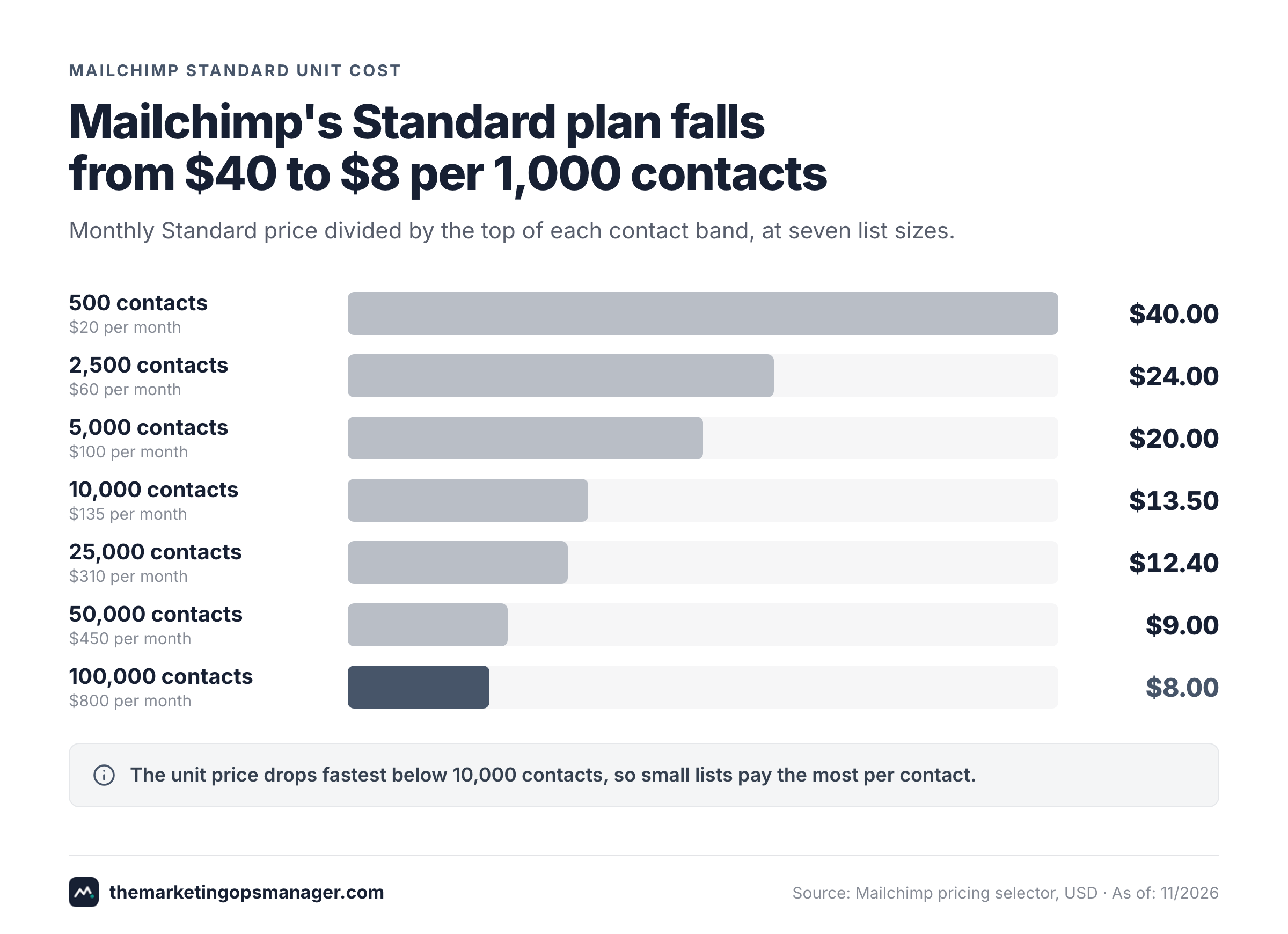
Monthly list prices from Mailchimp's pricing selector on November 20, 2026, in USD. Each contact count rounds up to the next band. The 15% first-year offer, SMS credits and add-ons are not included.
How much more does Standard cost than Essentials?#
The gap is $7 a month at 500 contacts, $15 at 2,500, $25 at 5,000 and $50 at 15,000. At 50,000 contacts it's $65. A team at 5,000 contacts pays $300 more per year for Standard. In return, you get branching in automations, send time optimization, custom reports, multivariate tests and predictive segmentation. If you send a monthly newsletter and one welcome flow, that $300 buys capabilities you'll never touch, whereas a lifecycle team would pay it without blinking.
What does Premium add for $350?#
Premium costs the same $350 from zero to 10,000 contacts, so it's $250 more than Standard at 5,000 contacts. At 10,000 contacts the difference is $215. The extra money buys 15 times the contact limit in sends (150,000 emails a month at the 10,000 band against 120,000 on Standard), unlimited seats and audiences, Enterprise SSO, five user roles, phone and priority support, four onboarding sessions and access to the Premium migration service. The compare-plans page also lists customer success management as included, whereas Standard and Essentials get it only from 30,000 contacts upward.
How do contact bands and limits work?#
Mailchimp bills for the contacts stored in your account, not for the people you email, and that's an important difference. Subscribed, unsubscribed and non-subscribed contacts all count. Archived and cleaned contacts don't. The help center says your bill reflects the highest number of contacts stored in the account during the month, so an import that briefly pushes you over a band can raise the month's bill, even if you delete the rows afterwards.
Each plan caps audiences as well: one on Free, three on Essentials, five on Standard and unlimited on Premium. Teams that don't share one list across brands, but run several audiences, should price the combined contact count, not the largest list, and check the audience cap of the plan.
What happens when you go over a limit?#
On a paid plan, nothing stops. Mailchimp's help center says that exceeding the contact or send limit doesn't interrupt service and instead adds an add-on contact block to the bill, and if you exceed the limit by more than one block covers, you pay for several blocks. A block adds contacts and the matching sends at your plan's ratio: in the help center's example, a block of 1,000 contacts on Standard adds 12,000 sends. Block prices differ by plan and tier, and Mailchimp shows them inside the account when you set a contact limit. They aren't listed in the help article. The pricing page's footnote says additional costs apply when either limit is exceeded.
The send limit is the one teams definitely miss. At 2,500 contacts the Standard limit is 30,000 emails a month. A weekly newsletter to a full list uses 10,000. Add a three-email welcome flow, a cart reminder series and promotional campaigns, and the total creeps up, although it still looks harmless on a calendar. A team that emails the full list daily passes the limit on the 13th day of the month. Test and transactional sends count toward the limit as well.
Does the 15% discount last?#
Mailchimp advertises 15% off for 12 months, shown with an audience of more than 10,000 contacts, and it also applies when you move to Essentials or Premium. At 10,001 to 15,000 contacts Standard drops from $230 to $195.50 a month, Essentials from $180 to $153 and Premium from $465 to $395.25. After month 12 the regular price returns, so the first-year saving on Standard at that band is $414 and the renewal price is the full $230.
Budget the regular price as the steady state, even though the first invoices look friendlier, and treat the offer as a one-time credit, not as a rate. Write the end date in the plan notes, and ask finance to approve the renewal figure at purchase.
What are the annual plan, nonprofit and pay-as-you-go options?#
Three alternatives to the monthly plan exist. Annual plans aren't self-serve. They're available for Standard and Premium with more than 10,000 contacts, and pricing and eligibility come from sales. Nonprofits and charities get 15% off if they register a free account and contact Mailchimp's billing team with a link to the organization's site. Infrequent senders can buy email credits instead of a monthly plan, which suits an organization that's sending a few campaigns a year, not a program with workflows.
Which extras are billed separately?#
SMS marketing is an add-on for paid plans in selected markets. You'll apply for it first, and after approval you buy credits in blocks that renew with your billing date. Unused credits expire each month and don't roll over, so you'll want to size the block to your real volume. MMS is available on Standard and Premium for contacts in the US and Canada. Transactional email is another add-on, and its price varies on Standard and Premium, and Essentials gets a demo only. Premium migration services are quoted by sales and available for the first 30 days after an account opens.
Which Mailchimp plan fits your situation?#
- Testing a signup form and a first campaignFree: up to 250 contacts and 500 emails a month.
- A newsletter with simple automations under 50,000 contactsEssentials: flows up to 4 steps, A/B testing and scheduling, from $13.
- Branching journeys, send time optimization, custom reportsStandard: from $20, up to 100,000 contacts.
- Several brands, SSO, phone supportPremium: from $350, unlimited seats and audiences.
- More than 200,000 contacts or high send volumeAsk sales for a custom plan.
What do sample Mailchimp budgets look like?#
The annual figures below multiply the monthly list price by 12 and leave out the 15% offer, SMS and Transactional email.
| Scenario | Plan | Monthly | Per year |
|---|---|---|---|
| Newsletter, 2,500 contacts | Essentials | $45 | $540 |
| Ecommerce store with flows, 5,000 contacts | Standard | $100 | $1,200 |
| Growing B2B list, 10,000 contacts | Standard | $135 | $1,620 |
| Same list, SSO and phone support needed | Premium | $350 | $4,200 |
| Retail list, 25,000 contacts | Standard | $310 | $3,720 |
| Multi-brand list, 50,000 contacts | Premium | $815 | $9,780 |
How can you lower the bill?#
Start with the contact band, because every other number hangs off it. Segment contacts who haven't opened or clicked, then archive them, which removes them from the count. They're not billable once archived. Run that review before the billing date and before a band edge, since it's too late afterwards. Merge duplicate records across audiences, so one subscriber isn't billed twice. Check whether you're using Standard-only features such as branching and custom reports. If your flows stay under 4 steps and you don't run multivariate tests, Essentials saves $25 a month at 5,000 contacts. Last, compare send volume to the 10-, 12- or 15-times limit each quarter so an extra block doesn't appear unnoticed.
How does Mailchimp pricing compare with alternatives?#
Mailchimp bills by contacts, with a monthly send cap. As our Klaviyo pricing guide shows, Klaviyo's Email plan costs $150 per month at 10,000 active profiles and $720 at 50,000, against $135 and $450 for Mailchimp Standard at the same counts. They meter differently, since Klaviyo counts active profiles only, so compare at your real list size. Our guides to Klaviyo pricing, Klaviyo vs Mailchimp, Mailchimp alternatives and ActiveCampaign pricing make that comparison in detail.
Is Mailchimp free?
Yes, within limits. The Free plan allows 250 contacts and 500 emails a month, with a cap of 250 a day. Going over 250 contacts holds sending until you upgrade or reduce the list.
How much does Mailchimp cost per month?
On November 20, 2026 Essentials started at $13, Standard at $20 and Premium at $350 per month in USD. At 10,000 contacts they cost $110, $135 and $350.
Does Mailchimp charge for unsubscribed contacts?
Yes. Subscribed, unsubscribed and non-subscribed contacts count toward the plan. Archived and cleaned contacts don't.
What happens if I exceed my Mailchimp contact or send limit?
On a paid plan sending continues and Mailchimp bills extra contact blocks. On the Free plan sending is held until you upgrade or cut the list.
Is the 15% Mailchimp discount permanent?
No. It applies for 12 months, and the regular price returns afterwards.
Does Mailchimp charge extra for SMS?
Yes. SMS is an add-on to a paid plan in selected markets, bought as monthly credits that expire if unused.
Bottom line on Mailchimp pricing#
Mailchimp is cheap to start but definitely expensive to scale. The free plan is a test bed, Essentials at $13 covers a simple newsletter, and Standard at $20 adds the automation and reporting a lifecycle program needs. The bill that matters is the one at your list size: $135 per month at 10,000 contacts on Standard, $310 at 25,000 and $450 at 50,000, before SMS and extras. Archive inactive contacts before a band edge, budget the regular price and not the 15% offer, and check your send volume against the 12-times limit.
Prices were read from Mailchimp's own pricing and compare-plans pages and its help center on November 20, 2026. We didn't run the product, so confirm the price for your contact band in the selector before you buy.