The best Mailchimp alternative depends on why you're leaving. If the bill grows faster than the list, you want a different billing metric. If automations hit a ceiling, you want a deeper builder. If your CRM sits outside Mailchimp, you want a tool that syncs with it. This page starts with those reasons, names the tool and the plan that fixes each one, and then covers the part most alternatives lists skip: what moves over from Mailchimp and what you have to rebuild.
We compared seven tools: Brevo, MailerLite, Omnisend, Klaviyo, ActiveCampaign, HubSpot Marketing Hub and Kit. For each one we read the pricing page, a feature page, a help-center article and G2's pros and cons summary, all on October 30, 2026. We didn't run hands-on tests, and we say where a number wasn't published. If you're choosing a platform from scratch rather than leaving one, our guide to marketing automation software is the better starting point.
Which Mailchimp alternative fits why you're leaving?#
The Mailchimp alternative that fits depends on why you're leaving, because each of these seven fixes a different problem and creates a different one. The picks below name the number that decides it.
 Best for a lower bill at the same list sizeMailerLiteAt 5,000 subscribers Comfort is $49 a month on monthly billing. Mailchimp's Standard plan at the same list size shows $100.
 Best for a big list you email rarelyBrevoBrevo bills on emails sent, not contacts. Free allows 300 emails a day and Standard is $18 at 5,000 emails a month.
 Best for a store that wants email and SMS in one flowOmnisend15+ preset workflows for cart, checkout and order events, with SMS billed per message on top of the plan.
 Best for flows built on store dataKlaviyoTriggers on purchases, price drops and low inventory. Cost follows active profiles, a common G2 complaint.
 Best for deeper automation and a two-way Salesforce syncActiveCampaignMulti-step automation from Starter, $79 a month at 5,000 contacts billed yearly.
 Best if HubSpot is your CRMHubSpot Marketing HubEmail and CRM share one database, so there's no sync to break. Professional starts at $800 a month plus onboarding.
 Best free plan for a large newsletter listKitFree up to 10,000 subscribers, but no visual automations or sequences until Creator.
 Our product · for the gaps after the switchThe Marketing Ops ManagerIt isn't an email platform. It checks that forms, tracking and CRM handoffs still work after you move.
Why do teams leave Mailchimp?#
Mailchimp, listed on G2 as Intuit Mailchimp Email Marketing, bundles email campaigns, automation flows, forms and audiences, and teams leave it because the bill grows with the contact count, the free plan is small, and automation depth sits on the higher tiers. G2 gives Mailchimp 4.3 out of 5 from 12,997 reviews, and ease of use is its most common praise, with 140 mentions. The complaints are where the switching reasons show up.
The documented limits explain the first complaint. Mailchimp's Free plan lists 250 contacts, 500 sends a month with a cap of 250 a day, and one seat. Paid plans bill on contacts, and the help center says subscribed, unsubscribed and non-subscribed contacts all count toward the total, while archived, cleaned and deleted contacts don't. On the pricing page, the Standard plan at the 2,501 to 5,000 contacts tier shows $100 a month and up to 60,000 emails. Essentials flows are limited to four steps, Standard and Premium allow up to 200 flow points, and A/B and multivariate testing and phone support are listed on Premium.
The handoff to a CRM is the other pressure point. Mailchimp lists its Salesforce integration as an app built by Beaufort 12, a third-party vendor, with a two-way sync from $25 a month per Salesforce org. We found no HubSpot integration page on Mailchimp's side. HubSpot's own knowledge base describes a one-way sync from HubSpot forms to Mailchimp that carries first name, last name and email.
Mailchimp alternatives compared#
The table lists Mailchimp first, so every row reads as a trade against it. Prices are the starting prices each vendor publishes, and review scores are G2 ratings out of 5 with the review count.
| Tool | Where your data goes | Starting price (USD) | G2 rating |
|---|---|---|---|
 Mailchimp | Flows triggered by tags, signups and store events; Salesforce through a third-party app | Free under 250 contacts; Essentials from $13, Standard from $20 and Premium from $350 per month, priced by contacts with a monthly send cap; 14-day trial on paid plans | 4.3 (12,997) |
| Brevo | Workflows on lists, events and site tracking; two-way HubSpot and Salesforce sync on Professional and up | Free with 300 emails a day; at 5,000 emails a month Starter is $9 and Standard $18 on monthly billing; Professional from $499 at 150,000 emails; automation workflows start at Standard | 4.5 (2,776) |
| MailerLite | Automations with webhooks; Shopify, WooCommerce and Zapier built in, HubSpot as a partner integration | Free up to 250 subscribers; Comfort from $12 and Power from $25 per month at 500 subscribers; at 5,000 subscribers Comfort is $49 and Power $69 a month ($44.10 and $62.10 billed yearly); 14-day trial of premium features without a card | 4.6 (1,114) |
| Omnisend | Store events from Shopify, BigCommerce and WooCommerce to email, SMS and push | Free for 250 contacts and 500 emails a month; Standard from $11.20 and Pro from $41.30 per month as shown on the pricing page (plan lists show 500 and 2,500 contacts); Enterprise custom; SMS billed per message | 4.6 (1,257) |
| Klaviyo | Store orders and onsite events to email and SMS flows; Salesforce data flows in one way | Free up to 250 active profiles; email from $20 per month for 251 to 500 profiles; SMS and other mobile messages billed per message | 4.6 (1,371) |
| ActiveCampaign | Event and site tracking to automations; two-way Salesforce sync | Billed yearly, per month at 1,000 contacts: Starter $15, Plus $49, Pro $79, Enterprise $145; Pro rises to $375 at 10,000 contacts; no free plan, 14-day trial | 4.4 (14,841) |
| HubSpot Marketing Hub | Forms and workflows on HubSpot CRM records | Free tools for up to 2 users; Starter $20 per seat per month list ($7 for new customers in a limited promotion); Professional from $800 per month ($890 struck through on the page) plus required $3,000 onboarding; Enterprise from $3,600 per month plus required $7,000 onboarding | 4.4 (16,036) |
| Kit | Tag-based automations on sign-ups, clicks and purchases | Free up to 10,000 subscribers with 1 user and no visual automations or sequences; Creator $33 per month at 1,000 subscribers ($390 a year); Creator Pro $50 a month promo price ($66 list) at 1,000 subscribers | 4.4 (236) |
| The Marketing Ops Manager Our product | Checks every handoff in the campaign journey on a schedule | Starter $159/month billed annually ($199 monthly), Growth $399/month billed annually ($499 monthly), Enterprise custom; signup is invite-only and needs an access code, then every plan starts with a 14-day trial, no credit card | No reviews yet |
Prices checked on vendor pages on October 30, 2026 (Klaviyo October 18, 2026), on annual billing where the vendor shows it. G2 counts: Mailchimp 12,997, Brevo 2,776, MailerLite 1,114, Omnisend 1,257, Klaviyo 1,371, ActiveCampaign 14,841, HubSpot Marketing Hub 16,036, Kit 236.
What a plan counts matters as much as what it costs, because the same list can produce very different bills. This table shows the billing metric of each tool and the price listed at 5,000 contacts. Where a vendor didn't publish that price, the cell says so, because the third-party price lists we found disagreed with one another.
| Tool | Billing metric | What counts toward it | Price read at about 5,000 contacts |
|---|---|---|---|
| Mailchimp | Contacts | Subscribed, unsubscribed and non-subscribed contacts count; archived, cleaned and deleted ones don't | Standard $100 a month, monthly billing, up to 60,000 emails |
| Brevo | Emails sent | Sends, not list size; the email tier chosen sets the plan | Standard $18 at 5,000 emails a month, monthly billing |
| MailerLite | Active subscribers | Unsubscribed and bounced don't count, but any address active during a billing cycle counts until it resets | Comfort $49 monthly ($44.10 yearly), Power $69 monthly ($62.10 yearly) |
| Omnisend | Contacts | Unsubscribed contacts aren't billed; email caps are a second limit | Not published at 5,000 on the pricing page |
| Klaviyo | Active profiles | Any profile that can be emailed, including checkout contacts who never opted in; suppressed profiles don't count | Not read: the calculator needs a manual lookup |
| ActiveCampaign | Contacts | Price scales with list size | Starter $79, Plus $145, Pro $205, Enterprise $375 a month, billed yearly |
| HubSpot Marketing Hub | Marketing contacts | Only contacts set as marketing contacts count | Professional includes 2,000 marketing contacts; 5,000 not read |
| Kit | Confirmed subscribers | Soft bounces and subscribers who haven't opened or clicked in 90 days still count | Not published at 5,000 on the pricing page |
The 7 best Mailchimp alternatives#
Every entry below follows the same order: what your Mailchimp setup becomes, what the bill counts, where the data goes, and who should skip it. G2 numbers come from the pros and cons published pages, with the date on the card.
Brevo#
Brevo
Brevo prices on emails sent, not contacts, and bundles email, SMS, WhatsApp and a sales CRM. Unlimited multi-step workflows start on the Standard plan.
Brevo fits a team with a large list that mails it a few times a month, because the plan follows emails sent instead of contacts.
What your Mailchimp setup becomes: Brevo's migration guide says contacts, tags, lists, segments and templates transfer, and automations and reports don't. You rebuild flows as workflows, which trigger on lists, events and website tracking. Unlimited multi-step workflows start on Standard, and re-entry is off by default, so each contact passes through a workflow once unless you change that setting.
What the bill counts: emails sent. Free allows 300 emails a day, and at 5,000 emails a month Starter is $9 and Standard $18 on monthly billing. A list of 20,000 contacts mailed twice a month is 40,000 emails, so run your own send plan against the tiers before you compare it with a per-contact price.
Where the data goes: Brevo bundles email, SMS, WhatsApp and a sales CRM. The two-way HubSpot and Salesforce sync is limited to Professional and Enterprise accounts and is set up with Brevo's Enterprise team, so a team that needs a native CRM sync on a small plan won't get one here.
- you have a large list but send rarely, so pricing on email volume beats pricing on contacts
- you want email, SMS and a CRM in one tool at a low entry price
- you need self-serve native Salesforce sync: it is limited to Professional and Enterprise accounts and set up with Brevo's Enterprise team
- you send weekly to a large list, where the volume-based plans climb fast
- Users like
- Ease of use (314 mentions)
- Users dislike
- Missing automation features and design limits (107 mentions); expensive with rising SMS costs (55)
- Source: G2, 2,776 reviews
- Starting price
- Free with 300 emails a day; at 5,000 emails a month Starter is $9 and Standard $18 on monthly billing; Professional from $499 at 150,000 emails; automation workflows start at Standard
- Billing metric
- Emails sent per month
- Free plan
- 300 emails a day
- Workflows
- Unlimited multi-step workflows from Standard
- Re-entry
- Off by default, one entry per contact
- CRM sync
- HubSpot and Salesforce two-way, Professional and Enterprise, set up with Brevo's Enterprise team
- Mailchimp import
- Brevo's migration guide says contacts, tags, lists, segments and templates transfer; automations and reports do not
MailerLite#
MailerLite
MailerLite prices by active subscribers and gives every paid plan the full feature set. Comfort includes the automation builder, dynamic content and full API access, and multiple automation triggers wait for Power.
MailerLite fits a team that wants a visual automation builder and a smaller bill, and that can live with fewer native CRM connectors.
What your Mailchimp setup becomes: MailerLite's switching guide says subscribers, tags (which become groups) and static-field segments come across. Behavioral and ecommerce segments, automations, templates, forms and landing pages have to be rebuilt by hand, and the guide doesn't say whether campaigns and reports migrate.
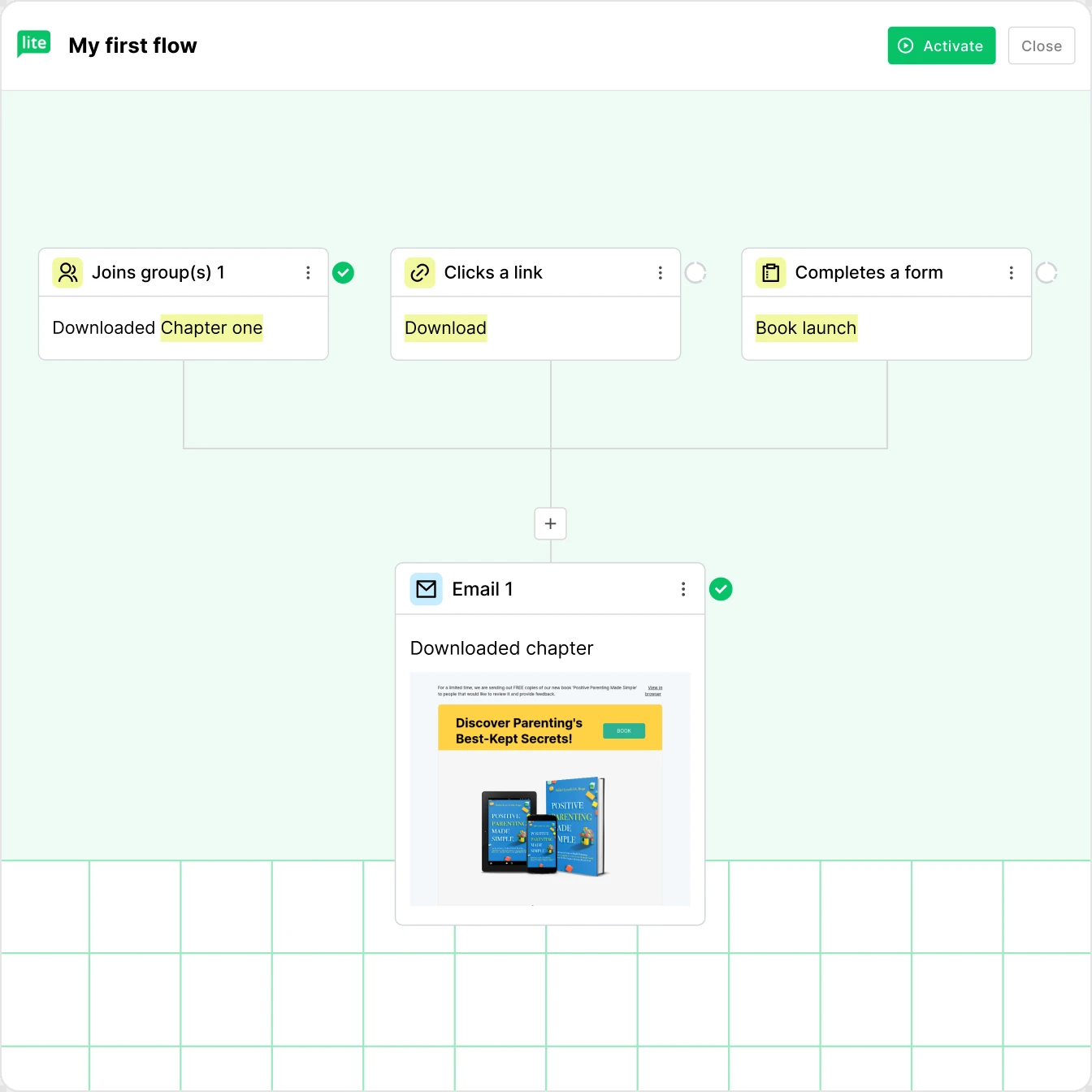
How automations work: triggers include form completion, link click, group join, custom field update, a date and abandoned cart, with up to three triggers on one automation on Power. Condition blocks can branch on campaign activity, segment or group membership, and custom fields, and an action can send data out through a webhook. Free allows 3 active automations of 5 steps, Comfort allows 50 of 100 steps, and Power is unlimited.
What the bill counts: active subscribers. Unsubscribed and bounced addresses don't count, but the count is cumulative within a billing cycle, so an address you delete on April 1 still counts until the cycle resets on your billing date. At 5,000 subscribers Comfort is $49 a month on monthly billing ($44.10 yearly), and Power is $69 ($62.10 yearly).
Where the data goes: Shopify, WooCommerce and Zapier are built by MailerLite, HubSpot is a partner integration and Salesforce is third-party. We couldn't verify the sync direction or field depth for either CRM, so test that with a sample contact before you commit. Paid plans include the full API.
- you want a visual automation builder and a lower bill than Mailchimp's at the same list size
- you run newsletters and simple lifecycle flows, and your forms and store connect through built-in integrations or Zapier
- your flows need several triggers on one automation but not Power's price: multiple triggers start on Power, $69 a month at 5,000 subscribers
- you rely on behavioral or ecommerce segments in Mailchimp: they do not migrate and must be rebuilt
- Users like
- Ease of use (70 mentions) and patient support (37)
- Users dislike
- Steep learning curve with outdated help resources (20 mentions), then difficult setup and missing features (17 each)
- Source: G2, 1,114 reviews
- Starting price
- Free up to 250 subscribers; Comfort from $12 and Power from $25 per month at 500 subscribers; at 5,000 subscribers Comfort is $49 and Power $69 a month ($44.10 and $62.10 billed yearly); 14-day trial of premium features without a card
- Billing metric
- Active subscribers; unsubscribed and bounced do not count, and the count is cumulative within a billing cycle
- Free plan
- 250 subscribers, 2,500 emails a month, 3 active automations of 5 steps, 2 seats
- Comfort
- 50 automations, 100 steps, 3 seats, dynamic content, auto resend and A/B tests, full API
- Power
- Unlimited automations and seats, multiple automation triggers (up to 3), 24/7 live chat
- Triggers
- Form completion, link click, group join, custom field update, date, abandoned cart and product purchase
- Integrations
- Shopify, WooCommerce and Zapier built by MailerLite; HubSpot partner-built; Salesforce third-party
- Mailchimp import
- Subscribers, tags (as groups) and static segments come over; behavioral and ecommerce segments, automations, templates and forms must be rebuilt
Omnisend#
Omnisend
Omnisend is built around store events. It ships 15+ preset workflows such as abandoned cart and browse abandonment and sends them over email, SMS and web push from one workflow.
Omnisend fits an online store that wants cart, checkout and order flows ready to switch on, with SMS and web push in the same workflow.
What your Mailchimp setup becomes: you connect your store and then Mailchimp through an API key. Contacts, custom fields, tags and subscription status come over; workflows, templates and signup forms don't. The sync is one-way, and Omnisend's guide says to keep the Mailchimp account active until you've verified the import and to warm up your sender reputation with engaged contacts first.
How the store flows work: the help center lists 15+ preset workflows, among them welcome, abandoned cart, abandoned checkout, browse and product abandonment, order and shipping confirmation, cross-sell and customer reactivation. Abandoned cart triggers on Added products to cart and exits on Placed order or Started checkout. Only identified contacts are tracked, meaning someone who clicked an Omnisend email, signed up through an Omnisend form or entered an email at checkout. The flow isn't retroactive, and the default allows one workflow per contact per 24 hours.
Where the data goes: Shopify, BigCommerce and WooCommerce are native. On Shopify and BigCommerce the platform's own abandoned-cart reminders aren't switched off automatically, so turn them off to avoid duplicate emails. After you connect a store, the first sync takes 1 to 24 hours depending on the platform.
What it costs beyond the plan: SMS is billed per message on top of the plan, from $0.007 to $0.009 for US messages depending on spend. Phone numbers from Shopify, BigCommerce and WooCommerce sync after a first order, so a shopper's first abandoned cart can only be recovered by email. No price at 5,000 contacts is listed, because the pricing page shows one default tier.
- you run a Shopify, BigCommerce or WooCommerce store and want cart, checkout and order flows ready to switch on
- you want email, SMS and push in one workflow without a second tool
- you are lead-gen or SaaS: the triggers and the supported platform list are built around store events
- you expect SMS to recover a first abandoned cart: phone numbers sync after the first order, and SMS is billed per message on top of the plan
- Users like
- Ease of use (202 mentions), support (114) and automation (108)
- Users dislike
- Limited features and integrations (60 mentions) and expensive SMS (40)
- Source: G2, 1,257 reviews
- Starting price
- Free for 250 contacts and 500 emails a month; Standard from $11.20 and Pro from $41.30 per month as shown on the pricing page (plan lists show 500 and 2,500 contacts); Enterprise custom; SMS billed per message
- Billing metric
- Contacts, with email caps as a second limit; unsubscribed contacts are not billed
- Free plan
- 250 contacts, 500 emails and 500 web push a month
- Workflows
- 15+ preset workflows; abandoned cart triggers on Added products to cart and exits on Placed order or Started checkout
- Abandoned cart
- Only identified contacts are tracked; not retroactive; default of one workflow per contact per 24 hours
- SMS
- US messages from $0.007 to $0.009 each depending on spend, billed on top of the plan
- Mailchimp import
- Contacts, custom fields, tags and subscription status come over via a Mailchimp API key; workflows, templates and signup forms must be rebuilt; the sync is one-way
Klaviyo#
Klaviyo
Klaviyo is the email and SMS platform most ecommerce stores start with: Shopify orders and onsite events land on the profile, and flows trigger on purchases, price drops or low inventory.
Klaviyo fits a Shopify or other ecommerce brand that wants flows built on order, browse and inventory data from day one.
What your Mailchimp setup becomes: Klaviyo's import syncs contacts including unsubscribes and cleaned contacts, plus open and click events from campaigns in the last 90 days. Tags don't sync, so bring them in by CSV as custom properties. Automations have to be rebuilt as flows, and sign-up forms and drag-and-drop templates have to be rebuilt too, because only custom-coded HTML templates import.
What the bill counts: active profiles, meaning any profile that can be emailed through Klaviyo, including checkout contacts who never opted in. Suppressed profiles don't count, but suppressing a segment doesn't lower the bill by itself unless auto-downgrade is on, so a cleanup needs someone to own it. SMS and other mobile messages are billed per message.
Where the data goes: flows trigger on a list, segment, metric, date, price drop or low inventory, and Klaviyo reaches email, SMS, MMS, WhatsApp, RCS, push and Meta ad audiences. Salesforce data is pulled into Klaviyo hourly for up to three objects, which is a one-way flow. There's no native HubSpot sync, and a warehouse sync is a paid add-on with an hourly export.
- you're running a Shopify or other ecommerce store and want flows on order, browse and inventory data from day one.
- you want a free start and pricing that grows with active profiles.
- your CRM is HubSpot or you need two-way Salesforce sync: there's no native HubSpot sync and the Salesforce sync is one-way.
- your list grows fast; cost scales with active profiles, a common complaint on G2.
- Users like
- Ease of use (167 mentions) and automation (131)
- Users dislike
- Expensive (73 mentions), then a steep learning curve (63)
- Source: G2, 1,371 reviews
- Starting price
- Free up to 250 active profiles; email from $20 per month for 251 to 500 profiles; SMS and other mobile messages billed per message
- Channels
- Email, SMS, MMS, WhatsApp, RCS, push, Meta ad audiences
- Journey builder
- Flows (list, segment, metric, date, price drop, low inventory triggers)
- Pricing metric
- Active profiles, mobile messages per message
- Salesforce sync
- Pulled into Klaviyo hourly, up to 3 objects
- Warehouse sync
- Paid add-on, hourly export
- Active profile
- Any profile that can be emailed, including checkout contacts who never opted in; suppressed profiles do not count and suppressing does not lower the bill unless auto-downgrade is on
- Mailchimp import
- Contacts, unsubscribes and cleaned contacts sync, plus open and click events from campaigns of the last 90 days; tags do not sync; automations, forms and drag-and-drop templates must be rebuilt
ActiveCampaign#
ActiveCampaign
Contact-priced email and cross-channel automation with event tracking, site tracking and ecommerce triggers; lead scoring and deal automation sit in a separate Pipelines add-on.
ActiveCampaign fits a team whose journeys depend on behavior and events, and that wants a two-way Salesforce sync without moving everything into a CRM suite.
What your Mailchimp setup becomes: the Migration Agent, for eligible accounts, moves audiences, contacts with their subscribed or unsubscribed status, tags and custom fields, forms, campaigns, templates and Classic Automations. Segments and reports aren't supported, and the card doesn't appear in every account, so check yours before you plan the cutover. Automations other than Classic have to be rebuilt.
What the bill counts: contacts, and the price moves in steps. On the pricing page, billed yearly at 5,000 contacts, Starter is $79, Plus $145, Pro $205 and Enterprise $375 a month. At 10,000 contacts Pro is $375. Mailchimp's Standard plan shows $100 at 5,000 contacts, so the gap depends on which ActiveCampaign tier your automations need. Lead scoring and deal automation sit in a separate Pipelines add-on whose price isn't published. For a full breakdown, see our ActiveCampaign pricing guide.
Where the data goes: event tracking, site tracking and ecommerce triggers feed the automations. The Salesforce sync is two-way, going to Salesforce every 10 minutes and coming back every 1 to 24 hours as you set it. A trigger set to run multiple times lets a contact in up to 10 times in 24 hours, which matters when a form fires twice. Compare it with HubSpot in HubSpot vs ActiveCampaign.
- event, ecommerce and behavior triggers drive most of your journeys
- you want multi-step automation from a low starting price and can keep the CRM in another tool
- you need lead scoring and deal automation on a small budget: they require the Pipelines add-on, and Pro at 10,000 contacts is already $375 a month
- you need native Salesforce sync below Enterprise: the pricing page lists it there, though the help center names every plan
- Users like
- Ease of use (1,270 mentions) and easy automation building (1,254)
- Users dislike
- Missing features such as simple form creation and custom date triggers (535 mentions); high prices (506)
- Source: G2, 14,841 reviews
- Starting price
- Billed yearly, per month at 1,000 contacts: Starter $15, Plus $49, Pro $79, Enterprise $145; Pro rises to $375 at 10,000 contacts; no free plan, 14-day trial
- Users included
- 1 (Starter, Plus), 3 (Pro), 5 (Enterprise)
- Attribution
- Pro and above
- Lead scoring
- Pipelines add-on, price not published
- Re-entry
- Triggers set to run multiple times let a contact in up to 10 times in 24 hours
- Salesforce sync
- Two-way: to Salesforce every 10 minutes, from Salesforce every 1 to 24 hours as you set
- Price at 5,000 contacts
- Billed yearly, per month: Starter $79, Plus $145, Pro $205, Enterprise $375
- Mailchimp import
- The Migration Agent moves audiences, contacts with status, tags, forms, campaigns, templates and Classic Automations; segments and reports are not supported; availability is account-specific
HubSpot Marketing Hub#
HubSpot Marketing Hub
Marketing automation integrated with HubSpot CRM. Its shared-record model can reduce separate marketing-to-CRM handoffs for teams that also use HubSpot CRM.
HubSpot Marketing Hub fits a company whose sales team already works in HubSpot CRM, because email and CRM records share one database.
What your Mailchimp setup becomes: we found no HubSpot-official Mailchimp import page. Contacts import through the standard file import, and an advanced option in a single-file import lets you set them as marketing contacts. Without it they arrive as non-marketing contacts. Unsubscribes go in as an opt-out list, which doesn't create contacts and doesn't count toward your billable total, but addresses that already exist as contacts still count.
What the bill counts: marketing contacts only. Professional includes 2,000 marketing contacts and 3 seats, and if you reach a set maximum, further imported or workflow-set contacts become non-marketing. No price at 5,000 contacts is given. Our HubSpot Marketing Hub pricing guide covers the contact tiers.
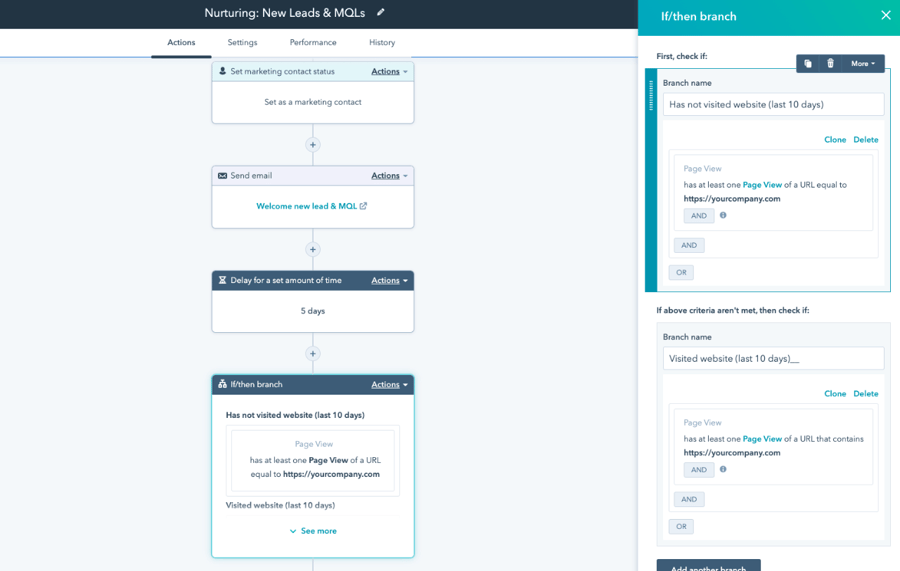
Where the data goes: forms and workflows write to CRM records directly, so the usual marketing-to-CRM handoff disappears when both sit in HubSpot. Of course, that only holds if sales and marketing both work in HubSpot. Workflows are capped at 300 on Professional and 1,000 on Enterprise, lead scoring at 5 scores on Professional and 50 on Enterprise, and multi-touch revenue attribution is Enterprise only. If your CRM is Salesforce instead, read our HubSpot and Salesforce integration guide before you choose.
- marketing and sales use HubSpot CRM as their shared record
- the team wants workflow enrollment controls and published starting prices
- Salesforce-centered organizations whose required program architecture is already implemented in Marketo
- Users like
- Ease of use with built-in integration and automation (2,525 mentions)
- Users dislike
- Steep learning curve (808 mentions), missing features for smaller teams (786) and cost as the contact list grows (667)
- Source: G2, 16,036 reviews
- Starting price
- Free tools for up to 2 users; Starter $20 per seat per month list ($7 for new customers in a limited promotion); Professional from $800 per month ($890 struck through on the page) plus required $3,000 onboarding; Enterprise from $3,600 per month plus required $7,000 onboarding
- Professional includes
- 3 seats, 2,000 marketing contacts
- Workflows
- Up to 300 (Professional), 1,000 (Enterprise)
- Lead scoring
- Up to 5 scores (Professional), 50 (Enterprise)
- Attribution
- Multi-touch revenue attribution is Enterprise only
- Onboarding
- Required: $3,000 Professional, $7,000 Enterprise
- Billable contacts
- Only marketing contacts count; contacts imported without a status default to non-marketing unless you tick the marketing option in a single-file import
Kit#
Kit
Kit, formerly ConvertKit, is an email platform for creators and newsletters. Its free plan allows 10,000 subscribers, and visual automations and sequences start on Creator.
Kit, formerly ConvertKit, fits a newsletter or creator business that wants a free plan holding a large list and sells digital products to it.
What your Mailchimp setup becomes: we didn't research Kit's Mailchimp importer, so test it with a copy of your list. What matters for the move is the plan: the Free plan has no visual automations or sequences, so a Mailchimp journey needs Creator, which has unlimited automations and sequences and two users.
What the bill counts: confirmed subscribers only. Unconfirmed, unsubscribed, hard-bounced, complained and blocked addresses don't count. Soft bounces and cold subscribers, meaning those with no open or click in 90 days, still count, so inactive contacts keep costing money until you remove them. Prices at 5,000 subscribers aren't published on the pricing page.
Where the data goes: automations trigger on a sign-up, a link click or a purchase, and can send an email, apply a tag, adjust a segment or add a delay, with conditional content that branches on engagement. Digital products, memberships and subscriptions are sold inside Kit. Deliverability reporting, subscriber engagement scoring and unlimited users are Pro only, and Kit's integrations page names Shopify among its connections.
- you run a newsletter or sell digital products and want a free plan that holds a large list
- your segmentation is built on tags and sequences more than on a product catalog
- you run ecommerce lifecycle flows on catalog data: we found no catalog-level triggers on Kit's automation page
- several teammates need seats or automations on a small budget: the free plan has 1 user and no visual automations, Creator has 2 users
- Users like
- Ease of use (7 mentions)
- Users dislike
- Pricing for smaller creators (3 mentions)
- Source: G2, 236 reviews
- Starting price
- Free up to 10,000 subscribers with 1 user and no visual automations or sequences; Creator $33 per month at 1,000 subscribers ($390 a year); Creator Pro $50 a month promo price ($66 list) at 1,000 subscribers
- Billing metric
- Confirmed subscribers only; soft bounces and subscribers who never open or click (cold) still count
- Free plan
- 10,000 subscribers, 1 user, unlimited landing pages, forms and broadcasts
- Creator
- Unlimited visual automations and sequences, 2 users, 24/7 email and chat support
- Pro only
- Deliverability reporting, subscriber engagement scoring and unlimited users
- Triggers
- Sign-up, link click and product purchase
- Plan check
- Prices at 5,000 subscribers are not published on the pricing page
What carries over from Mailchimp, and what breaks#
What carries over from Mailchimp is mostly contacts and tags, while automations and templates move almost nowhere. Before you pick a tool, take Mailchimp's own export, because it's the only copy of your history. The account export covers contacts, campaign content, reports and templates, but the help center doesn't list automations or segments as exportable. Exported reports can't be re-imported, deleted audiences can't be exported, and you get one account export per 24 hours.
| Tool | What the importer brings | What you rebuild |
|---|---|---|
| Brevo | Contacts, tags, lists, segments and templates (per Brevo's guide) | Automations and reports |
| MailerLite | Subscribers, tags as groups, static-field segments | Behavioral and ecommerce segments, automations, templates, forms, landing pages |
| Omnisend | Contacts, custom fields, tags, subscription status through an API key; one-way sync | Workflows, templates, signup forms |
| Klaviyo | Contacts, unsubscribes, cleaned contacts, 90 days of open and click events | Tags (import by CSV), automations as flows, forms, drag-and-drop templates |
| ActiveCampaign | Audiences, contacts with status, tags, forms, campaigns, templates, Classic Automations, for eligible accounts | Segments, reports, non-Classic automations |
| HubSpot Marketing Hub | Contacts by file import, with an option to set them as marketing contacts; unsubscribes as an opt-out list | Everything else; no official Mailchimp importer found |
| Kit | Not researched | Not researched |
What is the best free alternative to Mailchimp?#
Kit has the largest free list cap at 10,000 subscribers, but it has no visual automations or sequences, so it suits a newsletter. Of course, a bigger cap only helps if the plan has the features you use. For automation on a free plan, MailerLite and Omnisend are the closest to Mailchimp's free tier, each at 250 contacts or subscribers. The limits differ more than the names suggest.
| Tool | Free plan limit | What the free plan leaves out |
|---|---|---|
| Mailchimp | 250 contacts, 500 sends a month, 250 a day, 1 seat | Multi-step journeys |
| Kit | 10,000 subscribers, 1 user | Visual automations and sequences |
| MailerLite | 250 subscribers, 2,500 emails a month, 2 seats | Automations beyond 3 active of 5 steps; sending locks above 250 active subscribers |
| Omnisend | 250 contacts, 500 emails and 500 web push a month | Nothing by feature, according to its FAQ; caps limit it |
| Brevo | 300 emails a day | Unlimited multi-step workflows, which start on Standard |
| Klaviyo | 250 active profiles | G2 reviewers report limited and slow support on the free plan (39 mentions) |
| HubSpot Marketing Hub | Free tools for up to 2 users | The paid Marketing Hub plans, which start at $20 per seat as listed |
| ActiveCampaign | No free plan | 14-day trial only |
After you switch: seven checks for your campaign data#
The switch isn't finished when the first email sends. A marketing email tool sits between forms, the CRM and your analytics, and each of those handoffs can quietly break during a move. This checklist covers the ones that cost leads, and the campaign tracking checklist goes deeper on each one.
- Authenticate the sending domain in the new tool and send a test to an inbox you can inspect
- Submit a test lead through every form that used to post to Mailchimp and confirm it lands in the new tool with its source fields filled
- Check that links in the first campaigns follow your UTM naming convention, using our guide to UTM parameters
- Compare the new tool's billable contact count with the number you imported and look for unsubscribed contacts that were billed
- Create a test contact and watch it reach the CRM, noting the field mapping, the direction and the delay
- Confirm that unsubscribed and cleaned contacts are suppressed and not mailable
- Remove old Mailchimp embed codes, pop-ups and webhooks so no page keeps feeding a list nobody reads
Where The Marketing Ops Manager fits#
The Marketing Ops Manager fits after the switch, because none of the seven tools tells you that a form stopped sending its UTM fields or that a CRM connection expired. It checks landing pages, tracking, forms, CRM connections and sales handoffs on a schedule and opens an incident with evidence when a step fails. It isn't an email platform, and it replaces none of the tools above. Connections are read-only by default, fixes need a human approval, and signup is invite-only with a 14-day trial on every plan.
Frequently asked questions#
Why are people leaving Mailchimp?
People leave Mailchimp mainly because of cost and limits. G2 reviewers name an expensive plan as the top complaint (44 mentions), followed by a steep learning curve for advanced automation and segmentation and limited automation features (31 each). Paid plans also bill on contacts, including unsubscribed ones, and the Free plan is limited to 250 contacts and 500 sends a month.
What is the best free alternative to Mailchimp?
The best free alternative depends on what the plan has to do. A newsletter with a large list fits Kit, which allows 10,000 subscribers but no visual automations. A list under 250 that needs flows fits MailerLite with 3 active automations or Omnisend with its features included, and Brevo caps sending at 300 emails a day instead of capping the list.
What is the best Mailchimp alternative for ecommerce?
The best Mailchimp alternatives for ecommerce are Klaviyo and Omnisend, which are built around store events. Klaviyo triggers flows on purchases, price drops and low inventory, and Omnisend ships 15+ preset workflows for cart, checkout and order events and adds SMS and web push to the same workflow.
Is MailerLite cheaper than Mailchimp?
At 5,000 subscribers MailerLite's Comfort plan is $49 a month on monthly billing, while Mailchimp's Standard plan shows $100 at the 2,501 to 5,000 contacts tier. The plans aren't identical, so compare the automation limits you need and read the multiple-trigger note: those start on MailerLite's Power plan at $69.
Can I move my automations from Mailchimp?
Mostly no. Brevo, MailerLite, Omnisend and Klaviyo all say automations or workflows must be rebuilt. ActiveCampaign's Migration Agent moves Classic Automations for eligible accounts, and Mailchimp's own export doesn't list automations.
Which alternative works best with Salesforce or HubSpot?
HubSpot Marketing Hub is the native choice if HubSpot is your CRM. ActiveCampaign has a two-way Salesforce sync, Brevo offers two-way HubSpot and Salesforce sync on Professional and Enterprise, and Klaviyo pulls Salesforce data in one way. MailerLite lists HubSpot as a partner integration.