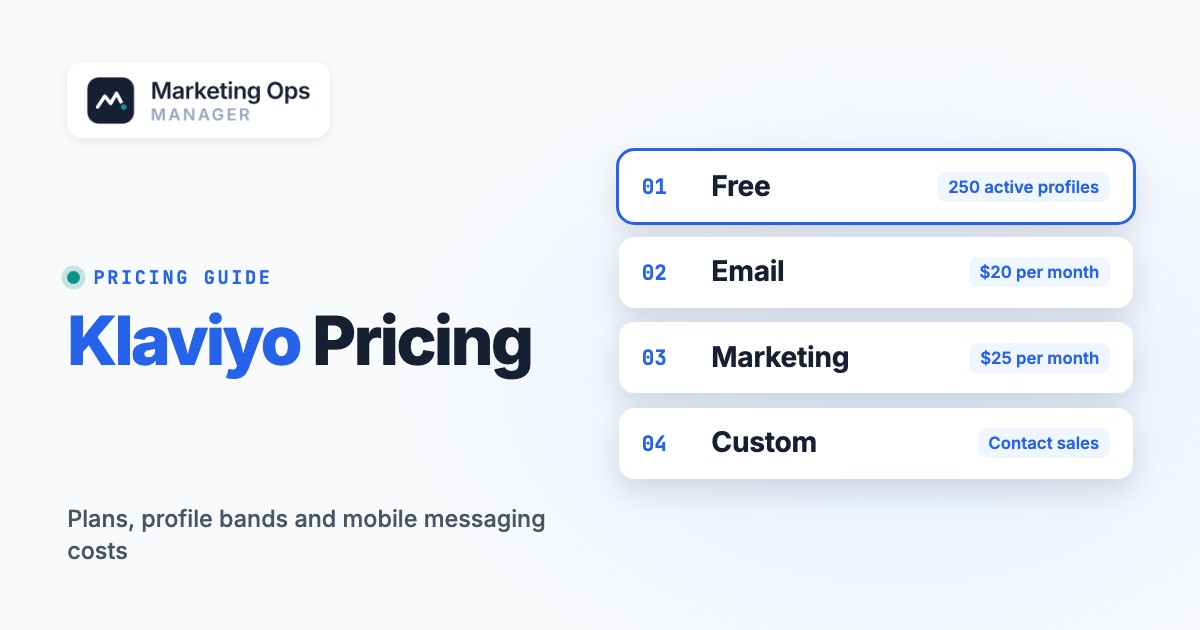
Klaviyo pricing starts at $0 for the free plan (up to 250 active profiles and 500 emails a month). The first paid step is the Email plan at $20 per month for 500 active profiles and 5,000 emails, and the Marketing plan at $25 per month for the same audience. Those are the figures Klaviyo's own pricing slider showed on November 6, 2026, and they're the baseline for everything below. Both plans scale with the number of active profiles: at 10,000 profiles the same two plans cost $150 and $195 per month, and at 50,000 profiles $720 and $885. Mobile messaging, and add-on products such as Reviews on the Email plan, are billed on top.
For a marketing operations team, the sticker price is the easy part. The harder questions are how Klaviyo counts a profile, what happens when your list crosses a band, and why an SMS budget written in 2025 doesn't match the 2026 invoice. That's where the real cost sits.
- The free plan covers 250 active profiles and 500 emails a month; the Email plan starts at $20 and the Marketing plan at $25 for 500 profiles.
- Price follows active profiles, meaning profiles with an email address that aren't suppressed. Email sends are included at ten per active profile.
- The Marketing plan costs $5 more than Email at 500 profiles and $45 more at 10,000, so decide on the extra products, not the label.
- Mobile messaging moved from credits to dollar-based per-message rates on July 13, 2026. Read your rates in the billing settings.
- Upgrades apply at once; downgrades wait for the next billing cycle and aren't refunded.
How much does Klaviyo cost in 2026?#
Klaviyo sells three public plans and one custom tier. The prices below are the ones the pricing page showed for the smallest paid band, 500 active profiles, in US dollars, on November 6, 2026.
| Plan | Price per month at 500 active profiles | Active profiles | Emails per month | What it adds |
|---|---|---|---|---|
| Free | $0 | Up to 250 | 500 | Core email, plus small allowances of reviews, Customer Hub and Helpdesk |
| $20 | 500 and up | 5,000 | Paid email capacity; other products as add-ons | |
| Marketing | $25 | 500 and up | 5,000 | Social Marketing, unlimited review orders and Customer Hub included |
| Custom | Contact sales | Above 150,000 or multiple brands | Custom | SSO, dedicated customer success manager and SLA |
- Free$0 /mo, up to 250 active profiles
- 500 emails per month
- $5 of Composer usage and $5 of mobile messaging per month
- Reviews for 50 orders a month
- Email support for the first 60 days
- Email$20 /mo at 500 active profiles
- 5,000 emails per month
- Everything in Free
- Price rises with active profiles
- SMS, Reviews and Social are add-ons
- Marketing$25 /mo at 500 active profiles
- 5,000 emails per month
- Everything in Email
- Social Marketing for 500 profiles
- Unlimited review orders and Customer Hub
- CustomContact sales Above 150,000 profiles or multiple brands
- Tiered pricing across products
- Dedicated CSM and SLA
- SSO and multi-account billing
- Data warehouse sync
USD prices from Klaviyo's pricing page, as of November 6, 2026. The Marketing plan is shown at its regular price; a first-month promotion is described below.
Klaviyo's comparison page states that multi-step flows are included on every plan with no extra feature fee, so the plan choice is about capacity and the surrounding products, not about unlocking automation. The pricing page lists SMS and MMS, Social Marketing, Reviews, Customer Hub, Composer, Customer Agent and Helpdesk as add-ons to the Email plan, without a price for each. Treat those as separate quotes, since they aren't part of the base price.
What does the Klaviyo free plan include?#
The free plan allows up to 250 active profiles and 500 email sends per month. Klaviyo's pricing page also lists a small allowance of other products: Composer usage worth $5 a month, mobile messaging worth $5 a month, Social Marketing for 250 profiles, Reviews for 50 orders a month, Customer Hub for 250 profiles, 10 Customer Agent resolutions and 10 Helpdesk tickets a month.
The limits are hard. Above 250 active profiles, sending is blocked until you get back to 250 or upgrade. When you reach 500 sends, sending stops until the next billing cycle, and flow emails can be skipped. 500 emails go quickly once flows run alongside campaigns.
Three other limits matter for a free account.
- Support: email support covers the first 60 days after sign-up. After that, free users get the community and the education resources.
- Branding: free accounts show Klaviyo branding in email footers and in pop-up, flyout and full-page sign-up forms. A paid email plan removes it.
- Hosted pages: custom subscribe and preference pages need a paid profile and email plan plus account verification.
What do the Klaviyo Email and Marketing plans cost at different list sizes?#
Klaviyo prices the Email and Marketing plans by active profiles, and its slider moves in uneven steps. The table shows a representative set of bands, and each row is the monthly list price Klaviyo displayed for that band on November 6, 2026.
| List size | Emails per month | Email plan, per month | Marketing plan, per month | Email plan cost per 1,000 profiles |
|---|---|---|---|---|
| 500 profiles | 5,000 | $20 | $25 | $40.00 |
| 1,000 profiles | 10,000 | $30 | $40 | $30.00 |
| 2,500 profiles | 25,000 | $60 | $80 | $24.00 |
| 5,000 profiles | 50,000 | $100 | $130 | $20.00 |
| 10,000 profiles | 100,000 | $150 | $195 | $15.00 |
| 15,000 profiles | 150,000 | $350 | $430 | $23.33 |
| 25,000 profiles | 250,000 | $400 | $505 | $16.00 |
| 50,000 profiles | 500,000 | $720 | $885 | $14.40 |
| 100,000 profiles | 1,000,000 | $1,380 | $1,610 | $13.80 |
| 150,000 profiles | 1,500,000 | $1,955 | $2,200 | $13.03 |
The email allowance in every row is ten times the profile count, so send capacity grows in step with the audience. Above 150,000 profiles the slider switches to the custom plan.
Two patterns are worth noting, and they're not obvious from the headline price. First, the price per profile falls as the list grows, from $40 per 1,000 profiles at 500 to about $13 at 150,000. Second, the curve isn't smooth. The Email plan costs $140 at 6,500 profiles and only $150 at 10,000, so a list of 10,000 pays almost the same as one of 6,500. Right above that band the slider moves in steps of 500 profiles and the price climbs $25 per step: $175 at 10,500, $200 at 11,000, $325 at 13,500 and $350 at 15,000. That makes 10,000 the lowest unit price ($15 per 1,000) on the slider below 25,000 profiles, and it's why $16.00 at 25,000 profiles is a higher unit price than at 10,000. The price per 1,000 only drops under $15 again from 50,000 profiles up. Read the band edges before you decide that a list is "too big" for a plan.
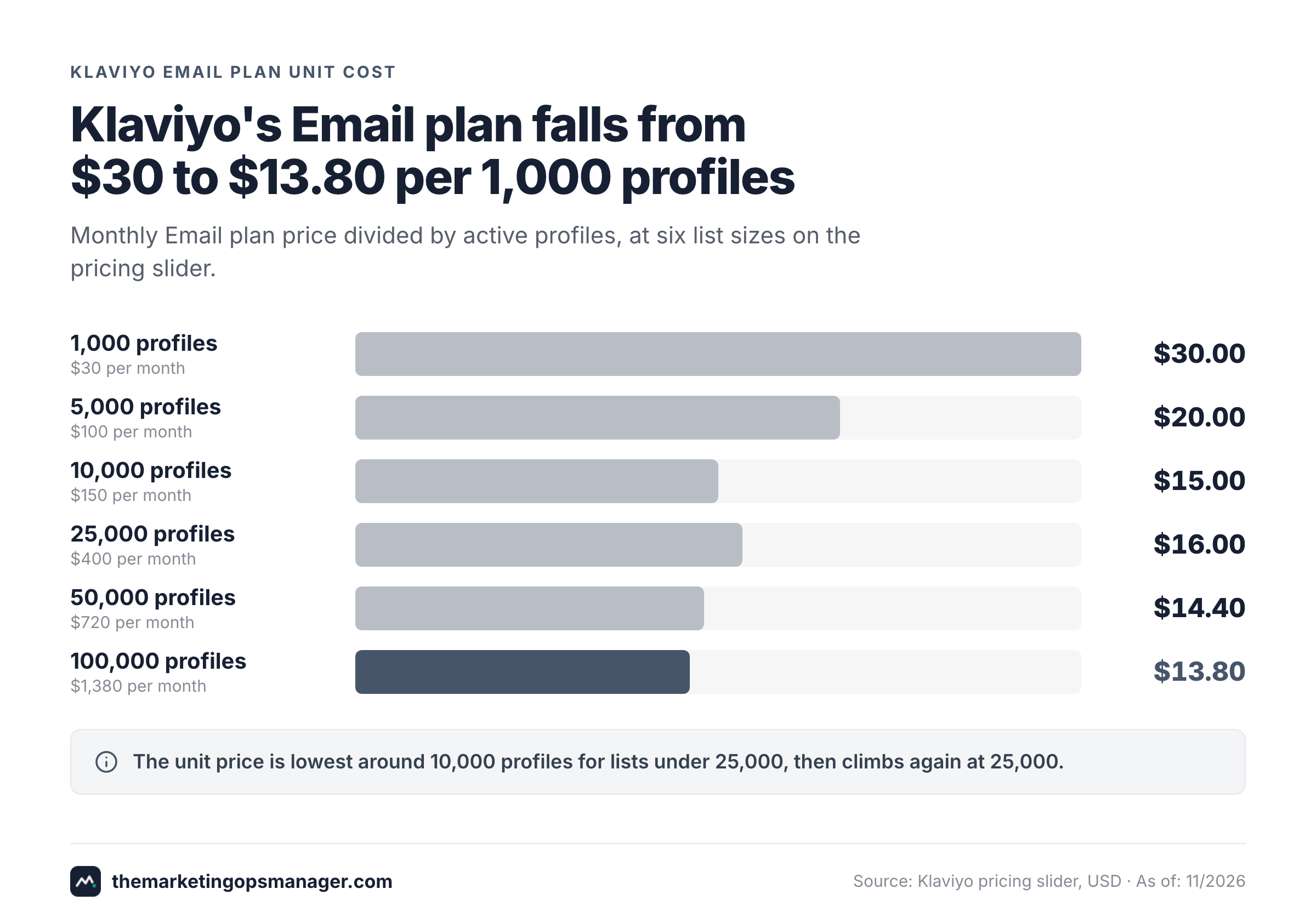
Monthly list prices from Klaviyo's pricing slider on November 6, 2026, in USD. Each profile count rounds up to the next band the slider offers. The Marketing plan is shown at its regular price, not the first-month promotion. Add-ons such as mobile messaging are not included.
Email or Marketing: which plan do you need?#
The gap between the two plans grows with the audience. The Marketing plan costs $5 more than Email at 500 profiles, $10 more at 1,000, $30 more at 5,000, $45 more at 10,000, $105 more at 25,000 and $165 more at 50,000. For that premium Klaviyo includes Social Marketing and Customer Hub for the same number of profiles and unlimited review orders, where the Email plan treats those as add-ons.
The decision is simple arithmetic. Price the add-ons you'd otherwise buy for Email, add them to the Email price at your list size, and compare with the Marketing price. If you won't use Reviews, Social Marketing or Customer Hub, the Email plan is the cheaper way to run campaigns and flows. If you use all three, ask for the add-on quotes before assuming Marketing is a premium.
What is the Klaviyo $1 promotion?#
The pricing page shows the Marketing plan at $25 with a $1 first month, described as a limited-time offer for eligible plans with up to 5,000 active profiles. A footnote on a Klaviyo comparison page says the plan then renews automatically at the regular monthly price. Budget from the regular price; you'll pay it from month two. A promotion changes the first invoice, not the cost of running the program for a year.
How does Klaviyo count active profiles?#
Klaviyo's help center defines an active profile for the Profiles and Email plan as a profile with an email address that isn't suppressed from email. Four details change the number you pay for, and each one is easy to miss.
- Phone numbers alone don't count. A profile with only a phone number doesn't count toward the email plan.
- Suppressed profiles don't count. They stay in the account for reporting, but drop out of the billable count once suppression is processed.
- Deleted profiles don't count going forward and can't be recovered.
- Counts refresh slowly. After a large cleanup, the displayed count can take up to 72 hours to update.
Klaviyo contrasts this with Mailchimp on its comparison page, and it's a fair point: it says Klaviyo doesn't charge for profiles that are inactive or have unsubscribed. That's a useful property for a large, ageing list, but it isn't the same as a cleanup, and it doesn't excuse skipping one. Profiles that can still receive email, including people who never engaged, remain active and billable.
When does Klaviyo bill you, and what happens when you grow?#
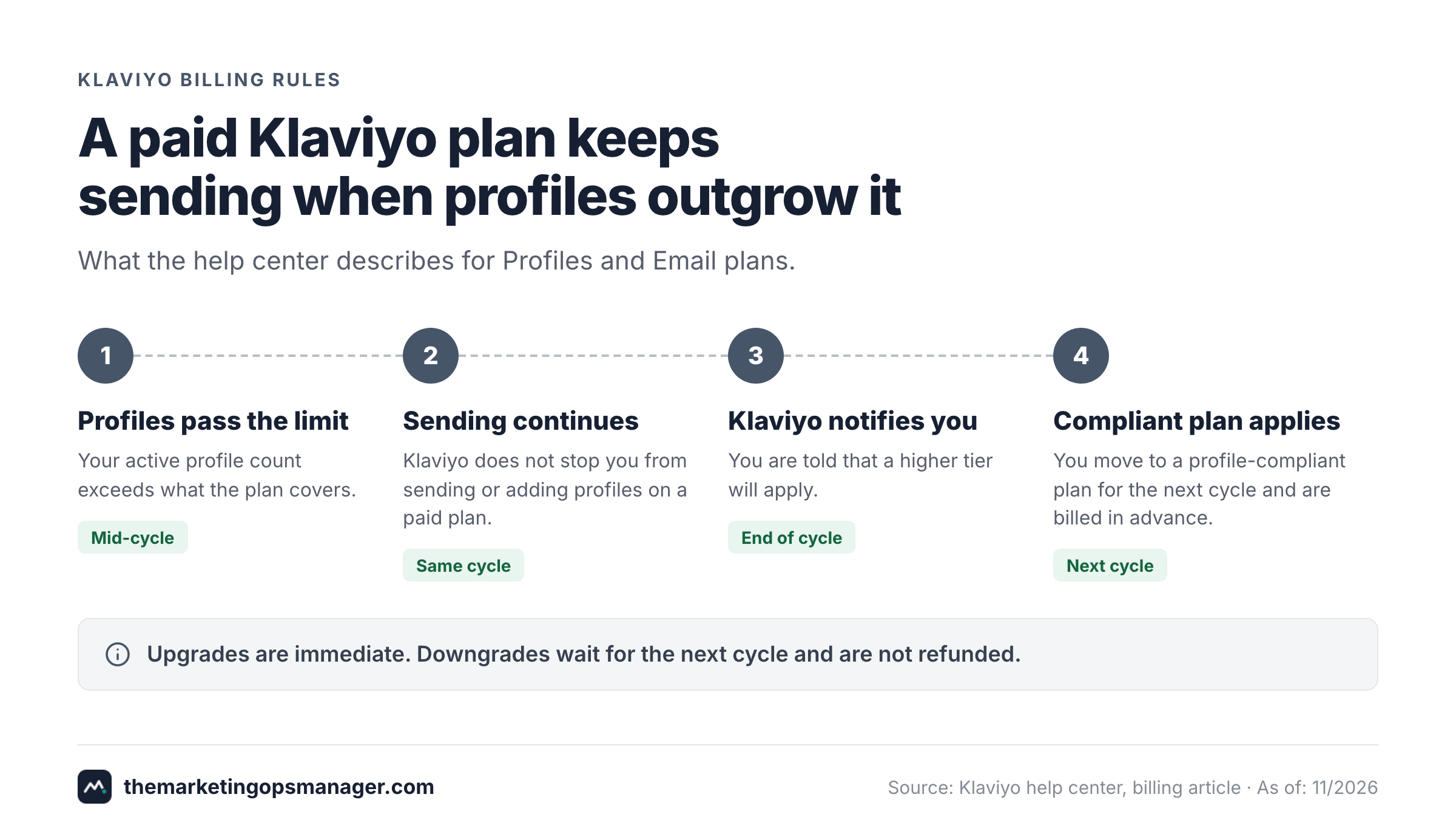
Klaviyo bills monthly, in advance, starting on the day a paid plan begins, and free plans renew on the first of the month. Four billing rules matter most for budgeting.
- Upgrades take effect immediately. For plans that aren't prorated, you pay the difference for the current cycle.
- Downgrades wait for the next billing cycle. You finish the current cycle on the old plan, and Klaviyo doesn't refund mid-cycle downgrades.
- Profile growth isn't blocked. If your plan no longer covers your active profiles at the end of a cycle, Klaviyo moves you to a profile-compliant plan for the next cycle and notifies you.
- Free accounts are different. On the free plan, going over the profile limit stops you from sending emails or setting flow emails live until you're back under it.
The third rule is the one that surprises teams. A paid account keeps sending while it outgrows a band, so the first sign is the next invoice. Klaviyo notifies you, but the higher price still lands on the next invoice. Put the active profile count on a monthly review, because it's the number that moves your plan, especially before a large import, a giveaway or a list acquisition.
How do upgrade preferences work?#
Klaviyo offers three settings for what happens when you reach a limit, found under Billing and Preferences.
| Setting | What happens at the limit | Good for |
|---|---|---|
| Automatically upgrade | Moves you to the next plan tier and charges the difference. It's on by default when you first buy Profiles and Email or Mobile Messaging. | Teams that can't risk a stopped flow |
| Flexible overages | Adds usage for the current cycle for a one-time fee at your plan's unit rate, and keeps your tier. You can flex more than once per cycle. | Seasonal peaks such as Black Friday |
| None | Sending stops until you upgrade, flex, or the cycle renews. Available for Email and Mobile Messaging only. | Hard budget ceilings |
The account owner gets alerts as usage approaches limits, for example at 75 and 90 percent. A failed subscription payment switches off auto-upgrade and flexible overages, so a card update should be part of the pre-launch checklist.
Klaviyo also offers an optional auto-downgrade for Profiles and Email plans. It looks at your active profile count shortly before renewal and moves you to a lower eligible tier for the next cycle. It works with flexible overages or the None setting, but not with auto-upgrade. Without it, your plan doesn't shrink on its own when the list does, and you'd keep paying the old band, so a cleanup only lowers the bill if you also choose the lower tier or turn auto-downgrade on.
How does Klaviyo SMS and mobile messaging pricing work in 2026?#
Mobile messaging is clearly the line most likely to break an older budget. Klaviyo's help center says it began moving mobile messaging from credits to dollar-based, per-message rates on July 13, 2026. New customers and free mobile plans moved at once. Existing paid mobile plans move at the first billing date after August 13, 2026.
The help center lists several changes, and each one affects how you forecast.
- Credits are replaced by dollar rates per message, set by channel and region.
- Klaviyo's adding more than 70 new plan tiers, with smaller gaps between them.
- US and Canada SMS and MMS pricing is split into toll-free and short code rates.
- For SMS, the rate applies per message segment, so a two-segment message costs twice the segment rate.
- Carrier fees stay inside the rate rather than appearing as separate line items.
- Mobile plans are still bought upfront each month.
- If your old tier is retired, you move to the closest available tier at or below your current plan price.
Klaviyo doesn't publish the rate table in the article, so you can't price it from outside the app. You find your own rates in the app under Settings, Billing, Overview, the Mobile messaging card, and then See rates. Flexible overages for mobile apply to self-service plans with a monthly list price of $490 or more, according to the same article.
To forecast, multiply each message type's rate by its expected volume, and count segments, not messages. For illustration only, 4,000 messages at an assumed rate of $0.02 per segment would be $80; with two segments each, $160. The $0.02 is an assumption for the arithmetic, not a Klaviyo rate. Replace it with the number from your billing page, because it's your rate that counts.
Which Klaviyo plan fits your situation?#
Match your situation to the smallest plan that covers it, then price that plan at your own list size.
- Testing flows and a small signup formStart on the free plan; it ends at 250 active profiles or 500 emails a month.
- Email campaigns and flows for a growing storeEmail plan; check the band at your list size in the slider.
- Reviews, Social Marketing and Customer Hub in one billPrice the add-ons against the Marketing plan before choosing.
- Predictable SMS costRead your rates under Billing, then set the preference to None or Flex.
- 150,000+ profiles, several brands or SSOAsk sales for the custom plan.
What do sample Klaviyo budgets look like?#
Each example multiplies the regular slider price by 12 and excludes tax, add-ons, mobile messaging and growth during the year.
| List size | Email plan, per month | Email plan, 12 months | Marketing plan, 12 months |
|---|---|---|---|
| 2,500 profiles | $60 | $720 | $960 |
| 5,000 profiles | $100 | $1,200 | $1,560 |
| 10,000 profiles | $150 | $1,800 | $2,340 |
| 25,000 profiles | $400 | $4,800 | $6,060 |
| 50,000 profiles | $720 | $8,640 | $10,620 |
A store that grows from 5,000 to 10,000 profiles during the year doesn't pay $100 for 12 months. It climbs through the bands at $110, $130, $140 and $150, so the Email plan total lands between $1,200 and $1,800 depending on how fast the list grows. Model the profile forecast month by month, then add mobile spend, optional products and tax.
Klaviyo says its plan terms apply to customers on monthly terms, and the public pages mention no annual discount. Don't assume one; ask for any yearly commitment in writing.
How can you reduce your Klaviyo bill?#
- Suppress what you shouldn't email. Suppressed profiles drop out of the active count once processed. Use Klaviyo's supported suppression workflows, and don't throw away consent records.
- Turn on auto-downgrade if your list shrinks, and pair it with flexible overages or None.
- Choose the preference deliberately. Auto-upgrade avoids a stopped flow, yet it raises the invoice. None protects the budget, although it can stop a promotion mid-send.
- Check the band edges. At 10,000 profiles you pay about the same as at 6,500. If you're sitting just above a band, a cleanup can matter; if you're in the middle, it won't.
- Review add-ons monthly, because they're easy to forget. Remove products that nobody's using, and compare the Marketing plan against Email plus the add-ons you actually need.
- Read your mobile rates before every peak season, since rates can move up or down after the 2026 change.
Is Klaviyo worth the price?#
Klaviyo definitely suits ecommerce teams that trigger email and SMS from store events such as orders, browsing and inventory, and that want a free start with pricing that follows the list. It's harder to justify for a team that sends an occasional newsletter, and it won't pay off without commerce data to segment on. It's worth running a two-week trial with a welcome flow, an abandoned checkout flow and one campaign, then price the next two bands up. The cheapest starting plan isn't necessarily the cheapest one to operate.
How does Klaviyo pricing compare with alternatives?#
Mailchimp prices by contacts and has a free plan for up to 250 contacts, with Essentials from $13, Standard from $20 and Premium from $350 per month in USD as of October 27, 2026. Omnisend has a free plan for 250 contacts and 500 emails, and its pricing page showed Standard at $11.20 and Pro at $41.30 per month on November 6, 2026, both as discounted rates for paying three months upfront. ActiveCampaign has no free plan and starts at $15 per month at 1,000 contacts, billed yearly. Prices like these only compare at the same list size, channels and automation needs. Our guides to Klaviyo vs Mailchimp, Mailchimp alternatives and ActiveCampaign pricing do that comparison.
Is Klaviyo free forever?
The free plan has no expiry, but it caps you at 250 active profiles and 500 email sends per month. Email support is included for the first 60 days after sign-up.
How much does Klaviyo cost per month?
On November 6, 2026 the Email plan started at $20 per month for 500 active profiles and the Marketing plan at $25. At 10,000 profiles they cost $150 and $195 per month.
Does Klaviyo charge for unsubscribed or inactive contacts?
Klaviyo counts active profiles, meaning profiles with an email address that aren't suppressed. Suppressed and unsubscribed profiles aren't counted, but an inactive profile that can still receive email stays billable until you suppress it.
Is SMS included in the Klaviyo email price?
Not on a paid plan. Mobile messaging is a separate plan with dollar-based per-message rates since July 13, 2026. Only the free plan bundles mobile messaging, worth $5 a month.
What happens if I go over my Klaviyo profile limit?
On a paid plan Klaviyo doesn't stop sending; it moves you to a profile-compliant plan for the next cycle. On the free plan, sending is blocked until you're under 250 active profiles.
Can I downgrade my Klaviyo plan?
Yes. Downgrades take effect at the next billing cycle, and Klaviyo doesn't refund mid-cycle downgrades. Auto-downgrade can handle profile-based downgrades for you.
Bottom line#
Klaviyo's free plan is a real test bed, and the Email plan at $20 for 500 profiles is a low entry price. The bill that matters is the one at your list size: $150 per month at 10,000 profiles, $400 at 25,000 and $720 at 50,000 on the Email plan, before add-ons. Budget on the regular price, but keep the active profile count under review, and read your mobile messaging rates in the billing settings before the next campaign peak. For features, limits and what G2 reviewers say, read our Klaviyo review.