Klaviyo's the stronger fit for ecommerce teams building campaigns around product and checkout events. Mailchimp's a practical choice for businesses that primarily need newsletters, audience management, and straightforward automations. Both can connect to Shopify, so the decision's about how your team uses customer data, not whether one platform supports online stores at all.
 Pick Klaviyo if
- lifecycle teams with store-event triggers
- you can maintain and test event-driven flows
- active-profile billing fits your list after cleanup
 Pick Mailchimp if
- a lean generalist team runs newsletters and general campaigns
- the Shopify flows you need work in your chosen tier
- you want one familiar campaign-first workflow
Klaviyo vs Mailchimp at a glance#
| Tool | Core orientation | Shopify integration | Free tier | Billing driver | Best fit |
|---|---|---|---|---|---|
| Klaviyo | Customer data and event-led lifecycle marketing | Checkout and cart event workflows | Up to 250 active profiles and 500 monthly email sends | Active emailable profiles and messaging usage | Store-led retention and personalization |
| Mailchimp | General-purpose campaigns, audiences and automations | Customer, order and behavioral event sync | Free plan for up to 250 contacts | Contact tier, feature plan and sends | Newsletters, services and mixed audiences |
| Decision factor | Klaviyo | Mailchimp | Why it matters |
|---|---|---|---|
| Marketing data model | Events, profiles, products, purchases | Audience contacts plus connected-store events | Determines segmentation flexibility |
| Abandoned checkout | Dedicated checkout-triggered flow | Shopify-connected automation flows | Validate suppression after purchase |
| Content creation | Campaign and flow editors | Campaign templates and audience tools | Affects nontechnical team adoption |
| Pricing | Active profiles and sends | Plan, contacts and sends | Clean the audience before comparing |
| Data operations | Verify event payloads and flow filters | Verify Shopify sync, tags and audience mapping | Broken data creates silent campaign failures |
Bottom line: If most lifecycle decisions depend on purchases, product views, and checkout events, shortlist Klaviyo first. If your marketing program revolves around newsletters, lead magnets, and occasional automations, compare Mailchimp's appropriate paid tier against the features you actually use. Neither platform should be purchased without a test of the events and permissions your workflows require.
Which platform costs less?#
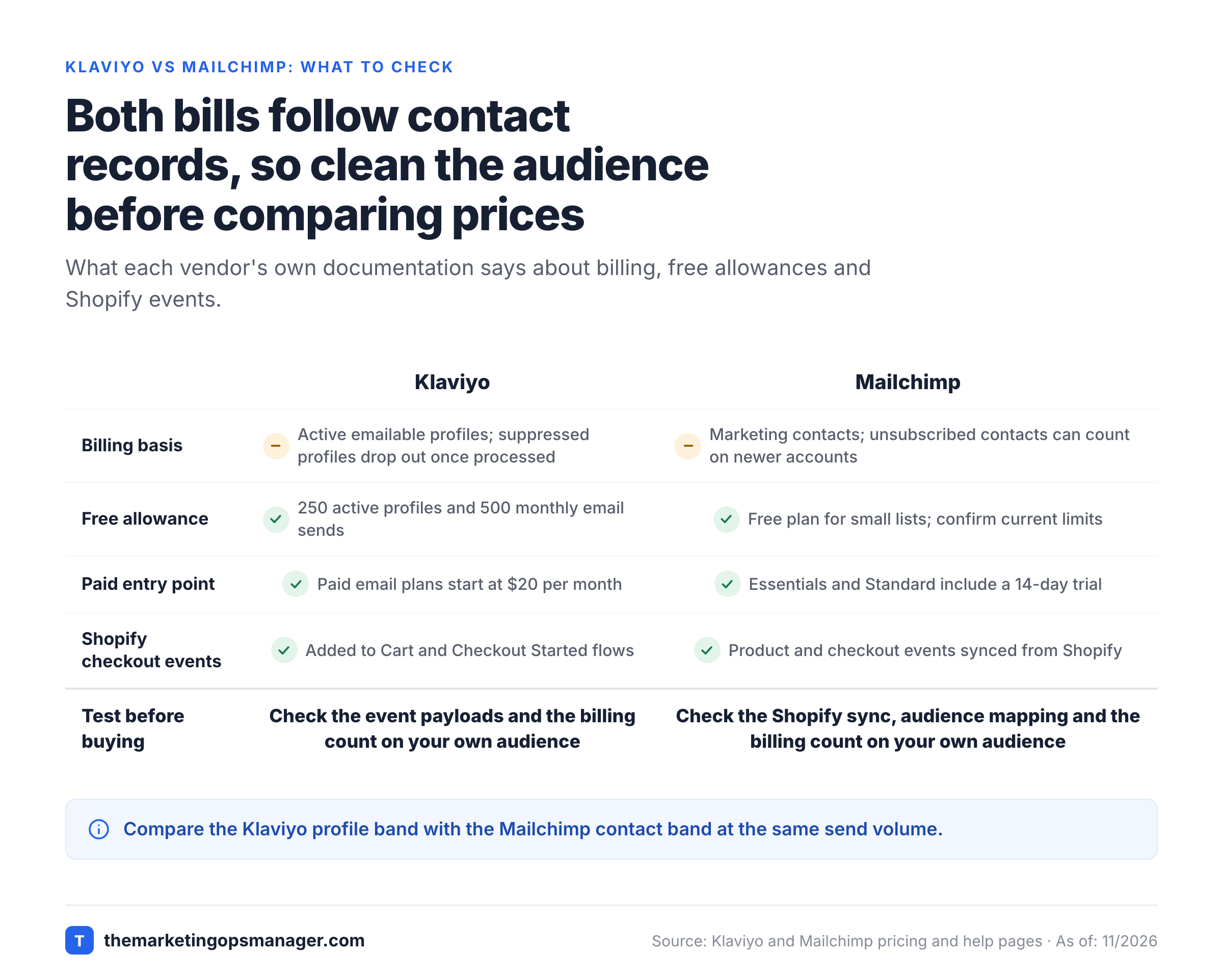
Which platform costs less depends on the audience, and an accurate comparison requires matching list size, send volume, plan capabilities, and messaging channels. Klaviyo's official pricing page describes a free allowance of 250 active profiles and 500 monthly email sends. Its comparison page says paid email plans start at $20 per month. Mailchimp offers Free, Essentials, Standard, and Premium options, but the contact-based selector and promotions mean a static price copied from another comparison can mislead.
Treat published starting prices as an entry point, not a quote for your actual audience. Mailchimp's official pricing page also describes a 14-day trial for Essentials or Standard. Mailchimp's nonprofit discount and promotional terms shouldn't be assumed to apply to every account.
What counts toward the bill?#
Klaviyo's billing documentation says an active profile can receive email, whether or not that person recently engaged. Email-suppressed profiles are excluded once suppression's processed. This distinction matters: active doesn't mean engaged. An old but emailable customer may still affect your tier. The billing count may take time to refresh after cleanup, so don't assume a suppression action immediately lowers the invoice.
Mailchimp's audience and billing rules require separate inspection. Unsubscribed contacts can count toward marketing contact limits for accounts created after May 15, 2019, and separate audiences may create avoidable duplication. Before comparing prices, export counts by subscription status, audit duplicate audiences, and confirm which records your account counts as billable.
A practical total-cost worksheet#
| Input | Example value to enter | Why |
|---|---|---|
| Emailable profiles | Your current count | Klaviyo billing basis |
| Mailchimp billable contacts | Current account billing count | May differ from emailable profiles |
| Campaign sends | Forecast monthly volume | Avoid unexpected send constraints |
| Automated sends | Forecast monthly volume | Include cart and post-purchase |
| SMS usage | Country, destination and forecast | Messaging isn't simply included everywhere |
| Paid tier | Required features | Don't compare a restricted tier with a full workflow |
| Labor | Setup, testing and monthly QA hours | A cheap license can hide operational work |
Which one's better for Shopify?#
Both platforms integrate with Shopify. Klaviyo provides detailed Shopify event and cart data for event-triggered flows. Mailchimp's official Shopify documentation describes syncing customers, orders and behavioral events, including product views and checkout activity. Claims that Mailchimp can't run meaningful ecommerce automations are outdated or overly broad.
The meaningful difference's the workflow you need to maintain. A retention team that routinely branches by order behavior, catalog information, and product interest may prefer Klaviyo's event-centered setup. A small shop with simple campaigns may be satisfied with Mailchimp's Shopify integration, provided the required events, segments and flow controls work on its chosen plan.
What does an abandoned-cart setup look like?#
For Klaviyo, distinguish Added to Cart from Checkout Started. The vendor documents separate flows and recommends filters that stop the added-to-cart reminder when a customer starts checkout or completes an order. Its Shopify guide also explains that identified shoppers and correct behavioral tracking are necessary for an added-to-cart trigger to work. A flow can be set up correctly in the editor and still do nothing when the upstream event never arrives.
For Mailchimp, confirm that the Shopify integration sends the event your automation expects. The official syncing documentation lists product and checkout events. The setup guide warns that existing abandoned-cart automations may need to be recreated when connecting the new integration. That migration detail matters more than a generic feature checklist because duplicated or broken reminders can damage the customer experience.
Operational test: Use a consenting test shopper, add a product, start checkout, abandon, then purchase. Inspect event timestamps and customer identity, confirm the intended message enters the flow, and verify that purchase suppression prevents an unnecessary follow-up. Test with a real integrated store, because a preview email won't show you event problems.
How do segmentation and personalization compare?#
Klaviyo's compelling when segments use behavioral events, catalog data, and purchase history. Its event-variable documentation explains that event-specific variables can populate metric-triggered flow messages. That's useful for cart contents, quantities and product images. It also sets an important limit: the same event variables aren't available in a generic one-time campaign or a flow triggered only by a list or profile property. Our Klaviyo review lists the other flow, filter and prediction rules to check before you build.
Mailchimp also receives behavioral events from Shopify and supports segments and product recommendations through its integration. The key question's whether the team can express the exact segment in its selected tier, then prove the underlying data's fresh and consent-appropriate. A segment that looks right in the editor can be wrong if the Shopify sync points to the wrong audience or customer tags haven't been mapped.
Segmentation scenarios worth testing#
| Business question | Required data | Acceptance test |
|---|---|---|
| Who started checkout but didn't buy? | Checkout and order events, identity | No purchasers receive a recovery message |
| Who purchased a particular category? | Order line items, catalog mapping | Segment membership matches sample orders |
| Who should get a replenishment reminder? | Product and purchase date | Timing reflects real purchase cadence |
| Who opted out of email? | Consent and suppression state | Excluded from every marketing send |
| Who entered through a lead magnet? | Form source and audience property | Correct welcome sequence and attribution |
Build these as acceptance criteria before comparing marketing dashboards. If the data doesn't arrive, neither vendor's segment builder can compensate for the missing event.
How do automation and campaign building differ?#
The automation builders differ in emphasis. Klaviyo emphasizes flows connected to customer activity. Mailchimp combines email campaigns, templates, audience management and marketing automation flows. Both can certainly support a welcome sequence. The more revealing evaluation's how each handles exception paths: duplicate triggers, a shopper purchasing during a delay, an out-of-stock item, a contact changing consent, or a failed sync.
Ask your operators to build the same welcome and post-purchase scenarios in each trial. Time the setup and note every workaround. A vendor demonstration definitely isn't enough; the person who'll maintain the workflow should be able to diagnose why a particular contact did or did not receive a message.
Example: welcome flow#
A welcome flow begins when a permitted signup arrives, assigns the correct source, sends a welcome message, and stops or branches based on subsequent behavior. The setup should record the form source, consent timestamp and owner. Test duplicate signups, unsubscribes and an existing customer entering through a new form. This prevents a new automation from treating a known purchaser like an unknown lead.
Example: post-purchase flow#
A post-purchase flow should wait for a valid order event and then deliver messages appropriate to the order state. Don't send review requests before fulfillment or cross-sells for items that were canceled. If fulfillment events aren't available, use conservative timing and a clear operational fallback rather than pretending the automation has shipment visibility.
What about reporting and attribution?#
Klaviyo and Mailchimp can both report campaign and ecommerce activity, but their numbers aren't automatically interchangeable. Klaviyo's emphasis on customer events supports lifecycle analysis. Mailchimp's Shopify management documentation describes attribution settings with editable email and SMS windows. Different windows can credit the same purchase differently even when the underlying order data matches.
When comparing platforms, reconcile a sample of attributed orders to your ecommerce backend. Document the attribution window, timestamp, currency, refunds, order IDs, and which campaigns or flows can claim the conversion. Don't treat platform-attributed revenue as an incremental lift estimate. Incrementality requires a separate experiment or holdout design.
A useful dashboard pairs message performance with operational quality: event completeness, suppression errors, duplicate sends, flow entry volume, time since last sync, and revenue reconciliation differences. These diagnostics help identify whether a campaign underperformed or its data pipeline quietly failed.
Which one's easier to operate with a small team?#
Which one's easier to operate depends on the work. A generalist who builds newsletters may prefer Mailchimp's campaign-first workflow. A lifecycle specialist managing ecommerce triggers may prefer Klaviyo because its event model aligns with the job. Neither preference's a universal usability ranking.
Map ownership before choosing:
| Owner | Responsibility | Evidence to retain |
|---|---|---|
| Ecommerce developer | Store integration and event schema | Test events, app settings |
| Marketing operations | Identity, consent, tags and audience mapping | Field map, suppression QA |
| Lifecycle marketer | Flow logic, creative and experiments | Trigger and filter screenshots |
| Analytics | Order reconciliation and attribution definitions | Comparison worksheet |
| Finance | Plan tier and usage review | Monthly usage and invoice |
If these responsibilities are spread across people, write the handoffs down. Most failures appear between systems and owners, not inside a marketing email template.
How should you migrate from Mailchimp to Klaviyo, or the reverse?#
A safe migration preserves consent and event continuity before any campaign's switched on. Export contacts with subscription status, tags, custom fields and source metadata. Then map those fields into the destination and test the integration with a limited audience. Don't assume a CSV export transfers historical flow state, attribution rules or suppression semantics exactly.
Migration checklist#
- Inventory active campaigns, flows, forms, segments and integrations. Identify the owner of each.
- Export contact records and consent evidence, including suppression status and acquisition source.
- Map custom fields, tags and ecommerce events to the destination data model.
- Configure sender authentication and verify your sending domain before live traffic.
- Rebuild critical flows and test with known customer scenarios.
- Compare Shopify order counts and event timestamps between the store and destination.
- Pause legacy automations before enabling replacement flows to avoid double sends.
- Run a controlled launch, monitor delivery and event volume, then retire the old connection.
Mailchimp specifically warns about recreating abandoned-cart automations when connecting its newer Shopify integration. Use that warning as a reason to test migration state, not as evidence that either platform lacks ecommerce features.
How can marketing ops keep either platform reliable?#
Treat the email platform as one component in a larger campaign data flow. A working flow depends on the storefront, consent collection, identity matching, event delivery, segmentation, email rendering, deliverability and downstream sales or customer records. Any broken handoff can make a campaign appear healthy while customers receive the wrong message or none at all.
- The business uses detailed store and checkout eventsKlaviyo
- Lifecycle marketers need event-driven personalizationKlaviyo
- The team can maintain and test complex flowsKlaviyo
- The program centers on newsletters and general campaignsMailchimp
- A lean team values a generalist workflowMailchimp
- The required Shopify flows work in the selected tierMailchimp
For either platform, establish a lightweight recurring QA routine: submit a test form, verify consent and identity, trigger a store event, check the intended automation, and compare the destination record with the source. Record failures with the affected customer journey and a clear owner. Campaign monitoring can complement an email platform by watching upstream forms and handoffs, but it doesn't replace the platform's internal flow testing.
What should you ask each vendor before you sign?#
A trial shows you the editor. It doesn't show you what happens at the edges of your own data, so put a short list of questions to each vendor's sales or support team and keep the written answers with your evaluation notes.
- Billing basis: Which record types count toward the bill on our account, and how soon does the count update after we suppress or delete contacts?
- Plan limits: Which of the automation, segmentation and reporting features we tested are included in the plan we'd actually buy, and which sit in a higher tier?
- Shopify connection: Which store events reach the platform, how quickly, and what happens to an automation when the store connection is reauthorized or replaced?
- Consent: How does the platform store consent source and timestamp, and can we export that evidence in a usable format?
- Sending setup: What sender authentication and domain verification steps are required before the first live send, and who on our side owns them?
- Exit path: Which data can we export, in what format, and which automation logic has to be rebuilt by hand in another tool?
Score the answers the same way for both vendors. If an answer only appears in a sales call, ask for it by email, because plan names and limits change and you'll want something to point back to at renewal.
Which should you choose?#
Choose Klaviyo when your revenue team needs sophisticated event-led ecommerce journeys and has the capacity to maintain their data quality. Choose Mailchimp when the core job's newsletter production, audience management and simpler automation, including stores whose required Shopify flows work well in Mailchimp. For either, test your own data and compare actual quotes before committing.
Is Klaviyo better than Mailchimp for Shopify?
Klaviyo often fits event-led ecommerce lifecycle programs better, but Mailchimp also syncs Shopify customer, order and behavior data. Test the required flows before deciding.
Does Mailchimp support abandoned-cart automation?
Mailchimp supports Shopify-connected automation workflows. Verify the chosen plan and migration setup, especially if replacing an existing abandoned-cart automation.
Is Klaviyo free?
Klaviyo publishes a free tier with up to 250 active profiles and 500 email sends per month. Check the current pricing page for all conditions.
Can I migrate without losing consent data?
Export subscription and suppression evidence, map fields carefully, test with a limited audience and avoid activating duplicate automations.
Does a cheaper subscription mean lower total cost?
Not necessarily. Include messaging, contact tiers, add-ons, migration work and ongoing QA when comparing total operating cost.