Klaviyo is an email, SMS and push platform built around ecommerce data. Orders, checkouts and product views land on the customer profile, and flows react to them. Its strongest points are that data model, flexible flow triggers and a free start. Its weak points are a bill that follows your list size, a steep learning curve in the advanced features and CRM connections that mostly move data in one direction.
This Klaviyo review covers what the platform does, how G2 reviewers rate it, where operations teams run into limits and what to test before you commit. It fits online stores and subscription brands with a store platform that feeds clean order data. It's a poor fit for a team that sends one newsletter a month to a small, static list.
- Best fit: ecommerce and subscription brands that want flows triggered by orders, browsing, price drops and low inventory.
- Rating: 4.6 out of 5 on G2 from 1,371 reviews (November 24, 2026).
- Recurring complaints on G2: cost as lists grow (69 mentions), missing features (56), a steep learning curve (55) and support (40).
- Price: free up to 250 active profiles; Email from $20 and Marketing from $25 per month at 500 active profiles, rising with list size.
- Buyer test: count your real active profiles, run one purchase flow on live order data, read the mobile messaging rates and check what your CRM sync can and can't do.
What is Klaviyo?#
Klaviyo is a customer messaging platform that sends email, SMS and push messages based on what people do in your store. You connect a store platform such as Shopify, WooCommerce, BigCommerce or Magento, or you send orders through the API. Klaviyo then keeps a profile for every person, with their orders, events and properties on one timeline.
On top of that profile sit four building blocks: segments (groups defined by rules), flows (automated message sequences), campaigns (one-off sends) and forms (sign-up capture). Klaviyo also sells add-on products, including Social Marketing, Reviews, Customer Hub and Helpdesk. They're priced separately, although the Marketing plan bundles some of them.
Klaviyo isn't built as a sales CRM. It reads customer and purchase data and acts on it. The quality of the incoming order data decides how good your flows can be.
How do users rate Klaviyo?#
Klaviyo scores well on G2, but the complaints concentrate on price and on how much there is to learn.
- G2 rating, 1,371 reviews
- 4.6/5
- G2 mentions of ease of use, the top praise theme
- 160
- G2 mentions of cost growing with the list, the top complaint
- 69
On the G2 pros-and-cons page, reviewers praise ease of use most often (160 mentions), followed by email marketing and general feature power (123), integrations with platforms such as Shopify (81) and automation (79). Cost is without question the most common criticism: pricing that becomes expensive as contact lists grow (69 mentions). Then come missing features (56), a steep learning curve in advanced features (55), support (40, with AI-driven responses named) and limited features, including SMS options (37).
One way to read this: people like how quickly they get working email, integrations and automation, and they complain when the list gets big or the setup goes beyond the basics. G2 counts are mentions of a theme across reviews and not satisfaction scores, so use them to pick the questions you'll ask in a demo.
Which features matter most?#
Six areas decide whether Klaviyo fits an operations team: flows, segmentation and predictions, send controls, store and CRM data, channels, and mobile messaging billing.
Flows and triggers#
Here's what Klaviyo's help center lists as the six flow trigger types: added to a list, added to a segment, a metric (an event such as Placed Order), a date property, a price drop and low inventory. Price-drop flows work on a fixed amount or a percentage and exclude people who already bought the item.
In Klaviyo, common programs map to specific events: abandoned cart runs on Started Checkout or Added to Cart, post-purchase and win-back run on Placed Order, and browse abandonment runs on Viewed Product. Event variables from those metrics personalize flow messages, but in Klaviyo they work only in metric-triggered flows and not in campaigns, and they need an installed integration.
Three details really matter when you build, because they're easy to miss in a demo.
- Filters come in two kinds, and they behave differently. Trigger filters narrow entry using the data of the triggering event and, according to the documentation, exist only for metric-based, custom object-based and price-drop flows. Profile filters check profile properties on entry and again before each action.
- Re-entry is a setting. You choose between entering once, re-entering whenever someone re-qualifies, or re-entering after a minimum time.
- A trigger can't be changed after it's set. To use a different trigger, you copy the flow. Performance metrics such as Opened Email and Clicked Email can't trigger flows at all.
Segmentation and predictive analytics#
Segments update from profile properties and event history, and there's a useful twist: a segment can itself trigger a flow when someone newly qualifies. Klaviyo's predictive analytics add customer lifetime value (historic, predicted and total), churn risk, average time between orders, expected date of next order and predicted gender. The predicted CLV window defaults to one year.
Predictions have entry requirements. The help center says CLV predictions appear only if at least 500 customers have placed an order, an ecommerce integration or API sends placed orders, there are at least 180 days of order history with orders in the last 30 days, and some customers have ordered three or more times. A young store won't see them yet, which is a real constraint if you're evaluating Klaviyo early, yet it's easy to miss in a demo account with sample data. Klaviyo also says predictions are most accurate across groups of customers rather than individuals, and the expected next-order date doesn't take the products ordered into account. That means you shouldn't build a one-to-one promise on a single score.
Smart Sending#
Smart Sending limits how many marketing messages a profile gets on one channel in a set window. The defaults are 16 hours for email and 24 hours for SMS and push, while each channel keeps its own timer. Messages marked as transactional are never skipped. Klaviyo's documentation says Smart Sending is on for flow messages in many pre-built flows, so check each flow you build yourself. For a sent campaign, the Recipient activity report lists skipped profiles and the reason, such as Smart Sending, a spam complaint or an invalid address, for campaigns sent on or after April 15, 2026.
Store and CRM data#
For Shopify, Klaviyo first pulls the last 90 days of order and customer data, then older records covering up to 10 years by default. The first sync can take from a few minutes to several days, depending on store size, while new data arrives in real time afterwards. One limit to remember: Klaviyo doesn't re-sync a metric after the initial event, so later changes to an order, such as tags added afterwards, don't appear.
The Salesforce integration pulls data into Klaviyo rather than writing it back. It syncs up to six objects (Lead, Contact, Account, Opportunity and others) every hour, and each object needs an email field mapped, because Klaviyo uses the email address to create or update profiles. The Klaviyo Salesforce sync carries only one metric, Became Lead. If your sales team expects Klaviyo activity to appear in the CRM in real time, test that before you buy, because it isn't how the sync is described.
Channels#
Klaviyo sends email, SMS, MMS, RCS, WhatsApp and push messages, and its pricing page lists mobile app marketing as well. Email sits in the plan you pick by profile count. SMS, MMS, WhatsApp and RCS are billed separately. Klaviyo asks you to commit to a spend amount based on expected volume, and each send draws it down. Rates vary by message type and country, and an MMS uses more of that spend than an SMS. If WhatsApp or RCS is the channel you want most from Klaviyo, ask for the rate card for your countries before you plan the program.
Mobile messaging#
Klaviyo moved mobile messaging from credits to dollar-based per-message rates on July 13, 2026. New customers and free-plan accounts switched immediately, and existing paid accounts move at the first billing cycle after August 13, 2026. US and Canada rates now differ between toll-free and short code sending. Carrier fees are built into the rate, with no separate invoice lines.
Klaviyo's help center doesn't publish the dollar rates, so you can't budget from the documentation alone, but it does show where to read them. You read them in Settings, then Billing, under the mobile messaging card. The formula is the rate per segment times recipients times segments, so a longer SMS costs more. An SMS segment holds 160 characters, or 70 with an emoji or special character, and a multi-segment SMS holds 153 or 67 per segment. MMS is billed as one message up to 1,600 characters with an image or GIF under 600 KB. Failed deliveries are billable. Opt-in messages and replies to keywords such as STOP and HELP aren't.
Is Klaviyo difficult to learn?#
Basic setup is quick, but advanced features take longer to learn, and that's where reviewers struggle. G2 reviewers name ease of use as the top praise theme (160 mentions) and a steep learning curve in advanced features as a separate complaint (55 mentions). The difficult parts are the ones with rules you can't see in a template: trigger filters work only for some flow types, a flow trigger can't be changed once it's set, profile filters are checked again before each action, and predictions need order history before they appear. Budget a build-and-review habit for your first three flows, and keep one person responsible for the filters and re-entry settings.
What does Klaviyo cost?#
Klaviyo's pricing page lists a free plan, an Email plan, a Marketing plan and a custom tier for more than 150,000 active profiles or several brands. We read the USD prices from the pricing slider on November 24, 2026. For plan-by-plan detail and budgeting examples, see our Klaviyo pricing guide.
| Klaviyo list size | Email plan per month | Marketing plan per month | Emails per month |
|---|---|---|---|
| Klaviyo at 500 active profiles | $20 | $25 | 5,000 |
| Klaviyo at 2,500 active profiles | $60 | $80 | 25,000 |
| Klaviyo at 10,000 active profiles | $150 | $195 | 100,000 |
| Klaviyo at 25,000 active profiles | $400 | $505 | 250,000 |
| Klaviyo at 50,000 active profiles | $720 | $885 | 500,000 |
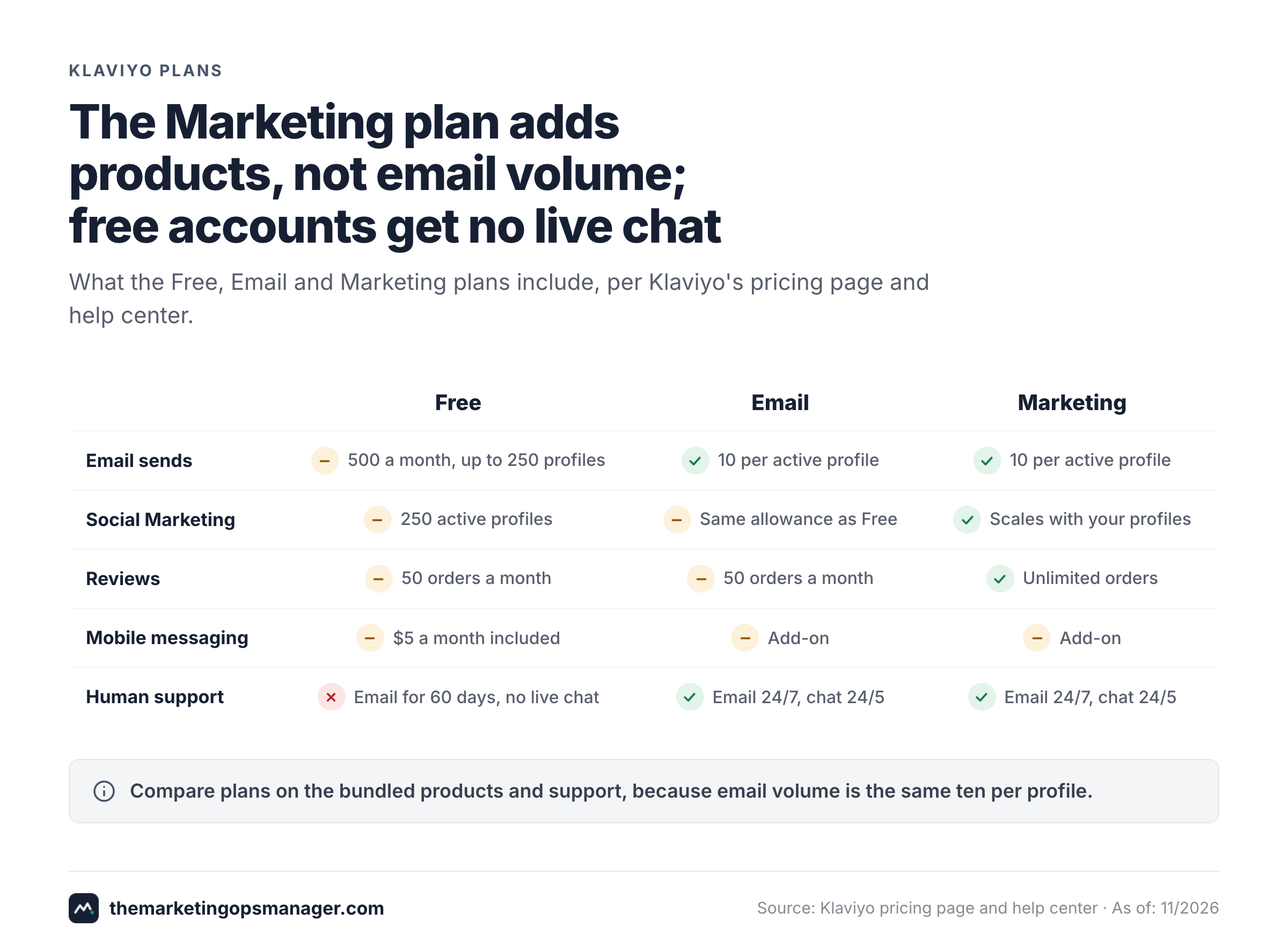
The free plan covers up to 250 active profiles and 500 emails a month. Klaviyo also lists a Helpdesk and a Customer Agent on the free plan, with allowances of 10 tickets and 10 solutions a month. Email sends scale at ten per active profile on both paid plans. The Marketing plan costs $5 more than Email at 500 profiles and $45 more at 10,000, and the gap reaches $165 at 50,000. Marketing adds Social Marketing, unlimited review orders and Customer Hub, so decide on those products rather than on the plan name.
How does Klaviyo count active profiles, and what happens when you grow?#
The bill follows active profiles, so the definition matters. Klaviyo's billing documentation says any profile, regardless of consent status, that can be emailed through Klaviyo counts as active. In billing terms that means a profile with an email address that isn't suppressed. A phone number alone doesn't count toward the Profiles and Email plan. Suppressed profiles leave the count once suppression is processed, and deleted profiles stop counting but can't be recovered.
Growth rules are forgiving, but they aren't free. Klaviyo's documentation plainly states that when you exceed your plan's active profile limit, it doesn't stop you from sending or adding profiles. You move to a higher tier as of your next billing cycle. The exception is the free plan, where you can't send email until you're back under the limit. For email sends, Klaviyo offers three options: flexible overages (extra capacity for the current cycle only), upgrading manually or automatically, or stopping sends on that plan until the next cycle. When you change plans yourself, an upgrade takes effect immediately, but a downgrade is typically scheduled for the next billing cycle, and mid-cycle downgrades aren't refunded.
What are Klaviyo's main limitations?#
The limitations that show up in reviews and in the documentation fall into five groups, and they're easier to plan for once you've seen them listed.
- Cost as lists grow. This is the top G2 complaint theme. Because every profile that can be emailed counts, including checkout contacts regardless of consent status, list hygiene is a recurring cost task, not a one-time cleanup.
- Learning curve. G2 reviewers describe advanced features as hard to set up and manage. Flow triggers can't be edited after you set them, and filters have specific rules, so plan time for a build-and-review habit.
- One-way CRM data. The Salesforce sync reads into Klaviyo, runs hourly and carries one metric. Teams that need two-way sync should check the integration directory for their CRM before they sign.
- Predictions need history. Predicted CLV needs 500 ordering customers and 180 days of order history, so small or new stores won't see it.
- Support depends on your plan. Free accounts can email support only during the first 60 days after sign-up, and they get no live human chat. Klaviyo offers its Composer assistant for AI-powered help instead, and community forums and learning materials stay available. Paid plans get email 24/7 and chat 24/5, with weekend hours varying by plan.
How does Klaviyo compare with other platforms?#
Klaviyo's strength is the store-data model, and its trade-off is pricing by profile. Other platforms offer more CRM depth, other channel mixes or lower cost, though none of them removes the need for clean order data.
| Platform | What our guide covers | Where to read more |
|---|---|---|
| Klaviyo | Features, limits, rating and buyer fit | This review |
| ActiveCampaign | Pricing, ecommerce and CRM fit | Klaviyo vs ActiveCampaign |
| Mailchimp | Pricing, features and buyer fit | Klaviyo vs Mailchimp |
| Braze | Features, limitations, pricing and buyer fit | Braze review |
| Iterable | Features, limitations and buyer fit | Iterable review |
What's better than Klaviyo depends on the gap you're trying to close: cost, CRM depth or channel mix. If cost is the reason you're looking, our list of Klaviyo alternatives sorts options by switch reason. Build a weighted scorecard before the demos. For example, give 30% to data fit, 25% to flow control, 20% to cost at your list size, 15% to reporting and 10% to support. Those weights are an illustration, so set your own.
Who should buy Klaviyo, and who should skip it?#
Klaviyo suits teams that run purchase-driven programs such as abandoned cart, post-purchase, win-back, price-drop and back-in-stock flows, and that have order data flowing from a store platform; it's weaker when the data is thin. The clearest match is a Shopify store with a few thousand customers and a marketer who owns the flows.
Choose Klaviyo when: orders and onsite events should trigger messages, you want a free start with the first 250 profiles and you can maintain list hygiene.
Pause the purchase when: your order data is incomplete, nobody owns consent and suppression, or finance can't model a bill that grows with the list.
Skip Klaviyo when: you need two-way CRM sync with Salesforce, you send a few newsletters a month to a small static list, or you can't absorb a bill that steps up as the list grows.
How should you run a pilot?#
A pilot should prove that Klaviyo works with your data, rather than that a template looks good. Start on the free plan or a small paid band, but run one flow, such as post-purchase, for a real segment.
- Connect the store and wait for the historical sync to finish before you judge any report.
- Count your active profiles in the billing screen and compare them with your own list.
- Build one metric-triggered flow, set the re-entry rule on purpose and read the trigger filter rules before you publish.
- Send to a seed group, then open the campaign's Recipient activity and read the Skipped list.
- If you migrate from another provider, remember that automations aren't transferred and must be rebuilt as flows, and templates aren't moved automatically. Klaviyo's migration guidance is to send your first campaigns to engaged contacts only: for the first week if you send daily, or for the first two or three campaigns if you send more than weekly.
- Open the mobile messaging rates in Billing before you plan an SMS budget.
Assign an owner to each step, write down the pass criteria first and keep a log of every defect.
The Marketing Ops Manager, our own product, checks the handoffs around platforms like Klaviyo: tracking, forms, CRM connections and lead routing. It's a monitoring layer and not a Klaviyo replacement, and it works in Claude and ChatGPT through MCP while a named person approves any change.
Klaviyo review FAQ#
Buyers usually ask about price, the free plan, SMS costs and how Klaviyo handles growth, so that's what the answers cover. Each answer reflects Klaviyo's pricing page and help center as read in November 2026.
What is Klaviyo used for?
Klaviyo sends email, SMS and push messages based on customer and order data. Typical uses are abandoned cart, post-purchase, win-back, price-drop and back-in-stock flows for online stores.
How much does Klaviyo cost?
The free plan covers up to 250 active profiles and 500 emails a month. At 500 active profiles the Email plan costs $20 a month and the Marketing plan $25, and the prices rise with list size, for example $150 and $195 at 10,000 profiles (pricing page, November 24, 2026). Mobile messaging is billed per message on top.
Does Klaviyo have a free plan?
Yes. The free plan covers up to 250 active profiles and 500 emails a month, with small allowances for products such as reviews and Customer Hub. Free accounts get email support only in the first 60 days and no live human chat.
What counts as an active profile in Klaviyo?
Any profile that can be emailed through Klaviyo counts, regardless of consent status. Suppressed profiles leave the count and deleted profiles stop counting. A phone number alone doesn't count toward the Profiles and Email plan.
What happens if I exceed my Klaviyo plan?
Klaviyo doesn't stop you from adding profiles or sending on a paid plan. You move to a higher tier at your next billing cycle. On the free plan you can't send email until you're back under the 250-profile limit.
Does Klaviyo sync with Salesforce?
Yes, as a one-way pull into Klaviyo. It syncs up to six objects every hour and maps each object by email address. Only the Became Lead metric syncs.
How are Klaviyo SMS messages billed?
Since July 13, 2026 mobile messaging uses dollar-based per-message rates instead of credits. The rate is per SMS segment, so cost equals rate times recipients times segments. You find your rates in the billing settings.
Is Klaviyo good for beginners?
G2 reviewers name ease of use as the top praise theme, and they also name a steep learning curve in advanced features as a common complaint. Basic flows are quick to build; filters and predictions take longer.
Method: we read Klaviyo's pricing page and help center documentation and the G2 listing in November 2026. We didn't run the product.