Click fraud protection software finds paid clicks that come from bots, click farms and competitors and blocks the source before it can click again. The six tools below all do that, but they differ in what happens after a visitor is flagged: some write an IP to an ad platform's exclusion list, some build an audience exclusion, some stop your tracking tags from firing, and one only reports until you upgrade.
That difference matters more to a marketing ops team than the detection claims, because every action lands in a system someone else owns: the ad account, the tag manager, GA4 or the CRM. It's the handoff, not the score, that breaks. For each tool we read the vendor's pricing page, a product page, a how-it-works or help page where one existed, and a review source where one was readable. Where a detail wasn't published we say so.
- price by volume: ad spend, ad clicks, scans or visits
- 6 of 6
- lowest published monthly price (TrafficGuard Shield, promotional)
- $49
- publishes no price at all (Lunio)
- 1 of 6
- free trial or audit on every tool
- 7 to 30 days
Our picks by situation#
 Best for one verdict across Google, Meta and MicrosoftClickCeaseOne detection event updates the exclusion lists on all three platforms, and Pixel Guard keeps Google tags from firing on flagged visitors.
 Best to measure before you blockOpticksLite at $60 a month reports invalid traffic without blocking anything, and automated prevention starts on Pro.
 Best for small Google Ads accounts priced in clicksFraud BlockerPlans are 5,000 and 25,000 ad clicks a month, plus a one-click clean-up of negative keywords, Search Partners and location settings.
 Best when the plan should follow ad spendClickGUARDLite, Standard and Pro are capped at $5k, $50k and $100k of monthly spend, with on-site behavior used as a signal.
 Best for Google Ads accounts above $30k a monthTrafficGuardPrevention mode adds invalid sources to Google Ads IP exclusions beyond Google's standard list limit; Scale adds Meta and affiliate coverage.
 Best for Performance Max and many ad networksLunioAccount-level IP blocking for Performance Max and one invalid IP excluded across every connected channel, on a custom quote.
 Not a click fraud tool · for the checks around itThe Marketing Ops ManagerChecks that landing pages, tracking, forms and CRM handoffs still work after you switch blocking on.
Click fraud protection software compared#
| Tool | Handoff | Starting price (USD) | Review score |
|---|---|---|---|
| ClickCease | In: visitor sessions from paid clicks; out: IP and audience exclusions in the ad platforms, tag suppression, HubSpot lead verdicts | Starter $99/mo (marked as billed annually), Pro $149/mo, Advanced $349/mo, with 30% off the first 3 billing cycles for new customers; 7-day free trial (vendor pricing page, checked 2026-11-24) | 4.2 (Trustpilot, 530) |
| ClickGUARD | In: every paid click scored on IP, device and on-site behavior; out: blocked sources, click and behavior reports | Lite from $74/mo (1 site, up to $5k ad spend), Standard from $119 (3 sites, up to $50k), Pro from $159 (unlimited sites, up to $100k), Custom above that; quarterly saves 10%, yearly 20%; free trial (vendor pricing page, checked 2026-11-24) | 4.0 (Trustpilot, 182) |
| Lunio | In: clicks from every connected ad channel; out: IP exclusions shared across channels, click-level data kept two years | Custom quote, set as a small share of ad spend based on spend and channels; 14-day free traffic audit (vendor pricing page, checked 2026-11-24) | No reviews yet |
| TrafficGuard | In: Google Ads clicks scored with 200+ signals; out: automatic IP exclusions beyond Google's standard list limit, eligible invalid-click cost recovery | Shield $49/mo promotional price (one website on a Google Search Ads account, up to $30k monthly ad spend); Scale is a quote for spend above $30k with Search, Meta, Affiliate and Mobile; 30-day free trial (vendor pricing page, checked 2026-11-24) | No reviews yet |
| Fraud Blocker | In: ad clicks counted per plan; out: blocked sources plus a one-click set of account clean-ups | Starter $79/mo (5,000 ad clicks, 1 website), Pro $99/mo (25,000 clicks, 50 websites), Enterprise from $489/mo (250,000+ clicks); annual billing saves 20%; 7-day free trial (vendor pricing page, checked 2026-11-24) | No reviews yet |
| Opticks | In: traffic measured by the Opticks Sensor from Google Tag Manager; out: automated blocking from the Pro plan, alerts, reports and lead-quality monitoring | Lite $60/mo (10k monthly scans, 1 user, detection only), Pro $240/mo (100k scans, 5 users, automated prevention), Max $820/mo (300k scans, 10 users, API), Custom; yearly saves 10%, plus taxes; 7-day free trial without a card (vendor pricing page, USD view, checked 2026-11-24) | No reviews yet |
| The Marketing Ops Manager Our product | Checks every handoff in the campaign journey on a schedule | Starter $199 per month (up to 10 campaigns, checks every 15 minutes), Growth $499 per month (up to 50 campaigns, checks every 5 minutes); billed monthly in advance through Stripe, card required at checkout, cancel anytime (vendor homepage, as of 2026-11-02) | No reviews yet |
Starting prices are the lowest published paid monthly price or the vendor's own promotional price, checked on November 24, 2026. Review scores come from Trustpilot where a profile with reviews exists.
What is click fraud protection software?#
Click fraud protection software is a tool that scores the visitors who arrive from your paid ads, flags the ones that aren't real buyers and blocks them from seeing or clicking your ads again. Vendors also call it ad fraud detection software or invalid traffic protection. The traffic it targets comes from bots, click farms, scrapers, competitors and repeat clickers.
Most tools in this category work in three steps. A script on your site or a click tracker records the visit. The vendor's engine scores it using signals such as IP address, device fingerprint, timing and on-site behavior. If the score crosses a threshold, the tool sends an exclusion to the ad platform. How good that last step is depends on what each platform lets a third party change.
| Type of invalid traffic | How it shows up in your reports |
|---|---|
| Bots and scripts | Many clicks with zero time on site and no scroll or mouse movement |
| Click farms and proxies | Clusters of clicks from one network or an unexpected country |
| Competitor clicks | Repeat clicks on high-cost keywords from the same device |
| Fake form fills | Leads with throwaway emails or gibberish names reaching the CRM |
Click-level protection for paid media is the scope here, and payment or chargeback fraud isn't, because it uses different tools. For lead quality after the click, see our guide to lead management software.
Does Google already filter invalid clicks?#
Google already filters part of it. Google says it doesn't charge you for invalid clicks it identifies: those clicks are filtered out of your campaign metrics and removed from billing. If Google finds invalid clicks after you were billed, it credits the account. The Invalid traffic card on the Overview page summarizes the protection and the credits.
That leaves two gaps that a third-party tool tries to close. The first is traffic that Google doesn't classify as invalid but that still never converts, such as a competitor who clicks twice a day or a bot that acts human for a few seconds. The second is everything outside Google Ads: Meta, Microsoft Ads and the other networks each run their own filters with their own rules.
Treat vendor claims about the share of fake clicks with caution, of course. Several vendor pages quote a percentage of wasted spend, but each measures something different. The only number worth acting on is yours: how much invalid traffic a tool flags in your account during a trial, and whether blocking it changes conversions.
What should you rule out before you buy a tool?#
A thin lead list isn't always click fraud. Wide location settings, broad keywords, poor display placements and open forms produce the same symptoms, and each has a free fix. Rule these out first, because a tool can't repair a targeting problem.
- Add the invalid clicks column to the campaigns table and compare each campaign with its own previous three months
- Open the change history and look for budget increases, new keywords or wider location settings around the date of any spike
- Switch location targeting from presence or interest to presence only if people outside your area shouldn't see the ads
- Review where Display and Performance Max ads appeared and exclude spam placements
- Store the GCLID with every lead, so a form fill or a call can be matched to one click
- Check that forms use server-side validation or double opt-in, so fake details don't reach the CRM
- Call or email 20 recent leads from the suspect campaign and note how many were genuine enquiries
If those checks explain the pattern, you may not need a tool. If leads stay poor after the fixes, the traffic itself is the likely problem, and a trial gives you evidence.
How does click fraud software block a visitor?#
After a tool decides that a visitor is invalid, it can only act through the controls that the ad platform exposes. Those controls differ, so the same detection event produces different blocking on each platform.
- Step 1Detect
- ClickCease
- TrafficGuard
- Opticks
Breaks when the script isn't on the page that receives the click, so the visit is never scored - Step 2Decide
- ClickGUARD
- Fraud Blocker
- Lunio
Breaks when a rule is too strict and blocks a real buyer who shares an office IP - Step 3Act in the ad platform
- ClickCease
- Lunio
- TrafficGuard
Breaks when the campaign type doesn't accept IP exclusions, as with Performance Max, or the list is full - Step 4Keep data clean
 Google Analytics 4
 HubSpot Marketing Hub
Breaks when flagged sessions still fire conversion tags, and fake leads reach the CRM - Across allMonitor the journey
- The Marketing Ops Manager
Catches tracking or form breakage after you change tags or rules
The table below lists what each tool does after a flag, as far as the vendors publish it.
| Tool | Google Ads | Meta | Microsoft Ads | Other actions |
|---|---|---|---|---|
| ClickCease | IP exclusion list; account-level list for Performance Max | Custom exclusion audience | Audience exclusion only, because Microsoft doesn't allow automatic IP blocking | Pixel Guard stops Google tags; Lead Shield scores forms |
| ClickGUARD | Blocks the source; Lite covers one of Google, Meta or Microsoft | Standard and above cover all three | Standard and above cover all three | Blacklist management from Standard |
| Lunio | Account-level IP blocking, including Performance Max | Listed | Listed (Bing) | An invalid IP is excluded across connected channels |
| TrafficGuard | Automatic IP exclusions beyond Google's standard limit | One portfolio, up to 25 ad accounts, on the enterprise plan | Not stated | Smart Bid Optimiser and Performance Max Shield on Scale |
| Fraud Blocker | Blocks invalid clicks; applies account clean-ups | Listed as Meta API approved | Not stated | 400+ negative keywords, 450+ excluded display sites |
| Opticks | Prevention from the Pro plan | Prevention from Pro | Prevention from Pro | Also TikTok, Reddit and Taboola |
Two limits repeat across the vendors. First, IP-based blocking is weakest where a platform hides the user, and Performance Max works differently from standard campaigns, so ClickCease and Lunio both describe account-level exclusion for that reason. Second, blocking a click doesn't undo the data it already created, which is why tools that stop your Google tags from firing or that exclude audiences protect bidding signals as well as budget.
All six tools appear on Google's list of certified click trackers, which matters if you use a click tracking template or parallel tracking on your account. Check your tracking setup against our campaign tracking checklist before you add any of them, because the tool will certainly touch your tags.
How do you choose click fraud protection software?#
Start with where you spend and how you'd like to be billed, because both change the price by an order of magnitude. Six checks separate these tools.
- Platforms. Google only, Google plus Meta and Microsoft, or also TikTok, Reddit and native networks. Match the list to your actual spend.
- Billing unit. Ad spend per month, ad clicks, monthly scans or site visits. A tool priced in visits can get expensive on a high-traffic site with modest ad spend.
- Detect-only versus block. Some plans report without blocking. That's a fair way to start, but a poor place to stay.
- Performance Max and Microsoft Ads. Ask how the tool blocks there, since neither takes standard IP exclusions the way search campaigns do.
- Tracking effects. Whether flagged sessions are kept out of conversion tags and GA4, and how the tool gets installed (a script, a tag manager container or a click tracker).
- Leads. If fake form fills are your problem, check whether the tool filters submissions or only clicks.
| If your situation is | Start with |
|---|---|
| Google, Meta and Microsoft spend and HubSpot forms | ClickCease |
| Plans that scale by monthly ad spend, agency use | ClickGUARD |
| Many ad networks or Performance Max under pressure | Lunio |
| Google Ads above $30k a month, or Meta and affiliate traffic | TrafficGuard |
| One small Google Ads account counted in clicks | Fraud Blocker |
| You want to measure before paying for blocking | Opticks |
Click fraud protection software reviewed: 6 tools#
Each entry covers how the tool detects and blocks, what the plans limit, what reviewers say where a review source was readable, and who should skip it. The tools are grouped by the buyer they fit best. Prices are the lowest published monthly price on each vendor's pricing page on November 24, 2026.
Best click fraud protection software for Google, Meta and Microsoft#
ClickCease
ClickCease, a CHEQ product, runs 2,000+ behavioral tests on each visit that arrives from a paid click and pushes the verdict to the exclusion lists of Google Ads, Meta and Microsoft Ads.
ClickCease turns one detection event into exclusions on Google Ads, Meta and Microsoft Ads, and it extends past clicks to your tags and your HubSpot forms.
A visitor arrives from a paid ad, and ClickCease starts a session that runs 2,000+ behavioral and technical tests in parallel and assigns a fraud risk score. If the score crosses the threshold, the block happens in the same session. On Google Ads the IP goes on the campaign-level exclusion list; for Performance Max and YouTube campaigns it goes on the account-level list. On Meta the visitor joins a custom exclusion audience. On Microsoft Ads ClickCease uses audience exclusion, because Microsoft doesn't allow automatic IP blocking.
Two add-ons matter for the rest of your stack. Pixel Guard stops Google tags from firing on a flagged visitor, so Google Ads conversions, GA4 audiences and Smart Bidding signals don't count the session. Lead Shield checks each form submission for bots, disposable emails and mismatched identities and writes a verdict and risk score to the HubSpot contact; it also works with Gravity Forms, WPForms and Contact Form 7 on WordPress.
- you buy traffic on Google, Meta and Microsoft Ads and want one detection event to update the exclusion lists on all three
- your forms feed HubSpot and you want a fraud verdict and risk score on the contact record through Lead Shield
- you expect IP blocking on Microsoft Ads: ClickCease says Microsoft doesn't allow automatic IP blocking, so it uses audience exclusion there
- your paid spend sits on TikTok, LinkedIn or Reddit, which the paid-protection page doesn't list
- Users like
- Setup help from the support team (a reviewer in October 2026 describes being guided through installation step by step)
- Users dislike
- Billing terms: one October 2026 reviewer says they were charged for a full year when they expected month-to-month billing
- Source: Trustpilot, 530 reviews
How it works in practice
Starter lists at $99 a month, which the pricing page marks as billed annually, and covers one website, 5,000 monthly visits and 250 HubSpot leads. New customers get 30% off the first three billing cycles, which brings Starter to about $69, so you'll want to budget for the full price from month four. Pro at $149 adds multiple-domain setup, agency permissions and white-label reporting, and Advanced at $349 adds an in-person onboarding session. Unlimited Google Ads accounts and 24/7 support are on every plan.
The tool counts any visit it detects or blocks against the traffic allowance, including internal page views, so a busy site can outgrow Starter faster than the ad spend suggests.
- Starting price
- Starter $99/mo (marked as billed annually), Pro $149/mo, Advanced $349/mo, with 30% off the first 3 billing cycles for new customers; 7-day free trial (vendor pricing page, checked 2026-11-24)
- Detection
- 2,000+ real-time behavioral and technical tests per visit
- Blocks on
- Google Ads IP exclusions (account-level list for Performance Max), Meta custom exclusion audience, Microsoft Ads audience exclusion
- Lead filtering
- Lead Shield for HubSpot forms and WordPress forms (Gravity Forms, WPForms, Contact Form 7)
- Free trial
- 7 days
ClickGUARD
ClickGUARD scores every paid click on IP, GCLID, referrer, device fingerprint and on-site behavior, and its plans are capped by monthly ad spend rather than by visits.
ClickGUARD prices by monthly ad spend instead of by visits and scores each click on network, device and on-site behavior signals.
ClickGUARD validates the GCLID, referrer and device fingerprint, checks for IP, geolocation and device spoofing, and then watches what the visitor does on the page: bounce rate, time on site, mouse movement and scroll depth. A visitor who clicks and does nothing can be blocked before they return, which is useful when the IP address alone looks normal. The same behavioral data feeds its reports, so you can see which clicks were blocked and why.
The plan ladder is easy to read. Lite protects a single website and one of Google, Microsoft or Meta Ads, up to $5k of monthly spend. Standard covers up to three websites with two PPC accounts each and up to $50k of spend, and adds blacklist management. Pro covers unlimited websites up to $100k of spend and adds conversion tracking and advanced reporting. Above that, Custom adds a dedicated customer success manager.
- you size the tool by ad spend: the caps are $5k, $50k and $100k a month on Lite, Standard and Pro
- you want on-site behavior such as bounce rate, time on site, mouse movement and scroll depth used to flag visitors
- one account spends more than $100k a month, because Pro stops there and Custom is a quote
- you run Google and Meta together on the entry plan: Lite protects only one of Meta, Microsoft or Google Ads
- Users like
- Detailed click reports (older Trustpilot reviews from 2018 and 2019 say the reports are the strongest part)
- Source: Trustpilot, 182 reviews
How it works in practice
Because plans are capped by spend, a team that doubles its budget in a quarter moves up a tier even if traffic stays flat. Quarterly billing saves 10% and yearly billing 20% on the pricing page, and the page shows prices in USD, EUR and GBP. The vendor's pricing page cites 4.7 out of 5 from 197 reviews without naming the source, so treat that figure as a vendor claim.
- Starting price
- Lite from $74/mo (1 site, up to $5k ad spend), Standard from $119 (3 sites, up to $50k), Pro from $159 (unlimited sites, up to $100k), Custom above that; quarterly saves 10%, yearly 20%; free trial (vendor pricing page, checked 2026-11-24)
- Detection
- IP, geolocation and device checks, GCLID and referrer validation, on-site behavior
- Plan cap
- Ad spend per month: $5k, $50k, $100k, custom
- Blacklist management
- Standard plan and above
- Conversion tracking
- Pro plan and above
Best click fraud protection software for high spend and many channels#
Lunio
Lunio detects invalid traffic across search, social, display, Performance Max and affiliate campaigns, and an invalid IP found in one campaign or platform is excluded across the others.
Lunio is built for advertisers who buy on many networks, and it is the only tool here that treats an invalid IP found in one channel as a block for all of them.
Lunio combines machine learning, cyber security tests and IP cross-referencing to score each click. When it finds an invalid IP in one campaign or platform, it excludes that IP across your other campaigns and platforms. For Performance Max it offers automatic account-level IP blocking, so an address flagged in a Performance Max campaign stops seeing ads across the whole account. It also surfaces spam placements and unprofitable search terms for manual exclusion.
The pricing page lists integrations with Google, Bing, Twitter, LinkedIn, Meta, Reddit, TikTok, Yandex and Naver. Every click from every channel is stored as first-party data for two years, which gives your analysts a raw log to query when a report doesn't match. Workspaces support multi-account management with admin and user controls, which suits agencies.
- you run Performance Max: Lunio offers automatic account-level IP blocking, so an IP flagged there stops seeing ads in every campaign of the account
- you buy on many networks: the pricing page lists Google, Bing, Twitter, LinkedIn, Meta, Reddit, TikTok, Yandex and Naver
- you want the raw click log: click stream data is stored as first-party data for two years
- you need a monthly price before talking to anyone, because the pricing page publishes none and routes you to a form and a 14-day traffic audit
- you want a self-serve signup with a card, since the entry path is an audit and a demo
How it works in practice
Pricing is set per customer as a small fraction of ad spend, depending on spend and channel coverage. The entry point is a 14-day free traffic audit that shows how much of your traffic is invalid, with full analytics access during the audit. Lunio's own case studies report a 68% cut in invalid traffic and a 12% lower CPA for one adventure-travel company, but those are vendor-published results, not independent ones.
- Starting price
- Custom quote, set as a small share of ad spend based on spend and channels; 14-day free traffic audit (vendor pricing page, checked 2026-11-24)
- Channels
- Paid search, paid social, display, Performance Max, affiliate
- Multi-account
- Multiple workspaces with admin and user controls
- Data retention
- Click stream data stored for two years
- Free trial
- 14-day traffic audit
TrafficGuard
TrafficGuard scores each Google Ads click with 200+ signals and, in Prevention mode, adds invalid sources to your Google Ads IP exclusions, going beyond Google's standard exclusion limit.
TrafficGuard starts in a report-only mode and later switches to automatic exclusions, with plans split at $30k of monthly ad spend.
TrafficGuard scores each Google Ads click with 200+ signals, including device fingerprint, timing and behavior, rather than relying on the IP address alone. In Detection mode you see where invalid traffic comes from and which campaigns are exposed. In Prevention mode it adds identified invalid sources to your Google Ads IP exclusions, and the vendor says it goes beyond Google's standard IP exclusion limit so protection keeps scaling as the list grows. Coverage on the Google side spans Search, YouTube, Demand Gen, Shopping, Display and Performance Max.
Shield, the entry plan, protects one website connected to a Google Search Ads account for up to $30k of monthly ad spend, with unlimited users, custom click-frequency rules and email support. Scale is a quote for spend above $30k and adds Search, Meta, Affiliate and Mobile protection, unlimited ad accounts, Performance Max Shield, Smart Bid Optimiser and a dedicated success manager.
- you want to see invalid traffic before anything is blocked: Shield starts in Detection mode and Prevention is a separate switch
- spend is above $30k a month or sits on Meta and affiliate links too, where Scale adds omnichannel protection, unlimited ad accounts and a success manager
- you need more than one domain on a self-serve plan, because Shield covers a single website
- you want a posted price for large accounts: Scale and the Meta portfolio plan are quotes
How it works in practice
The $49 price is labeled a limited promotional price on the pricing page, so confirm the regular price before you commit. The Meta product protects one Meta portfolio with up to 25 ad accounts and is priced as a quote. TrafficGuard also says it recovers eligible invalid-click costs; check what that covers in your contract, since Google already credits invalid clicks it finds.
- Starting price
- Shield $49/mo promotional price (one website on a Google Search Ads account, up to $30k monthly ad spend); Scale is a quote for spend above $30k with Search, Meta, Affiliate and Mobile; 30-day free trial (vendor pricing page, checked 2026-11-24)
- Detection
- 200+ signals per click including device fingerprint, timing and behavior
- Modes
- Detection (report only) and Prevention (automatic exclusions)
- Google coverage
- Search, YouTube, Demand Gen, Shopping, Display and Performance Max
- Meta
- One Meta portfolio, up to 25 ad accounts, on the enterprise social plan
- Free trial
- 30 days
Best click fraud protection software for small budgets and trials#
Fraud Blocker
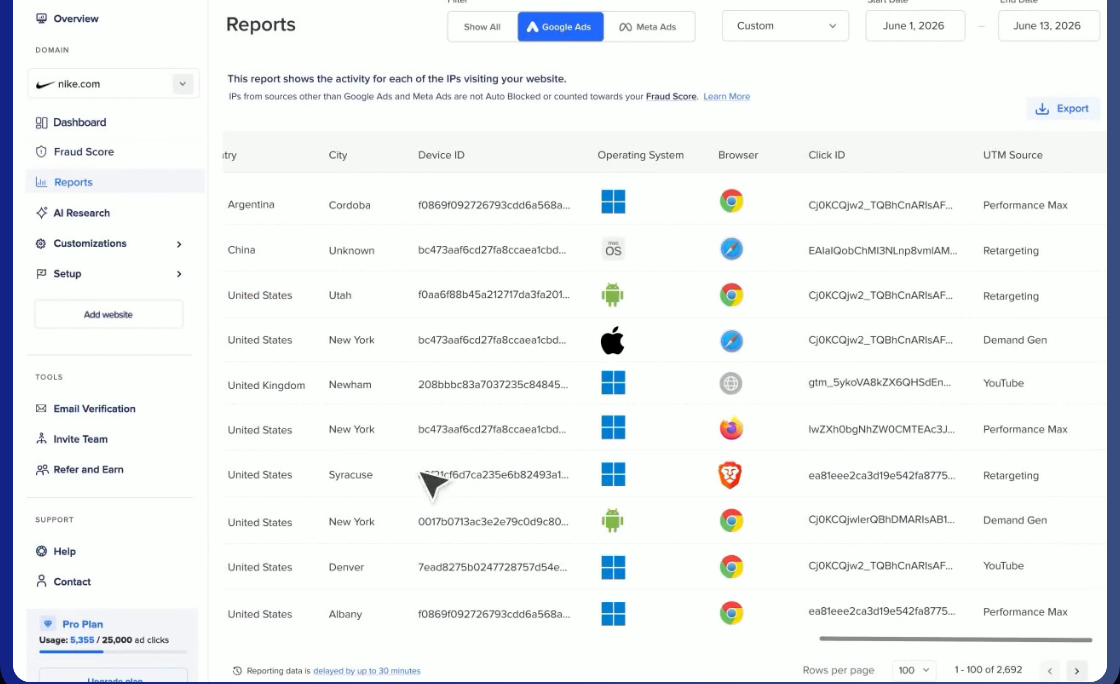
Fraud Blocker bills by the number of ad clicks it tracks and, besides blocking invalid clicks, applies a one-click set of Google Ads account clean-ups called Instant Performance Boost.
Fraud Blocker counts ad clicks instead of spend, and it bundles four account clean-ups that you can switch on without writing any rules.
The plan sizes are 5,000, 25,000 and 250,000+ ad clicks a month, so you can estimate your tier from your Google Ads click report. The Instant Performance Boost applies four settings: it adds a list of 400+ negative keywords (standard or generated from your website), excludes 450+ made-for-advertising sites from display placements, turns off the Search Partners network and switches location targeting from presence or interest to presence only. Those settings reduce wasted clicks even before a single visitor is flagged.
Starter covers one website and three team members, Pro covers 50 websites and 10 members, and Enterprise has unlimited websites and members. Blocking rules are fully customizable on every plan, and a white-label platform and AI detection are listed throughout.
- your click volume is easy to size: the plans are 5,000, 25,000 and 250,000+ ad clicks a month
- you want account hygiene applied for you: the Boost adds 400+ negative keywords, excludes 450+ made-for-advertising sites, turns off Search Partners and switches location targeting to presence only
- you need click history older than 90 days, because only Enterprise keeps 12 months
- you manage several client sites on Starter, which covers one website and three team members
How it works in practice
Starter and Pro keep 90 days of data, and only Enterprise keeps 12 months. Pro includes 250 email verifications a month and Enterprise 1,250, which supports the vendor's email spam check for lead forms. Annual billing saves 20% against monthly, and the trial lasts 7 days.
- Starting price
- Starter $79/mo (5,000 ad clicks, 1 website), Pro $99/mo (25,000 clicks, 50 websites), Enterprise from $489/mo (250,000+ clicks); annual billing saves 20%; 7-day free trial (vendor pricing page, checked 2026-11-24)
- Plan unit
- Ad clicks per month
- Data retention
- 90 days on Starter and Pro, 12 months on Enterprise
- Email checks
- 250 email verifications on Pro, 1,250 on Enterprise
- Free trial
- 7 days
Opticks
Opticks measures traffic with a sensor installed through Google Tag Manager, reports invalid traffic by channel and, from the Pro plan, blocks it automatically on Google, Meta, Microsoft, TikTok, Reddit and Taboola.
Opticks lets you measure invalid traffic first and pay for blocking later, since the cheapest plan is detection only.
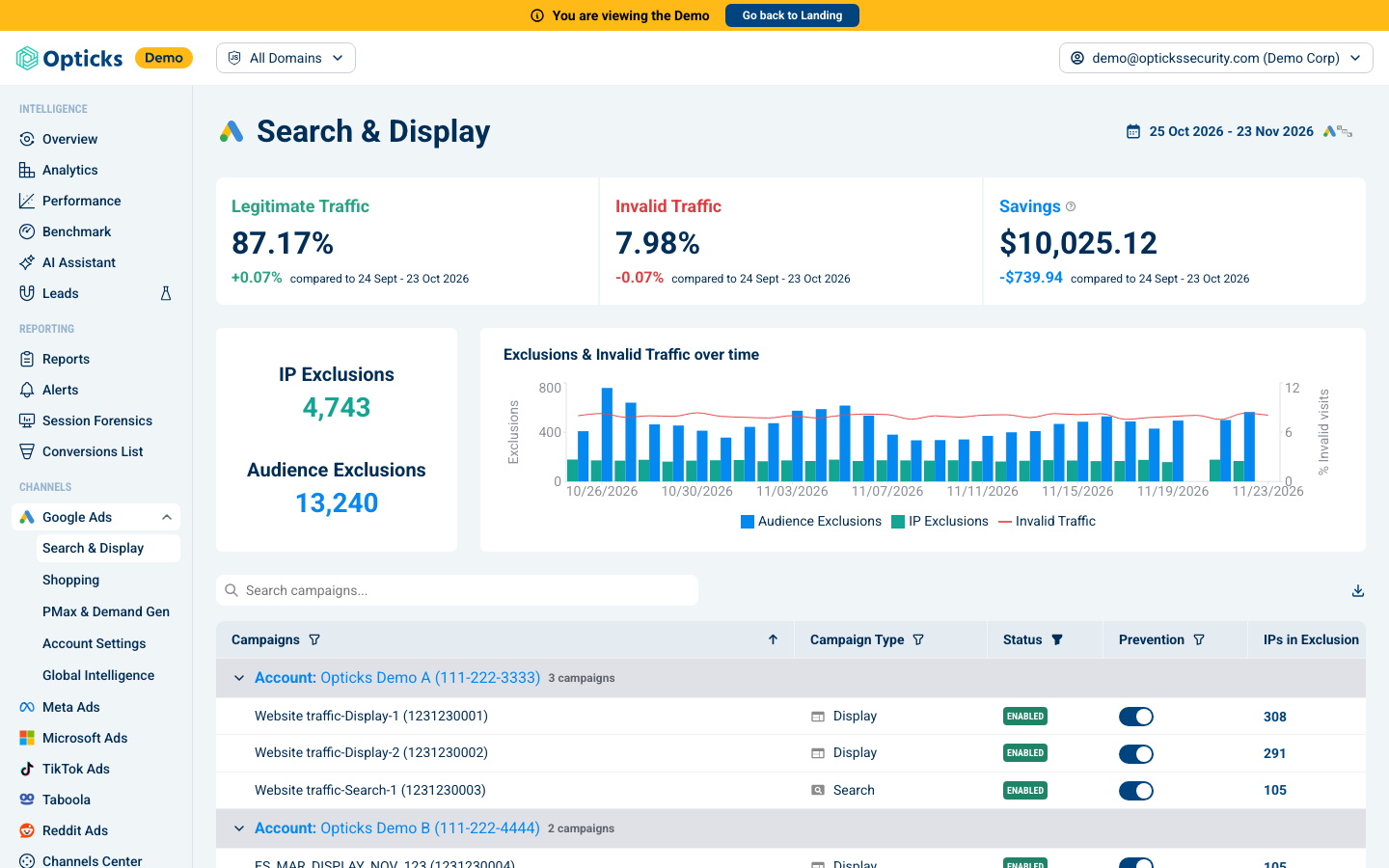
You install the Opticks Sensor through Google Tag Manager or manually, and invalid traffic shows up within minutes. The analytics view lets you combine up to 3 of 80+ dimensions, such as channel, country, device, domain or UTM, and you can set alerts on the same dimensions with custom thresholds. Session Forensics shows the timeline and fraud findings of a single transaction, and a Leads view monitors the quality of incoming leads, with a HubSpot integration.
Automated prevention starts on Pro and covers Google Ads, Meta Ads, Microsoft Ads, TikTok Ads, Reddit Ads and Taboola. X Ads and Outbrain are clearly marked as coming soon. Lite is $60 a month for 10k monthly scans and one user; Pro is $240 for 100k scans and five users; Max is $820 for 300k scans, ten users, custom click-by-click reports and API access.
- you want to measure before you block: Lite detects and analyses invalid traffic without blocking, and prevention starts on Pro
- you advertise on TikTok, Reddit or Taboola, where Opticks lists automated prevention
- you need automatic blocking on the cheapest plan, since Lite is detection only
- you need prevention on X or Outbrain, which the site marks as coming soon
How it works in practice
The pricing page shows EUR by default and offers a USD toggle; prices exclude taxes, and yearly billing is about 10% cheaper. The 7-day trial needs no credit card. Because plans are metered in scans rather than ad spend, a high-traffic site on a small budget can burn through Lite's 10k scans quickly.
- Starting price
- Lite $60/mo (10k monthly scans, 1 user, detection only), Pro $240/mo (100k scans, 5 users, automated prevention), Max $820/mo (300k scans, 10 users, API), Custom; yearly saves 10%, plus taxes; 7-day free trial without a card (vendor pricing page, USD view, checked 2026-11-24)
- Setup
- Opticks Sensor through Google Tag Manager or manual install
- Reporting
- Filter by up to 3 of 80+ dimensions; alerts on 80+ dimensions
- Lead quality
- Leads dashboard and a HubSpot integration
- Free trial
- 7 days, no credit card
How do you test a click fraud tool during a trial?#
Every tool above offers a trial or audit, so you can test before you pay. A useful trial shows whether the tool flags traffic that's really worthless and whether turning on blocking leaves your measurement intact.
- Install the script or tag on every landing page that receives paid clicks, and confirm it fires with a tag debugger
- Run in detect-only mode for the first 7 days
- Export the flagged visits and match them to CRM records: how many became leads or customers?
- Check that flagged clicks share a pattern (network, device, zero engagement) instead of one-off guesses
- Compare your ad platform's click and cost numbers before and after blocking starts
- Confirm GA4 and Google Ads conversion counts don't drop for visitors you know are real
- Test one known good visitor from an office or mobile network to see whether rules catch them
- Check the exclusion lists in the ad platform and note how many entries the tool added
- Write down who owns the rule set and who reviews blocked IPs each month
The tag debugger step matters more than it looks. A script placed on the wrong template, or loaded after consent logic, can silently skip half your landing pages, and the tool then reports a clean account that isn't clean. Our guide to the Google Tag Assistant shows how to check that a tag fires, and a UTM naming convention keeps the flagged traffic traceable to a campaign.
FAQ#
What is the best click fraud protection software?
The best choice depends on where you spend. ClickCease covers Google, Meta and Microsoft Ads and HubSpot forms, ClickGUARD plans follow monthly ad spend, Lunio and TrafficGuard target larger and multi-channel budgets, and Fraud Blocker and Opticks are the cheapest ways to start. All six offer a trial or audit.
How much does click fraud protection software cost?
Published monthly prices start at $49 (TrafficGuard Shield, promotional), $60 (Opticks Lite, detection only), $74 (ClickGUARD Lite), $79 (Fraud Blocker Starter) and $99 (ClickCease Starter, billed annually). Lunio publishes no price and quotes a small share of ad spend.
Does Google already protect me from click fraud?
Google protects you partly. Google says it doesn't charge for invalid clicks it identifies and credits ones it finds later. Traffic that looks human for a few seconds, repeat clicks from competitors and traffic on other ad networks can still cost you money.
Can click fraud software block Performance Max traffic?
Some can. Performance Max doesn't accept the same campaign-level IP exclusions as standard campaigns, so ClickCease sends IPs to the account-level exclusion list while Lunio offers account-level IP blocking and TrafficGuard sells a Performance Max Shield on its Scale plan.
Will blocking clicks hurt my conversions?
Blocking can hurt conversions if a rule blocks real buyers who share an IP address. Run the tool in detect-only mode first, match flagged visits to your CRM records, and switch blocking on only after the flagged group shows no real leads.
Does click fraud protection also stop fake leads?
Only some tools filter leads. ClickCease Lead Shield scores HubSpot and WordPress form submissions, Opticks has a leads view with a HubSpot integration, and Fraud Blocker bundles email verifications on its Pro and Enterprise plans.