
A martech stack is the set of software a marketing team uses to run campaigns, manage customer data and measure results, plus the connections that move data between those tools. Most teams don't design one. They collect it, one tool per problem, until nobody can say what the whole thing costs or which parts still get used.
This guide covers what a stack contains, what real stacks look like at three company sizes, how to build one, how to audit one and how to cut one down. It ends with the part most stack advice skips, which is what breaks between the tools after everything is bought and connected. We read vendor material and did not run these products.
- A martech stack is the marketing software a team uses plus the connections between it. Think in six layers: data and CRM, engagement and automation, content and web, advertising, analytics and reporting, integration and operations.
- A startup stack can run on free tiers plus about $45 a month at list price. A growth stack on HubSpot Marketing Hub Professional starts at $800 a month plus a $3,000 onboarding fee. Enterprise stacks are mostly quote-only.
- Build from the data outward: pick the CRM as system of record first, then add a tool only for a named job and a named metric.
- Audit every tool with an owner, cost, billing unit, active users, data in and out, and a keep, merge, replace or retire decision.
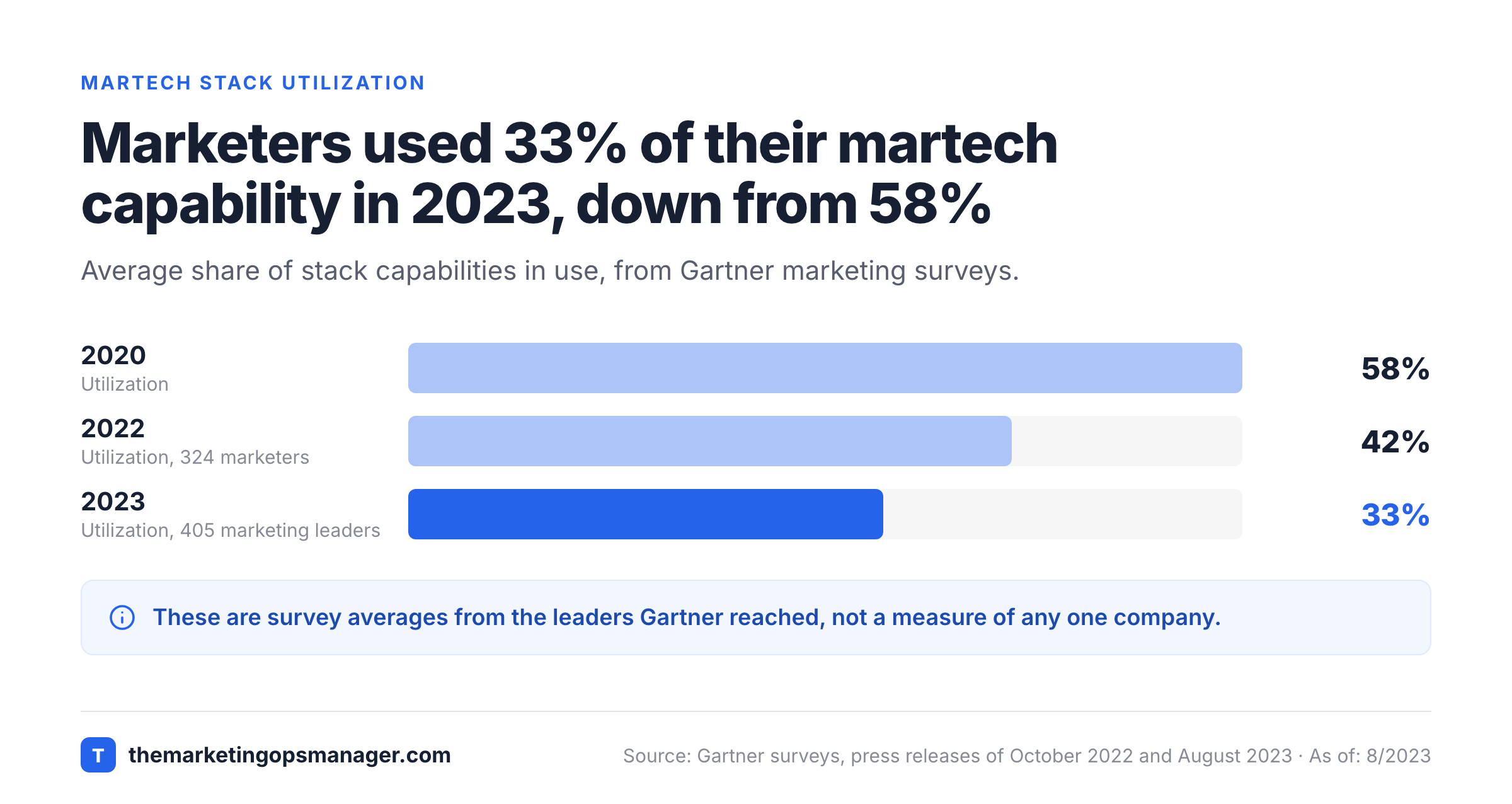
- Gartner's 2023 survey of 405 marketing leaders put average utilization of stack capability at 33%, down from 42% in 2022.
- After the audit, check the handoffs between tools on a schedule. That's where live campaigns fail.
What is a martech stack?#
A martech stack, also called a marketing technology stack, is the collection of tools a marketing team uses to attract, convert and retain customers, together with the integrations that connect them. The core usually includes a CRM, an email or automation platform, web analytics, a content system and one or more advertising accounts. Advertising technology (adtech) is the narrower slice that buys and measures paid media. It's one layer of a stack, not the whole thing.
The category's large and keeps turning over. The 2025 martech landscape from Scott Brinker and Frans Riemersma counted 15,384 tools, up 9% from 14,106 the year before. The census added 2,489 tools and removed 1,211 because of acquisitions or shutdowns, an 8.6% churn rate, according to MarTech. MarTech's own 2026 figure is 15,505 tools, growth of just 0.7%. For a buyer, that means nearly every need has several vendors, and some of them won't be around in three years.
A stack differs from a suite. A suite's one vendor's bundle, such as HubSpot Marketing Hub or Adobe's marketing products. A stack is what you actually run, and in most companies it mixes suites with point tools. The stack isn't just the list of tools. The connections count as much as the tools, because a stack with fourteen unconnected tools is fourteen separate databases. A stack also isn't tied to one of the types of marketing: the same CRM and analytics tool serve email, paid, content and event programs.
What layers does a martech stack have?#
Most stacks have six layers. Sort each tool by the job you use it for, because suites such as HubSpot span several layers and a tool's marketing category can mislead.
| Layer | Job it does | Example tools | Question to ask |
|---|---|---|---|
| Data and CRM | Holds contacts, companies and events; is the system of record |  HubSpot Sales Hub,  Salesforce Agentforce Sales,  Twilio Segment,  RudderStack | Which tool wins when two records disagree? |
| Engagement and automation | Sends email, runs journeys, scores and routes leads |  Mailchimp,  Brevo,  HubSpot Marketing Hub,  Adobe Marketo Engage | Which events start a journey and where does the lead go next? |
| Content and web | Builds pages, designs assets, publishes and schedules |  Canva,  HubSpot Content Hub | Who can publish without a developer? |
| Advertising | Buys and tracks paid media | Google Ads, Meta ads,  StackAdapt | Do clicks arrive with consistent UTM parameters? |
| Analytics and reporting | Measures traffic and conversions, builds reports |  Google Analytics 4,  Data Studio (formerly Looker Studio),  Supermetrics,  Tableau | Does every dashboard read from the same source? |
| Integration and operations | Moves data, plans work, keeps naming and routing consistent |  Zapier,  Workato,  Asana,  Claravine,  Chili Piper | Who owns each connection? |
Two things matter in this table. The first is the question column: every layer has a failure that belongs to nobody unless you assign it. The second is the bottom layer, and it's the one people forget. In a martech stack, Workato or Zapier moves records between systems, Supermetrics pulls ad and analytics data into reports, Claravine standardizes campaign naming and Chili Piper routes inbound leads to owners. Zapier, Workato and similar tools get left out of stack diagrams, yet they carry the data between the other five layers.
Work-management tools such as Airtable, ClickUp and Smartsheet sit in that bottom layer of a martech stack too, and Hootsuite or Buffer cover social publishing in the content layer. The layers also have a natural build order. Data and CRM come first because every other layer reads from it. Our marketing operations software guide covers the work-management end of the bottom layer in more depth.
What does a martech stack look like at different company sizes?#
A startup stack runs on free tiers and one or two paid plans, a growth stack adds marketing automation and a data pipeline, and an enterprise stack adds governance, routing and a dedicated integration layer. The three stacks below are illustrations assembled from published plan prices, not quoted customer stacks. Prices are US list prices read from vendor pricing pages in October and November 2026 and will change.
| Layer | Startup (1 to 5 marketers) | Growth (5 to 20 marketers) | Enterprise (20+ marketers) |
|---|---|---|---|
| CRM | HubSpot Sales Hub: free CRM for up to 2 users | HubSpot Marketing Hub Professional: from $800 a month plus a required $3,000 onboarding | Salesforce Agentforce Sales: $195 (Core) to $395 (Advanced) per user per month |
| Email and automation | Mailchimp: free under 250 contacts, Essentials from $13 a month | Included in Marketing Hub |  Salesforce Marketing Cloud: $1,500 per org per month billed annually (Growth), or Adobe Marketo Engage on a custom quote |
| Customer data | Not needed yet | Twilio Segment Team from $120 a month for 10,000 monthly tracked users | CDP or warehouse pipeline, usually quote-based |
| Reporting | Google Analytics 4: free | Supermetrics Growth at EUR 159 a month billed yearly, feeding Data Studio (formerly Looker Studio) (free) | Tableau Standard from EUR 15 per user per month; at least one Creator license per deployment |
| Integration | Zapier Professional: $19.99 a month for 750 tasks | Zapier for light connections | Workato: quote only |
| Work and design | Canva Pro: $12 per person per month billed yearly | Asana Starter: $10.99 per user per month billed annually |  Adobe Workfront, Claravine and Chili Piper (from $15,000 a year) |
Startup: free CRM, one email tool, one connector#
The startup column costs almost nothing until contact volume grows. One Mailchimp Essentials plan, one Zapier Professional plan and one Canva Pro seat add up to about $45 a month at list price. The free HubSpot CRM and Google Analytics 4 carry the data layer. What's missing is deliberate: no CDP, no dashboard tool, no work-management app. A founder who's also the only marketer doesn't need a fourth system to check, and wouldn't check it.
Growth: the price jumps when automation arrives#
The growth column is where the budget changes shape. HubSpot's Professional tier starts at $800 a month and requires a $3,000 onboarding payment, so the stack's first real cost isn't a license but the move from free tools to a platform. Adding Segment Team at $120 a month and Supermetrics at EUR 159 a month brings the recurring cost to roughly $920 a month plus EUR 159, before seats for Asana or extra contacts. At this size one person usually owns the whole stack part-time, and that's why the audit in the next section matters.
Enterprise: half the layers are quote-only#
At enterprise scale most of the layers have no public price. Salesforce publishes per-user tiers for its CRM and a $1,500 starting price for Marketing Cloud Next on an annual contract, while Marketo Engage, Workato, Workfront and Claravine are sold by quote. In an enterprise martech stack, Workfront usually takes the work intake and Marketo Engage the nurture programs. The hard problem here isn't picking tools. It's ownership: the integration layer and the campaign taxonomy each need a named owner, because with several hundred users in the CRM nobody can fix a broken field mapping informally.
How do you build a martech stack?#
Build a martech stack by working out the jobs first and the tools second, and start with the system that holds your customer data. The sequence below works for a first stack and for rebuilding one that grew by accident. Written down on one page, it doubles as your martech stack strategy.
List the jobs and the metric for each
Write down what the team must do in the next year, for example capture leads from webinars, nurture them to a sales handoff and report cost per qualified lead. Each job gets one metric that tells you the tool is working.
Choose the system of record first
Decide which tool holds the contact and company record. Everything else should read from it or write to it. Teams that skip this step end up with the same contact in three places and three different lifecycle stages.
Usually the CRM:HubSpot Sales Hub or Salesforce Agentforce SalesAdd a tool only for a named job
For every candidate tool, name the job it does that no current tool can do, and who will use it weekly. If the answer's 'it might be useful later', wait.
Map the data flow
Draw how a lead moves: ad, landing page, form, tracking event, CRM record, owner. For each arrow, write which field carries the data and which tool writes it.
Assign an owner and a budget to each tool
A tool without a named owner and a renewal date will outlive its usefulness. You'll want both in the same sheet you use for the audit.
Review the stack every quarter
Check which jobs changed, which tools went unused and which connections broke. Put the review in the calendar when you build the stack, not after the first surprise invoice.
On the data side of a martech stack, RudderStack and Twilio Segment collect events, Brevo and Mailchimp send the email, and Tableau reads the results. Step three has a trap: tools bill by different units, so list prices aren't comparable until you convert them to your own volume. Every martech stack carries this billing-unit mismatch, and it's the main reason renewal quotes surprise people.
| Tool | Billing unit | Published entry point (list price) |
|---|---|---|
| Mailchimp | Contacts, with a monthly send cap | Free under 250 contacts; Essentials from $13 a month |
| Brevo | Emails sent | Free with 300 emails a day; Starter $9 at 5,000 emails a month |
| Twilio Segment | Monthly tracked users | Free to 1,000 users; Team from $120 a month |
| RudderStack | Events | Core free to 250K events a month; Growth $265 a month |
| Zapier | Tasks | Professional $19.99 a month for 750 tasks |
| Asana | Seats | Starter $10.99 per user per month billed annually |
A newsletter with 4,000 contacts and one email a month fits Brevo's per-email model cheaply, while the same list on a per-contact plan pays for every address. A product with a few thousand users and heavy event tracking can hit an event or user cap much faster than the price page suggests. Read the unit, then multiply by your own numbers.
How do you run a martech audit?#
A martech audit is a tool-by-tool review of what you pay for, who uses it, what data it holds and how it connects to the rest. Run it as a one-time sweep first, then repeat a shorter version each quarter. The aim is a decision for every tool: keep, merge, replace or retire. A martech stack audit that ends without dated decisions and named owners is just an inventory.
Build the inventory from money and logins
Don't ask people which tools they use, because they won't remember them all. Pull the list from card statements, vendor invoices, your single sign-on app list and each platform's admin console. That finds the tools nobody remembered to mention.
Fill in one row per tool
Use the columns in the table below. Leave a cell empty if you can't find the answer, and treat every empty owner or empty last-used cell as a finding.
Map the connections
For each tool, list what flows in and what flows out, and which integration carries it: a native connector, Zapier, a custom script or a manual export.
Mark overlaps
Find two or more tools that do the same job, such as two email platforms or two form builders. Overlap was the biggest reason Gartner's respondents gave for low utilization, and it's easy to find once the sheet exists.
Decide and date it
Mark each tool keep, merge, replace or retire, with a date. You'll need a renewal check and a data export plan before you retire anything.
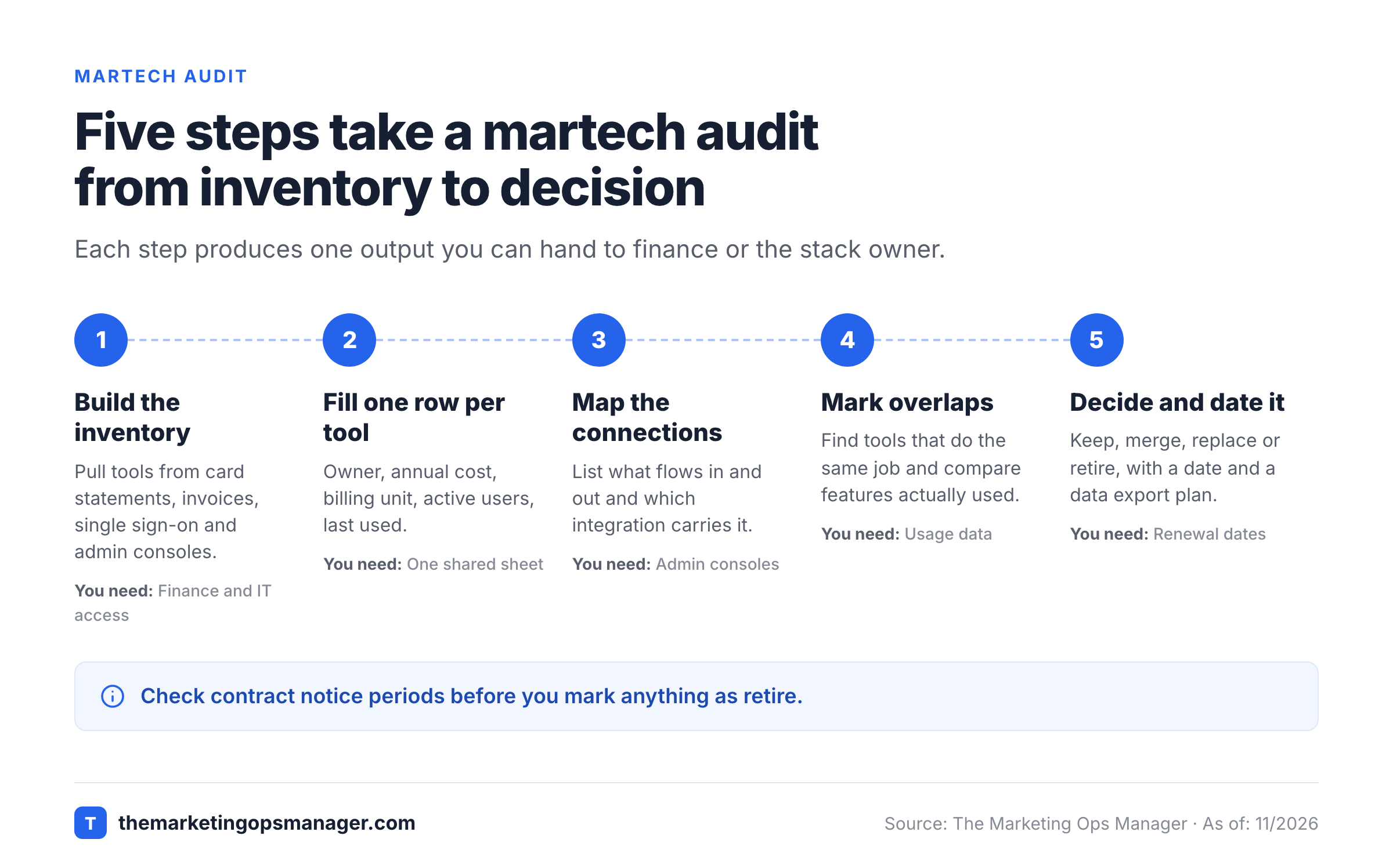
The audit sheet needs these columns. Keep it as a reusable template, because the quarterly review reuses it. The example rows are illustrative.
| Tool | Layer | Owner | Annual cost | Billing unit | Active users | Last used (time ago) | Data in | Data out | Overlaps with | Decision |
|---|---|---|---|---|---|---|---|---|---|---|
| Email platform A | Engagement | Lifecycle manager | Enter from invoice | Contacts | Enter from admin console | This week | CRM contacts | Campaign stats to CRM | Email platform B | Keep |
| Form builder | Content and web | Web producer | Enter from invoice | Submissions | Enter from admin console | 14 months ago | Landing pages | Leads to CRM | CRM native forms | Retire |
| Zap that syncs lead owner | Integration | Nobody | Included in plan | Tasks | n/a | Last month | CRM | Spreadsheet | None | Find owner |
- Every tool has a named owner and a renewal date
- Every paid seat is checked against logins in the last 90 days
- Every integration is listed, including manual exports and scripts
- Each job from the build step has exactly one primary tool
- Every tool that writes to the CRM is documented with the fields it writes
- Contract notice periods are in the calendar before the renewal date
- Each retire decision has a data export and a person who confirms nothing reads from the tool
If you'd rather start from a checklist, our marketing operations audit checklist goes deeper on the process side of the same review, and the UTM governance template covers the tracking-naming part that the audit sheet only flags.
How do you simplify a martech stack?#
Simplify a stack by retiring tools in a fixed order: no owner, then no use, then overlap, then contract date. The audit gives you the evidence, and the order stops the loudest user from deciding which tool survives. Stack consolidation and stack optimization are the same work seen from two sides: fewer tools, and more use of the ones that stay.
Unused capability is the common state, and it's measured. Gartner's survey of 324 marketers in May and June 2022 found they used 42% of the breadth of capabilities in their martech stacks, down from 58% in 2020. The top reasons were overlap among solutions (30%), difficulty recruiting talent to drive adoption (28%) and the complexity of the ecosystem (27%). Gartner's 2023 survey of 405 marketing leaders put average utilization at 33%, a second year of decline, with complexity, customer data challenges and inflexible governance as the most common obstacles. Those are survey figures from the marketing leaders Gartner reached. They aren't a measurement of any single company. Read them as direction: stacks tend to grow faster than the team's ability to use them.
- No owner. If nobody owns a tool, nobody notices when it breaks. Assign an owner or retire it, because there's no third option.
- No use. A tool with no logins in 90 days and no scheduled jobs is a candidate, though you'll want to confirm that. Check scheduled jobs before you cancel, because a tool can be unused by people and still push data every night.
- Overlap. Keep the tool that holds the system of record or the most connections, and move the other tool's jobs across. Moving a journey from one automation platform to another takes more work than the license saving suggests, so you'll want to budget the migration.
- Contract date. Align retire decisions with renewal and notice dates. Many annual plans auto-renew, so the cheapest day to cancel is before the notice window closes. In a martech stack with a dozen annual contracts, the notice window is the date that decides whether a retire decision saves money this year or next.
Where does a martech stack break?#
A martech stack breaks at the handoffs between tools, not inside them. Each tool can be healthy while the journey fails: a landing page still loads and the ad still spends, but a tag was removed, a form field was renamed or a CRM token expired, and leads stop arriving where sales expects them.
- Step 1Ad and clickBreaks when UTM parameters are missing or renamed, so the source can't be traced later
- Step 2Landing pageBreaks when The page loads but a tracking tag was removed in an edit
- Step 3FormBreaks when A field is renamed and the form stops posting to the CRM
- Step 4CRM recordBreaks when An integration token expires and new contacts don't sync
- Step 5Lead ownerBreaks when A routing rule finds no match and the lead sits with no owner
None of these failures produces an error page, and that's why they last. Paid media keeps spending, the dashboard keeps showing the last good numbers, and the problem appears days later as a dip in pipeline. The checklists for form submission testing, campaign tracking and the marketing-to-sales handoff cover the manual version of this check. Our lead routing workflow guide covers the last step.
The manual version works until you're running more campaigns than one person can test by hand. The Marketing Ops Manager checks those handoffs on a schedule, from the ad to the lead owner in HubSpot and Google Analytics 4, and opens an incident with evidence when a step fails. It isn't a stack layer that replaces any of the six above. It monitors the connections between them.
FAQ#
What is a martech stack?
A martech stack is the set of software a marketing team uses to run campaigns, manage customer data and measure results, plus the integrations between those tools. It typically spans a CRM, email or marketing automation, web analytics, a content system and advertising accounts.
How many tools should a martech stack have?
A martech stack has no right number of tools. Count jobs instead: each job the team does should have one primary tool, and each tool should have an owner and a metric. Gartner's surveys found utilization of stack capability at 42% in 2022 and 33% in 2023, so more tools doesn't mean more use.
How much does a martech stack cost?
A startup stack can run on free tiers plus about $45 a month at list price. A growth stack built on HubSpot Marketing Hub Professional starts at $800 a month plus a required $3,000 onboarding fee, and enterprise tools are mostly quote-only. Check each tool's billing unit, since contacts, emails, tracked users, events, tasks and seats scale differently.
What is the difference between a martech stack and a marketing suite?
A suite is one vendor's bundle of marketing tools. A stack is everything the team actually runs, which usually combines a suite with point tools and the connections between them.
How often should you audit a martech stack?
You'll want a full audit once a year and a short review every quarter that checks owners, usage and broken connections. Run an extra one before a major renewal or after a merger, when two stacks meet.
What is a martech audit?
A martech audit is a tool-by-tool review of cost, owner, billing unit, active users, data in and out and overlap, ending with a keep, merge, replace or retire decision for each tool.