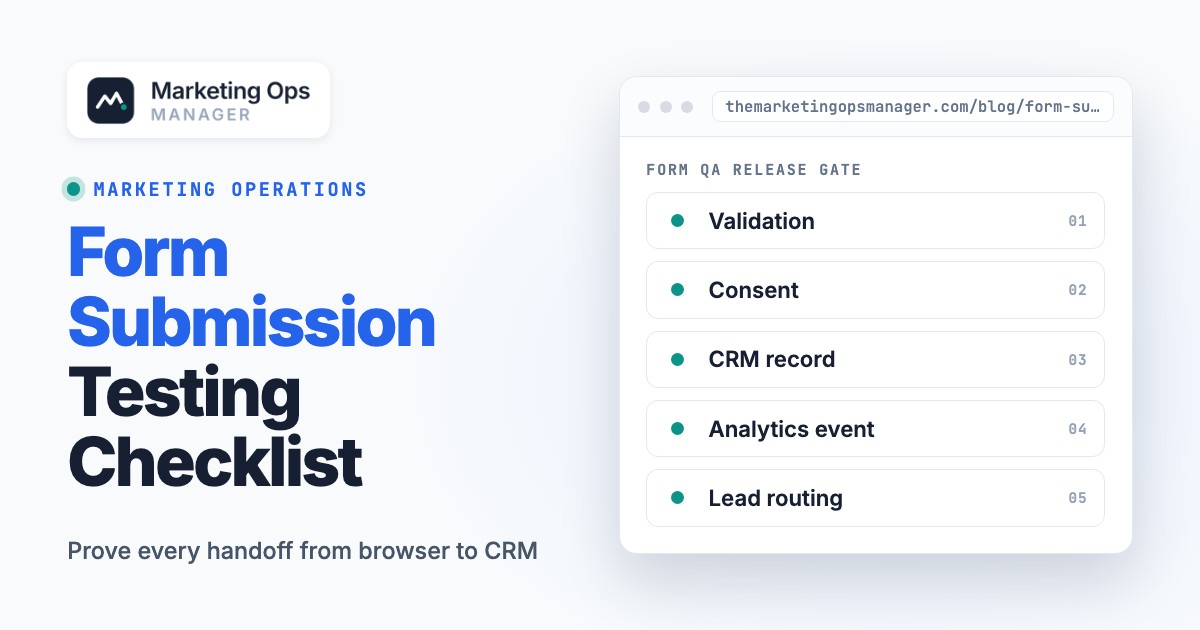
A form submission testing checklist is a set of pass-or-fail checks that proves a form works from the visitor's first keystroke to the record a person acts on. A good test checks the visitor experience, validation, consent, event tracking, delivery to the right system, lead ownership, and recovery when something fails. A thank-you message on screen proves only the first of those.
This checklist gives marketing operations teams a repeatable release gate for contact, demo, newsletter, webinar, and gated-content forms. It separates observable outcomes from assumptions, so a green confirmation screen never substitutes for a verified record in the CRM.
Use a dedicated test identity and clearly label test records, so nobody mistakes them for real leads. Don't submit real customer information into production forms during routine QA. Coordinate with sales operations before generating test leads that might trigger sequences, notifications, scoring, or assignment rules.
- Test the user interface and the downstream CRM record, not only the confirmation screen.
- Verify consent, analytics events, routing, and failure recovery for every release.
- Use synthetic records, write the expected result before you test, and save evidence for each gate.
- Treat a blocked check as a failure to resolve; it's never a pass.
What should a form submission test prove?#
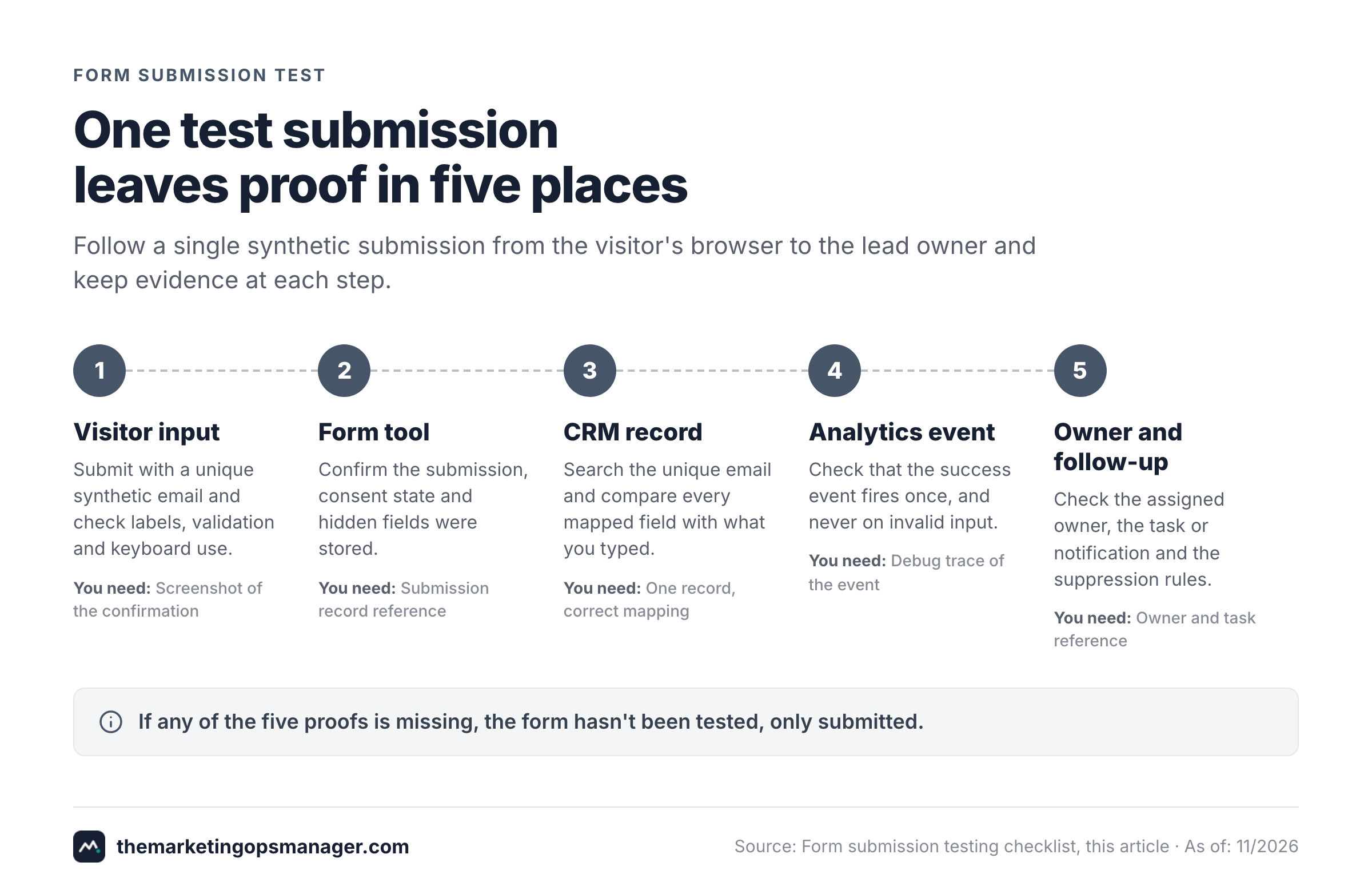
A form looks like one action to the visitor, but it's really a chain of handoffs, and each one can fail without any visible sign. The browser accepts the input, the form tool stores it, a connector pushes it to the CRM, a tag fires an analytics event, a routing rule assigns an owner, and an automation sends a follow-up. Any link can break while the visitor still sees "Thanks, we'll be in touch."
- 01Visitor inputWhat breaks labels, validation and keyboard use fail, so people can't finish.
- 02Form toolWhat breaks consent text or hidden fields are not stored with the submission.
- 03CRM recordWhat breaks the connector rejects the payload or maps a value to the wrong field.
- 04Analytics eventWhat breaks the success event fires on invalid input or twice per submission.
- 05Routing and follow-upWhat breaks the lead lands with the wrong owner or never triggers a task.
Treat each column as its own control. If you can't name the proof for a handoff, you haven't tested it yet, you've only assumed it works. For every handoff, write down what goes in, what should come out, who owns the boundary, and what proof shows the output arrived. The rest of this guide walks through those controls in order and closes with a worksheet you can copy and a release gate.
Define the form's intended outcome#
Start with a written contract for the form: audience, business purpose, required fields, destination system, campaign association, and expected follow-up. Identify the form owner, the technical owner, and the person authorized to approve release.
Write down the success condition in language a tester can observe, so nobody's judgment call decides a pass. For a demo form, success might mean an accepted submission, a correctly populated CRM lead or contact, and the right routing rule. For a newsletter form, success may mean consent captured and the subscriber entering the appropriate subscription workflow. Keep the expected outcome separate from optional enhancements such as personalization or enrichment. If testers don't know what success looks like, they'll default to whatever the confirmation screen says, and that's the weakest evidence you have.
Record the form URL, environment, version, and deployment date. If a form is embedded on multiple landing pages, test the actual embeds, not just the source form. Different containers, scripts, or content security settings can change behavior, so an embedded form can behave differently from the source form.
How do you build a realistic test matrix?#
Cover desktop and mobile layouts, common browsers used by your audience, keyboard-only interaction, and both clean and intentionally invalid submissions. Include a returning visitor, a new visitor, and a visitor who declines optional consent. Test the form on a slow connection and with scripts blocked when that reflects your supported experience, though you don't need to cover every device you've ever seen in analytics.
Use representative but synthetic inputs: long names, hyphenated names, plus-addressed email, international phone formatting, whitespace, and punctuation. Give every test submission a unique, searchable value, for example qa+form-0142@yourdomain.example, so you can find exactly one record later and never confuse it with a real lead.
Identify which cases are required for release and which are exploratory. Avoid an enormous matrix that no team can maintain; a small matrix that runs every release beats a perfect one that gets skipped. Prioritize the combinations most likely to affect conversion, privacy, or downstream data quality. For every case, record the expected result before testing so reviewers can distinguish a defect from a changed requirement. Without it, a test run can easily turn into an argument about what the form was supposed to do.
- Form URL, environment, version and deployment date recorded
- Every embed location listed and tested, not only the source form
- Desktop and mobile layouts covered
- Keyboard-only run planned
- New visitor, returning visitor and declined-consent visitor included
- Unique synthetic identifier per test case
- Required and exploratory cases marked separately
- Expected result written before the first submission
How do you verify field labels and accessibility?#
Every field needs a clear visible label, a programmatic association where applicable, and an understandable indication of whether it is required. Placeholder text shouldn't be the only label. It's gone the moment someone starts typing, and it's often too light to read. Check tab order, visible keyboard focus, error announcements, and the ability to submit without a mouse.
The Web Content Accessibility Guidelines give you concrete pass-or-fail anchors for this work. Success Criterion 3.3.2, Labels or Instructions, is Level A and requires labels or instructions when content needs user input. Success Criterion 3.3.1, Error Identification, is also Level A: when an input error is detected automatically, the field in error is identified and the error is described to the user in text. A red border with no text doesn't meet that. People who can't see color won't know what went wrong.
Two WCAG 2.2 criteria matter on small screens and long forms. Success Criterion 2.5.8, Target Size (Minimum), is Level AA and asks for pointer targets of at least 24 by 24 CSS pixels unless an exception applies. Success Criterion 3.3.7, Redundant Entry, is Level A and asks that information already entered in a multi-step process is auto-populated or selectable instead of requested again, with exceptions for essential re-entry, security, and invalid data. Check both on multi-step demo forms. Both are easy to overlook in a desktop-only test run, and they're cheap to check.
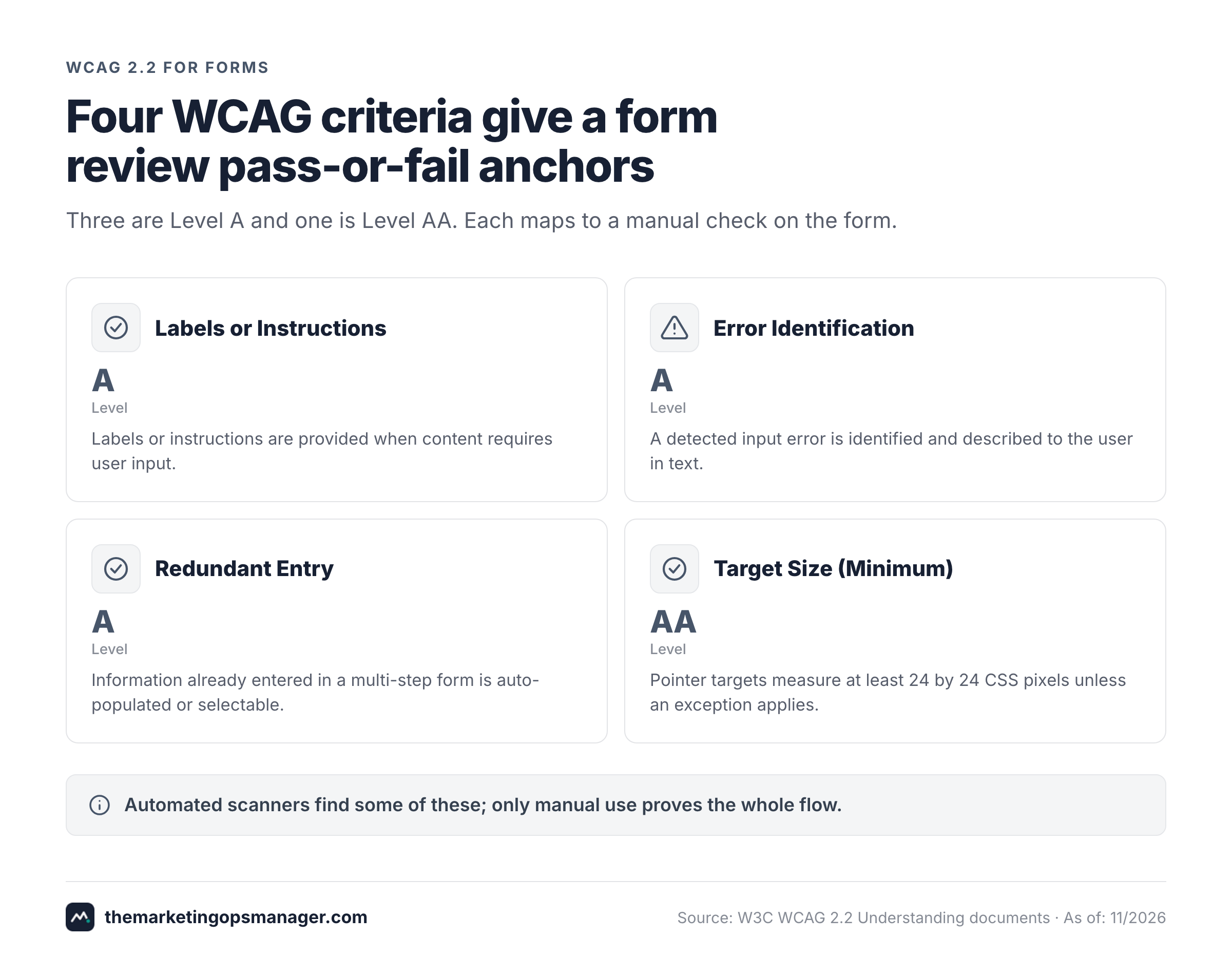
If the form uses a custom dropdown or date picker, confirm it works with keyboard controls and doesn't trap focus. Check that error messages identify the specific problem and offer a practical correction. Inspect the form at increased browser zoom, and with long translated strings if localization applies. Accessibility testing combines automated checks with manual interaction; a scanner alone can't establish that the entire flow is usable.
- Each field has a visible label, not only placeholder text
- Required fields are marked in text, not by color alone
- Tab order follows the visual order and focus is always visible
- Errors name the field and say how to fix it, in text
- Custom dropdowns and date pickers work by keyboard and never trap focus
- Touch targets are at least 24 by 24 CSS pixels
- Multi-step forms don't ask for the same value twice
- Layout holds at increased zoom and with longer translated labels
How do you test validation and edge cases?#
Submit an empty form and confirm required fields reject the request without losing correctly entered information. Try an invalid email address, unexpected characters, excessive field lengths, and values outside documented ranges. Don't stop at the obvious cases; the ones that bite later are usually a name with an apostrophe or a phone number with a plus sign. Test trimming of leading and trailing spaces without silently changing meaningful data.
Ensure client-side rules and server-side rules agree; disabling JavaScript shouldn't bypass critical server validation. Check whether duplicate clicks create multiple records. Impatient visitors double click all the time, and they won't tell you that they did. Verify that a submission in progress shows a clear state and that network errors allow a safe retry. If the button doesn't change while the request runs, people click again, and that's how duplicates happen.
Avoid claiming that a regex validates whether an email inbox exists. It only checks formatting. Record any intentional exceptions, such as accepting international phone numbers or company names containing punctuation.
A short set of inputs finds most validation gaps. Run each one and write down both what the visitor sees and what the destination system received.
| Input to submit | Expected visitor result | Expected backend result |
|---|---|---|
| Empty form | Required fields flagged in text, entered data kept | No record created |
| Email missing the domain part | Inline error naming the email field | No record created |
| Name with hyphen, apostrophe or accent | Accepted | Stored exactly as typed |
| Value with leading and trailing spaces | Accepted | Spaces trimmed, content unchanged |
| Text far above the field limit | Clear limit message or safe truncation rule | No error from the connector |
| Double click on submit | One confirmation | One record only |
| JavaScript disabled | Server rejects invalid data | No invalid record created |
How do you confirm privacy and consent behavior?#
Check that optional marketing consent isn't preselected where affirmative consent is required. Read the actual consent wording and confirm it matches the data processing purpose. Test both acceptance and refusal. Teams usually test the happy case and forget that refusal is where the legal risk sits. Verify that refusal doesn't silently enroll someone in an unrelated promotional workflow.
Check whether privacy links open correctly and whether the form records the consent state, text version, and timestamp according to the organization's requirements. Avoid collecting sensitive information in ordinary marketing forms unless there's a documented, lawful need.
If a cookie preference affects analytics, verify that tracking honors the preference rather than assuming every browser session can be measured. Some visitors won't be measurable at all, and that's expected behavior, not a defect. Escalate legal interpretation to the appropriate privacy professional; QA should validate implementation against an approved policy, not invent that policy.
Run the consent test as a pair. Submit once with consent given and once with consent declined, then compare the two CRM records side by side. The consent field, the subscription status, and the list or workflow membership should differ in exactly the way the policy says they should, and in no other way. If the declined-consent record shows up in a promotional list, that's a blocker, even if everything else passes.
How do you trace the submission into the CRM?#
After submitting, search for the synthetic record using the unique test email or identifier. Confirm the record appears in the intended object, not merely in a temporary marketing database. Compare submitted values against mapped CRM fields. Look for values that landed in the wrong property too, because they're harder to spot than missing ones. Check required properties, campaign identifiers, source values, consent fields, and any hidden fields.
Verify that empty optional fields don't overwrite valuable existing data unless that behavior is intended. Test an existing contact and a net-new lead separately because deduplication and updates may follow different paths. Inspect integration error queues or sync logs when available. If there isn't a log, that's a finding in itself, because you'll have no way to see rejected payloads later.
A form can display success while a connector rejects the payload later, and nobody's told. Record the final system state and the elapsed time before it appears, without treating a single observed delay as a universal service-level guarantee.
For an existing contact, change one mapped field in the form and confirm the CRM value updates only where you intend it to. For a net-new lead, confirm that the creation source, lifecycle or status value, and campaign association all match the form contract. Where a tracked link feeds the form, the campaign tracking checklist covers the UTM-to-CRM side of the same chain.
How do you check attribution and analytics events?#
Document the intended event name, trigger condition, destination, and key parameters before opening a debugger. For lead forms in Google Analytics 4, generate_lead is the event Google's reference lists for a lead generated through a form. It accepts optional value, currency and lead_source parameters, and currency is required when you send a value.
Submit once successfully and verify the event fires once. It's easy to miss a double fire, since the form still works and nothing looks wrong on the page. Submit invalid data and confirm that a success event doesn't fire. Compare page location, campaign parameters, and form identifiers with the analytics specification. If the spec doesn't exist yet, write it now; it's ten minutes of work that saves hours of guessing.
If your site uses a tag manager, inspect both its preview and the receiving analytics tool. In Google Analytics 4, DebugView shows the events Analytics collects in near real time, and debug mode can be enabled through Tag Assistant, a debug_mode parameter in gtag.js, or the Google tag in Tag Manager. Browser console output alone doesn't prove collection or reporting.
Account for consent settings, ad blockers, and attribution limitations. Don't promise perfect user-level reconciliation between a CRM and an analytics platform; the systems may apply different identity, consent, deduplication, and reporting rules. Record these differences so conversion reports are interpreted appropriately.
- Event name, trigger and parameters documented before testing
- One valid submission fires the success event exactly once
- An invalid submission fires no success event
- A declined analytics cookie choice is honored
- Form identifier and page location match the spec
- Event seen in both the tag manager preview and the analytics tool
- CRM and analytics counts compared, with known differences written down
How do you validate lead routing and follow-up?#
Inspect assignment logic for the synthetic record. Check territory, segment, product interest, account ownership, and fallback owner rules relevant to the form. Confirm the intended notification or task was generated once and sent to the correct team. A notification that's sent twice trains the team to ignore it, and one that's missing means nobody follows up. The lead routing workflow guide explains how those rules are usually structured.
If an automated email is expected, review its subject, sender, personalization, links, unsubscribe behavior, and suppression rules. Test a submission that shouldn't trigger promotional follow-up. That's the case that proves your suppression rules actually work, and it's the one that's rarely tested. When scoring or enrichment is asynchronous, allow the configured processing window and inspect the resulting fields rather than guessing.
Make sure test leads are suppressed from sales outreach and cleaned up under a process everyone's agreed to. Record whether the test exercised the live workflow, a sandbox workflow, or a mocked downstream system. When the lead is meant to reach sales, compare the result with your marketing to sales handoff checklist so the fields sales needs actually arrive.
How do you test failure and recovery paths?#
A useful test plan includes deliberate failures. Simulate a timeout, a rejected API request, an unavailable integration, and an accidental second click when safe to do so in staging. You aren't trying to break the form for fun; you're finding out what the visitor and your team would see on a bad day. Verify that users receive an understandable message without exposing technical secrets.
Determine whether a retry preserves the payload and whether the backend prevents duplicate records. Confirm failures create observable logs or alerts with enough context to investigate without logging unnecessary personal information. Define who receives the alert and who owns the recovery. An alert that goes to a shared inbox nobody reads isn't an alert, it's a log.
If you can't simulate failures safely in production, record the staging evidence and the remaining production risk. A release shouldn't be marked complete solely because the happy path worked once. Failures tend to hide in the paths nobody's rehearsed, and they aren't visible from the happy path.
What belongs in the release checklist?#
Before launch, confirm the approved copy and fields, working mobile layout, keyboard interaction, validation rules, consent behavior, successful submission, CRM field mapping, analytics event, lead routing, notifications, and recovery handling. Attach evidence for each required check: a screenshot, test record reference, analytics debug trace, or integration log identifier.
Record pass, fail, not applicable, and blocked distinctly. A blocked item isn't a pass. Assign each failure an owner and severity. Retest after a fix, then perform a short regression pass because changes to a form can affect analytics tags or routing logic. A fix that's verified in isolation can still break the next handoff down the line. Approve release only when the named owner accepts the remaining risks. Preserve the checklist with the deployment record so future teams can explain what was verified. When something breaks six months later, you'll be glad the evidence is still there.
- Approved copy, fields and consent wording match the form contract
- Mobile layout and keyboard-only submission work
- Validation rejects bad input on the client and the server
- Consent given and consent declined both behave as specified
- One valid submission creates exactly one CRM record with correct mapping
- Success event fires once, and never on invalid input
- Lead lands with the correct owner or queue and the right task or notification fires once
- Failure and retry behavior verified in staging, production risk written down
- Evidence attached for every required check
- Release owner has accepted any open risks in writing
How do you use a repeatable QA worksheet?#
Create columns for case ID, scenario, precondition, input, expected UI result, expected backend result, actual result, evidence, owner, severity, and status. Keep the worksheet concise rather than exhaustive, and attach it to the ticket or change request. This turns a vague instruction to test the form into an auditable, repeatable process.
Here are three example rows with the core columns. Add precondition, actual result, evidence, owner and severity in your own copy.
| Case ID | Scenario | Input | Expected UI result | Expected backend result | Status |
|---|---|---|---|---|---|
| FORM-01 | New visitor submits a valid demo request | Synthetic email, approved consent | Confirmation displayed | One CRM record created, correct owner assigned | Pass, record reference attached |
| FORM-02 | Invalid email address | Email without a domain | Inline error shown | No CRM record, no conversion event | Pass, screenshot attached |
| FORM-03 | Network timeout during submit | Valid data, request interrupted | Recoverable message shown | Retry creates no duplicate | Blocked until staging fault injection is available |
Notice that FORM-03 is blocked, not passed. It's the row that's most easily marked green by mistake. The worksheet makes that visible, and the release owner has to decide whether to accept the risk or wait for the test.
What counts as a release blocker?#
Not every cosmetic difference deserves the same response. Block release when submissions disappear, sensitive data leaks, consent is mishandled, mandatory fields are corrupted, or leads are routed to the wrong destination. Treat inaccessible essential controls and duplicate conversion events as serious defects.
A minor spacing issue may be accepted with an owner and follow-up date if it doesn't impair usability. Write down the decision and the approving person. It's much easier to defend a call that's on record than one that's remembered differently by everyone. Avoid an arbitrary numerical pass-rate target: a form with many passing cosmetic checks and one broken CRM integration is still not ready. Release criteria should reflect business impact and user harm rather than a simple count of test cases. What matters is whether a valuable lead still reaches the right owner.
How do you monitor a form after deployment?#
Repeat a small production smoke test after the release using a clearly labeled synthetic identity. Verify the production URL, actual embed, analytics collection under the relevant consent state, CRM record, and expected routing. Remove or quarantine test records according to the agreed procedure. Stale test records don't stay harmless: they skew reports and they're easy to email by accident.
Watch error logs, submission volume, and conversion event counts for anomalies, while accounting for seasonality and traffic variation. Define an escalation path and rollback owner before launch. You won't want to be deciding who's in charge while submissions are failing. Revisit the checklist when changing form builders, tag managers, consent tools, CRM mappings, or lead routing.
A release test is a snapshot; ongoing monitoring is what catches failures caused by later configuration changes. The marketing operations audit checklist shows how to fold recurring form checks into a wider review.
Final takeaway#
A dependable form test follows a submission all the way from the visitor's browser to its operational outcome. Use the checklist as a release gate, keep evidence, and assign ownership for failures. The best process is the one your team can repeat whenever the form or its connected systems change.
What should I test after submitting a form?
Confirm the on-screen response, the destination record, field mapping, consent state, analytics event, and lead assignment. The confirmation screen alone proves only the first step, not the downstream ones.
How do I test a form without creating real leads?
Use synthetic test identities with a unique, searchable email, label the records as tests, and agree on suppression and cleanup with sales operations before you submit.
Should invalid submissions count as conversions?
No. A success event should represent an accepted submission under your documented measurement rules, so an invalid submission must not fire it.
Can automated tools replace manual form QA?
No. Automation helps regression coverage, but keyboard usability, consent interpretation, and cross-system behavior need human review.
How often should I retest forms?
Test at release, after changes to the form builder, tag manager, consent tool, CRM mapping or routing rules, and periodically through a short production smoke test.
What is the difference between a blocked and a failed test?
A failed test ran and produced the wrong result. A blocked test could not run, for example because staging can't simulate a timeout. Neither is a pass, and a blocked item needs an owner and a decision.