Claude can use MCP servers in three places: Claude Code (a command-line tool), Claude Desktop (local servers and extensions) and custom connectors, which work in Claude on the web, Claude Desktop and the mobile apps. MCP, the Model Context Protocol, is the open standard that lets Claude call your tools and read your data instead of guessing. This guide shows how to add a server in each place, what Claude is allowed to do once it is connected, and how to fix the errors people hit most. It's written for marketing ops teams who want Claude to look at ad accounts, tracking and CRM records without giving it free rein.
- Anthropic created MCP and Claude is an MCP client (a host that connects to servers). Claude doesn't ship a server of its own that you switch on.
- Claude Code adds servers with claude mcp add. Claude on the web, Claude Desktop and the mobile apps add remote servers as custom connectors.
- Remote connectors are called from Anthropic's cloud, so the server must be reachable from the public internet. A server on your laptop or behind a VPN won't connect, and that's the most common surprise.
- Custom connectors are not verified by Anthropic. Treat every server as code you're letting act in your accounts.
- Start with read-only tools, keep write actions on approval and review what Claude proposes before it runs. Don't skip that last step.
What is Claude MCP?#
Claude MCP means using the Model Context Protocol with Claude. MCP is an open standard that Anthropic introduced in November 2024. It defines how an AI app (the host) talks to an outside system through a small program called an MCP server. The server tells Claude which tools it offers, such as "list campaigns" or "create a task", and Claude calls them when your question needs live data, which is of course the whole point. For the longer background, read our explainer on the Model Context Protocol for marketers.
Does Claude have its own MCP?#
Claude is an MCP client, not a single server. Anthropic maintains the protocol, but Claude apps connect to servers that you or a vendor run, and that's an important difference. One exception is useful to know: Claude Code can itself run as an MCP server, started with claude mcp serve, so another MCP client can use its tools.
What does MCP let Claude do?#
MCP lets Claude read data and take actions in outside systems through the tools a server exposes. A marketing ops example is asking Claude for the open incidents on a campaign: Claude calls a list tool, gets the live records and answers from them instead of from memory. Claude decides when to call a tool, and your settings decide whether it has to ask you first. It doesn't act alone unless you've told it to.
What is the difference between an MCP server and a connector?#
Two words cause most of the confusion, so it's worth pinning them down:
- MCP server: the program that exposes tools and data. It runs on your machine (local) or at a web address (remote).
- Connector: Claude's name for a remote MCP server that you add in the Claude app. A custom connector is simply a remote MCP server that isn't in Claude's directory.
Where can Claude use MCP servers?#
Where Claude can use MCP servers depends on the app, and it's worth checking before you build anything. The big difference is where the server runs: Claude Code and Claude Desktop can start servers on your computer, while custom connectors are always reached from Anthropic's cloud.
| Claude app | Server types it supports | How you add one | Runs from |
|---|---|---|---|
| Claude Code | Remote HTTP, SSE (deprecated) and local stdio | claude mcp add in a terminal | Your machine for stdio, the web for remote |
| Claude Desktop (local servers) | Local servers and .mcpb extensions | Extensions menu or the claude_desktop_config.json file | Your machine |
| Claude on the web, Claude Desktop and the mobile apps (custom connectors) | Remote MCP servers | Customize, then Connectors, then Add custom connector | Anthropic's cloud |
Local servers configured in the Claude Desktop config file aren't available in Claude on the web, and Claude's advanced research mode can't call tools from local servers.
How do you add an MCP server to Claude Code?#
Claude Code is the quickest route if you're comfortable in a terminal. Each server takes one command, so you don't need a config file to start.
Pick the transport
Use remote HTTP for any cloud service. It is the recommended transport. SSE still works but is deprecated. Use stdio only for a program that runs on your own machine. You'll rarely need it for cloud services.
Add the server
For a remote server, run
claude mcp add --transport http <name> <url>. For a server that needs a bearer token, add--header "Authorization: Bearer <token>". For a local server, put the options first and the command after two dashes, for exampleclaude mcp add --transport stdio --env API_KEY=<key> <name> -- npx -y <package>.Authenticate if asked
A server that answers with a 401 or 403 shows as needing authentication, and you don't have to restart anything. Run
/mcpinside Claude Code, orclaude mcp login <name>in the shell, and finish the sign-in.Check the status
Run
claude mcp list. A healthy server shows Connected, and anything else tells you what's wrong. Useclaude mcp get <name>for details andclaude mcp remove <name>to remove one.
Which scope should you use?#
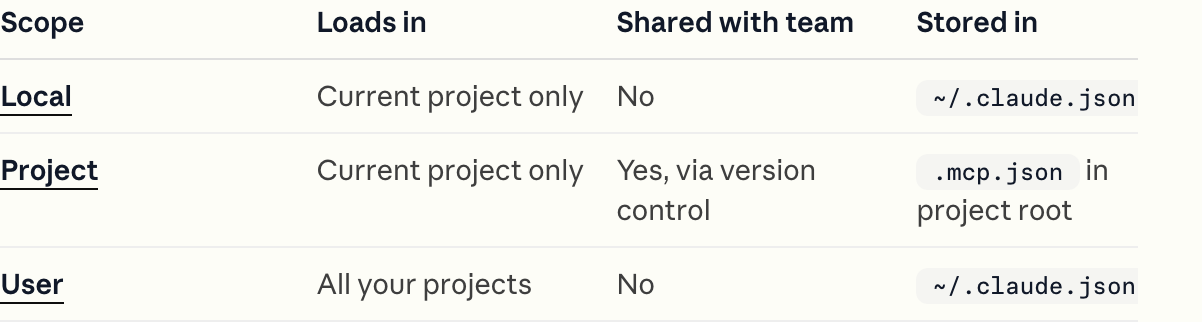
The scope you choose for a Claude Code MCP server decides who gets it. The default is local, which is private to you and to the current project, not shared with the team.
| Scope | Flag | Available in | Stored in | Shared with the team |
|---|---|---|---|---|
| Local (default) | --scope local | The current project only | ~/.claude.json | No |
| Project | --scope project | The current project | .mcp.json in the project root | Yes, through version control |
| User | --scope user | All your projects | ~/.claude.json | No |
If the same server is defined in several places, Claude Code connects once and uses the entry from the highest-precedence source: local first, then project, then user, then plugin-provided servers, then claude.ai connectors. Fields aren't merged.
Project-scoped servers need approval, and that's a good thing. In an interactive session, Claude Code asks before it uses a server from a project's .mcp.json, and a cloned repository can't approve its own servers. In non-interactive runs (claude -p, the Agent SDK) the prompt can't be shown and project servers load without asking, so keep unreviewed .mcp.json files out of automated jobs outright.
How do you add a remote MCP server to Claude and Claude Desktop?#
On the web and in Claude Desktop you add remote servers as custom connectors. Custom connectors are available on the Free, Pro, Max, Team and Enterprise plans, and Free accounts can add one, though they can't add a second.
- Pro and Max: open Customize, then Connectors, click Add, then Add custom connector. Enter a name and the server URL, review the authentication settings that Claude detects and confirm.
- Team and Enterprise: an Owner or Primary Owner adds the connector in Organization settings, then Connectors. Members then open Customize, then Connectors, and click Connect to sign in with their own account.
- API keys and bearer tokens: use the request-header option instead of OAuth.
- Per conversation: the plus button in the chat box, then Connectors, switches each connector on or off for that chat.
You can't edit a connector in place. Remove it and add it again with the new details, and it'll pick up the change.
What can Claude do once a server is connected?#
An MCP server exposes tools, and each one is either a read or a write. Reads return data. Writes change something in a system, and that's where the risk sits. What Claude may do without asking is controlled in two layers, and it's the second one most teams forget: the server decides which tools exist, and your Claude app decides which of them need your approval. The same read, draft and write split drives the approval policy in AI agents for marketing.
- Claude apps: you can review each tool request and choose Allow always, which Anthropic advises only for servers and tools you've verified. The Search and tools menu lets you switch tools off for a conversation. In research mode Claude can call connector tools without asking again, which makes it the riskiest mode, so switch off any tool that writes to outside apps first.
- Claude Code: permission rules follow the pattern
mcp__<server>__<tool>. The rulemcp__<server>__*covers every tool of one server, so you don't have to list them. Rules are checked in order: deny, then ask, then allow, and the first match wins. - Team and Enterprise: owners can disable specific tool calls for connectors in Organization settings. In Claude Code, administrators can supply servers through managed settings, and a server blocked by policy shows as blocked by enterprise managed policy.
Is it safe to connect Claude to MCP servers?#
Connecting Claude to an MCP server is only as safe as the server and the scopes you give it, never safer. Anthropic states that custom connectors can reach arbitrary services it hasn't verified and warns about prompt injection, where text that a tool returns tries to steer the model. Claude Code's own docs say you should verify that you trust each server before connecting it, especially servers that fetch outside content.
- You know who runs the server and can name the source of the code or the vendor
- The token or OAuth sign-in is limited to the data this job needs, with no admin keys
- A fixed credential on a Team or Enterprise plan is shared by everyone who uses the connector, so it is scoped for the whole team
- Read tools are allowed, write tools stay on approval
- Nobody has set Allow always on a tool that sends, publishes or deletes
- You can revoke the token in one place and you know where
- Someone owns reviewing the activity after the first week
How should marketing ops teams use Claude MCP?#
Marketing ops teams should use Claude MCP for reading and checking first, not for changing things. That's really the safest way to start. A marketing ops lead can ask Claude to compare what the ad platform, the analytics property and the CRM each show for the same campaign, and Claude can only do that if each system has a server and the tokens are scoped to read.
- Step 1Ask a plain questionBreaks when the question is vague, so Claude picks the wrong campaign
- Step 2Claude calls read toolsBreaks when a token has expired or lacks the scope for that account
- Step 3Claude compares resultsBreaks when two systems define a lead differently, so the answer looks wrong
- Step 4A person approves any change
 The Marketing Ops Manager
Control nothing runs in a connected system until someone approves it
Three habits keep this useful instead of risky, and they're cheap to adopt:
- One job per server. A server that only reads campaign health is much easier to review than one that also edits CRM records.
- Name the system of record. Tell Claude which system wins when numbers disagree, because it can't guess. Our campaign tracking checklist lists what to compare, and the marketing operations audit checklist shows where to start.
- Log what Claude did. Keep a record of which tools were called, with what arguments and who approved them. You'll need it the first time a number looks wrong.
What does an MCP server for marketing ops look like?#
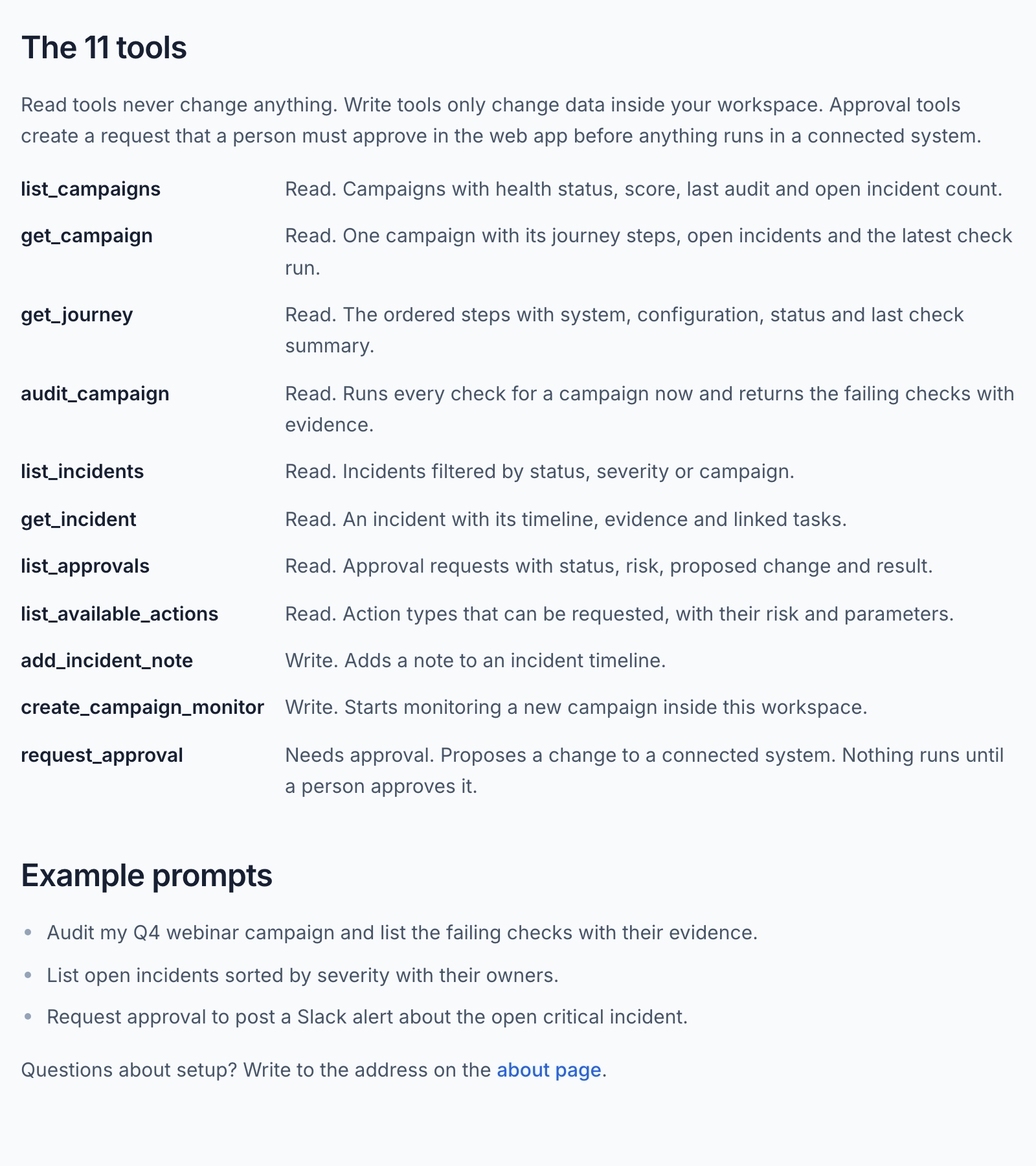
The Marketing Ops Manager is built around that pattern. Its MCP server speaks JSON-RPC over Streamable HTTP and offers 11 tools. Eight of them only read: list campaigns, get a campaign, get a journey, run an audit, list incidents, get an incident, list approvals and list available actions. Two write inside the workspace (add an incident note, start monitoring a new campaign). One, request approval, proposes a change to a connected system and does nothing until a person approves it in the web app. Access is a token that a workspace owner or admin creates. It's shown once, stored as a hash and revocable at any time.
Connecting it to Claude Code is the command shown earlier with an Authorization header. In Claude Desktop and on the web, the product's setup page says to paste the endpoint URL followed by a slash and the token into a custom connector and leave the OAuth fields empty. A URL that contains a token is a secret, so treat it like a password and revoke it if it leaks. It isn't something to paste into a ticket or a chat. It connects to HubSpot, GA4, Google Ads, Slack, Jira and Asana, and it doesn't replace the tools it watches.
Why does a Claude MCP server fail to connect?#
A Claude MCP server fails to connect for a handful of reasons. Start with claude mcp list in Claude Code, which prints a status per server, then match it below.
| What you see | Likely cause | Fix |
|---|---|---|
| Failed to connect | The command, URL or transport is wrong, or the server did not start in time | Run the server command by hand, check the URL and set MCP_TIMEOUT (milliseconds) to give it longer to start |
| Needs authentication | The server answered 401 or 403 | Run /mcp or claude mcp login <name> and sign in again |
| Server looks configured but is never used | A JSON entry has a url but no type, so Claude Code reads it as stdio | Add "type": "http" to the entry |
| A stdio server ignores its own flags | The two dashes are missing, so Claude parses the flags itself | Put -- between the server name and its command |
| Connector works in Claude Code but not on the web | The server is local or on a private network | Host it at a public address or allow Anthropic's IP ranges |
| Pending approval | A project server from .mcp.json has not been approved | Start claude in the project and approve it |
| Blocked by enterprise managed policy | An administrator's policy blocks the server | Ask your administrator which policy applies |
Large results are a quieter failure, but they aren't rare. Claude Code warns when a tool returns more than 10,000 tokens and limits output to 25,000 tokens by default, which you can change with MAX_MCP_OUTPUT_TOKENS if you've got a good reason. If answers look cut off, don't raise the limit first. Ask the tool for a narrower slice, such as one campaign or one date range.
FAQ#
Does Claude have its own MCP?
Claude is an MCP client: it connects to servers that you or vendors run, and it doesn't bundle one of its own. Anthropic created the protocol and maintains it, and Claude Code can also act as an MCP server through claude mcp serve.
How do I add an MCP server in Claude Code?
Run claude mcp add with a transport, a name and a URL, for example claude mcp add --transport http name https://example.com/mcp. For a local program, add two dashes before its command. Then run claude mcp list to confirm it shows as connected.
Can Claude on the web use a local MCP server?
No. Custom connectors are reached from Anthropic's cloud, so the server must be publicly reachable. Local servers set up in the Claude Desktop config file work in Claude Desktop only.
Do custom connectors work on the Free plan?
Yes, with a limit of one custom connector. Pro and Max users add their own, and on Team and Enterprise an Owner adds the connector for the organization.
Is Claude MCP safe for marketing data?
It depends on the server and the scopes. Anthropic doesn't verify custom connectors and warns about prompt injection. Give tokens the narrowest scope, allow reads first and keep write tools on approval.
Why does my Claude MCP server say failed to connect?
Usually the command or URL is wrong, the server starts too slowly, authentication is missing, or a remote connector points at a private address that Anthropic can't reach. Check claude mcp list, run the server command by hand and raise MCP_TIMEOUT if it needs longer to start.