AI agents for marketing are software systems that use a language model to pursue a marketing goal by choosing their own steps and calling tools, such as a CRM, an analytics property or an ad account, within limits a person sets. Unlike a rule-based automation, an agent decides what to do next. That's what makes it useful for audits, reporting and lead handling, and it's also why every agent needs a written approval policy before it touches a live system.
- An agent picks its own steps toward a goal; marketing automation follows a path you drew in advance.
- Start with read-only work such as audits, reports and drafts, where a wrong answer costs a review, not a campaign.
- Anything that sends, spends, publishes or edits a live system should wait for a named approver.
- The main risks are bad data in, compounding errors, prompt injection and cost without value.
- Roll out in five steps and move on only when the review log is clean.
What are AI agents for marketing?#
AI agents for marketing are systems in which a language model directs its own process: it reads a goal, decides which tool to call, looks at the result and decides the next step, until the job is done or a person has to step in. Anthropic's engineering guide on building agents draws the line between two designs. In a workflow, the model and its tools are orchestrated through predefined code paths. In an agent, the model dynamically directs its own process and tool use.
Three terms get mixed up, and it's worth separating them:
- Automation: a fixed rule such as "when a form is submitted, create a contact and send email 1". The path is drawn by a person.
- Assistant: a chat tool that answers when asked, such as drafting a subject line. It acts only inside the conversation.
- Agent: a system with access to tools that works toward a goal, such as "audit this campaign and open a ticket for anything broken". It chooses the steps.
Most marketing work needs only the first two. Gartner's guidance puts it plainly: use agents where decisions are needed, automation for routine workflows and assistants for simple retrieval. The rest of this guide is about the cases where an agent is the right choice, and the guardrails that keep it that way.
How are AI agents different from marketing automation?#
Marketing automation runs a path that someone designed, and an AI agent chooses its own path toward a goal. Automation is predictable and cheap to run. An agent handles cases nobody wrote a rule for, and it pays for that flexibility in cost, speed and error risk.
| Marketing automation | AI assistant | AI agent | |
|---|---|---|---|
| Who decides the next step | The person who built the rule | The person asking | The model |
| Typical input | An event, such as a form fill | A prompt | A goal and access to tools |
| Can change a live system | Yes, as built | No | Only through tools you connect |
| Handles an unplanned case | No, it fails or skips | Answers, but takes no action | Tries another step |
| Main risk | A rule that is wrong or stale | A wrong answer | A wrong action, repeated |
| Best for | Routine, high-volume paths | Drafting and lookup | Open-ended checks and multi-step jobs |
Anthropic advises finding the simplest solution possible and adding complexity only when needed, and notes that agentic systems often trade latency and cost for better task performance. The same guide warns that the autonomous nature of agents means higher costs and the potential for compounding errors. For a marketing team that means one thing: if a plain automation does the job, keep the automation. Don't add an agent for the sake of it.
What can AI agents do in marketing?#
AI agents are most useful where the work has several steps, the inputs change each time and a person currently does the checking by hand. The safest way to sort use cases is by what the agent is allowed to do, because the risk follows the permission, not the topic.
| Use case | What the agent does | Reads or changes | Review needed |
|---|---|---|---|
| Campaign audit | Walks the journey from ad to landing page, form, tracking event and CRM record, and lists what fails | Reads | Light, read the findings |
| Reporting and anomaly flags | Pulls numbers from analytics and the CRM, writes the summary and flags drops against a baseline | Reads | Light, spot-check the numbers |
| Content drafts | Writes first drafts of emails, posts or landing copy from a brief and brand rules | Drafts | Full edit before use |
| Lead handling | Researches an account, scores or routes a lead, suggests the next message | Reads, then proposes changes | Approval before CRM edits or sends |
| Paid media tuning | Proposes bid, budget or audience changes from performance data | Proposes changes | Approval before any spend change |
| Support and knowledge | Answers customer questions from approved content | Sends replies | Approval policy and escalation rules |
The first two rows are where most teams should start. They read data, they never change a campaign and their errors are visible. The last three can send messages, edit records or move budget, so they need the approval rules described later in this guide. For a related view of the data these agents depend on, see the marketing operations audit checklist and the campaign tracking checklist.
What are examples of AI marketing agents from vendors?#
Several marketing platforms now ship agents inside their products, and most of them keep a person in the loop for at least part of the work. The examples below come from the vendors' own documentation and announcements.
- HubSpot Breeze agents. HubSpot's spring 2025 announcement describes four agents: a Customer Agent that answers customer questions with personalized answers, a Prospecting Agent that uses selling profiles to customize outreach, a Content Agent that helps marketers create and scale content, and a Knowledge Base Agent that drafts help articles from existing tickets and conversations and provides drafts for human review and publishing. At the time of the post the Customer, Content and Prospecting agents were generally available, and the Knowledge Base Agent was in private beta. Check HubSpot's current documentation for availability.
- Salesforce Agentforce and the Einstein Trust Layer. Salesforce's Trailhead training describes a trust layer around agents that scores replies for toxicity before they reach a customer, masks personal data such as credit card numbers, phone numbers and addresses before a prompt reaches the model, and records an audit trail of each interaction.
- Agents in Claude and ChatGPT. Chat clients that support the Model Context Protocol can call tools in your own systems. The next section explains how that works.
Here's the pattern: the vendors that publish guardrails describe review and logging as part of the product, not as an add-on. Gartner also warns about "agent washing", the rebranding of assistants, robotic process automation and chatbots as agents, and estimates that only about 130 of the thousands of agentic AI vendors are real. When a vendor says "agent", ask which steps the system chooses on its own.
How do AI agents connect to your marketing stack?#
An AI agent reaches your HubSpot, Google Analytics 4 or ad platform through tools, and many agent clients now expose those tools over the Model Context Protocol (MCP). The MCP documentation defines it as an open-source standard for connecting AI applications such as Claude or ChatGPT to external systems, including data sources, tools and workflows. The deeper background is in our guides to the Model Context Protocol and Claude MCP for marketing teams.
What matters for a marketing team is that each tool the agent can call is either read-only or able to change something. That single property sets the risk:
| Access level | Example tool call | What can go wrong | Control |
|---|---|---|---|
| Read | List open incidents, fetch event counts | Wrong conclusion from stale data | Show the data source and time with every answer |
| Draft | Write a message or a record change into a queue | A poor draft | Nothing leaves the queue without a person |
| Write | Update a CRM property, post a message, change a budget | A wrong change on a live system | Named approver, risk rating, log entry |
The MCP tools specification says there should always be a human in the loop with the ability to deny tool invocations. It also lists what servers must do (validate inputs, implement access controls, rate limit tool calls, sanitize outputs) and what clients should do (prompt for confirmation on sensitive operations, show tool inputs before the call, and log tool usage for audit). OWASP's guidance on prompt injection adds the matching rule for the model's permissions: restrict access to the minimum necessary for its intended operations.
In practice that means three setup decisions. Give the agent its own credentials, not a shared admin login. Grant read access first and add write access one tool at a time. And decide, before connecting anything, where an approval request is shown and who can answer it.
What are the risks of AI agents in marketing?#
The main risks of AI agents in marketing are wrong inputs, errors that compound over several steps, instructions hidden in content the agent reads, brand or compliance slips, and cost that outgrows the value. Each has a control that costs less than the failure.
| Risk | How it shows up in marketing | Control |
|---|---|---|
| Bad data in | The agent reports a conversion drop that is really a broken tag, or trusts a stale CRM field | Make the agent cite the check and the time of each number; verify tracking before analysis |
| Compounding errors | A wrong first step leads to wrong audience, wrong budget, wrong message | Limit the steps per run and stop at a checkpoint for review |
| Prompt injection | Text on a web page, in a form field or in an email tells the agent to act | Least privilege, no write access without approval, treat all fetched content as untrusted |
| Brand and compliance slips | A reply or draft makes a claim you cannot support | Brand rules in the instructions, human edit before anything is published |
| Runaway spend | An agent raises a budget or sends to a bigger list than intended | Hard caps in the platform, spend changes always need approval |
| Cost without value | Credits and review time exceed the hours saved | Measure review time per task; stop projects that do not pay back |
Three sources support this list. Anthropic notes that autonomy means higher costs and the potential for compounding errors, and recommends extensive testing in sandboxed environments along with appropriate guardrails. OWASP defines prompt injection as user prompts altering the model's behavior or output in unintended ways, and lists human-in-the-loop controls for privileged operations among its mitigations. Gartner predicts that over 40% of agentic AI projects will be canceled by the end of 2027 because of escalating costs, unclear business value or inadequate risk controls, and recommends pursuing agentic AI only where it delivers clear value or ROI.
None of these risks is a reason to avoid agents. They're a reason to match the permission to the evidence: an agent that has only read access can be wrong without costing you anything but time, and that's the cheapest way to learn where it fails.
Which marketing actions should need human approval?#
Any action that sends a message, spends money, publishes content or edits a live system should wait for a named person to approve it. Reading data, running checks and writing drafts into a queue can run without approval. The table below is a starting policy; the values are examples to adapt, not benchmarks.
| Action type | Example | Approval | Approver | Log |
|---|---|---|---|---|
| Read | Pull GA4 event counts, list failing checks | None | n/a | Yes |
| Draft | Write an email or a record update into a queue | None until used | Editor reviews the queue | Yes |
| Change a record | Update a CRM property, reassign a lead owner | Required, risk-rated | Owner of the system | Yes |
| Send | Email a list, post to Slack or social | Required | Channel owner | Yes |
| Spend | Raise a budget, change bids, add audiences | Required, with a cap | Budget owner | Yes |
| Publish or delete | Push a page live, remove a campaign | Required, two people for delete | Head of marketing ops | Yes |
- Step 1Agent proposesFails when the proposal lacks the data behind it
- Step 2Risk is ratedFails when every change is rated low
- Step 3Named person approvesFails when approval is a shared inbox nobody reads
- Step 4Change runs and is loggedFails when the log has no record of who approved
Three rules keep the policy honest. First, the approver is a named person, not a team alias, so someone is accountable for each change. Second, the approval screen shows the exact change and the evidence behind it, because approving a vague summary is the same as approving nothing. Third, the policy is written down and versioned like any other process document, so a new teammate can read what the agent may do. The pattern follows what the MCP specification asks of clients: confirmation prompts for sensitive operations, visible tool inputs and an audit log.
How do you roll out an AI agent step by step?#
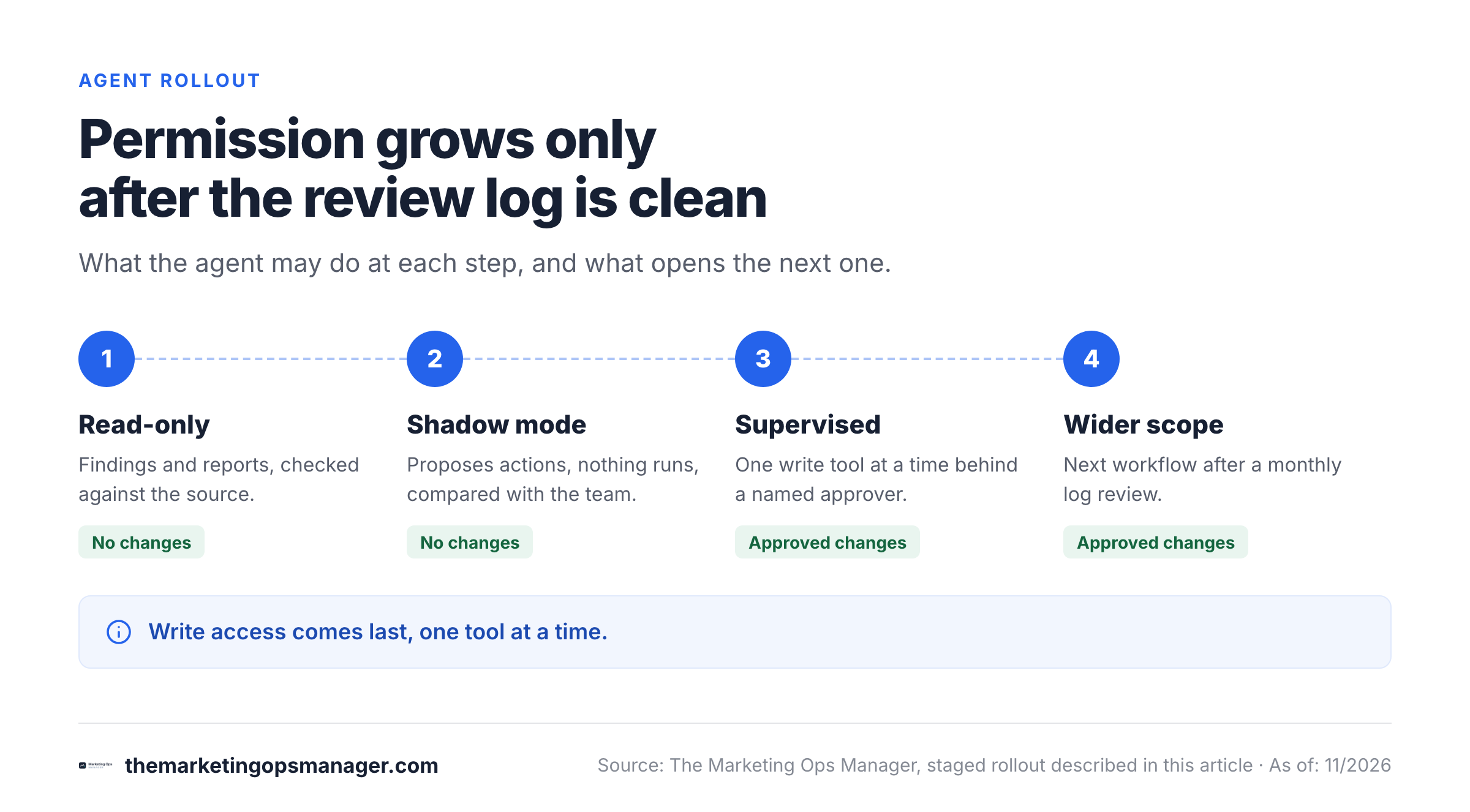
Roll out an agent in five steps: pick one workflow, run it read-only, run it in shadow mode, allow supervised changes, then review monthly and widen the scope. Move to the next step only when the review log shows that the agent was right often enough for the stakes of that step.
Pick one workflow with clear inputs
Choose a job that is repetitive, has a known right answer and is checked by hand today, such as a weekly campaign audit or a lead routing review. Write down what a correct result looks like.
Run read-only
Connect read access only. The agent produces findings and reports, and a person checks each one against the source. Log every miss and the reason.
Run in shadow mode
Let the agent propose the actions it would take, and compare them with what the team actually did. Do not let it execute anything yet.
Allow supervised changes
Turn on write tools one at a time, each behind the approval policy above. Start with the lowest-risk change type, such as a Slack alert or a CRM note.
Review monthly and widen scope
Read the log of proposals, approvals and rejections. Expand to the next workflow only if rejection reasons are shrinking and review time is lower than doing the task by hand.
- The workflow, the goal and the definition of a correct result are written down.
- The agent has its own credentials with the minimum permissions.
- Each write tool is listed with its risk level and its named approver.
- Spend and send actions have hard caps in the platform itself.
- Every proposal, approval and rejection is logged with who and when.
- Content the agent reads from the web, forms or email is treated as untrusted.
- Someone owns the monthly review of the log.
Exit criteria are yours to set, and they shouldn't be gut feel. Use numbers you track, such as the share of proposals approved without edits and the minutes of review per task. Example: if, over four weeks, most proposals are approved unchanged and review takes less time than doing the task by hand, widen the scope. If rejections cluster around one cause, fix that cause before adding permissions. Gartner's warning about costs and unclear value is the reason to measure review time from the first week.
If you run lead handling, the same staging applies to scoring and routing; the guides on lead scoring and marketing operations software cover the data an agent will read there.
How do you monitor what agents change?#
Agents change live systems, so someone has to check that tracking, forms and CRM handoffs still work afterward. A chat window that says "done" isn't evidence that a tag still fires or that a lead still reaches the right owner.
That check is a monitoring job, and it is the reason  The Marketing Ops Manager exists. It checks campaign journeys step by step on a schedule, opens an incident with evidence when a step fails, and lets an AI agent in Claude, ChatGPT or any MCP client propose a fix that a person approves. Approvals happen in its web app, and its activity log records each detection, proposal and approval. It doesn't replace your automation or your agent platform. It watches the handoffs between them.
FAQ#
What is an AI agent in marketing?
An AI agent in marketing is a system that uses a language model to work toward a goal, such as auditing a campaign, by choosing its own steps and calling tools like a CRM or analytics property. A person sets the goal and the limits.
Are AI agents the same as marketing automation?
No. Marketing automation follows a path someone designed in advance. An agent decides its next step itself, which lets it handle unplanned cases but adds cost and the risk of repeated errors.
What is the best first workflow to give an AI agent?
The best first workflow for an AI agent is a read-only job that is checked by hand today, such as a weekly campaign audit or a report with anomaly flags. Errors there cost a review, not a live campaign.
Do AI marketing agents need human approval?
AI marketing agents need human approval for anything that sends, spends, publishes or edits a live system. The MCP specification says there should always be a human in the loop with the ability to deny tool invocations, and OWASP lists human-in-the-loop controls for privileged operations.
Will AI agents replace marketing teams?
AI agents are not set to replace marketing teams on current evidence. Gartner expects at least 15% of day-to-day work decisions to be made autonomously through agentic AI by 2028, which leaves most decisions with people, and it advises using agents only where they show clear value.