Programmatic advertising software is a demand-side platform (DSP): the tool where you set a budget, pick an audience and buy ad impressions automatically across websites, apps, connected TV, audio and digital billboards. The eight platforms below all do that job. They differ in who can open an account, what a campaign costs before it spends a dollar on media, and how well the platform fits the tracking and CRM stack that decides whether the spend can be measured.
Pricing is the first surprise. Only two of the eight say anything concrete about a minimum spend or a self-serve fee: Amazon DSP and StackAdapt. The others sell through a sales conversation, a partner or an account manager, so this guide spends as much time on access and handoffs as on features. We read vendor material and didn't run these products.
- platforms compared
- 8
- state a minimum spend or a self-serve fee (Amazon DSP, StackAdapt)
- 2 of 8
- typical minimum for Amazon DSP managed service
- $50,000
- range of review scores across the eight
- 3.6 to 4.7
Our picks by situation#
 Best for a self-serve startStackAdaptA Basic plan you can start on a credit card and no minimum ad spend. It has the largest review base on this list: 4.7 from 925 reviews on G2.
 Best when Amazon data is the audienceAmazon DSPSelf-service has no management fee. Managed service typically needs $50,000 in spend.
 Best for omnichannel buying with first-party dataThe Trade DeskIndependent DSP with UID2, direct supply paths and data onboarding through uploads, SDK, Databricks or Snowflake.
 Best for teams on Google Marketing PlatformDisplay & Video 360Customer Match connects to BigQuery, Google Sheets and HubSpot. Access runs through Google sales or a partner.
 Best for agencies that plan and bill in one systemBasisMedia plans, DSP line items and billing reconciliation sit in one workflow.
 Best for retailers with a product catalogCriteoSetup starts with a product feed and one tag. Pricing is CPC or CPM by insertion order.
 Best for engineering-led CTV and native buyingYahoo DSPOpen trafficking, reporting and conversion APIs plus MCP servers for AI assistants.
 Best for display to digital out-of-home in one stackAdformDSP, ad server and DMP in one platform, with a map-based planner for out-of-home screens.
Programmatic advertising software compared#
| Tool | Category | Data handoff | Fee model | Review score |
|---|---|---|---|---|
| StackAdapt | Multi-channel self-serve DSP with email | In: first-party CRM data and pixel or server-side conversion events, creative, budget and targeting choices. Out: programmatic delivery across CTV, display, native, video, audio, DOOH and email, with cross-channel reporting and attribution. | No minimum ad spend; CPM, CPC or CPE pricing; plans Basic (self-serve, credit card), Bronze, Silver, Gold and Platinum, plan fees not published (checked 2026-11-18) | 4.7 (925) |
| Amazon DSP | Retail-data demand-side platform | In: campaign goals, budget, creative, pixel or Amazon Ad Tag conversion signals, and optional first-party signals through Amazon Marketing Cloud. Out: display, video, audio and streaming TV delivery on Amazon properties and third-party sites, plus campaign reporting and AMC audiences. | Self-service: no management fees, you pay media cost. Managed service: typically $50,000 minimum spend, may vary per country (Amazon DSP guide, checked 2026-11-18) | 4.2 (18) |
| The Trade Desk | Independent demand-side platform (DSP) | In: first-party data (hashed emails, phone numbers in APAC only, UID2s, cookies, device IDs, IP addresses) via the First-Party Data Uploader, Data SDK or CDP/clean room onboarders, plus first-party conversion data, campaign and creative setup (manually or via API/connectors such as Salesforce). Out: campaign reports, My Reports, hourly performance feeds and Raw Event Data Stream (REDS) via API, and exposure data shared with measurement partners. | Fee and minimum spend not published; accounts are set up through The Trade Desk (checked 2026-11-18) | 4.4 (196) |
| Display & Video 360 | Enterprise demand-side platform (Google Marketing Platform) | In: Customer Match lists (file upload or connections such as BigQuery, Google Sheets, HubSpot), audiences from Analytics 360 and Google Cloud, creatives, deals and campaign settings (UI, bulk tools or Display & Video 360 API). Out: campaign and billing reports, Bid Manager API reporting queries, viewability and reach and frequency metrics. | Fee is a percentage of media spend, higher for open auction and private deals and lower for YouTube, Demand Gen and programmatic guaranteed; rates and minimum spend not published (Google help, checked 2026-11-18) | 4.5 (37) |
| Yahoo DSP | Enterprise omnichannel DSP (CTV, native, display, audio, DOOH) | In: advertiser accounts, audience and first-party data, creatives, conversion events (pixel or server-to-server Conversion API), deals and budgets. Out: bought programmatic impressions across channels, campaign reports (CSV via Reporting API) and conversion data. | Fees and minimum spend not published (checked 2026-11-18) | 3.6 (184) |
| Adform | Omnichannel DSP with ad server and DMP (Adform FLOW) | In: advertisers, budgets, audiences (DMP segments and IDs), creatives and site tracking data. Out: programmatic and direct line item delivery across display, video, CTV, audio, mobile and DOOH, plus campaign reports and forecasts. | Fees and minimum spend not published, contact sales (checked 2026-11-18) | 4.3 (11) |
| Basis | Agency advertising operating system with built-in DSP | In: media plans, line items with budgets, CRM or pixel audiences, creatives and ad tags, and API connections to search, social and ad servers. Out: programmatic, direct, search and social campaigns, unified reports and dashboards, and billing reconciliation reports. | Custom enterprise quote, no published price or minimum (checked 2026-11-18) | 4.5 (294) |
| Criteo | Commerce media platform: retail media and open-web retargeting | In: product catalog feed, Criteo OneTag events (product views, add to cart, purchases), first-party data from CDP, CRM or contact lists, and for retail media SKUs on participating retailers. Out: retargeting and acquisition ads across the open web and social, sponsored products and onsite and offsite retail media ads, plus campaign and SKU-level reports. | Insertion-order based with CPC or CPM; no public price list, minimum spend or fees published (checked 2026-11-18) | 3.8 (242) |
 The Marketing Ops Manager Our product | Campaign monitoring | Checks every handoff in the campaign journey on a schedule | Starter $199 per month (up to 10 campaigns, checks every 15 minutes), Growth $499 per month (up to 50 campaigns, checks every 5 minutes); billed monthly in advance through Stripe, card required at checkout, cancel anytime (vendor homepage, as of 2026-11-02) | No reviews yet |
Fee and minimum-spend wording is taken from vendor pages read on November 18, 2026. Where a vendor publishes no figure, the table says so. Review scores are G2 unless noted.
What is programmatic advertising software?#
Programmatic advertising software is a platform that buys ad impressions through automated auctions and deals instead of through a salesperson at each publisher. You tell the platform the audience, the budget, the creative and the goal. It then bids on each available impression in milliseconds and reports what it bought.
The software category is wider than the DSP, and mixing the pieces up is the most common reason a shortlist goes wrong. The tools on this page are DSPs. Four neighbors appear in every programmatic setup.
| Piece | Who uses it | What it does |
|---|---|---|
| Demand-side platform (DSP) | Advertisers and agencies | Buys impressions across many publishers and exchanges. This is the software reviewed here. |
| Supply-side platform (SSP) | Publishers | Sells a publisher's impressions to many buyers. |
| Ad exchange | Both sides | Runs the auction that matches a DSP's bid with an SSP's inventory. |
| Ad server | Advertisers and publishers | Stores the creative, serves it and counts impressions. Adform and Basis bundle one with the DSP. |
| Data management platform (DMP) | Advertisers | Builds audience segments from first-party and third-party data. Adform includes one. |
What the software does for a marketing team is concrete. It targets audiences across channels from one budget, caps how often one person sees an ad, forecasts reach before you spend, optimizes bids against a conversion goal and reports delivery. The part that depends on your own stack is the conversion goal. A DSP optimizes toward whatever conversion event you send it, so a broken tag teaches the platform the wrong lesson.
How do you get an account, and what does it cost?#
Getting an account is the real filter on this list. Two platforms let a team start without a sales call. The rest need an account manager, a partner or a funded account request.
| Platform | Who can open an account | Fee model | Minimum spend |
|---|---|---|---|
| StackAdapt | Self-serve on the Basic plan with a credit card, or by demo request | CPM, CPC or CPE; plan fees not published | None stated |
| Amazon DSP | Self-service or managed, for advertisers who do and don't sell on Amazon | Self-service has no management fee; managed fee not published | Managed service typically $50,000, may vary by country |
| The Trade Desk | Account set up through The Trade Desk or a partner agency | Not published | Not published |
| Display & Video 360 | Google sales contact or Google Marketing Platform partner | Percentage of media spend, higher for open auction and private deals, lower for YouTube, Demand Gen and programmatic guaranteed | Not published |
| Yahoo DSP | Quote through Yahoo sales | Not published | Not published |
| Adform | Contact sales or request a demo | Not published | Not published |
| Basis | Quote-based enterprise contract | Custom quote | Not published |
| Criteo | Commerce Growth through sales; Commerce Max by account request, funded before launch | Insertion-order based, CPC or CPM | No minimum published |
Two things follow from the table. First, a vendor that says "self-serve" can still route account setup, API credentials and data onboarding through an account manager, as The Trade Desk's developer documentation describes. Second, the media itself is only part of the bill. API access can carry its own setup fee, and agency or managed-service fees sit on top of the platform fee.
How do programmatic auctions and deal types differ?#
Programmatic auctions and deals come in four routes, and every platform here buys through some mix of them. Knowing which route a campaign uses explains most surprises in cost and reach.
| Route | How the price is set | What you get | Typical use |
|---|---|---|---|
| Open auction (real-time bidding) | Each impression is auctioned to all bidders | Widest reach, least control over where ads appear | Prospecting and retargeting at scale |
| Private marketplace | Auction limited to invited buyers on selected publishers | Named, vetted inventory at auction prices | Brand-safe reach on premium sites |
| Preferred deal | Fixed price agreed with a publisher, no volume guarantee | First look at the inventory at a set CPM | Repeat buys on a trusted publisher |
| Programmatic guaranteed | Fixed price and a guaranteed volume | Reserved impressions, like a classic media buy | Launches and seasonal peaks |
Display & Video 360 prices its fee differently by route: the fee is higher for open auction and private auction deals and lower for programmatic guaranteed and YouTube. Amazon's guide lists real-time bidding, private marketplaces and programmatic guaranteed as buying modes in its DSP.
Where does a DSP sit in the campaign data flow?#
A DSP sits in the middle of the campaign data flow, and each link in that chain can fail without any platform reporting an error. For a marketing ops team the useful question is what each step needs from the stack around it.
- Step 1Tag and send conversions
- Criteo
- StackAdapt
- Amazon DSP
Breaks when a tag is removed in a site release and the DSP keeps optimizing against conversions that no longer arrive - Step 2Onboard first-party data
- The Trade Desk
- Display & Video 360
- StackAdapt
Breaks when a list upload fails or matches too few people and the audience is smaller than the plan assumed - Step 3Buy and optimize
- The Trade Desk
- Yahoo DSP
- Adform
- Basis
Breaks when the optimizer learns from a double-counted or test conversion and shifts budget toward the wrong audience - Step 4Report back to analytics and CRM
- The Marketing Ops Manager
Catches the landing page, form, tracking event or CRM handoff behind a live campaign has stopped working, with evidence
Step 1 is where programmatic buying and marketing ops meet. Criteo's setup runs on one tag (OneTag) that collects product views, add-to-cart actions and purchases, and it installs through Shopify, WooCommerce, Google Tag Manager or direct code. StackAdapt accepts a pixel or server-to-server events through its Pixel API. Amazon's tag sends conversion signals into Amazon's ecosystem. If your analytics counts a different event than the one the DSP optimizes on, the two reports will never match. Settle the event definitions with your UTM naming convention and your attribution model before the first campaign.
Step 2 differs more between platforms than anything else. The Trade Desk takes hashed or raw email lists through a First-Party Data Uploader, a Python Data SDK, or Databricks and Snowflake connectors. Display & Video 360 builds Customer Match lists from file uploads or connections to BigQuery, Google Sheets and HubSpot, and lists can take up to three hours to process. Neither of those is a native CRM sync in the sense of a live two-way connection, so plan an owner for list refreshes.
Step 4 is the gap these platforms don't cover. The Marketing Ops Manager checks the journey after the click: landing page response, form submission, tracking event, CRM record and lead owner. It connects to Google Ads, GA4, HubSpot, Slack, Jira and Asana, and it doesn't connect to the DSPs on this list, so treat it as a check on the destination, not on the buying. For the pre-launch routine, use the campaign tracking checklist.
How do you choose programmatic advertising software?#
Start from who will operate it and where the audience data lives. Five criteria separate the eight platforms.
- Access and minimums. Can your team start without a sales cycle, and what spend does the vendor expect? Self-serve with no stated minimum is a different decision from a managed service with a $50,000 floor.
- Where your audience data lives. A retailer with a product catalog, a team on HubSpot and BigQuery, and a team with Amazon shoppers as the audience each map to a different platform.
- Channels and supply. Display and video are common. Connected TV, audio and digital out-of-home vary by platform. Check the channels you will use in year one, not the full list.
- Reporting and API. If finance or a warehouse needs the numbers, check how reports leave the platform: CSV by API (Yahoo DSP), query-and-download reports (Display & Video 360's Bid Manager API), hourly feeds and a raw event stream (The Trade Desk).
- Support model. Support and account management are recurring praise for Basis and StackAdapt in review summaries. A steep learning curve appears among the recurring complaints for The Trade Desk and StackAdapt.
| Your situation | Start with |
|---|---|
| Small team, credit card, no sales cycle wanted | StackAdapt |
| Amazon shoppers are the audience and you want no management fee | Amazon DSP self-service |
| Existing Google Marketing Platform contract, Campaign Manager 360 and Analytics 360 | Display & Video 360 |
| Independent platform with strong data onboarding and your own engineers | The Trade Desk |
| Agency running many clients with billing reconciliation | Basis |
| E-commerce or retail brand with a product feed | Criteo |
| Engineers want open APIs on CTV and native | Yahoo DSP |
| Display, video and out-of-home under one ad server | Adform |
Programmatic advertising software reviewed: 8 platforms#
Each entry follows the same order: how an account opens and what it costs, how a campaign is built and measured, what goes in and out, what reviewers report and who should skip it. Review scores come from G2 unless the entry says otherwise, and the praise and complaint lines summarize the themes reviewers list on those pages.
StackAdapt
StackAdapt is a self-serve programmatic platform that covers CTV, display, native, audio, video, DOOH and email, with an Ivy Studio planning hub and a 1st-party Data Hub. StackAdapt states it has no minimum advertising spend and prices campaigns on CPM, CPC or CPE.
StackAdapt is the one platform here that a team can open with a credit card and no minimum spend, then grow into managed service.
StackAdapt lists five plans: Basic and Bronze are self-serve, and Silver, Gold and Platinum can be self-serve or managed. Campaigns price on CPM, CPC or CPE. StackAdapt's plans page says most teams find their stride around $5,000 a month, and plan fees aren't published.
You install the pixel or send events through the Pixel API, sync first-party CRM data into the Data Hub and build campaigns in the interface or through the GraphQL API. Targeting covers first-party audiences, contextual and account-based audiences, with a live forecast of impressions, reach, clicks and conversions. Channels include connected TV, display, native, audio, video, digital out-of-home and email.
- You want a self-serve DSP you can start on a credit card with no minimum spend and move up to account services later.
- You want programmatic and email under one platform with CRM-fed audiences and API access, including a GraphQL API and an MCP server.
- You need published rate cards, because plan fees and platform fees are not published.
- You rely on deep native reporting, because G2 reviewers most often complain about reporting limits and custom pulls.
- Users like
- Ease of use and helpful support (G2 AI summary ties ease of use to efficient campaign setup; support described as helpful and strategic)
- Users dislike
- Reporting limitations that require custom pulls, plus a steep learning curve and complex budget management (G2 AI summary)
- Source: G2, 925 reviews
How it works in practice
The developer documentation lists a REST API (read-only reporting, with write operations deprecated), a GraphQL API for campaign management, a Pixel API for server-to-server conversions, a Data Taxonomy API and an MCP server. That gives it broad automation options for a self-serve platform. Email is an add-on on Basic, 12 million sends a year on Bronze and unlimited from Silver.
Reviewers on G2 praise ease of use and helpful support. The recurring complaints are reporting limits that force custom pulls, a steep learning curve and complex budget management. StackAdapt names CRM integrations for the Data Hub but publishes no CRM vendor list, so confirm your CRM before you buy.
- Starting price
- No minimum ad spend; CPM, CPC or CPE pricing; plans Basic (self-serve, credit card), Bronze, Silver, Gold and Platinum, plan fees not published (checked 2026-11-18)
- Minimum spend
- None; StackAdapt states it has no minimum advertising spend (stackadapt.com/platform)
- Spend guidance
- Most teams hit their stride around $5k a month; no minimum required to start (plans page)
- Pricing models
- CPM, CPC and CPE (stackadapt.com/platform)
- Plans
- Basic (self-serve, credit card), Bronze, Silver, Gold, Platinum; Basic and Bronze are self-serve, Silver and above are self-serve or managed; net terms from Bronze up (plans page, US and Canada example)
- Channels
- CTV, display, native, audio, video, DOOH, email
- Targeting
- 1st-party audiences, contextual targeting, ABM targeting, real-time forecasting of impressions, reach, clicks and conversions (platform page)
- API
- GraphQL, REST reporting, Pixel API, MCP server
- Email automation add-on
- Basic: add-on; Bronze: 12M per year; Silver and above: unlimited (plans page)
- Access
- Basic on a credit card, no minimum ad spend
- Pricing model
- CPM, CPC or CPE
Amazon DSP
Amazon DSP was Amazon Ads' programmatic buying platform for display, video, audio and streaming TV ads across Amazon properties (Prime Video, Twitch, Fire TV, Amazon.com) and third-party sites and apps. Amazon's product page now states it is part of Amazon Ads Agent, with programmatic capabilities available through DVA+ and existing campaigns, audiences and pricing carried forward.
Amazon DSP puts Amazon's shopper and streaming data behind a programmatic buy, with a fee structure that differs sharply between self-service and managed.
Amazon's guide says self-service carries no management fees and gives you full control of campaigns, and that managed service typically needs a $50,000 minimum spend, which may vary by country. It's open to advertisers who sell on Amazon and to those who do not. Amazon doesn't publish a platform fee percentage or a self-service minimum.
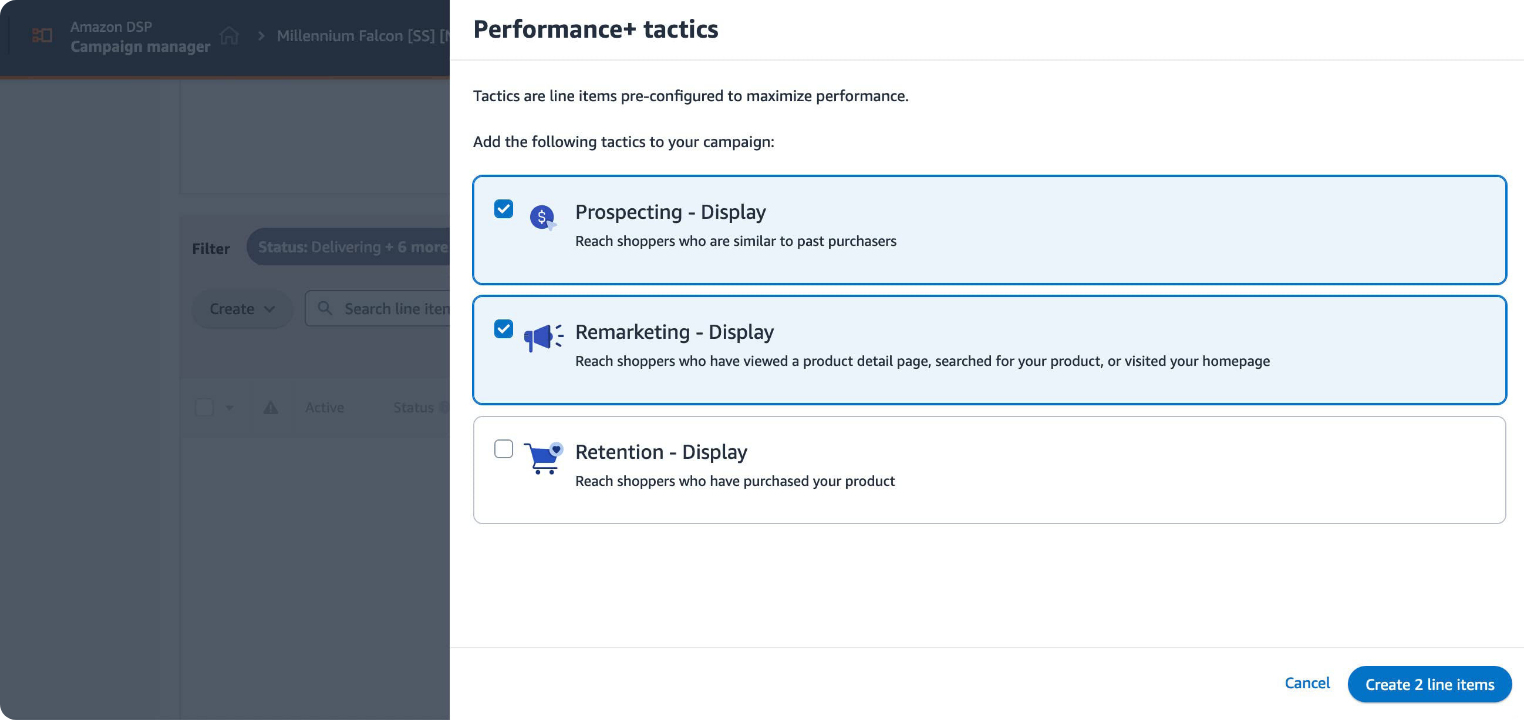
Amazon's product page now places the DSP inside Amazon Ads Agent under the name DVA+. You register, pick an objective and let the optimization run, or switch to DVA+ advanced for manual control of targeting, deals and inventory. Supply includes Amazon properties such as Prime Video, Twitch and Fire TV plus third-party sites and apps, and buying modes include real-time bidding, private marketplaces and programmatic guaranteed deals.
- You sell on Amazon or want Amazon shopper signals and Amazon-owned inventory such as Prime Video and Twitch in one buy.
- You want either a self-service console with no management fee or an Amazon-managed service and can meet its minimum.
- You need a small test budget with managed help, because the managed route typically requires $50,000 minimum spend.
- You need broad plug-and-play third-party CRM or analytics connectors, because G2 reviewers rate API and integrations lowest of the features G2 tracks (6.4 from 11 reviews).
- Users like
- Reporting and Amazon ecosystem data access (G2 AI summary: integration with the Amazon ecosystem and access to customer data helps campaign performance; intuitive reporting metrics)
- Users dislike
- Slow platform and glitches that delay ad uploads and interface changes; weak API and integrations score (6.4 on G2).
- Source: G2, 18 reviews
How it works in practice
Measurement and audiences run through Amazon Marketing Cloud, a clean room built on AWS Clean Rooms. Advertisers query pseudonymized Amazon and first-party signals, build custom audiences and activate them in display and video ads. Reporting, audience and signal onboarding are available by API. First-party signals enter through Marketing Cloud signal onboarding and the Amazon Ad Tag.
Reviewers on G2 praise reporting and access to Amazon customer data. The complaints are a slow platform and glitches that delay ad uploads, and a weak API and integrations score of 6.4 from 11 reviews. The sample is small at 18 reviews. Amazon publishes no list of CRM or tag manager connectors, so expect the stack to meet Amazon through the clean room.
- Starting price
- Self-service: no management fees, you pay media cost. Managed service: typically $50,000 minimum spend, may vary per country (Amazon DSP guide, checked 2026-11-18)
- Access model
- Self-service and managed-service options, available to advertisers who do and do not sell on Amazon (advertising.amazon.com/solutions/products/amazon-dsp)
- Self-service fees
- No management fees; you keep full control of campaigns (Amazon DSP guide)
- Managed-service minimum
- Typically $50,000 minimum spend, may vary per country (Amazon DSP guide)
- Formats
- Display, video and audio ads; Amazon's guide also lists real-time bidding, private marketplaces and programmatic guaranteed as buying modes
- Inventory
- Amazon properties plus third-party sites and apps
- Optimization
- DVA+ is powered by Brand+ and Performance+ optimization; DVA+ advanced keeps full control over targeting, deals and inventory (Amazon product page)
- Clean room
- Amazon Marketing Cloud on AWS Clean Rooms
- Pricing figures not published by Amazon
- Platform fee percentages and a self-service minimum are not published on Amazon pages checked
- Self-service
- No management fees; media cost applies
- Managed service
- Typically $50,000 minimum
The Trade Desk
The Trade Desk is an independent demand-side platform for buying display, video, connected TV, audio, native, mobile and digital out-of-home inventory, and it describes itself as a self-serve experience. Its Kokai interface adds AI-driven bid optimization (Koa), real-time forecasting, UID2-based identity, the OpenPath direct supply path and a marketplace of data and measurement partners.
The Trade Desk is the independent DSP most built around identity and data onboarding, and the one where a data engineer matters as much as the media buyer.
The platform page describes a self-serve experience, while the developer documentation says account setup, API credentials and data onboarding paperwork go through an Account Manager or Technical Account Manager. The fee percentage and minimum spend aren't published.
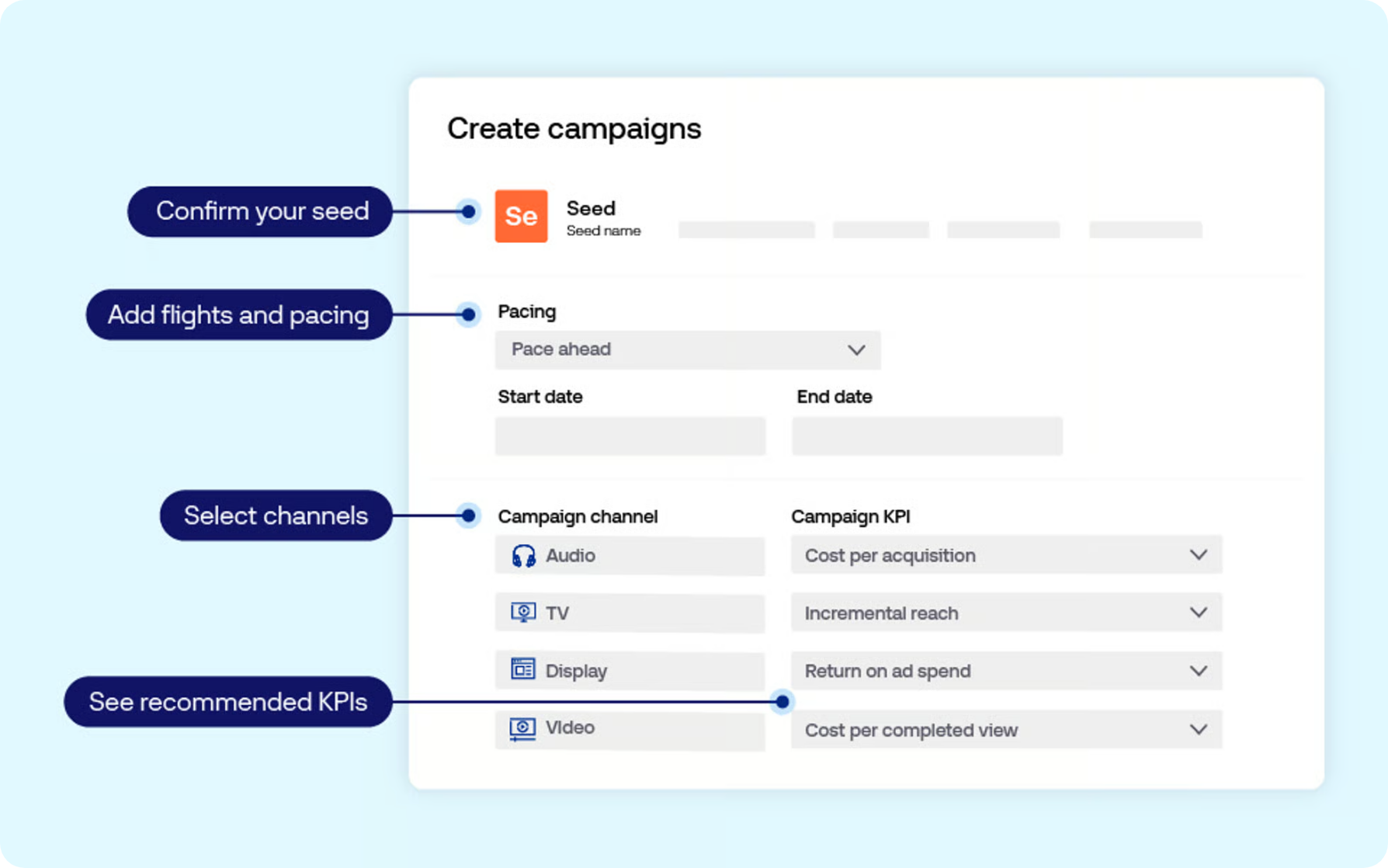
Your team onboards first-party data by uploading hashed or raw email lists to the First-Party Data Uploader, through a Python Data SDK, through Databricks or Snowflake connectors or through a CDP or clean room partner. Identity runs on UID2, with EUID for Europe and the UK. In Kokai, the current interface, you build campaigns with audience seeds and bid factors, and a real-time forecast shows spend, reach and frequency before changes save. The Trade Desk says its Koa optimization analyzes up to 15 million ad opportunities per second.
- You run omnichannel programmatic buying (CTV, audio, display, video) and want one platform with open-internet inventory and a large marketplace of data and measurement partners.
- You have first-party data (CRM lists, conversion data) to onboard and want to activate it via UID2, a CDP or a clean room and measure with your own conversion data.
- You need a published price, free trial or small-budget self-signup: fees and minimum spend are not published and accounts are set up through The Trade Desk.
- You want a lightweight tool without a steep learning curve: G2 reviewers most often name learning curve, complexity and cost as negatives.
- Users like
- Audience targeting, features and ease of use (listed among G2's top positive themes)
- Users dislike
- Learning curve and complexity, plus cost described as expensive (G2's top negative themes)
- Source: G2, 196 reviews
How it works in practice
The OpenPath direct supply path connects buyers and publishers with fewer intermediaries, and Kokai lets you target a Sellers and Publishers 500 list. Outcomes are measured with your own conversion data, partner measurement providers or exports through My Reports, hourly performance feeds and a Raw Event Data Stream that takes an estimated two to four weeks to build.
The REST and GraphQL Platform API has a sandbox, typically carries a setup fee and doesn't give access to the platform interface. The documentation names a campaign connector for booking systems such as Salesforce, MediaOcean and Strata, but no native CRM or tag manager list is published. Reviewers on G2 praise audience targeting and features. The most common negatives are the learning curve, complexity and cost.
- Starting price
- Fee and minimum spend not published; accounts are set up through The Trade Desk (checked 2026-11-18)
- Access model
- The Trade Desk's platform page describes a self-serve experience; account setup, API credentials and data onboarding paperwork go through an Account Manager or Technical Account Manager.
- Fees and minimum spend
- Platform fee percentage and minimum spend are not published on thetradedesk.com.
- Inventory and supply path
- Omnichannel buying across CTV, audio, digital out-of-home, display, mobile, native and video; OpenPath offers a direct connection between buyers and publishers to reduce intermediaries; Kokai lets buyers target a Sellers and Publishers 500 list.
- AI optimization
- Koa AI analyzes up to 15 million ad opportunities per second (per The Trade Desk); Kokai offers real-time forecasts before changes go live and bid factors to express value.
- Audience data onboarding
- First-Party Data Uploader (no-code UI/GraphQL), Data SDK (Python), Databricks and Snowflake connectors; email and phone upload requires signed service agreement paperwork unless you already have UIDs; PII is stored temporarily in a secure environment and deleted after UIDs are created.
- Identity
- UID2 and EUID
- Reporting and API
- My Reports, Hourly Performance Feeds and Raw Event Data Stream (REDS, estimated 2 to 4 weeks to build); REST and GraphQL Platform API with sandbox; API services typically carry a setup fee; API credentials do not give access to the platform UI.
- Access
- Account set up through The Trade Desk or a partner
- Data onboarding
- Uploader, Data SDK, Databricks, Snowflake, CDP
- Reporting
- My Reports, hourly feeds, Raw Event Data Stream
Display & Video 360
Display & Video 360 is Google's enterprise demand-side platform for planning, buying and measuring display, video, connected TV and audio campaigns, including YouTube inventory and programmatic guaranteed deals. Access is through a Google sales contact or certified partner, and campaigns can be run in the UI or through the Display & Video 360 and Bid Manager APIs.
Display & Video 360 is the enterprise DSP for teams that already run measurement and ad serving inside Google Marketing Platform.
Access goes through a Google sales contact or a Google Marketing Platform partner. The fee is a percentage of media spend with an upper rate for open auction and preferred or private auction deals and a lower rate for YouTube, Demand Gen and programmatic guaranteed. Google publishes the structure, not the percentages, and no minimum spend.
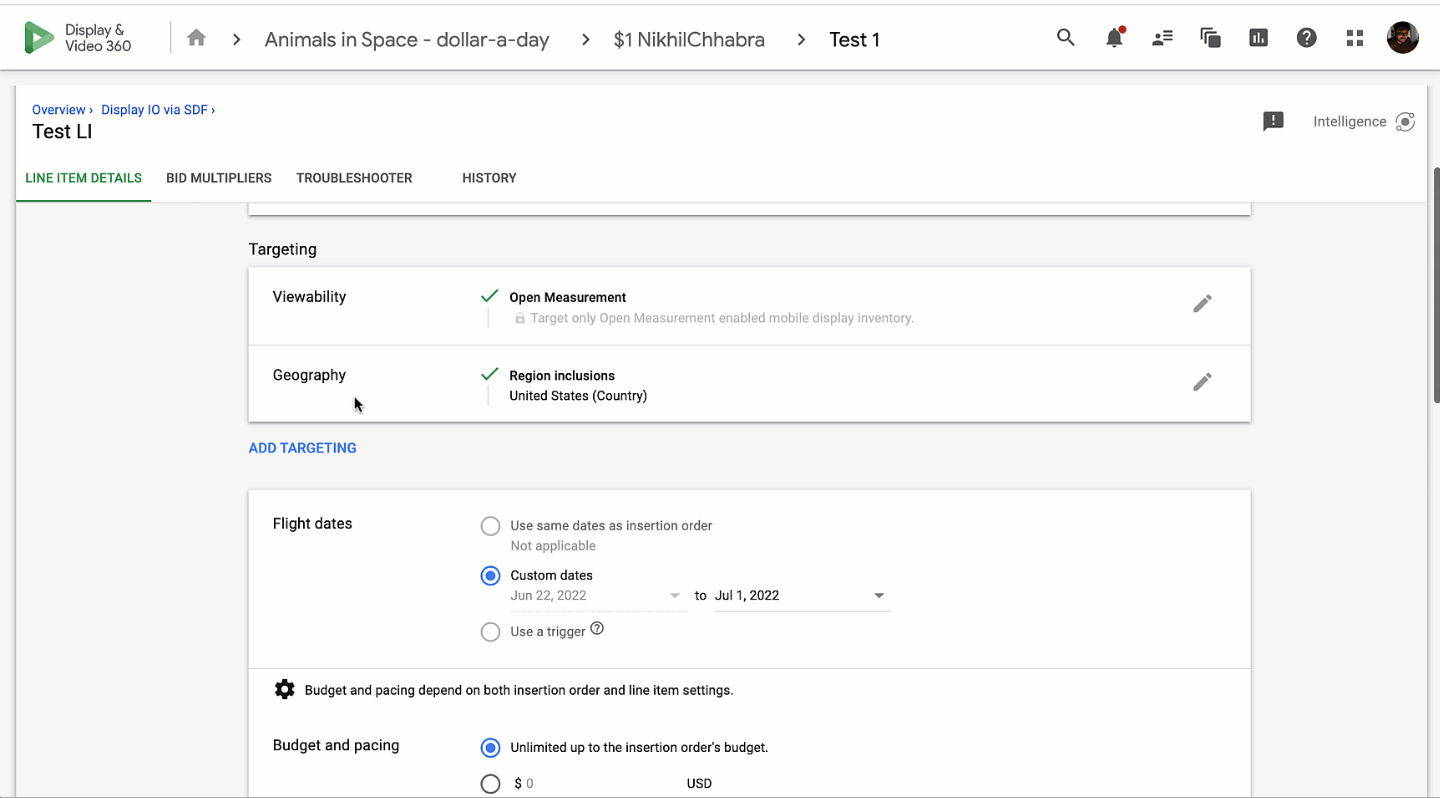
A partner and advertiser hierarchy sets up access, and users get Admin, Standard or Read only roles. You build audiences from Customer Match lists, Analytics 360 or Google Cloud data, then create campaigns, insertion orders and line items, choosing inventory from the Marketplace, programmatic guaranteed deals, YouTube or open exchanges. Fixed bids go up to $1,000 CPM, $1,000 CPC and $4,000 CPA, or an automated strategy takes over.
- You already use Google Marketing Platform (Campaign Manager 360, Analytics 360) or heavy YouTube buying and want unified buying, reach and frequency measurement and reporting.
- You manage many campaigns across teams or agencies and need partner and advertiser hierarchy, enterprise bulk tools and API access.
- You want self-signup with a published price: access requires a sales conversation or a Google partner, and minimum spend is not published.
- You want to train a small team quickly: Gartner Peer Insights reviewers cite difficult training and a steep learning curve.
- Users like
- Integration with other Google products and complete, easy-to-navigate reporting
- Users dislike
- Difficult to train people, run reports cannot be shared between team members, budget changes are hard during a live campaign; one reviewer cites high costs for smaller teams
- Source: G2, 37 reviews
How it works in practice
Customer Match lists load by file upload or by connections to BigQuery, Google Sheets and HubSpot, need at least 100 members and can take up to three hours to process. Measurement covers Active View viewability, de-duplicated reach and frequency across devices and third-party partners. Developers manage line items with the Display & Video 360 API and pull report data with Bid Manager API queries.
G2 shows no score for this product, so the review figure comes from Gartner Peer Insights: 4.5 from 37 ratings. Reviewers praise the integration with other Google products and complete reporting. They complain that training is difficult, that saved reports can't be shared between team members and that budget changes are hard during a live campaign.
- Starting price
- Fee is a percentage of media spend, higher for open auction and private deals and lower for YouTube, Demand Gen and programmatic guaranteed; rates and minimum spend not published (Google help, checked 2026-11-18)
- Access model
- Contact Google sales or a Google Marketing Platform partner; the API quickstart says to contact sales if your organization has no access. Partners in DV360 represent agencies, trading desks or large advertisers.
- Fees
- The Display & Video 360 fee is a percentage of media spend with an upper (exchange) rate for open auction and preferred or private auction deals and a lower (non-exchange) rate for YouTube and partners, Demand Gen and programmatic guaranteed; it supports a tiered rate structure. Percentages and minimum spend are not published.
- Bidding
- Fixed CPM bids up to USD 1,000 CPM, USD 1,000 CPC, USD 4,000 CPA and USD 1,000 viewable CPM; automated bid strategies use machine learning.
- Customer Match audiences
- Create lists by file upload or connections (BigQuery, Google Sheets, HubSpot); processing can take up to 3 hours; list membership lasts up to 540 days and a list needs at least 100 members added or updated in that window; forecasting and inventory reports are not available for these audiences.
- Inventory
- Marketplace, programmatic guaranteed, Google Preferred, YouTube Reserve, TrueView, and bidding on or excluding impressions from dozens of third-party exchanges.
- Measurement
- Active View viewability, reach and frequency de-duplicated across devices, TV Ad Explorer, and third-party measurement integrations; over 180 filters for invalid traffic per Google.
- API
- Display & Video 360 API for campaign management and Bid Manager API for reporting queries (create, run, poll and download).
- Access
- Google sales or a Google Marketing Platform partner
- Fee
- Percentage of media spend, rates not published
- Customer Match
- File upload, BigQuery, Google Sheets, HubSpot
- APIs
- Display & Video 360 API, Bid Manager API
Yahoo DSP
Yahoo DSP is a demand-side platform for buying CTV, native, audio, digital out-of-home and display inventory, with Yahoo's own premium supply (Yahoo Backstage) and identity-based targeting. Yahoo does not publish pricing, fees or a minimum spend, and its product page does not say whether the platform is self-serve or managed.
Yahoo DSP is the choice when the buying team has engineers: its APIs are documented in detail, and it adds supply paths to named CTV and native partners.
Yahoo publishes no fees and no minimum spend, and its product page doesn't say whether the platform is self-serve or managed. The DSP buys connected TV, native, audio, digital out-of-home and display inventory, including Yahoo's own premium supply called Backstage. Yahoo's page names partners such as Roku, Paramount and Disney and says the platform is SOC 2 Type II certified.
The API starts inside the DSP: a user with the User Ops role enables API access in Seat Settings, activates it under My Account and copies the client ID and secret, which the interface shows only once. The client signs a token request and receives a Bearer token. Reports are requested, polled until they finish and downloaded as CSV, covering up to 13 months of data.
- You buy CTV and premium native at scale and want direct supply paths to named partners such as Roku, Paramount and Disney (as listed on Yahoo's page).
- You have engineers who want open APIs (Trafficking, Reporting, Conversion, Bring Your Own Algorithm) and MCP connections for AI assistants.
- You want published, self-serve pricing and a small test budget; Yahoo publishes no fees and no minimum.
- Users like
- G2's aggregated positive themes include ad management, audience targeting, campaigns and ease of use. One reviewer (Aparna S.) praises the flexibility of managing display, video, CTV and native campaigns, uploading creatives, placing tracking pixels and monitoring performance in one platform.
- Users dislike
- G2's aggregated negative themes include ad issues, ad management and campaign management issues, and delayed implementation. G2 lists an average implementation time of 1 month.
- Source: G2, 184 reviews
How it works in practice
Yahoo lists open Trafficking, Reporting, Conversion and Bring Your Own Algorithm APIs under one authentication, plus Reporting and DSP MCP servers for AI assistants. Conversions arrive through a pixel or the server-to-server Conversion API, since no CRM or tag manager connector is documented. Supermetrics offers a Yahoo DSP connector that sends data to Google Sheets, Looker Studio, Power BI, BigQuery and warehouses.
G2 shows 3.6 from 184 reviews and an average implementation time of one month. Reviewers praise audience targeting and campaign management. The complaints are ad and campaign management issues and delayed implementation.
- Starting price
- Fees and minimum spend not published (checked 2026-11-18)
- Channels
- CTV, native, audio, DOOH, display
- Audience scale
- 625M Yahoo user profiles and 200+ global partners, per Yahoo internal data from 2024 (Yahoo DSP page)
- Premium supply
- Yahoo Backstage, described as certified MFA-free by Jounce Media; named partners include Warner Bros. Discovery, Fox, Paramount, Disney, Roku, NBC and Spotify
- Unified TV
- Plans, activates and measures CTV and linear campaigns together
- Open APIs
- Trafficking, Reporting, Conversion and Bring Your Own Algorithm, under one authentication; Reporting and DSP MCP servers for AI assistants
- Reporting API limit
- Reports can cover data up to 13 months old; older data is purged. Output is CSV
- Compliance
- SOC 2 Type II
- Fees
- Not published
- Reporting API
- CSV, up to 13 months of data
Adform
Adform is a Copenhagen-based omnichannel DSP, sold individually or packaged as Adform FLOW, with a Campaign Planner, an ad server and a DMP in one platform. Pricing, fees and minimum spend are not published; the DSP page only offers a contact route.
Adform packages a DSP, an ad server and a data management platform in one stack, so audiences and tracking sit next to the buying.
Adform shows no USD pricing or minimum spend. Its DSP page offers a contact route and a demo request, and the managed-service terms sit behind a login. It buys display, video, connected TV, audio, mobile and digital out-of-home, and its Campaign Planner forecasts, designs and launches a campaign in one workflow.
In the API workflow you create an advertiser, then a campaign plan from scratch or from a previous campaign whose best-performing targeting is reused. Inventory lists come from the Inventory Marketplace API, geography from the Classifiers API and audiences from the DMP Segments API. You can run a forecast before creation and then generate the campaign from the media plan.
- You run campaigns across display, video, CTV, audio, mobile and DOOH and want one workflow with a map-based DOOH planner.
- You need identity flexibility: Adform says ID Fusion supports 45+ IDs (the Why Adform page says 40+).
- You want to sign up and launch on your own: Adform's DSP page offers only 'Contact us' and a demo request, with no DSP fee or minimum spend stated.
- G2 lists
- The product as a DSP, DMP and ad server in one platform for mid-size to large companies
- Source: G2, 11 reviews
How it works in practice
The digital out-of-home planner is map-based: you find screens by city, venue or exact location. Adform says its ID Fusion supports more than 45 IDs, though another page says more than 40. The Plan API needs two user permissions, Manage Programmatic Line Items and Manage Campaigns & Orders, and OAuth scopes that Adform Support assigns. The Forecast API returns estimated reach for eCPC, CTR, eCPM viewable and viewability rate only. Adform also says it opened its platform through an MCP server for AI tools.
G2 lists the Integrated Advertising Platform at 4.3 from 11 reviews and the separate Adform DSP listing at 4.0 from 4 reviews, so peer evidence is thin. No CRM or tag manager connector list is published.
- Starting price
- Fees and minimum spend not published, contact sales (checked 2026-11-18)
- Channels
- Display, video, CTV, audio, mobile, DOOH
- Campaign Planner
- Forecast, design and launch in one workflow, powered by Adform IQ; plans can start from a minimal brief or from a past campaign
- DOOH
- Map-based planner to find screens by city, venue or exact location; Adform calls itself the first global DSP with a channel-specific DOOH workflow
- ID Fusion
- Adform says it supports 45+ IDs (DSP page); Why Adform page says 40+ IDs
- Plan API prerequisites
- User permissions Manage Programmatic Line Items and Manage Campaigns & Orders; OAuth client scopes assigned by Adform Support
- Forecast API
- Returns estimated KPI reach for eCPC, CTR, eCPM viewable and viewability rate only
- Access model
- Contact sales and demo request on the site; an Adform help article on 'Request Managed Services Support' exists but is behind login, so terms are not published
- Stack
- DSP, ad server and DMP in one platform
- Identity
- ID Fusion, 45+ IDs per Adform
- Access
- Contact sales or demo request
Basis
Basis (Basis Technologies, formerly Centro) combines media planning, a built-in demand side platform, direct, search and social buying, reporting and billing reconciliation in one platform aimed at agencies. Basis does not publish fees or a minimum spend on its site, and G2 lists its pricing as contact sales, enterprise or custom.
Basis is an agency operating system with a DSP inside it, so the buying sits in the same workflow as planning, approvals and billing.
Access is a custom enterprise quote, and Basis publishes no price and no dollar minimum. In its help center, work starts with a campaign that holds one or more media plans. A media plan holds line items across DSP, direct, search and social. A DSP line item is a plan to buy programmatically and matches a budget on an insertion order.
Every DSP line item then needs groups and tactics that define how, when and where the budget is spent, and client approval must be confirmed manually before groups and tactics can deliver. Tactics bid in an auction on exchange inventory, and the Analytics tab and billing reports support reconciliation with an ERP system.
- You run an agency or in-house team that buys programmatic, direct, search and social media and wants planning, activation, reporting and invoice reconciliation in one system.
- You want a DSP with private marketplace deals, CTV, audio, display, native and DOOH plus a services team for onboarding.
- You need a self-serve sign-up or a fixed fee: Basis sells on a custom enterprise quote, and its own comparison article names no dollar entry threshold.
- You only run a small amount of display retargeting: the platform is built around multi-channel agency workflows, and G2 reviewers mention a complex interface.
- Users like
- Account management and support. G2 lists account management as a top pro and support quality at 9.5 out of 10 (245 responses).
- Users dislike
- Interface. G2 lists a complex user interface and poor ease of use among the recurring cons.
- Source: G2, 294 reviews
How it works in practice
The DSP covers connected TV, video, native, audio, display, mobile and retargeting. Basis cites more than 2,000 active private deals and more than 25,000 audience segments, both vendor claims, and its help center lists 30-plus exchanges and 20 third-party data providers. Billing reconciliation ties to Mediaocean, and a Tealium connector adds users to a DSP audience segment by Basis cookie ID and Advertiser ID. Search and social line items connect to Google Ads, Bing, Meta, LinkedIn, TikTok, Snapchat, Reddit and Pinterest.
G2 shows 4.5 from 294 reviews. Reviewers praise account management and support, rated 9.5 out of 10 in the G2 summary. The recurring complaint is a complex interface and poor ease of use. CRM and tag manager coverage beyond Tealium isn't published.
- Starting price
- Custom enterprise quote, no published price or minimum (checked 2026-11-18)
- Access model
- Quote-based; G2 pricing shows Contact Sales, Enterprise / Custom
- Fees and minimum spend
- Not published; Basis comparison article lists its entry point only as a lower threshold, no dollar figure
- DSP channels
- Connected TV, video, native, audio, display, mobile, retargeting; DOOH listed in site navigation
- Private marketplaces
- 2,000+ active private deals (vendor claim)
- Audience data
- 25,000+ audience segments; page cites 30+ and, elsewhere, 40+ data providers
- Exchanges and deals (help center)
- 30+ exchanges and 1,000 private marketplace deals; 20 third-party data providers
- Enterprise API
- Create campaigns, tactics and ads, manage audiences and conversion tracking; pricing not published
- Access
- Custom enterprise quote
- Workflow
- Campaign, media plan, DSP line item, tactics
- Billing
- Mediaocean reconciliation
- Channels
- CTV, video, native, audio, display, mobile
Criteo
Criteo sells Commerce Growth for retargeting and acquisition on the open web and Commerce Max for retail media across 225+ retailers and publishers. Criteo does not publish fees or a minimum spend: Commerce Growth pricing is insertion order based with CPC or CPM, and Commerce Max accounts must be funded before campaigns launch.
Criteo is built around a product catalog, which makes it the most direct fit for e-commerce and retail teams and the least general of the eight.
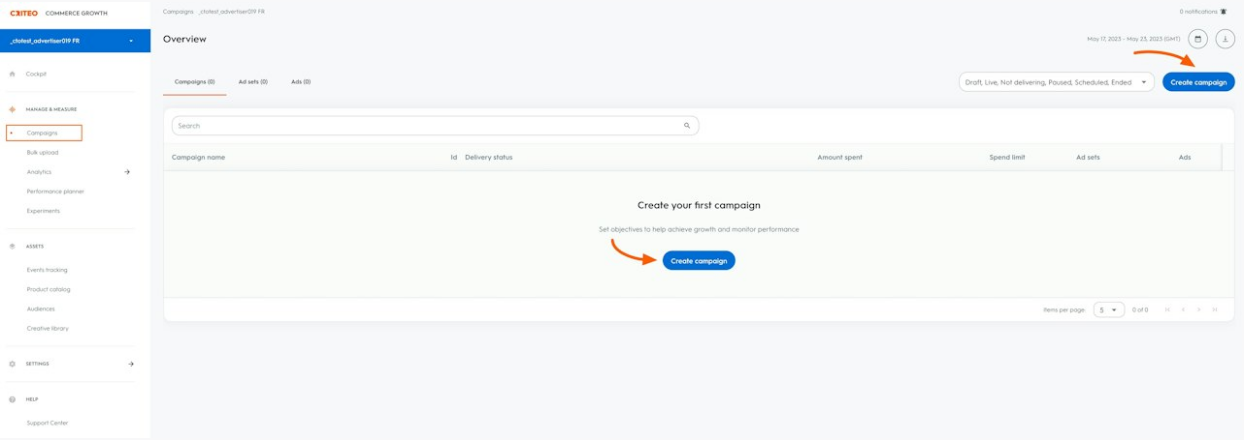
Criteo sells two products with different access. Commerce Growth is the open-web product: it is insertion-order based with CPC or CPM, and no minimum spend or fees are published. Commerce Max is the retail media product: advertisers with SKUs at a participating retailer request an account, which must be funded before launch.
Commerce Growth setup has three steps: import the product catalog feed, confirm the Criteo OneTag is running on the site and build the first ad set. OneTag is one JavaScript snippet that collects product views, add-to-cart actions and purchases. The campaign spend limit is fixed and the campaign pauses when it is reached. Criteo recommends setting the limit to 1.5 times the total ad set budget.
- You run an online store with a product feed and want dynamic retargeting and AI-driven acquisition across the open web and social.
- You are a brand or agency with SKUs at retailers and want sponsored products and onsite and offsite ads across many retailers from one account.
- You need a fixed fee or minimum spend up front: Commerce Growth runs on insertion orders with CPC or CPM via Contact Sales, and Commerce Max accounts must be funded before launch.
- You need granular control and traffic-source visibility: G2 reviewers cite limited customization and weak transparency in reporting.
- Users like
- Performance and automation. Reviewers describe ROI as the best part and say most of the process is automatic.
- Users dislike
- Transparency and control. Reviewers cite reporting broken up by campaign only, unable to see the true source of traffic, and limited customization.
- Source: G2, 242 reviews
How it works in practice
Optimization options are a manual maximum CPC, AI models for ROAS, sales or visits, and target budget models. Criteo says its GO Campaigns launch in as little as five clicks and ten minutes. Commerce Max runs Sponsored Products on a first-price CPC auction plus onsite and offsite display and video, and offers two budget models: Criteo Budget, where Criteo funds and bills in one invoice, or Retailer Budget, where the retailer invoices media and Criteo bills platform and service fees separately.
Commerce Growth supports Google Analytics 4 attribution and incrementality testing, and onboards first-party data through CDP or CRM connections or contact lists. G2 shows 3.8 from 242 reviews for Commerce Growth. Reviewers praise ROI and automation. The complaints are reporting broken up by campaign only, no view of the true traffic source and limited control.
- Starting price
- Insertion-order based with CPC or CPM; no public price list, minimum spend or fees published (checked 2026-11-18)
- Access model
- Commerce Growth: Contact Sales; Commerce Max: advertisers with SKUs on a participating retailer request an account, which must be funded before launch
- Pricing basis
- Insertion order, CPC or CPM
- Commerce Max reach
- 225+ retailers and publishers; 17,000+ advertisers (vendor claim)
- Commerce Max campaign types
- Sponsored Products (first-price CPC auction), Onsite Display and Video (CPM), Offsite Display and Video
- Commerce Max budget models
- Criteo Budget (Criteo funds and bills in one invoice) or Retailer Budget (retailer invoices media; Criteo bills platform and service fees separately)
- Commerce Growth optimization
- Manual max CPC, AI models for ROAS, sales or visits, and target budget models
- GO Campaigns
- Faster AI-driven launch; Criteo says as little as five clicks and 10 minutes to go live
- G2 ratings by product
- G2 lists Commerce Growth at 3.8 (242 reviews) and Commerce Max (Retail Media) at 4.0 (18 reviews)
- Products
- Commerce Growth (open web), Commerce Max (retail media)
- Tag
- OneTag via Shopify, WooCommerce, Google Tag Manager or code
- Catalog
- Product feed import
Should you run programmatic in-house or through an agency?#
In-house programmatic buying means your team owns three jobs: tagging, audience data and weekly optimization. An agency or a managed-service tier takes over the buying but not the first two, because the tags and the CRM lists live in your stack.
- In-house works when one person can own the platform each week, the conversion events are already clean and you can fund a test of at least a few thousand dollars a month. StackAdapt's plans page uses $5,000 a month as the point where most teams find their stride.
- Managed service fits larger budgets. Amazon's guide puts the typical managed minimum at $50,000 in spend. Basis is built for agencies that run the same workflow for many clients.
- Hybrid is common: the agency buys and your team owns the tags, the audience lists and the report that reconciles the DSP with your CRM.
Whichever you pick, put the event definitions in writing. A programmatic account that nobody on your side can audit is the usual reason a DSP report and a CRM report disagree by a large margin.
What should you check before a programmatic campaign goes live?#
Checking a programmatic campaign before it goes live prevents most of the cost of a bad launch, because that cost is paid before anyone sees a report. Run this list on the first campaign and again after every site release.
- The conversion event the DSP optimizes on is the same event your analytics and CRM count
- The tag or server-to-server event fires once per conversion, and a test conversion shows in the DSP
- Every ad links to a landing page with UTM parameters that follow your naming convention
- The form submits, and the test lead appears in the CRM with a source, a campaign and an owner
- First-party lists are uploaded, and the matched audience size is recorded against the plan
- The fee percentage, the minimum spend and any API or data onboarding fee are confirmed in writing
- The frequency cap, the supply route (open auction, private marketplace or guaranteed) and the brand-safety settings are set deliberately
- Someone owns the day-three check, after the first real impressions and clicks arrive
For the next step, see our guide to marketing operations software, where a DSP is one layer in a larger stack, and our review of ad intelligence software for researching what competitors run before you brief a buy.
What is programmatic advertising software?
Programmatic advertising software, usually called a demand-side platform or DSP, buys ad impressions through automated auctions and deals. You set the audience, budget and creative, and the platform bids on each impression across websites, apps, connected TV, audio and digital out-of-home screens, then reports delivery and conversions.
What are the top 5 DSPs?
The top five DSPs among the eight reviewed here, counted by G2 reviews, are StackAdapt (925), Basis (294), Criteo (242), The Trade Desk (196) and Yahoo DSP (184). No official ranking exists. Display & Video 360 has no G2 score, and Amazon DSP has 18 reviews.
How much does programmatic advertising software cost?
Programmatic advertising software costs are mostly unpublished, since most vendors publish no price list. StackAdapt states no minimum ad spend and prices on CPM, CPC or CPE. Amazon says self-service has no management fees, and managed service typically needs a $50,000 minimum spend. Display & Video 360 charges a percentage of media spend, with the rate depending on the buying route. The media itself is billed on top.
Can a small team use programmatic advertising software?
Yes, a small team can use programmatic advertising software on the platforms that open without a sales cycle. StackAdapt's Basic plan starts on a credit card with no minimum spend, and Amazon DSP offers self-service with no management fee. Platforms that quote by contract, such as Basis, Yahoo DSP and Adform, are aimed at larger budgets or agencies.
What is the difference between a DSP and an SSP?
A DSP serves advertisers and agencies and buys impressions. An SSP serves publishers and sells their impressions. An ad exchange runs the auction between them. The software reviewed on this page is on the buying side.
What does programmatic advertising do for a marketing team?
Programmatic advertising software automates the buying of ad impressions across channels from one budget, targets audiences with first-party and third-party data, caps how often one person sees an ad and optimizes bids toward a conversion goal. It depends on clean conversion tracking, because the platform learns from the events you send it.