Lead generation software finds, captures or identifies potential customers and passes them to sales. The nine tools below cover three jobs that people lump together: capturing visitors who raise a hand, identifying and enriching the contacts you want, and reaching out to them. Tools that name anonymous visitors are covered in our website visitor identification software guide. They differ less in features than in two details that decide what you pay and what breaks: how the tool charges for a lead (seats, credits or impressions) and where the data lands in your CRM.
We judged each tool on that handoff instead of on a feature checklist. For every entry we read the vendor's pricing page, a product page, a help or documentation page and a review source, and we say where a fact couldn't be confirmed. Vendor pages and G2 listings are the sources; review scores come from G2 listing summaries and can lag the live page.
- tools compared
- 9
- have a free plan or tier (HubSpot forms, Apollo, Lusha, Clay, Dealfront Lite)
- 5
- sells by quote only (ZoomInfo)
- 1
- credits for one phone number in Apollo, against 5 in Lusha
- 8
Our picks by situation#
 Best if you already run HubSpot CRMHubSpot Marketing HubForms write straight into the CRM, so capture has no sync step to break. Lead scoring starts at Professional.
 Best all-in-one for email-first outboundApollo.ioContact database, sequences and CRM sync share one pooled credit balance. Paid plans start at $49 per seat per month billed annually.
 Best for combining data providersClayRuns lookups across several providers per row. CRM auto-sync needs the Growth plan at $446 per month billed annually.
 Best for seeing which companies visitDealfront (Leadfeeder)Matches visits to companies before anyone fills in a form. The Lite plan is free.
 Best for cold email at volumeInstantlySending accounts, warmup and a lead database in one subscription. Plans start at $37.60 per month billed annually.
 Our product · for the gaps between toolsThe Marketing Ops ManagerChecks landing pages, forms, tracking and HubSpot contacts after you wire these tools together, and opens an incident with evidence when a step fails.
Lead generation software compared#
| Tool | Category | What it hands off | Starting price (USD unless noted) | Review score |
|---|---|---|---|---|
| HubSpot Marketing Hub | Marketing automation and CRM | Form and workflow events on HubSpot CRM records | Free tools for up to 2 users; Starter $20 per seat per month list ($7 for new customers in a limited promotion); Professional from $800 per month ($890 struck through on the page) plus required $3,000 onboarding; Enterprise from $3,600 per month plus required $7,000 onboarding | 4.4 (16,036) |
 OptinMonster | Website pop-up and lead capture | Site visitors on targeted pages in; email leads pushed one way to your email tool, HubSpot list, Zapier or webhook out | Basic $9, Plus $27, Pro $37, Growth $67 per month billed annually as first-year intro prices (renewal $210, $570, $870, $1,470 per year); billed by campaign impressions (2,500 to 100,000 per month), exit intent, Zapier and webhooks start at Pro | 4.3 (106) |
| Dealfront (Leadfeeder) | Website visitor identification | In: tracking script traffic (IP-based company matching); out: identified companies with visit history to CRM, Slack or email alerts, ad audiences | Official page shows EUR, not USD: Lite free (100 companies, 7-day history), Discover from 79/mo annual, Activate from 369/mo annual (200-1,500 credits), Scale from 599/mo annual only; unlimited users; visitor identification costs no credits, enrichment and exports do. We found no US dollar prices. | 4.3 (860) |
| Apollo.io | B2B contact database with outbound sequencing | In: ICP filters, CRM records to enrich; out: verified emails and phones, sequenced outreach, records synced to Salesforce/HubSpot/Pipedrive | Free $0 with 900 credits; Basic $49, Professional $79 and Organization $119 (minimum 3 seats) per seat per month billed annually, with 30,000, 48,000 and 72,000 pooled credits; credits expire each billing cycle | 4.7 (9,690) |
 ZoomInfo | B2B contact and intent database (enterprise) | In: ICP filters, CRM records to enrich, website visits; out: contact and company records with direct dials and intent signals exported to the CRM | Quote-based: Sales plans ZoomInfo Professional, Copilot Advanced, Copilot Enterprise; no prices published; priced by licenses, credits and add-ons, 1 credit per exported or enriched record, Streaming Intent sold separately. | 4.5 (9,089) |
 Lusha | B2B contact enrichment and prospecting extension | In: LinkedIn profiles, company sites, CRM records; out: verified emails and phone numbers exported or auto-synced to Salesforce, HubSpot and other CRMs | Free 40 credits/mo; Starter $49.90/mo monthly or $37.45/mo annual (400 credits, 1 seat); Pro $69.90 or $52.45 annual (600 credits, 2 seats); Premium $399.90 or $299.95 annual (3,400 credits, 5 seats); Scale custom; 1 credit per email, 5 per phone. | 4.3 (1,660) |
| Clay | Enrichment and workflow platform | In: CSV, CRM records, signals, or provider searches as table rows; out: enriched fields written back to HubSpot/Salesforce, email tools or ad audiences | Free $0 (500 actions, 100 data credits/mo); Launch $167/mo annual ($185 monthly) from 15K actions and 2.5K data credits; Growth $446/mo annual ($495 monthly) from 40K actions and 6K data credits, adds CRM auto-sync, HTTP API and webhooks; unlimited seats; Enterprise custom. | 4.7 (218) |
| Instantly | Cold email outreach with lead database | In: Lead Finder searches, CSV or HubSpot imports; out: verified leads sent to campaigns, lists or CRM export (HubSpot, others) | Outreach-only plans Growth $47/mo ($37.60 annual, 5,000 emails, 1,000 contacts), Hypergrowth $107/mo ($85.58 annual, 125,000 emails); bundles with lead credits Starter $94/mo ($85 annual, 1,500 credits), Scale $194/mo ($175 annual, 5,000 credits), Agency $555/mo ($500 annual); credit-only plans from $47/mo. | 4.8 (3,896) |
 LinkedIn Sales Navigator | Social selling and prospect search | Your ICP filters and saved searches in; saved leads, alerts and, on Advanced Plus only, CRM-synced records out | Core $119.99 per license monthly or $1,079.88 per year; Advanced $159.99 monthly or $1,799.88 per year; Advanced Plus by custom quote; 50 InMail credits per user per month and 10,000 saved leads and accounts per user on every plan | 4.4 (2,203) |
| The Marketing Ops Manager Our product | Campaign monitoring | Checks every handoff in the campaign journey on a schedule | Starter $199 per month (up to 10 campaigns, checks every 15 minutes), Growth $499 per month (up to 50 campaigns, checks every 5 minutes); billed monthly in advance through Stripe, card required at checkout, cancel anytime (live homepage, checked 2026-11-02) | No reviews yet |
Starting prices are the lowest published paid price or the free tier, as read on vendor pages on November 3, 2026. Dealfront (Leadfeeder) publishes euro prices only. ZoomInfo publishes none.
What is lead generation software?#
Lead generation software is a tool that captures, identifies or finds potential customers and hands their contact details to a sales team or a CRM. Some tools catch people who visit your site (forms and pop-ups), while others tell you which companies visited and a third group sells you contact data you can use to start a conversation.
Most tools in this list do one or two of four jobs, and the plan you buy decides how much of each you get.
| Job | What it covers | Where plans usually draw the line |
|---|---|---|
| Capture | Forms, pop-ups and chat that collect an email from a visitor | Targeting rules, A/B tests and integrations on higher tiers |
| Identify | Matching an anonymous visit to a company | Company count per month, contact reveal on higher tiers |
| Enrich | Adding email, phone, title and company data to a record | Credits per reveal, phone numbers costing more than email |
| Reach | Cold email, sequences and LinkedIn prospecting | Sending volume, mailboxes and CRM sync |
It isn't the same as lead management software, which scores, routes and tracks leads once you have them. If you need that layer, read our guide to lead management software. For the stages a lead moves through after capture, see lead lifecycle stages.
Where does lead generation software sit in the lead flow?#
A lead is created in one tool and used in another. A pop-up captures an email, an enrichment tool fills in the title, a sequencing tool sends the first message and the CRM assigns an owner. Each tool owns one step and hands the rest to the next system, and each handoff has a documented way to break.
- Step 1Capture or identify
- HubSpot Marketing Hub
- OptinMonster
- Dealfront (Leadfeeder)
Breaks when a pop-up pushes one way into a static list, or a form field isn't mapped - Step 2Find and enrich
- Apollo.io
- ZoomInfo
- Lusha
- Clay
Breaks when an overwrite rule replaces a good CRM value, or credits run out mid-month - Step 3Reach out
- Instantly
- LinkedIn Sales Navigator
Breaks when leads stay in the outreach tool and never reach the CRM - Across allMonitor the journey
- The Marketing Ops Manager
Catches a form that stops writing to the CRM or a lead that arrives with no owner, with evidence
Several of these breaks are written down in vendor documentation. OptinMonster's HubSpot integration sends leads in one direction, into a static HubSpot list, and nothing flows back. ZoomInfo lets an admin choose per field whether its data fills a blank or overwrites what the CRM holds. Clay's HubSpot guide recommends ignoring blank values when it writes back, so empty enrichment results don't wipe existing data. Instantly's documented HubSpot link exports new Lead Finder leads and has a separate import, and we found no documented two-way field mapping.
The last handoff is the one that costs the most. A Harvard Business Review study audited 2,241 US companies with a test web lead: 37% responded within an hour, 24% took more than 24 hours and 23% never responded. In a second analysis of 1.25 million leads, firms that tried to contact a lead within an hour were nearly seven times as likely to qualify it as firms that tried an hour later. The study measured hours, not minutes, yet the direction is clear: a lead with no owner is a lead that goes cold. If your pop-up and your form both feed the CRM, a campaign tracking checklist is the quickest way to confirm that each one still creates a record with a source and an owner.
How do you choose lead generation software?#
Start with three questions, because they remove most of the list. Who are you selling to (businesses or consumers)? Where do leads come from today (cold email, inbound content, paid ads or website visits)? What can you spend each month? A B2C store with paid social traffic needs capture and consent tools. A B2B team that wants 200 new accounts a month needs contact data and a sequencing tool. A B2B site that already gets traffic may only need to know who is visiting.
- You run HubSpot CRM and want forms to feed it with nothing to syncHubSpot forms (free for up to 2 users), then Professional when you need lead scoring
- Anonymous traffic needs a pop-up or slide-in with targeting rulesOptinMonster, with exit intent and webhooks from the Pro plan
- You want to know which companies visit before they fill in a formDealfront (Leadfeeder), starting with the free Lite plan
- Cold email is the main channel and you want one tool for list, sequences and sendingApollo or Instantly, depending on whether the CRM sync or the sending volume matters more
- You need to combine several data providers into one enrichment flowClay, with a marketing ops owner for the tables
- Enterprise budget, US data depth and intent signalsZoomInfo, sold by quote
- Reps work in LinkedIn and need emails and phone numbers on a small budgetLusha, which has a free plan and published prices
- Reps prospect on LinkedIn and you need the CRM syncedLinkedIn Sales Navigator Advanced Plus, which is quote-only
Then check four things on every shortlist tool, because they decide the real cost and the real risk:
- Credit or seat model. A seat price is predictable, but a credit price depends on how many emails and phone numbers you reveal. The cost table below shows the unit for each tool.
- CRM sync direction. One-way pushes, two-way syncs and manual CSV exports behave differently when a record already exists.
- Where the data comes from. Ask each vendor, and keep the answer. Lusha, for example, states that its data comes from community contributions, licensed partners and public information, and that it doesn't scrape professional networks.
- Legal basis for outreach. Cold email and purchased contact data are, of course, regulated: in the US, the CAN-SPAM Act sets rules for commercial email, and in the EU the GDPR and ePrivacy rules apply. Have counsel review your outreach before you scale it.
If you only need lead capture on a small budget and already use a marketing automation platform, check our guide to marketing automation software first, because forms and scoring may already be in the tool you pay for.
Lead generation software reviewed: 9 tools#
Each entry follows the same order: what the tool does and where the lead data comes from, what a lead costs in seats or credits, where it lands in the CRM, what reviewers report and who should skip it. The tools are grouped by the step of the lead flow they own.
Best lead generation software for capture and visitor identification#
HubSpot Marketing Hub
Marketing automation integrated with HubSpot CRM. Its shared-record model can reduce separate marketing-to-CRM handoffs for teams that also use HubSpot CRM.
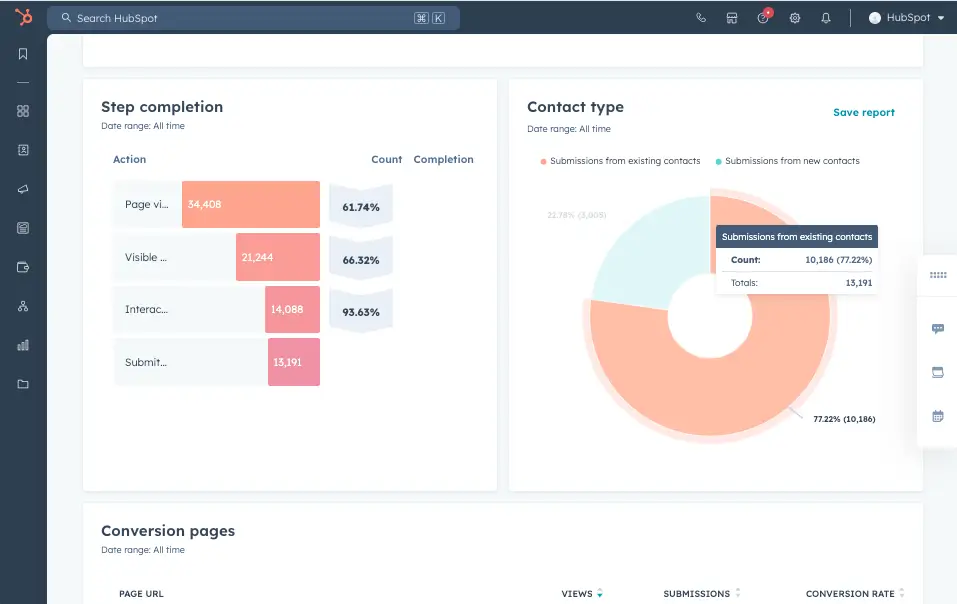
HubSpot is the only tool here where capture and the CRM are the same database, so a form fill creates or updates a contact with no sync step in between.
The form builder is free for up to two users. When the setting to always create a contact for a new email address is on, a form submission with a new email creates a contact and a known email updates the existing one. When it's off, HubSpot falls back to cookie matching, and its documentation warns that contacts may be overwritten if the same form is submitted repeatedly from one device. Hidden form fields can pass values such as UTM parameters into contact properties, which is where UTM parameters become usable in reports.
- marketing and sales use HubSpot CRM as their shared record
- the team wants workflow enrollment controls and published starting prices
- Salesforce-centered organizations whose required program architecture is already implemented in Marketo
- Users like
- Ease of use with built-in integration and automation (2,525 mentions)
- Users dislike
- Steep learning curve (808 mentions), missing features for smaller teams (786) and cost as the contact list grows (667)
- Source: G2, 16,036 reviews
How it works in practice
Lead scoring needs Marketing Hub or Sales Hub Professional or Enterprise, and AI-built scores are Enterprise only. Progressive profiling, which asks a returning visitor for new fields, also starts at Professional. On Starter, calls to action can't be targeted by device, country or referral source.
Data enrichment, the successor to Breeze Intelligence, matches contacts on first name, last name, work email or company domain and is off by default. Under HubSpot's current documentation it doesn't use HubSpot Credits, although older community posts say it cost one credit per record. Credits cost $10 per 1,000 and don't roll over; the data agent uses 10 credits per response.
The cost step is, of course, the jump from Starter to Professional: from $800 per month on annual billing, plus a required $3,000 onboarding fee. Reviewers on G2 report ease of use and built-in automation as the main strength, and a steep learning curve and cost as the contact list grows as the main weakness.
- Starting price
- Free tools for up to 2 users; Starter $20 per seat per month list ($7 for new customers in a limited promotion); Professional from $800 per month ($890 struck through on the page) plus required $3,000 onboarding; Enterprise from $3,600 per month plus required $7,000 onboarding
- Professional includes
- 3 seats, 2,000 marketing contacts
- Workflows
- Up to 300 (Professional), 1,000 (Enterprise)
- Lead scoring
- Professional and Enterprise
- Attribution
- Multi-touch revenue attribution is Enterprise only
- Onboarding
- Required: $3,000 Professional, $7,000 Enterprise
- Billable contacts
- Only marketing contacts count; contacts imported without a status default to non-marketing unless you tick the marketing option in a single-file import
- Form to CRM
- Direct write, no sync step
- Free tier
- Form builder and CRM, up to 2 users
OptinMonster
OptinMonster is a campaign builder that shows pop-ups, slide-ins and inline forms by page, scroll, time or exit-intent rules and sends the captured email to your connected tool.
OptinMonster captures anonymous traffic with pop-ups, slide-ins and inline forms, then pushes the email address to another tool and stops there.
A campaign fires on display rules: time on site, scroll depth or page. A/B testing and device targeting start at Plus, exit intent starts at Pro and geolocation starts at Growth. The unit that's metered is campaign impressions, not leads and not site pageviews: Basic includes 2,500 a month on one site, Plus 10,000 on two sites, Pro 25,000 on three and Growth 100,000 on five. Campaigns and subscribers are unlimited on every plan.
- you need to capture anonymous site traffic with targeted pop-ups and already have an email tool or CRM to receive the leads
- you want A/B testing and exit-intent triggers without developer work (Plus and Pro)
- you need the lead enriched or matched to an account after capture: it sends form fields and page context only, nothing comes back
- you need a predictable bill: intro prices roughly double at renewal and Zapier, webhooks and exit intent require Pro
- Users like
- Ease of use and features
- Users dislike
- Complexity and cost
- Source: G2, 106 reviews
How it works in practice
The HubSpot connection sends leads one way, in real time, into a static list. Active lists aren't supported. The native integration needs the Pro plan and a HubSpot account with API access, and free HubSpot accounts show a permission error. It writes campaign_lead_source as OptinMonster and stores the campaign name as a contact property. OptinMonster's own help page notes that its conversion counts often differ from the lead count in HubSpot because of double opt-in, existing subscribers and filtered disposable email addresses.
The webhook, also from Pro, posts a JSON payload with the lead's email, name and phone plus page context such as the page URL, time on site and pages visited. It supports no authentication header, so allowlist OptinMonster's fixed IP addresses on the receiving end.
The listed prices are first-year prices: $9, $27, $37 and $67 per month billed annually, renewing at $210, $570, $870 and $1,470 per year. G2 reviewers praise ease of use and features and report complexity and cost, although the sample is small at about 100 reviews.
- Starting price
- Basic $9, Plus $27, Pro $37, Growth $67 per month billed annually as first-year intro prices (renewal $210, $570, $870, $1,470 per year); billed by campaign impressions (2,500 to 100,000 per month), exit intent, Zapier and webhooks start at Pro
- Billing unit
- Campaign impressions per month
- CRM sync
- One way to a HubSpot static list, Pro plan
- Free tier
- No; trial of 500 impression credits
- Renewal
- Intro price applies to first year, renewals at full price
- Webhook
- JSON payload with page URL and time on site, no authentication support
Dealfront (Leadfeeder)
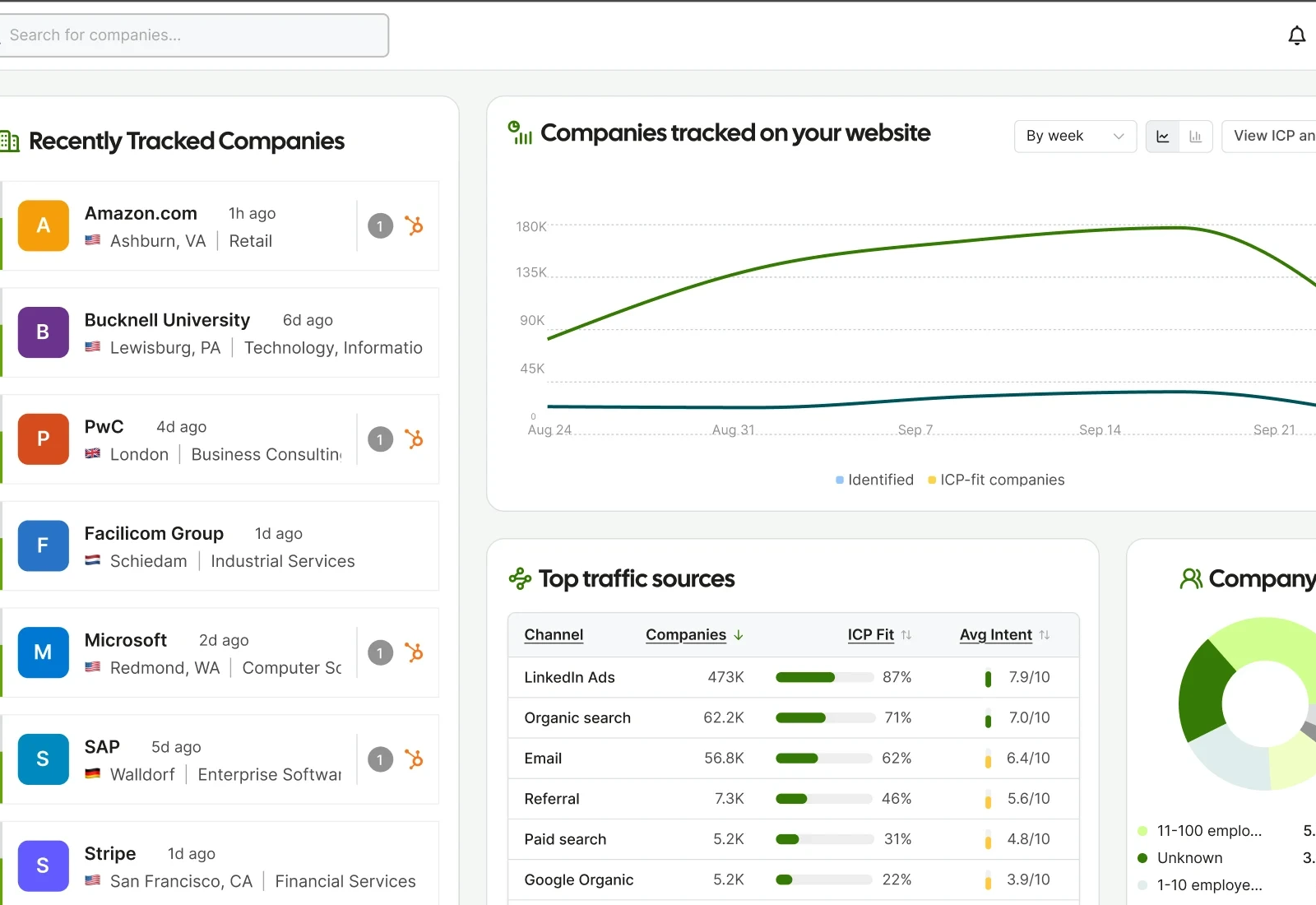
Dealfront is now branded Leadfeeder; a tracking script matches visitor IP addresses to companies, then lists them with pages viewed and pushes them to your CRM and alerts.
Dealfront, whose website visitor product now runs under the Leadfeeder name, turns anonymous visits into a list of companies, not people.
You install one tracking script. Leadfeeder matches each visit's IP address to a company, filters out internet providers and bots, and lists the companies with the pages they viewed. Individual people are generally not identified unless they submit a form, click a connected Mailchimp or ActiveCampaign email link, or are recognized through a HubSpot form or chat. The vendor claims it identifies up to 45% of B2B visitors at company level; we couldn't verify that figure, and the match rate depends on your traffic mix, with consumer traffic and very small companies resolving less.
- You want to see which companies visit your site and route them to sales before anyone fills in a form
- You want a free entry point (Lite) and unlimited users before paying
- You need to know which individual visited, because identification is company-level only unless the person submits a form
- Your traffic is mostly consumers or small businesses, where IP matching resolves fewer visits
How it works in practice
The free Lite plan shows the last 100 companies per month with seven days of visit history. Discover starts at 79 euros per month billed annually and adds full company profiles, ad reports, real-time alerts, CRM sync, API and MCP access. Activate starts at 369 euros and adds verified emails and phone numbers, intent filters and CRM automations. Scale starts at 599 euros, is billed annually only and adds automatic CRM data updates and free company export. All plans include unlimited users.
Identifying a visit uses no credits, although it counts against a monthly limit of identified companies, which sets the plan tier. Credits are spent on enrichment, exports and CRM syncs, and plan credits don't roll over. The published pricing page lists euros only, and no US dollar price is published. The CRM list names Salesforce, HubSpot, Pipedrive, Microsoft Dynamics and Zoho; the sync direction appears only in third-party summaries, so check it in a trial.
G2 shows the Leadfeeder listing at about 4.3 from roughly 860 reviews, and Capterra shows 4.2 from 135. We didn't read the review text, so we don't report review themes for this tool.
- Starting price
- Official page shows EUR, not USD: Lite free (100 companies, 7-day history), Discover from 79/mo annual, Activate from 369/mo annual (200-1,500 credits), Scale from 599/mo annual only; unlimited users; visitor identification costs no credits, enrichment and exports do. We found no US dollar prices.
- Credit model
- Identification free; enrichment, exports and CRM syncs use credits
- CRM sync
- HubSpot, Salesforce, Pipedrive, Dynamics, Zoho; included from Discover, automatic updates from Scale
- Free tier
- Lite: 100 companies per month, 7-day history
- Key limit
- Company-level only; vendor claims up to 45% of B2B visitors identified
- Rebrand
- dealfront.com redirects to leadfeeder.com; prices shown in EUR
- Identifies
- Companies, not individuals
Best lead generation software for finding and enriching contacts#
Apollo.io
Apollo combines a B2B contact database with email sequencing, so reps find prospects by filters, reveal verified emails with credits and run outreach in one tool.
Apollo puts a B2B contact database, email sequencing and CRM sync under one subscription, so the credits that reveal a contact also fund the outreach to that contact.
You filter the database by role, company and signals, select records and reveal emails and phone numbers with credits. An email costs 1 credit, a phone number 8 credits, enrichment 1 to 8 credits and an AI research run 1 credit. How many records you can select at once depends on the plan: 25 on Free, 1,000 on Basic, 2,500 on Professional and 10,000 on Organization. Waterfall enrichment and CSV import and export are listed on the paid plans.
- You run email-first outbound and want database, sequences and CRM sync in one tool
- You want a permanent free tier to test data quality before paying
- your team depends on phone numbers outside North America: reviewers report weaker phone accuracy, and a phone number costs 8 credits
- you need predictable spend: pooled credits expire at the end of each billing cycle and cannot roll over
- Users like
- search filters and the all-in-one platform
- Users dislike
- outdated or invalid contact data and tight credit limits on entry plans
- Source: G2, 9,690 reviews
How it works in practice
Credits are pooled across the team, granted at the start of each billing cycle and expire at the end of it, including purchased add-on credits. Add-on credits renew automatically until you set the slider back to zero. Admins can set per-user credit caps. Every seat on an account must be on the same plan.
On the sending side, Free and Basic allow 250 emails a day, while Professional and Organization have no daily cap. Free includes two sequences per team, Basic unlimited sequences and Professional adds A/Z testing. Apollo states that it syncs both ways with Salesforce, HubSpot and Pipedrive; we found no documentation on whether a CRM push uses credits, so test that before you commit.
G2 reviewers praise the search filters and the all-in-one platform. The most common complaints are outdated or invalid contact data and tight credit limits on entry plans.
- Starting price
- Free $0 with 900 credits; Basic $49, Professional $79 and Organization $119 (minimum 3 seats) per seat per month billed annually, with 30,000, 48,000 and 72,000 pooled credits; credits expire each billing cycle
- Credit model
- Pooled per team, granted each billing cycle, no rollover; email 1 credit, phone 8
- Free tier
- 900 credits, 2 sequences per team
- Export limit
- Record selection: 25 Free, 1,000 Basic, 2,500 Professional, 10,000 Organization
- CRM sync
- Vendor states two-way with Salesforce, HubSpot, Pipedrive
- Plan rule
- All seats must be on the same plan
- Plans
- Free 900 credits; Basic 30,000; Professional 48,000; Organization 72,000
- Credit cost
- Email 1, phone 8
- Billing
- Per seat per month, billed annually
ZoomInfo
ZoomInfo is an enterprise B2B database that adds contact, company and buyer intent data, with exports and enrichment pushed into the CRM through credits.
ZoomInfo is the enterprise end of this list: deep US contact data, direct dials and intent signals, sold by quote, with credits spent whenever a record is exported or enriched.
Sales plans are named ZoomInfo Professional, Copilot Advanced and Copilot Enterprise, and the marketing plans are Marketing Demand, ABM Lite and ABM Enterprise. No dollar amounts are published. Price depends on licenses, credit usage, features and add-ons, and payment terms are arranged with sales. Exporting a contact or company profile costs 1 credit, and the cost varies with the depth of data. Streaming Intent is a separate add-on priced by the keywords and accounts you track. The sales plans have free trials; the marketing plans are demo only.
- You need deep US contact data with direct dials and intent signals and have a sales-led budget
- You have a RevOps admin to manage field mapping, overwrite rules and credit usage
- You are a small team or startup, because reviewers flag high cost and prices are only given via sales
- You need fast self-serve testing without a contract; only some plans have free trials
- Users like
- contact data depth and ease of use
- Users dislike
- stale contact data and high cost for small teams
- Source: G2, 9,089 reviews
How it works in practice
The CRM setup is where a RevOps admin matters. In the Admin Portal you map ZoomInfo fields to CRM fields and choose per field whether ZoomInfo fills a blank or overwrites the existing value. ZoomInfo's HubSpot guide recommends overwriting only for custom ZoomInfo fields. A test mapping exports and then deletes a test record. Backfills run when you first connect or change mappings, and syncs after that are incremental. In Salesforce, each contact exported or enriched uses 1 credit, and a ZoomInfo custom object holds fuller data for records you already bought without extra credits. This comes from third-party summaries of ZoomInfo's integration guides, so confirm the details in a trial.
G2 reviewers praise the depth of contact data and ease of use. They report stale contact data and high cost for small teams.
- Starting price
- Quote-based: Sales plans ZoomInfo Professional, Copilot Advanced, Copilot Enterprise; no prices published; priced by licenses, credits and add-ons, 1 credit per exported or enriched record, Streaming Intent sold separately.
- Credit model
- 1 credit per exported or enriched contact or company; depth affects cost
- Pricing
- Quote only; no public prices
- CRM sync
- Field mapping per field: fill-if-blank or overwrite; incremental syncs
- Trial
- Free trial on Professional and Copilot plans; demo for marketing plans
- Intent
- Streaming Intent is a separate add-on
- Credit cost
- 1 credit per exported or enriched record
- CRM mapping
- Per field: fill if blank or overwrite
Lusha
Lusha is a Chrome extension and workspace that reveals verified emails and phone numbers for a credit each and exports or syncs them into the CRM.
Lusha is the self-serve end of contact data: a Chrome extension and workspace where each verified email costs one credit and each phone number five.
Reps find a profile on LinkedIn or a company site, reveal the email or phone with the extension and export or sync it to the CRM. A company info reveal costs 1 credit, and lookups with no match are free. On Pro and above, the Data Waterfall checks additional sources at 2 credits per email and 8 per phone, charged only on a confirmed match. The free plan includes the Chrome extension and the native HubSpot and Salesforce integrations.
- Reps prospect on LinkedIn and need quick email and phone reveals with a free tier to start
- You want small, self-serve plans with published prices instead of a sales quote
- Phone coverage outside North America matters, because reviewers report weaker phone accuracy
- You reveal many phone numbers, because each costs 5 credits and reviewers say credits run out fast
- Users like
- LinkedIn Chrome extension and ease of use
- Users dislike
- credit consumption and phone accuracy outside North America
- Source: G2, 1,660 reviews
How it works in practice
Starter is $49.90 per month, or $37.45 on annual billing, for 400 credits and one seat. Pro is $69.90 monthly or $52.45 annually for 600 credits and two seats, Premium is $399.90 monthly or $299.95 annually for 3,400 credits and five seats, and Scale is custom. Credits on monthly plans roll over up to twice the plan limit, and annual credits reset at the end of the year.
Supported CRMs and sales tools are Salesforce, HubSpot, Bullhorn, Pipedrive, Outreach, Salesloft, Zoho and Microsoft Dynamics. Lusha states that CRM Auto-Sync updates existing Salesforce and HubSpot records on a schedule in both directions, and that search marks records already in your CRM so you reveal only net-new contacts. Its docs page doesn't state direction, limits or credit use, so confirm which plan includes it before you rely on it. G2 reviewers praise the LinkedIn extension and ease of use and report fast credit use and weaker phone accuracy outside North America.
- Starting price
- Free 40 credits/mo; Starter $49.90/mo monthly or $37.45/mo annual (400 credits, 1 seat); Pro $69.90 or $52.45 annual (600 credits, 2 seats); Premium $399.90 or $299.95 annual (3,400 credits, 5 seats); Scale custom; 1 credit per email, 5 per phone.
- Credit model
- 1 credit per verified email, 5 per phone, 1 per company reveal
- Free tier
- 40 credits per month, 1 seat
- CRM sync
- Vendor states two-way CRM Auto-Sync for Salesforce and HubSpot
- Rollover
- Monthly plans up to 2x limit; annual resets at year end
- Seats
- Starter 1, Pro 2 to 10, Premium 5 to 25
- Credit cost
- Email 1, phone 5, company 1
Clay
Clay is a table-based enrichment platform that runs waterfall lookups across many data providers and AI research on each row, then pushes results to your CRM or outreach tools.
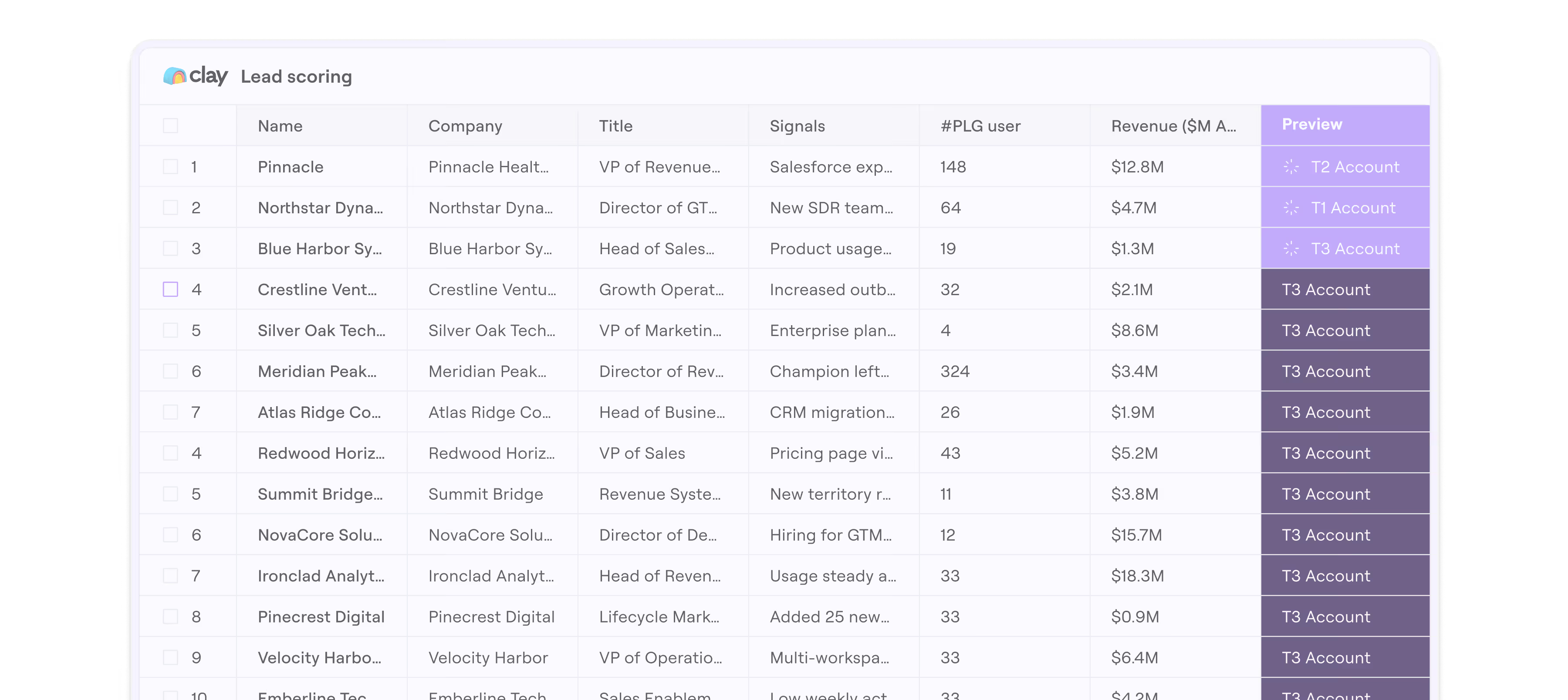
Clay isn't a contact database you search. It's a table where each row is a lead and each column runs an enrichment, so it sits between your lead sources and your CRM.
You import rows from a CSV, a CRM or a search, then add columns that call data providers in sequence (a waterfall), run an AI research agent or call an API. Each row run costs actions, and each provider result costs data credits. If you bring your own provider API key, the lookup uses actions but no data credits. The plans have unlimited seats and tables.
- You need to combine several data providers and signals into one enrichment flow before leads reach the CRM
- You have someone in marketing ops who will build and maintain tables, and a Growth-level budget for CRM auto-sync
- You want a ready-made contact database to search and export, because Clay is a workflow builder with a real learning curve
- You need cheap CRM sync, since auto-sync, API and webhooks start at Growth ($446/mo annual) and credits can get expensive at volume
- Users like
- Data enrichment and workflow automation
- Users dislike
- Steep learning curve and credit usage hard to track and expensive
- Source: G2, 218 reviews
How it works in practice
The HubSpot link is two-way and works by record ID. Lookup actions read from HubSpot, and Create, Update and Create association actions write back. You store the HubSpot record ID on each row so an Update hits the existing record, and auto-update of imported records runs every 24 hours by default. Clay's guide recommends the Ignore blank values option on writes so unenriched fields don't overwrite CRM data. Because every synced row consumes actions and every provider hit consumes data credits, a daily auto-update on a large table burns both, so limit what you sync.
Free gives 500 actions and 100 data credits a month with 200 rows per table. Launch is $167 per month billed annually ($185 monthly) and Growth is $446 ($495 monthly). CRM auto-sync, the HTTP API and webhooks start at Growth. Data credits start at $0.05 each, and top-ups carry a 30% premium. The pricing page gives conflicting rollover terms for data credits, so ask before you plan around it.
G2 shows about 4.7 from roughly 220 reviews, and TrustRadius shows 9.3 out of 10 from 144 reviews. Reviewers praise data enrichment and workflow automation and report a steep learning curve and credit usage that's hard to track and gets expensive.
- Starting price
- Free $0 (500 actions, 100 data credits/mo); Launch $167/mo annual ($185 monthly) from 15K actions and 2.5K data credits; Growth $446/mo annual ($495 monthly) from 40K actions and 6K data credits, adds CRM auto-sync, HTTP API and webhooks; unlimited seats; Enterprise custom.
- Credit model
- Actions per row run plus data credits per provider result
- CRM sync
- Two-way HubSpot by record ID, Growth plan
- Free tier
- 500 actions, 100 data credits, 200 rows per table
- Seats
- Unlimited on all plans
- Rollover
- Actions reset monthly; data credits can roll over on Launch and Growth
Best lead generation software for outreach and prospecting#
Instantly
Instantly is a cold email platform with unlimited sending accounts and warmup that also includes a 450M+ record B2B lead database, so you find, verify and email prospects in one tool.
Instantly is a cold email platform first, with a lead database added so the list, the verification and the sending sit in one subscription.
Outreach plans include unlimited sending accounts and warmup. In Lead Finder you filter by title, seniority, company size, industry, location, technologies, funding and signals. The vendor claims 450 million or more records, which we couldn't verify. Search is free and credits are charged only when an email is found: about 1.5 credits per verified work email on average, 1 if Instantly finds it and 2 if it comes from a data partner. Resolving a website visitor to a person costs 3 credits, and 2 for company only. The preview shows the first 50 results, and you convert 100, 500, 1,000, all or a custom number into leads.
- You run outbound cold email at volume and want sourcing, sending and warmup in one subscription
- You need many sending mailboxes with a flat plan rather than per-seat pricing
- You need two-way CRM sync with field mapping, because the documented HubSpot link is export of new leads plus a separate import
- You want inbound lead capture or website visitor identification as your main source, since it is an outbound tool
How it works in practice
Outreach-only plans are Growth at $47 per month ($37.60 billed annually) with 5,000 emails and 1,000 contacts, Hypergrowth at $107 ($85.58) with 125,000 emails and 25,000 contacts, and Light Speed at $358 ($286.30) with 500,000 emails and 100,000 contacts. Bundles that add lead credits are Starter at $94 monthly, Scale at $194 and Agency at $555. Monthly-plan credits expire two months after purchase and annual-plan credits after one year. We couldn't find what happens at zero credits.
The HubSpot connection comes in two parts. The newer one exports Lead Finder leads to HubSpot, and an older one imports leads from HubSpot into Instantly. The help article covers setup only; we found no documented triggers, field mapping or two-way sync. Leads can also go straight into a campaign without any CRM, but then the CRM never sees them.
G2 shows about 4.8 from roughly 3,900 reviews. No review text is cited, so we don't report review themes for this tool.
- Starting price
- Outreach-only plans Growth $47/mo ($37.60 annual, 5,000 emails, 1,000 contacts), Hypergrowth $107/mo ($85.58 annual, 125,000 emails); bundles with lead credits Starter $94/mo ($85 annual, 1,500 credits), Scale $194/mo ($175 annual, 5,000 credits), Agency $555/mo ($500 annual); credit-only plans from $47/mo.
- Credit model
- About 1.5 credits per verified work email; search is free
- Database
- Claims 450M+ B2B records, 50M+ local businesses
- CRM sync
- HubSpot export of new leads plus a separate import
- Sending limits
- 5,000 to 500,000 emails per month by plan
LinkedIn Sales Navigator
Sales Navigator is a paid LinkedIn search and tracking layer that lets sellers find prospects with filters, save them to lists and get alerts, rather than capturing inbound leads.
Sales Navigator is a search and alert layer on top of LinkedIn, not a capture tool, and its CRM sync is gated to the most expensive tier.
Reps build saved searches with advanced filters, save leads and accounts to lists and get alerts when something changes. Every plan includes 50 InMail credits per user per month and room for 10,000 saved leads and accounts per user. Advanced adds shared lists and searches, Smart Links, buyer intent, TeamLink, usage reporting and a CSV upload of your book of business. Still, contact details aren't exported: you still need the CRM, an enrichment tool or the prospect's reply to get an email address.
- your reps prospect outbound on LinkedIn and need advanced filters, saved leads and alerts
- you run Salesforce, HubSpot or Dynamics and can buy Advanced Plus for two-way CRM sync
- you want inbound capture or exportable contact data: it is a search layer and Core and Advanced have no CRM sync
- you need pricing without a sales call for CRM sync: Advanced Plus is quote-only
- Users like
- Lead generation and ease of use
- Users dislike
- Price
- Source: G2, 2,203 reviews
How it works in practice
Core is $119.99 per month or $1,079.88 per year for one user. Advanced is $159.99 per month or $1,799.88 per year and supports multiple users. Advanced Plus is by quote after a demo, and it's the only plan with a two-way CRM sync for HubSpot, Dynamics 365, Oracle Sales and Salesforce, plus CRM-powered lead recommendations and ROI reporting. Core and Advanced have a free trial. Third-party summaries of LinkedIn's guides say the HubSpot sync needs Sales Hub Professional or higher and admin rights on both sides, which the primary page does not confirm.
Without Advanced Plus, however, nothing syncs to your CRM, so leads move by hand or through a third-party tool. G2 reviewers praise lead generation and ease of use, and the most common complaint is price.
- Starting price
- Core $119.99 per license monthly or $1,079.88 per year; Advanced $159.99 monthly or $1,799.88 per year; Advanced Plus by custom quote; 50 InMail credits per user per month and 10,000 saved leads and accounts per user on every plan
- CRM sync
- Advanced Plus only, two-way
- InMail
- 50 credits per user per month
- Saved leads
- 10,000 leads and accounts per user
- Free tier
- Free trial for Core and Advanced only
- Seats
- Core single user; Advanced and Advanced Plus multi-user
What does lead generation software cost?#
Lead generation software prices hide the unit, and that is where budgets drift. A seat price grows with headcount, a credit price grows with the number of contacts you reveal, and an impression price grows with traffic. Here is what each tool counts and what makes the bill grow.
| Tool | Pricing unit | Entry price | What makes the bill grow |
|---|---|---|---|
| HubSpot | Seats and contacts | Free forms; Starter $20 per seat list price | Professional at $800 per month plus $3,000 onboarding |
| OptinMonster | Campaign impressions | $9 per month intro, $210 per year at renewal | Impression limits; exit intent, webhooks and Zapier need Pro |
| Dealfront (Leadfeeder) | Identified companies and credits | Free Lite; Discover from 79 euros per month annual | Company limit per tier; credits for enrichment and exports |
| Apollo | Seats and pooled credits | Free; Basic $49 per seat per month annual | Phones at 8 credits; credits expire each cycle |
| ZoomInfo | Licenses and credits | Quote only | Credits per export; Streaming Intent add-on |
| Lusha | Credits per month | Free; Starter $37.45 per month annual | Phones at 5 credits; extra seats on higher plans |
| Clay | Actions and data credits | Free; Launch $167 per month annual | CRM sync at Growth $446 per month; top-ups at a 30% premium |
| Instantly | Emails sent, contacts and credits | Growth $37.60 per month annual | Lead credits at about 1.5 per email; higher sending tiers |
| LinkedIn Sales Navigator | Seats | Core $1,079.88 per user per year | CRM sync only on Advanced Plus, by quote |
Is there free lead generation software?#
Yes, but each free tier is a trial of one step, not a free lead engine. These are the free tiers we confirmed on vendor pages on November 3, 2026.
| Tool | What the free tier includes | The limit that matters |
|---|---|---|
| HubSpot | Form builder and CRM for up to 2 users | Lead scoring and progressive profiling need Professional |
| Apollo | 900 credits, 2 sequences per team | Phones cost 8 credits, so 900 credits go quickly |
| Lusha | 40 credits per month, 1 seat | Phones cost 5 credits, so 40 credits buy a handful |
| Clay | 500 actions and 100 data credits per month | 200 rows per table |
| Dealfront (Leadfeeder) | Last 100 identified companies per month, 7 days of history | Company-level only, no CRM sync until Discover |
For small teams, the free tier that tests the riskiest step first is usually the right one. If you don't know whether your site traffic converts, the HubSpot form builder tells you. If you don't know whether the contact data in your market is accurate, spend the Apollo or Lusha free credits on 20 contacts you already know.
How do you test lead generation software before you buy?#
You should test lead generation software with a two-week pilot on one source, not all of them. Pick the channel you expect to win and push a small batch through the whole flow. The checklist below is built for a marketing ops owner, and each step maps to a break described earlier.
- Submit a test lead through every form or pop-up and confirm a CRM record appears with a source, a campaign and UTM values
- Check that the lead has an owner and that the owner is notified within minutes
- Reveal or enrich 20 contacts you already know and compare email, title and phone against what you have
- Count credits used per reveal and per CRM push, and compare with the plan's monthly allowance
- Run a second CRM write on an existing record and confirm blanks don't overwrite good values
- Confirm which direction data flows between the tool and the CRM and which field wins on a conflict
- Send the first outreach batch from a new mailbox to a small list and track bounces and replies
- Check unsubscribe and consent handling with the person who owns compliance
- Compare the pilot's cost per qualified lead with your current channel before you sign an annual plan
FAQ#
What is lead generation software?
Lead generation software captures, identifies or finds potential customers and passes their contact details to a CRM or a sales team. The category covers forms and pop-ups, website visitor identification, contact databases and enrichment tools, and cold email and prospecting tools.
Is there free lead generation software?
Yes, there is free lead generation software. HubSpot's form builder is free for up to two users, Apollo has a free plan with 900 credits, Lusha gives 40 credits a month, Clay gives 500 actions and 100 data credits a month, and Dealfront's Lite plan shows the last 100 identified companies each month. Each free tier is limited, so use it to test one step of the flow.
What are the types of leads in sales?
Teams usually sort leads by how far they have moved: information-qualified, marketing-qualified (MQL) and sales-qualified (SQL), and some add product-qualified or service-qualified leads. The names and the criteria vary by company, so write down your own definitions. See <a href="/blog/lead-lifecycle-stages/">lead lifecycle stages</a> and the <a href="/blog/mql-to-sql-conversion-benchmark/">MQL to SQL conversion benchmark</a>.
Is lead management part of CRM?
Lead management is part of the CRM in most stacks. Lead records, scoring, routing and follow-up tasks live in the CRM, while lead generation tools feed it. Where the two meet, check the sync direction. See <a href="/blog/lead-management-software/">lead management software</a> for the CRM side.
What is the 5 minute rule for leads?
It is a rule of thumb that you should respond to a new inbound lead within five minutes. The best-known published evidence, a Harvard Business Review study of 1.25 million leads, measured hours: firms that contacted a lead within an hour were nearly seven times as likely to qualify it as firms that waited an hour longer. Treat the five minutes as a goal, and measure your own response time.
How much does lead generation software cost?
Lead generation software costs anything from free to a custom quote. Published paid prices in this list run from $9 per month for a pop-up tool (first-year price) to $1,079.88 per user per year for LinkedIn Sales Navigator Core, and ZoomInfo is quote-only. The unit matters more than the price: seats, credits and impressions grow differently.