Affiliate marketing software gives each partner a trackable link or code, records the sales and signups those partners bring in, works out the commission and pays it. The nine tools below range from a $29-a-month tracker for online stores to quote-only platforms for partner programs with several channels. What separates them is what happens to a commission after the click: how the sale is tied to the partner, how a refund or cancellation changes the payout, and what reaches your billing system and CRM.
We judged each tool on that chain. Prices come from vendor pricing pages and ratings from review sites, both checked in October 2026, and we say so where a review page couldn't be read.
- tools compared
- 9
- publish an entry price
- 7
- offer a free plan that includes tracking
- 0
- lowest published monthly entry price
- $29
Our picks by situation#
 Best for Stripe subscriptions on a flat feeRewardfulCommissions adjust for upgrades, downgrades, cancellations and refunds, with a flat monthly fee that starts at $49.
 Best low-cost SaaS tracker with fraud rulesFirstPromoterConnects to Stripe, Chargebee, Paddle, Braintree and Recurly, with ad-traffic rules that track, hold or block.
 Best for unlimited affiliates and conversionsTrackdeskFlat $299 plan with Stripe subscription, refund and churn handling, but only 10 active offers.
 Best for custom multi-tier programsPost Affiliate ProCookie, server-to-server, pixel, coupon and SubID tracking, priced by tracking requests.
 Best for recurring commissions with coupon trackingTapfiliatePercentage, fixed, tiered and recurring commissions through Stripe or Shopify.
 Best for Shopify and WooCommerce storesRefersionFirst-party cart tracking on your own domain, from $29 a month plus 3% of affiliate sales.
 Best for B2B SaaS partner programsPartnerStackAffiliate, referral and reseller partners in one platform with CRM sync and one payout invoice.
 Best for large multi-channel partner programsimpact.comPixel, API and Stripe tracking with contracts and payouts, on a 12-month term.
 Best for performance teams with postbacksEverflowClick ID and server postbacks with built-in CRM, store, media buying and fraud integrations.
 Our product · for the gaps between toolsThe Marketing Ops ManagerChecks that the landing page, tracking and CRM handoff behind a partner link still work.
Affiliate marketing software compared#
| Tool | Category | Commission handoff | Starting price (USD) |
|---|---|---|---|
| Rewardful | SaaS affiliate and referral tracking (Stripe/Paddle billing) | A tracked affiliate link click or coupon code becomes a Stripe or Paddle subscription conversion, which Rewardful turns into a commission and pays out via PayPal, Wise or Managed Payouts. | Starter $49/month ($490/year), up to $7,500 monthly affiliate-attributed revenue, 1 campaign, 2 team members; Growth $99/month ($990/year), up to $15,000, unlimited campaigns and team members; Enterprise from $149/month (from $1,490/year), up to $30,000 on the entry tier. Annual billing gives 12 months for the price of 10. |
| FirstPromoter | SaaS affiliate and referral tracking | An affiliate link click or coupon redemption becomes a tracked referral, then a Stripe/Chargebee/Paddle sale is matched to the affiliate and turned into a commission record ready for approval and payout. | Starter $49/month ($490/year, up to $5,000/month affiliate revenue, up to 1,000 affiliates, 3 campaigns); Business $99/month ($990/year, up to $15,000/month, unlimited affiliates and campaigns, 2 websites); Enterprise $149/month ($1,490/year, above $15,000/month, 3 websites). Limits are based on monthly revenue from affiliates. |
| Trackdesk | Affiliate and partner tracking for SaaS and subscription billing | An affiliate link click is captured by a click script and a click ID cookie, matched to a Stripe (or other) payment, and turned into a tracked conversion and a commission payout. | Business $299/month; Enterprise $499/month; Enterprise PLUS from $1,199/month (monthly/annual toggle, annual labeled 'Save 2 months'; the page does not clearly say whether the listed figures are the annual rate) |
| Post Affiliate Pro | Self-serve affiliate tracking and commission platform | An affiliate link click is stored as a visitor ID cookie, matched to a Stripe, Shopify or other order event, and turned into a commission that is paid out in bulk. | Starter $89/month ($79/month billed yearly); Pro $139/month ($129/month yearly); Ultimate $269/month ($249/month yearly); Network $649/month ($599/month yearly). Priced by tracking requests per month. |
| Tapfiliate | Affiliate and referral tracking | Affiliate link or coupon code to a tracked conversion and a commission on the thank-you page | Launch $89 per month ($74 billed annually); Scale $179 per month ($149 billed annually); Enterprise custom |
| Refersion | Ecommerce affiliate and influencer tracking | An affiliate link click (or coupon, SKU or customer-email match) on a store checkout becomes a tracked conversion in Refersion, then an approved commission and a payout to the affiliate. | Marketplace Listing: free. Launch: $39/month billed monthly or $29/month billed annually, plus 3% of affiliate-driven sales. Growth: $199/month monthly or $159/month annually, plus 2% of affiliate-driven sales. Scale: flat monthly subscription, price not listed. Annual billing saves 20%. Fees are billed monthly on affiliate-driven sales only. |
| PartnerStack | B2B partner, affiliate and referral programs | Partner link to a customer key on signup, then Stripe or Chargebee transactions synced to partner payouts | Quote only (Launch, Growth, Enterprise); no cap on partners or internal users |
| impact.com | Partnership and affiliate management platform | A partner's tracked link click (irclickid) is matched to a conversion reported by pixel, API or Stripe/Shopify webhook, then commission and payout are calculated and paid out to the partner. | Starter $30/month + 2.5% of revenue (Shopify, WooCommerce, BigCommerce, Adobe Commerce, Squarespace, Ecwid, Shoplazza, nopCommerce, Zoho Commerce stores only); Essentials $500/month (up to $2m/yr ecommerce revenue, up to $2,500/month partner payouts included); Pro $2,500/month ($2m-$15m/yr, up to $14,300/month payouts); Enterprise $10,000/month ($15m+/yr or multi-channel, up to $82,500/month payouts). 12-month contract; Essentials and above need a demo; setup and onboarding $250/hour on Essentials and above; payouts above the included amount billed a la carte. |
| Everflow | Partner marketing and performance tracking platform | A partner click carrying the Everflow click ID (evclid) is matched to a server-to-server postback from the store or CRM, which becomes a tracked conversion and a partner payout. | No plan names or USD prices published; pricing is by personalized quote, with a 6-month commitment stated in the FAQ |
| The Marketing Ops Manager Our product | Campaign monitoring | Checks every handoff in the campaign journey on a schedule | Starter $159/month billed annually ($199 monthly), Growth $399/month billed annually ($499 monthly), Enterprise custom; signup is invite-only and needs an access code, then every plan starts with a 14-day trial, no credit card |
Starting prices as published by each vendor, checked October 25, 2026. Quote only means the vendor publishes no price. Impact's $30 Starter plan covers nine named store platforms only; its next tier is $500 a month.
What is affiliate marketing software, and how is it different from a network?#
Affiliate marketing software is the system a company uses to run its own affiliate program. It issues links or codes, records which partner sent each sale or signup, calculates the commission and pays partners. You recruit the partners and set the rules.
An affiliate network is a different model: it adds a marketplace of publishers who already work with the network, usually in exchange for a fee or a share of each sale. An agency runs the program for you and uses either tool. Several platforms in this guide blur the line, since impact.com and PartnerStack also help you find partners, but the buying question stays the same. You need either tracking and payouts for partners you already have, or a channel that supplies partners.
| Model | Who recruits partners | Who does the tracking | Typical fit |
|---|---|---|---|
| Affiliate software | You | The software | A company with its own partner list and a billing system |
| Affiliate network | The network's publisher base | The network | A brand that wants reach before it has partners |
| Agency | The agency | The agency, on top of a tool | A team with no capacity to run the program |
Customer referral programs use the same attribution, but they usually reward customers with credit or discounts instead of paying commissions. Our guide to referral marketing software covers that side.
How does a commission get from the click to the payout?#
Every tool here moves a commission through the same six steps. The tools rarely fail inside a step, but the losses sit at the joins, where one system passes the partner on to the next and nobody checks that it arrived.
- Step 1Click
- Tapfiliate
- Post Affiliate Pro
Breaks when a redirect or consent banner drops the partner parameter or blocks the cookie - Step 2Identify
- Rewardful
- Trackdesk
- FirstPromoter
Breaks when the tracking script is missing on the checkout page, so the click ID never reaches the payment - Step 3Convert
- Refersion
- impact.com
- Everflow
Breaks when a postback or webhook doesn't fire, so the sale arrives without a partner - Step 4Adjust
- Rewardful
- Trackdesk
- Post Affiliate Pro
Breaks when a refund or cancellation isn't passed back, so the commission stays - Step 5Pay
- PartnerStack
- impact.com
Breaks when payout data and the tax or currency setup don't match what finance expects - Step 6Report
- Everflow
- impact.com
Breaks when the partner source never reaches the CRM record, so reports count the lead as direct - Across allMonitor the path
- The Marketing Ops Manager
Catches broken landing pages, missing scripts and CRM handoffs, with evidence
- Click. The partner's link carries a code or ID, and a script on your site stores it in a first-party cookie.
- Identify. At signup or checkout the stored ID is attached to the customer: written into Stripe metadata, passed as the client reference ID, or posted back to the tool.
- Convert. The sale is matched to the partner through a thank-you page tag, a store integration, a billing webhook or a server postback.
- Adjust. Refunds, cancellations, upgrades and downgrades change what the partner is owed. That's the step most simple trackers skip.
- Pay. Commissions are approved after a hold period, then paid out through PayPal, a payout provider or a single invoice.
- Report. Source and commission status are sent to reporting and, ideally, to the CRM record.
The identifier the tool uses at step 2 decides what you must maintain. The table lists what each tool documents.
| Tool | Click identifier | How the sale reaches the tool |
|---|---|---|
| Rewardful | Referral ID from a cookie, plus coupon codes | Passed to Stripe as the client reference ID; Stripe webhooks sync the subscription |
| FirstPromoter | Cookies set on link click, plus coupon codes | Billing connection to Stripe, Chargebee, Paddle, Braintree or Recurly, or the tracking API |
| Trackdesk | Click ID in the trakdesk_cid cookie | Passed to Stripe as the client reference ID; the Stripe app syncs about every 15 minutes |
| Post Affiliate Pro | PAPVisitorId cookie | Tracking code, server-to-server call or payment webhooks |
| Tapfiliate | tap_vid cookie | Conversion script on the thank-you page, coupon codes or postbacks |
| Refersion | Cart ID tied to the shopping session | Native store integration, or a script and thank-you page report |
| PartnerStack | Partner key in a first-party cookie | A signup event with a customer key, then billing webhooks |
| Impact | Click ID (irclickid) | Pixel, API or FTP upload; Stripe webhooks for subscriptions |
| Everflow | Click ID (evclid) in the landing page URL | Server postback from your store or billing system |
A tracking tool can report that it recorded nothing, yet it can't tell you that the script was deleted from a landing page last Tuesday. That check sits outside the affiliate tool, and it's where The Marketing Ops Manager fits: it checks landing pages, tracking and CRM handoffs on a schedule. Our campaign tracking checklist covers the same checks by hand.
Affiliate marketing software reviewed: 9 tools#
The tools are grouped by the billing and sales model they were built around. Each entry says how the tool ties a sale to a partner, what the plan limits mean in practice and who should skip it. Review ratings are quoted with their source and count.
Rewardful: best for Stripe subscriptions on a flat fee#
Rewardful
Rewardful places a tracking script on your site that sets a cookie when a visitor arrives through an affiliate link, passes the referral ID to Stripe at checkout, and then follows the subscription lifecycle (upgrades, downgrades, cancellations, refunds) to adjust commissions. It is built for SaaS companies billing through Stripe or Paddle that want recurring commissions without custom infrastructure.
Rewardful is a narrow tool for SaaS companies that bill through Stripe or Paddle. It tracks the referral and then follows the subscription, so commissions change when the subscription does.
A script on your site sets a cookie when a visitor arrives through an affiliate link. Your checkout code reads the referral ID and passes it to Stripe as the client reference ID, and the connected Stripe account then drives the conversion. Rewardful adjusts commissions for upgrades, downgrades, free trials, cancellations and refunds, and flags self-referrals on every plan. Coupon codes cover influencer and offline channels where no link is clicked.
- you sell subscriptions on Stripe or Paddle and want commissions that adjust automatically for upgrades, downgrades, trials, cancellations and refunds
- you want a predictable flat monthly fee with unlimited affiliates and a 0% Rewardful transaction fee instead of a revenue share
- your revenue does not run through Stripe or Paddle, because the product describes itself as built for companies using those billing providers
- you expect to scale affiliate-attributed revenue well beyond the plan tiers, because each plan caps monthly affiliate-attributed revenue ($7,500 Starter, $15,000 Growth, $30,000 entry Enterprise)
- Users like
- Easy setup, ease of use, customer support and easy integrations (G2 summary themes)
- Users dislike
- Payment problems, limited functionality and limited customization, with some reviewers calling it expensive (G2 summary themes)
- Source: G2, 84 reviews
How it works in practice
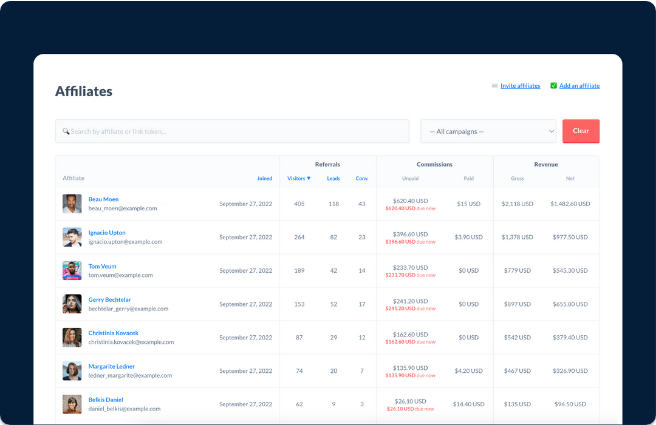
Every plan includes unlimited affiliates and all integrations, and the price steps up with monthly affiliate-attributed revenue: $7,500 on Starter, $15,000 on Growth and $30,000 on the entry Enterprise tier. That cap is the number to model. A program that grows past it moves up a plan, even if you didn't want more features. Starter allows one campaign and two team members, whereas Growth removes both limits. A branded affiliate portal, custom domain, private invite-only campaigns and custom rewards start on Growth.
Payouts can run as mass payments through PayPal or Wise (a money transfer service), or through Managed Payouts, where you fund one invoice and Rewardful distributes the money and collects tax documents. Managed Payouts carries a 3% processing fee. The break point is the checkout. If the script is missing on the payment page, or a Stripe Payment Link isn't set up as the docs describe, the referral ID isn't passed and the sale can't be matched.
- Starting price
- Starter $49/month ($490/year), up to $7,500 monthly affiliate-attributed revenue, 1 campaign, 2 team members; Growth $99/month ($990/year), up to $15,000, unlimited campaigns and team members; Enterprise from $149/month (from $1,490/year), up to $30,000 on the entry tier. Annual billing gives 12 months for the price of 10.
- Tracking
- Affiliate links and coupon codes; first- or last-touch attribution; referral cookie 60 days by default, customizable per campaign
- Rewards
- Recurring or one-time commissions; percentage or fixed amounts; minimum payout thresholds; double-sided incentives
- Payouts
- Managed Payouts (3% processing fee), PayPal and Wise mass payments; one-click PayPal payouts on Enterprise only
- Integrations
- Native Stripe integration with webhook sync, Paddle, 20+ integrations, REST API; all integrations on every plan
- Fraud checks
- Self-referral detection on every plan; automatic refund handling
- Pricing metric
- Flat monthly fee tiered by monthly affiliate-attributed revenue; unlimited affiliates and visitors
- Trial
- 14 days on every plan
FirstPromoter: best low-cost SaaS tracker with fraud rules#
FirstPromoter
FirstPromoter loads a tracking script that sets cookies on affiliate-link clicks, records signups, and matches sales from connected billing providers to the referring affiliate. It is built for SaaS and subscription businesses that bill through Stripe, Chargebee, Paddle, Braintree or Recurly.
FirstPromoter covers the same SaaS ground as Rewardful across a wider set of billing systems, and it documents ad-traffic rules for affiliates, which the other low-cost tools don't describe on the pages we read.
A tracking script sets two cookies on an affiliate-link click, records signups, and matches payments from a connected billing provider to the referring affiliate. Stripe, Chargebee, Paddle, Braintree and Recurly connect directly, and other billing systems send sales through the tracking API. For Stripe it can generate coupons with custom vanity codes. For Chargebee, Paddle, Recurly and Braintree, coupons are assigned manually and link tracking does the matching. Referrals can also be logged with the visitor's email or user ID at signup.
- you sell SaaS on Stripe and want sales and coupon redemptions matched to affiliates automatically once the billing account is connected
- you want flat monthly pricing tiers tied to affiliate-driven revenue rather than a percentage of every tracked sale
- you need one-click direct PayPal payouts, custom dashboard or email domains, or an embedded affiliate dashboard, because the pricing page lists these as Business-plan features and not in Starter
- you need a postback URL, white-labeling or SSO, because the pricing page lists these as Enterprise-only
- Users like
- Responsive support (6 mentions) and ease of use (3)
- Users dislike
- Reporting could be more robust (G2 AI summary); single mentions of setup issues and poor support
- Source: G2, 36 reviews
How it works in practice
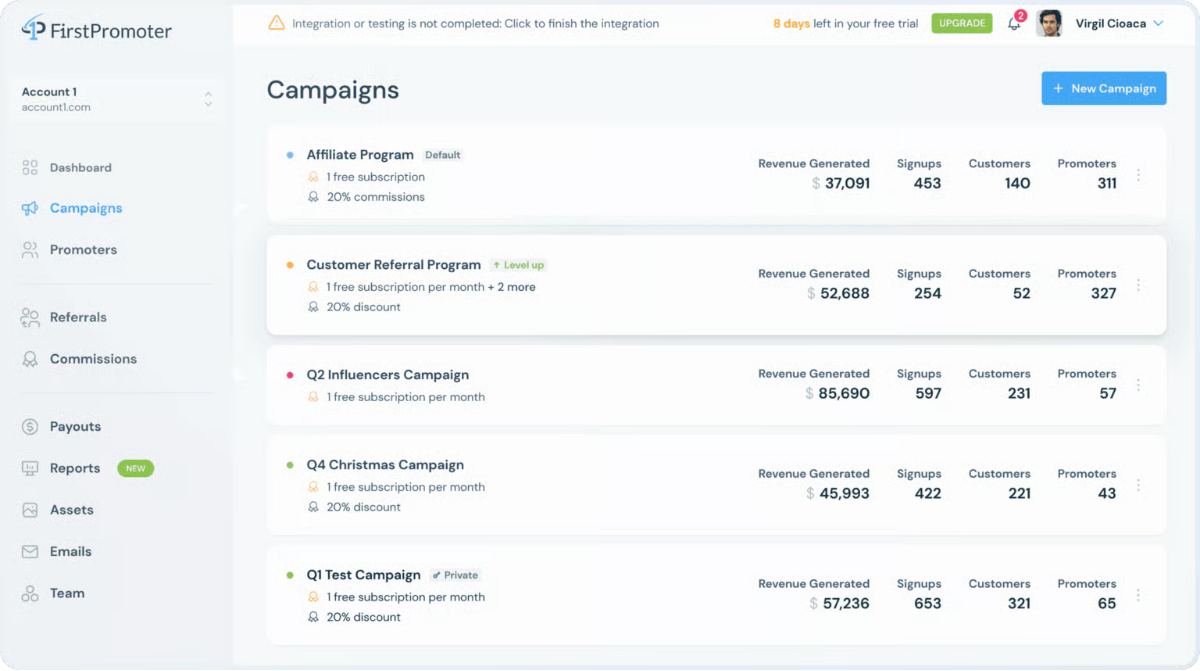
Fraud handling is described in more detail than in most tools at this price. Self-referral detection is built in, a per-campaign rule can track, hold or block traffic that comes from ads, and a flagged referral records the reason. Tiers follow monthly revenue from affiliates ($5,000, $15,000 and above) and exceeding the limit moves the account to the next tier. Starter allows up to 1,000 affiliates and three campaigns, and unlimited team members are included on every plan.
Some features sit higher than you might expect. One-click direct PayPal payouts, a custom dashboard domain and an embedded affiliate dashboard start on Business, while a postback URL, white-labeling and SSO are Enterprise only. We found no native HubSpot or Shopify integration on the pages we read, so plan on Zapier, Make or the API for those.
- Starting price
- Starter $49/month ($490/year, up to $5,000/month affiliate revenue, up to 1,000 affiliates, 3 campaigns); Business $99/month ($990/year, up to $15,000/month, unlimited affiliates and campaigns, 2 websites); Enterprise $149/month ($1,490/year, above $15,000/month, 3 websites). Limits are based on monthly revenue from affiliates.
- Tracking
- Script sets two cookies (_fprom_ref, _fprom_tid) on link click; referral links, coupon codes, direct URLs and manual logging; first or last click selectable
- Rewards
- Commission written as one record per conversion; promoter-only non-monetary rewards are Enterprise only
- Payouts
- One-click direct PayPal payouts on Business and up; Managed Auto Payouts on Enterprise for SaaS companies, approval required
- Integrations
- Stripe, Chargebee, Paddle, Braintree, Recurly connect directly; other billing via tracking API; Zapier, Make, Albato listed
- Fraud checks
- Self-referral detection; per-campaign ad-traffic rules to track, hold or block; flagged referrals record the reason
- Pricing metric
- Tier set by monthly revenue from affiliates; exceeding the limit moves the account to the next tier
- Trial
- 14 days on every plan, no credit card
Trackdesk: best for unlimited affiliates and conversions#
Trackdesk
Trackdesk records affiliate clicks with a script on your site that stores a click ID (cookie trakdesk_cid), passes it to Stripe as client_reference_id, and syncs Stripe payments, renewals, refunds and cancellations into conversions. It is built for SaaS and subscription businesses that want recurring commissions and automated payouts without developer work.
Trackdesk charges a flat monthly price with unlimited affiliates, clicks and conversions, so cost doesn't rise with program volume, and the limits sit on offers, seats and commission tiers instead.
A script on every page stores a click ID in a cookie, and for Stripe the ID is passed as the client reference ID. The Stripe app, which uses read-only access, syncs subscriptions, payments, renewals, refunds and cancellations into conversions about every 15 minutes, and commissions aren't paid on churned customers. Free trials need the offer's conversion type set to Free trial.
- you bill through Stripe and want subscriptions, refunds and churn reflected automatically in affiliate commissions, including recurring commissions
- you want unlimited affiliates, clicks and conversions at a flat monthly price instead of per-affiliate or per-conversion fees
- you need more than 10 active offers or 3 commission tiers, because the Business plan caps offers at 10 and tiers at 3 (Enterprise at $499/month lifts both)
- you have no developer or tag access to put the click script on every landing page, because the Stripe Payment Links setup requires the click script in the head of every page plus a helper script that appends the click ID to buy.stripe.com links
How it works in practice
The Business plan allows five seats, 10 active offers, three commission tiers, two currencies and one custom redirect domain. Enterprise at $499 a month lifts those caps. The 10-offer cap matters in practice because a commission goes to the offer the affiliate link belonged to, even if the customer buys a different package. Different rates per product therefore mean separate offers.
For Stripe Payment Links, the click script has to sit in the head of every page and a helper script appends the click ID to buy.stripe.com links. That's easy to break when a page is rebuilt, and nobody gets a warning. The pricing page also leaves it unclear whether $299 is the annual rate, so ask before you budget. G2 shows 4.8 from 355 reviews, but no review text was readable when we checked, so we don't quote a praise or complaint theme.
- Starting price
- Business $299/month; Enterprise $499/month; Enterprise PLUS from $1,199/month (monthly/annual toggle, annual labeled 'Save 2 months'; the page does not clearly say whether the listed figures are the annual rate)
- Tracking
- Click script on every page stores a click ID in cookie trakdesk_cid; Stripe app checks for new conversions every 15 minutes; attribution window not stated in the article read
- Rewards
- Recurring commissions; rates per affiliate; affiliate tiers; no payout on churned customers per the Stripe page
- Payouts
- Automated payouts listed; Tipalti integration for automated affiliate payouts
- Integrations
- Stripe (read-only access), Shopify, PayPal, HubSpot, Zapier, Tipalti named on the site
- Fraud checks
- Advanced fraud protection is listed; mechanics not described on the page read
- Pricing metric
- Flat monthly plan with unlimited affiliates, conversions and clicks; seats, active offers, coupon tracking, redirect domains, commission tiers, currencies and API rate vary by plan
- Trial
- Assisted 14-day trial, no free plan
PartnerStack: best for B2B SaaS partner programs#
PartnerStack
PartnerStack is a B2B partner platform: PartnerStackJS stores the partner key in a first-party cookie, your signup event attributes the customer, and billing webhooks sync transactions so partners are paid on real revenue.
PartnerStack treats affiliates, referral partners and resellers as one partner program, and it pays them from a single invoice.
PartnerStackJS stores the partner key in a first-party cookie when a visitor arrives through a partner link. Your signup event then attributes the customer to the partner, and transactions sync from Stripe, Chargebee, Chargify or Recurly webhooks, the API or a CSV import. Partner Payments calculates what each partner is owed and pays them together, so you get one invoice instead of paying each partner yourself.
- you sell B2B SaaS and want affiliate, referral and reseller partners in one platform with CRM sync.
- you want one invoice for partner payouts instead of paying each partner yourself.
- you want a published price or a free start: every plan is sold through a demo.
- you need a simple customer-referral widget for a B2C store.
- Users like
- Ease of use and partner management
- Users dislike
- Payment issues and partnership challenges
- Source: G2, 951 reviews
How it works in practice
The plans differ in what they unlock. Launch includes affiliate link tracking or lead and deal registration, but not both, and full access to both arrives only on Enterprise. Growth adds partner challenges, incentives, a learning module and market development funds management. The listed CRM integrations include Salesforce, HubSpot and Pipedrive. There's no cap on partners or internal users, and pricing depends on program size, features and support level, sold through a demo.
The docs page on fraud management describes flagged partners, withheld payouts and declined transactions. The trade-offs are the quote-only pricing and the payment issues that G2 reviewers report.
- Starting price
- Quote only (Launch, Growth, Enterprise); no cap on partners or internal users
- Tracking
- PartnerStackJS first-party cookie, signup events, billing webhooks
- Rewards
- Partner payments handled by the platform
- Fraud checks
- Fraud management page in the docs: flagged partners, withheld payouts, declined transactions
- Pricing metric
- Program size, features and support level
Post Affiliate Pro: best for custom multi-tier programs#
Post Affiliate Pro
Post Affiliate Pro sets a PAPVisitorId cookie (first-party, third-party and local storage) when a visitor arrives through an affiliate link, then matches later sales through tracking code, server-to-server calls or payment-provider webhooks. It is built for merchants who run their own affiliate program with multi-tier, recurring and lifetime commissions.
Post Affiliate Pro has the widest list of tracking methods and commission structures here, and it's priced by tracking requests instead of by affiliates.
A PAPVisitorId cookie is set in first-party, third-party and local storage when a visitor arrives through an affiliate link. Later sales are matched through tracking code, server-to-server calls, a pixel, coupons, SubIDs or payment webhooks. For Stripe, the visitor ID has to be written into the Stripe object at checkout, through the customer description, the Checkout client reference ID, a payment link parameter or a pricing table, and the webhooks for succeeded payments and refunds do the rest. Commissions can be per sale, action, click or impression, recurring, lifetime, multi-tier, bonus or split.
- you sell on Stripe, Shopify or WooCommerce and need recurring or lifetime commissions with refund handling on a single program
- you want unlimited affiliates and need several tracking methods (cookie, S2S, pixel, coupon, SubID) under one plan priced by tracking requests
- you need a lot of campaigns on the entry plan, because Starter is limited to 1 campaign and 10,000 tracking requests per month with $5 per extra 10,000
- you want quick, easy setup and a modern interface, because G2 reviewers describe setup as difficult and the interface as dated
- Users like
- Broad feature set, dependable performance and responsive customer support
- Users dislike
- Difficult initial setup, dated interface and cost that can climb over time
- Source: G2, 154 reviews
How it works in practice
The attribution setting that matters is "overwrite cookies": it decides between first-click and last-click credit, and it can be set per affiliate, per campaign or globally. Cookie lifetime is set per campaign. Starter is limited to one campaign and 10,000 tracking requests a month, with $5 for each extra 10,000, while Pro and above have unlimited campaigns. All plans include unlimited affiliates.
Reviewers on G2 praise the breadth and support and describe setup as difficult and the interface as dated. We couldn't confirm native HubSpot, Salesforce or ad-platform integrations, so connect those through the REST API or server-to-server calls.
- Starting price
- Starter $89/month ($79/month billed yearly); Pro $139/month ($129/month yearly); Ultimate $269/month ($249/month yearly); Network $649/month ($599/month yearly). Priced by tracking requests per month.
- Tracking
- Cookie (default 60 days, set per campaign), direct links, S2S, pixel, offline, SubID, coupon
- Rewards
- Pay per sale, action, click or impression; recurring, lifetime, multi-tier, bonus and split commissions
- Payouts
- Mass Payments for bulk payouts, invoice generation, VAT handling, multi-currency sales paid out in one currency
- Integrations
- Stripe, Shopify, WooCommerce, plugin library, REST API v3
- Fraud checks
- Transaction monitoring, transaction filtering rules, 2-step verification
- Pricing metric
- Tracking requests per month; unlimited affiliates on all plans
- Trial
- 30 days, advertised on the pricing page
Tapfiliate: best for recurring commissions with coupon tracking#
Tapfiliate
Tapfiliate is affiliate-first: a tap_vid cookie stores the affiliate code, a conversion script on the thank-you page records the sale, and coupon codes or server-to-server postbacks cover sales that never click a link.
Tapfiliate is built around the affiliate: it supports recurring, tiered and multi-level commissions and attributes sales that never click a link.
Each affiliate gets a link with a ref parameter. A tracking script stores the code in a tap_vid cookie, 45 days by default and configurable up to 365 days, and a conversion script on the thank-you page records the sale. Coupon codes attribute purchases that start without a click, automatically for Shopify, WooCommerce and Teachable, and through the REST API, Zapier or Make elsewhere. Server-to-server postbacks cover payments made off-site.
- you pay commissions, including recurring or tiered ones, and track them through Stripe or Shopify.
- you want the cookie window configurable, and coupon codes or postbacks to attribute sales that never click a link.
- you need fraud tooling: none is documented on the pages we read.
- you track across several domains: the help center says first-party cookies do not support cross-domain tracking.
- Users like
- Ease of use and setup
- Users dislike
- Limited data and affiliate management
- Source: G2, 57 reviews
How it works in practice
The cookies are first-party, so tracking across several domains isn't supported, according to the help center. The pricing metric is clicks and conversions: Launch includes 5,000 clicks and 500 conversions a month with overage of $1.50 per thousand clicks and $15 per thousand conversions, and Scale raises the allowance to 100,000 clicks and 10,000 conversions. Automated payouts through Trolley, multi-level commissions and deeplinks begin on Scale. We found no fraud tooling documented on the pages we read.
- Starting price
- Launch $89 per month ($74 billed annually); Scale $179 per month ($149 billed annually); Enterprise custom
- Tracking
- Affiliate link with ref parameter, tap_vid cookie, coupon codes, server-to-server postbacks
- Rewards
- Percentage, fixed, tiered, recurring and multi-level commissions
- Fraud checks
- None documented
- Pricing metric
- Clicks and conversions per month
- Trial
- 7 days on Launch, 14 on Scale, 30 on Enterprise
Refersion: best for Shopify and WooCommerce stores#
Refersion
Refersion tracks first-party: it logs each affiliate click with a cart ID tied to the shopping session and matches that ID to the order at purchase, with coupon, SKU and customer-email matching as alternatives. It is built for ecommerce brands on Shopify, BigCommerce, WooCommerce or Stripe that run affiliates and creators and need commission and payout management.
Refersion is the ecommerce option: first-party tracking on your own store domain, with a low entry price and a percentage of affiliate-driven sales on top.
Each click is logged with a cart ID tied to the shopping session, and the ID is matched to the order at purchase. Coupon, SKU and customer-email matching are alternatives. Orders arrive through a native Shopify, BigCommerce or WooCommerce integration, or through a tracking script plus a thank-you page report or webhook on other sites. Link orders that arrive after the attribution window land as Unqualified, and an admin can reset them to approve the commission.
- you run a Shopify, BigCommerce or WooCommerce store and want link, coupon and email attribution with a tracking domain on your own store domain
- you want a low entry price for a small affiliate program (Launch at $29/month annual) with unlimited affiliates, clicks and conversions
- you need a custom attribution window per offer on a lower tier, because changing the window (default 90 days) is available only on Growth and Scale
- you want a free tool to run a program, because the free Marketplace Listing does not include reviewing affiliates, tracking referrals, managing commissions or issuing payouts
- Users like
- ease of use and simple setup, plus tracking and reporting
- Users dislike
- price relative to features, and billing/integration problems (one review describes wrong commission calculations with Chargebee mid-term subscription changes)
- Source: G2, 22 reviews
How it works in practice
The attribution window defaults to 90 days, and changing it per offer is possible only on Growth and Scale. Launch costs $39 a month, or $29 billed annually, plus 3% of affiliate-driven sales. Growth costs $159 to $199 a month plus 2%, and Scale is a flat subscription with no listed price. Growth adds API access, product-level and new versus returning customer commissions and multi-store management. Stripe subscriptions can be credited through the SKU method, using the Stripe Price ID, and one G2 reviewer reported wrong commissions after mid-term subscription changes with Chargebee.
A free Marketplace Listing exists, but it doesn't include tracking, commissions or payouts. The weak spot is any checkout that redirects to another subdomain or an external gateway, which needs a compatibility check before launch.
- Starting price
- Marketplace Listing: free. Launch: $39/month billed monthly or $29/month billed annually, plus 3% of affiliate-driven sales. Growth: $199/month monthly or $159/month annually, plus 2% of affiliate-driven sales. Scale: flat monthly subscription, price not listed. Annual billing saves 20%. Fees are billed monthly on affiliate-driven sales only.
- Tracking
- First-party cart-ID click tracking on the store domain, no redirects; coupon, SKU and customer-email methods; last-touch for links
- Rewards
- Percent-of-sale or subscription commissions (Launch); advanced options, product-level and new vs returning customer commissions (Growth)
- Payouts
- One-click payouts including PayPal (Launch and up)
- Integrations
- Shopify, Shopify Plus, BigCommerce, WooCommerce, Stripe, public API; Growth lists 30+ marketing integrations and API access
- Pricing metric
- Flat monthly plan plus 2-3% of affiliate-driven sales (Launch/Growth)
Impact: best for large multi-channel partner programs#
impact.com
impact.com tracks partner conversions with a Universal Tracking Tag pixel, server-to-server API tracking that matches click and conversion data, or FTP/CSV conversion uploads, and ties each sale to a ClickID. It is built to run affiliate, creator and other partnership programs with contracts, commission rules and automated payouts in one platform.
impact.com is the broadest platform here, covering affiliate, creator and other partnership programs with contracts and payouts, and it's priced and contracted like enterprise software.
Conversions arrive through a pixel (the Universal Tracking Tag), a cookie-less server-to-server API that matches anonymized click and conversion data, or an FTP upload, and each sale is tied to a click ID. For subscriptions, the Stripe integration stores the click ID as impact_click_id in subscription metadata, reports first and recurring payments with separate tracker IDs, and sends refunds about an hour after the event. It supports three Stripe webhook events and the subscription create and cycle billing reasons only.
- you run a partner program with many affiliate and creator partners and want contracts, commission rules and payouts automated in one platform
- you sell SaaS on Stripe and want subscription first payments and recurring invoices reported as conversions through a native Stripe integration
- your ecommerce revenue is small and you are not on a supported store platform, since the $30 Starter plan only covers nine named platforms and the next tier is $500/month on a 12-month contract
- you need a flexible, cancel-anytime tool, since the pricing page states a 12-month term and a new 12-month addendum for any tier change
- Users like
- Responsive customer support and easy tracking setup (agency reviewer managing 300+ campaigns)
- Users dislike
- Cost with a flat fee even without sales, plus slow support and low-quality or fraudulent partner leads in the negative reviews
- Source: Capterra, 24 reviews
How it works in practice
The plan ladder is steep. Starter is $30 a month plus 2.5% of revenue and is limited to nine named store platforms, including Shopify, WooCommerce and BigCommerce. The next tier, Essentials, is $500 a month for up to $2 million of yearly ecommerce revenue and includes up to $2,500 a month in partner payouts. Pro is $2,500 and Enterprise $10,000. Every paid tier carries a 12-month term, a tier change starts a new 12-month addendum, and setup and onboarding are billed at $250 an hour from Essentials up.
Two technical limits are worth knowing. Pixel-only tracking can lose accuracy on Safari unless you use a custom tracking domain, and Stripe's limit of 16 webhook endpoints per account can block the integration. The Capterra reviews we read praise support and easy tracking setup, and the negative ones cite cost, slow support and low-quality partner leads.
- Starting price
- Starter $30/month + 2.5% of revenue (Shopify, WooCommerce, BigCommerce, Adobe Commerce, Squarespace, Ecwid, Shoplazza, nopCommerce, Zoho Commerce stores only); Essentials $500/month (up to $2m/yr ecommerce revenue, up to $2,500/month partner payouts included); Pro $2,500/month ($2m-$15m/yr, up to $14,300/month payouts); Enterprise $10,000/month ($15m+/yr or multi-channel, up to $82,500/month payouts). 12-month contract; Essentials and above need a demo; setup and onboarding $250/hour on Essentials and above; payouts above the included amount billed a la carte.
- Tracking
- Pixel (Universal Tracking Tag), API server-to-server (cookie-less), FTP CSV, CPC click tracking; Shopify connector with unique tracking domain
- Rewards
- Dynamic commissioning with higher rates for new customers, high-margin products or subscribers (vendor page)
- Payouts
- Automated contracts and payouts, 70+ currencies (vendor page); ACH, card, bank transfer for fees
- Integrations
- Stripe (invoice.paid, checkout.session.completed, charge.refunded webhooks), Shopify, Bold Subscriptions
- Fraud checks
- Always-on fraud detection and blocking claimed on vendor page; no mechanism detail verified
- Pricing metric
- Monthly platform fee by ecommerce revenue band plus included partner payout allowance; Starter adds 2.5% of revenue
- Trial
- 30 days on Starter only
Everflow: best for performance teams with postbacks#
Everflow
Everflow tracks partners through its own click ID and server-to-server postbacks, with the transaction ID passed on the landing page URL and returned when the conversion happens. It is built for performance teams that run affiliates, influencers, referral partners and media buying in one system.
Everflow suits teams that run affiliates, influencers and media buying together and want one tracking source of truth, so it's built around the postback, not a cookie.
The landing page URL carries a click ID (evclid) that your store or billing system returns in a server postback when a sale happens. Built-in integrations in the help center span CRM (Salesforce, HubSpot), ecommerce (Shopify, ReCharge, WooCommerce, Stripe), media buying (Meta, Google Ads, TikTok) and billing options including Everflow Pay, Tipalti and MassPay. Fraud scoring plugs in through 24Metrics, IPQualityScore or Anura.
- you run several performance channels (affiliates, influencers, media buying) and want one tracking source of truth with HubSpot, Salesforce, Shopify or Stripe connected through built-in integrations
- you want partner payouts handled in the same platform through Everflow Pay, Tipalti or MassPay and fraud scoring through 24Metrics, IPQualityScore or Anura
- you need a published self-serve price or a free trial to compare tools quickly, because the pricing page lists no plans or prices and only a personalized quote with a 6-month commitment
- you cannot pass a click ID and fire server-side postbacks from your checkout, because conversion matching depends on the evclid / transaction ID being carried through to the postback
How it works in practice
The docs show where the match can fail. In the 29 Next integration, test orders don't fire a postback, a postback can be delayed up to 10 minutes so that post-checkout upsell revenue from the same session counts, and tax is excluded from the conversion value by default. Orders created through the API need the everflow_transaction_id in their attribution metadata or they aren't linked to a partner. If an offer enforces a verification token, the sending app must send the same token.
The pricing page lists no plans or prices, only a personalized quote, and its FAQ states a six-month commitment. Everflow also offers free data migration from other platforms. TrustRadius reviewers mention responsive support, onboarding and flexible reporting, and also hard-to-read reports and website integrations that can break. We couldn't read a rating we trust from G2, so none is shown.
- Starting price
- No plan names or USD prices published; pricing is by personalized quote, with a 6-month commitment stated in the FAQ
- Tracking
- Click ID parameter evclid ({transaction_id} macro on the landing page URL) plus server-to-server postbacks; optional verification token on offers
- Payouts
- Billing integrations listed: Everflow Pay, Tipalti, MassPay
- Integrations
- 11 built-in categories in the helpdesk, including CRM (Salesforce, HubSpot), e-commerce (Shopify, ReCharge, WooCommerce, ClickFunnels, Stripe, ClickBank), media buying (Meta, Google Ads, TikTok) and pay per call (Invoca, Ringba)
- Fraud checks
- Built-in fraud integrations: 24Metrics, IPQualityScore, Anura
- Pricing metric
- Quote based; the quote form asks about current affiliate payout volume
What does affiliate marketing software cost?#
Published entry prices run from $29 a month, billed annually with 3% of affiliate sales added, to $299 a month, and two of the nine tools publish no price. The starting price matters less than the metric that moves you to the next plan.
| Tool | What the price counts | What makes the bill grow |
|---|---|---|
| Rewardful | Monthly affiliate-attributed revenue | Passing $7,500 or $15,000 a month moves you up a plan |
| FirstPromoter | Monthly revenue from affiliates | Exceeding $5,000 or $15,000 a month moves you to the next tier |
| Trackdesk | Flat plan with caps on offers, seats and tiers | Needing more than 10 active offers or three commission tiers |
| Post Affiliate Pro | Tracking requests per month | Starter's 10,000 requests, then $5 per extra 10,000 |
| Tapfiliate | Clicks and conversions per month | Overage per thousand clicks and conversions, or moving to Scale |
| Refersion | A flat plan plus 2% to 3% of affiliate-driven sales | Affiliate sales volume, since the percentage is charged monthly |
| PartnerStack | Program size, features and support level | A larger program or a higher plan |
| Impact | Ecommerce revenue band and included partner payouts | Crossing a revenue band, or payouts above the included amount |
| Everflow | A personalized quote | Not published |
Is there free affiliate marketing software?#
None of the nine tools offers a free plan that includes tracking, commissions and payouts. Refersion has a free Marketplace Listing, but that doesn't cover tracking or payouts. The realistic route is a trial, and the lengths differ by tool.
- Impact offers 30 days, on the Starter plan only.
- Post Affiliate Pro advertises 30 days on its pricing page.
- Rewardful gives 14 days on every plan.
- FirstPromoter gives 14 days on every plan, with no credit card required.
- Trackdesk offers an assisted 14-day trial.
- Tapfiliate gives 7 days on Launch, 14 on Scale and 30 on Enterprise.
- Refersion, PartnerStack and Everflow document no trial on the pages we read.
Open-source and self-hosted affiliate scripts also exist, but we didn't evaluate them. You'd own the tracking, the security and the payout process yourself.
What features should affiliate marketing software include?#
Look for six features, and ask each vendor to show them working instead of describing them:
- More than one tracking method. Cookies alone miss sales that start without a click. Tapfiliate and Rewardful add coupon codes, Everflow and Impact use server postbacks or an API, and Post Affiliate Pro lists cookie, direct link, server-to-server, pixel, offline, SubID and coupon tracking.
- Commissions that follow the subscription. Rewardful and Trackdesk document automatic changes for refunds and cancellations, and Post Affiliate Pro and Impact track refunds through billing webhooks.
- Fraud and self-referral checks. Rewardful flags self-referrals on every plan, FirstPromoter adds ad-traffic rules that track, hold or block, and Everflow connects to 24Metrics, IPQualityScore and Anura. We found no fraud tooling documented for Tapfiliate.
- Payout automation. Rewardful's Managed Payouts and PartnerStack's single invoice move the work off your team, and Tapfiliate's Trolley payouts start on Scale.
- A partner portal you control. Rewardful's branded portal and custom domain start on Growth, and FirstPromoter's custom dashboard domain starts on Business.
- Billing and CRM connections. Stripe is the most common billing link. Check the CRM separately, because only some tools document HubSpot or Salesforce connectors.
How do you choose affiliate marketing software?#
Start with the billing system and the kind of sale. Five questions narrow the shortlist quickly:
- What does a sale look like? A Stripe or Paddle subscription points to Rewardful, FirstPromoter or Trackdesk. A store order points to Refersion. A B2B contract with several partner types points to PartnerStack or Impact.
- What happens on a refund or cancellation? Rewardful and Trackdesk document automatic handling for subscriptions, and Post Affiliate Pro and Impact document refund webhooks. Ask every vendor to show you a refunded test order.
- How is the bill measured? Use the cost table, then add the extras you need, such as a custom domain, direct payouts or white-labeling, which several tools keep for higher plans.
- Who maintains the tracking? Script and cookie tools break when a page or checkout is rebuilt. Postback and webhook tools break when the click ID isn't carried through. Name an owner, because nobody else will notice.
- What reaches the CRM? HubSpot and Salesforce connectors are documented for Everflow and PartnerStack, and Zapier or the API cover most others. Our guide to the HubSpot Salesforce integration covers what breaks when the CRM is Salesforce.
Partner source data is only useful if it survives the form. Check that UTM parameters and partner parameters reach the lead, and read how lead management software routes the lead once it arrives. Our guide to marketing operations software shows where affiliate tools sit in the wider stack.
How do you launch an affiliate program once you have picked a tool?#
Six steps get a program live without losing the first sales:
- Write the commission rule. Decide the trigger (signup, first payment or renewal), the rate, the hold period before approval and what happens on a refund.
- Connect billing and place the script. Add the tracking script to the landing, signup and checkout pages, and connect Stripe, Shopify or your billing system.
- Run the paid test below. Buy through a partner link, refund the order and follow the record.
- Start with a small group of partners. Check that each partner's first conversions show up under the right name before you recruit more.
- Review the first payout with finance. Agree the currency, tax forms and the refund window.
- Schedule a monthly check. Look for sales that arrived without a partner and for partner-sourced leads that never reached the CRM.
- A partner link opened in a fresh browser sets the cookie and keeps the parameter through redirects and consent banners
- The tracking script is present on the landing page, the signup page and the checkout page
- A test purchase is attributed to the right partner in the tool
- The partner ID appears in the billing record, for example in Stripe metadata or the client reference ID
- A refunded test order reduces or reverses the commission
- A cancelled subscription stops further commissions
- The partner source and commission status reach the CRM record
- The payout currency, tax setup and approval hold period are written down
- One person owns a monthly check of sales that arrived without a partner
FAQ#
What is affiliate marketing software?
Affiliate marketing software lets a company run its own affiliate program. It gives each partner a link or code, records which partner sent each sale, calculates the commission and pays it out. The tools in this guide differ mostly in how they tie a sale to a partner: a cookie, a click ID, a coupon code or a server postback.
What is the difference between affiliate software and an affiliate network?
Affiliate software tracks and pays partners you recruit yourself. A network adds its own marketplace of publishers, usually for a fee or a share of each sale. An agency runs the program on your behalf. Platforms such as impact.com and PartnerStack mix tracking with partner discovery, so check which part you're paying for.
Is there free affiliate marketing software?
None of the nine tools in this guide offers a free plan with tracking and payouts. Trials run from 7 to 30 days: Impact and Post Affiliate Pro offer 30, Rewardful and FirstPromoter 14. Check the vendor pages for current terms, since trial lengths change.
How much does affiliate marketing software cost?
Published entry prices run from $29 a month, billed annually plus 3% of affiliate sales, for Refersion to $299 a month for Trackdesk. PartnerStack and Everflow publish no price, and Impact starts at $500 a month once your store platform isn't one of its nine named ones. The metric that grows the bill, such as affiliate revenue, tracking requests or clicks, matters more than the starting price.
Which affiliate software handles recurring commissions?
Rewardful, FirstPromoter and Trackdesk are built around subscription billing and recurring commissions. Tapfiliate and Post Affiliate Pro also document recurring commissions, and Impact reports recurring Stripe payments as conversions. Ask the vendor to show a refunded and a cancelled test order.
Is this guide for affiliates or for companies that run a program?
Affiliate marketing software is for companies that run a program and need tracking, commissions and payouts. People who want to earn commissions as affiliates use the partner dashboard of whichever program they join, while the company behind that program runs one of the tools listed here.