Marketo vs Pardot is a choice between flexible marketing automation and a Salesforce-centered operating model. Adobe Marketo Engage suits organizations that need reusable programs, advanced segmentation and native connections to more than one enterprise CRM. Pardot, now called Salesforce Marketing Cloud Account Engagement, suits teams whose lead management, sales ownership and reporting already live in Salesforce. Neither platform removes the work of maintaining field mappings, consent rules or campaign QA, and neither one's free of it.
The decision turns on the path from a form submission to a qualified lead, an assigned salesperson and a recorded opportunity. A feature checklist won't show you the costly failures: a lead that never syncs, a score that changes without a documented rule, or a campaign that sends after a prospect opts out. This comparison follows that data path, looks at where the package boundaries sit and gives procurement teams a test plan they'll actually use.
Marketo vs Pardot: which should you choose?#
Choose Marketo Engage if your team operates complex campaigns across products or regions, needs advanced program reuse, or wants the option of Salesforce, Microsoft Dynamics or Veeva CRM. Choose Account Engagement if Salesforce is already the system of record and your priorities are native lead qualification, sales visibility and a more transparent starting price. Both need a capable owner for data governance and campaign operations; you can't buy your way out of that.
 Choose Adobe Marketo Engage
- Marketing ops owns sophisticated trigger and batch programs
- You need native CRM options beyond Salesforce
- Your team can maintain sync permissions, program templates and complex segmentation
 Choose Salesforce Account Engagement
- Salesforce CRM already owns leads, contacts and opportunities
- Salesforce-native reporting and qualification matter more than multi-CRM flexibility
- You want published USD edition prices and defined contact blocks
There's clearly no universal winner. An enterprise with a marketing operations center of excellence can benefit from Marketo's flexibility. A smaller B2B demand-generation team already standardized on Salesforce may get a cleaner ownership model with Account Engagement. The right comparison uses the lowest edition that actually supports your data, governance and reporting requirements, not each vendor's entry package.
For broader context, compare our Marketo Engage pricing breakdown and Salesforce Account Engagement pricing guide. These are separate pricing analyses; this article focuses on the operational trade-offs between the platforms. If HubSpot is also on your shortlist, our HubSpot vs Marketo comparison and HubSpot vs Salesforce comparison cover that side.
Marketo vs Pardot feature comparison#
Marketo and Pardot both provide email marketing, lead scoring, forms, landing pages, segmentation and nurturing. The differences become important when the same campaign touches several CRM objects, business units and sales teams. This table separates vendor-documented capabilities from the operational judgment needed to choose between them.
| Tool | Primary operating model | Native CRM options | Automation design | Published US subscription price | Higher-tier attribution | Sync risk to test |
|---|---|---|---|---|---|---|
| Adobe Marketo Engage | Marketing-led programs and Smart Campaigns | Salesforce, Microsoft Dynamics and Veeva | Smart Lists, batch and trigger campaigns, flow steps | Customized quote; no public dollar price | Marketo Measure included in Ultimate | Sync-user access, field scope, backlog and object mapping |
| Salesforce Marketing Cloud Account Engagement | B2B engagement tied to Salesforce CRM | Salesforce-centered connector | Engagement programs, automation rules and Salesforce Flow capabilities by edition | Growth+ $1,250 per org/month, billed annually | B2B Marketing Analytics available by edition | Prospect matching, field sync behavior, initial import and sharing |
Don't read the comparison as a claim that one product has zero integration work. Marketo's Salesforce connection uses a dedicated sync process, with its own permissions and queues. Account Engagement's Salesforce connector still requires field mappings, record matching, sharing rules and an initial import plan. Native isn't the same as automatic or instantaneous.
A useful evaluation starts with the same test contact and runs through both systems. Capture the source and consent, update the qualification signal, assign a sales owner, create or associate an opportunity, then confirm that marketing and sales reports agree. Repeat with a duplicate email, a changed CRM field and an unsubscribed contact. These failure cases tell you more than a polished demo ever will, and they're cheap to run.
Pricing: why the entry numbers aren't directly comparable#
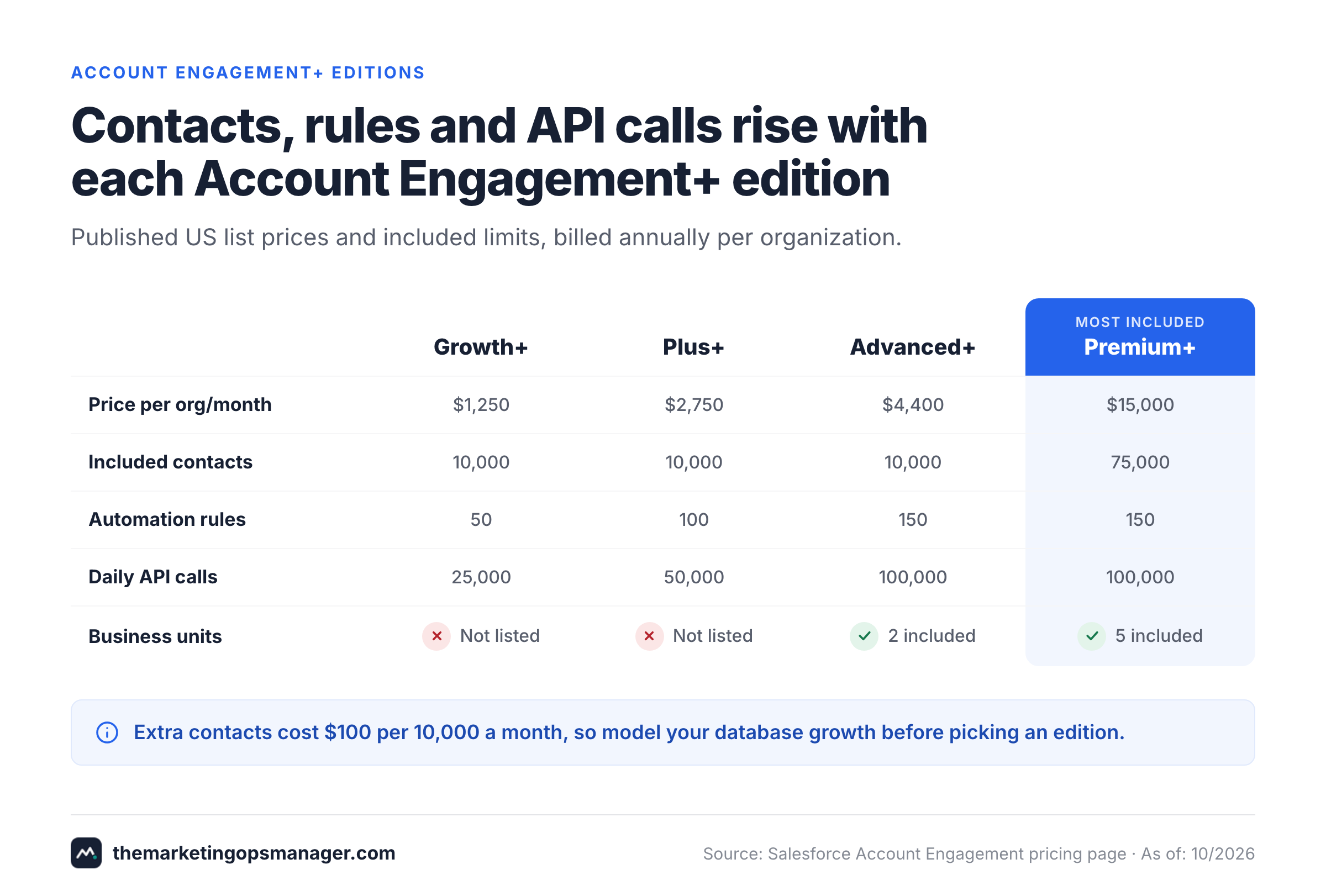
Adobe doesn't publish a fixed Marketo Engage USD subscription price. Its pricing page lists Growth, Select, Prime and Ultimate and directs buyers to request pricing. Salesforce publishes four Account Engagement+ editions with monthly per-organization prices, billed annually. As of October 27, 2026, Salesforce lists Growth+ at $1,250, Plus+ at $2,750, Advanced+ at $4,400 and Premium+ at $15,000 per organization per month. These are list prices, not complete implementation budgets, and they don't include services.
| Account Engagement edition | Monthly price per org | Annual baseline | Included contacts |
|---|---|---|---|
| Growth+ | $1,250 | $15,000 | 10,000 |
| Plus+ | $2,750 | $33,000 | 10,000 |
| Advanced+ | $4,400 | $52,800 | 10,000 |
| Premium+ | $15,000 | $180,000 | 75,000 |
Monthly prices are USD per organization, billed annually. Annual baselines are monthly list prices multiplied by twelve, before additional contact blocks, add-ons, services, implementation and negotiated terms. Salesforce's official US pricing page was checked October 27, 2026.
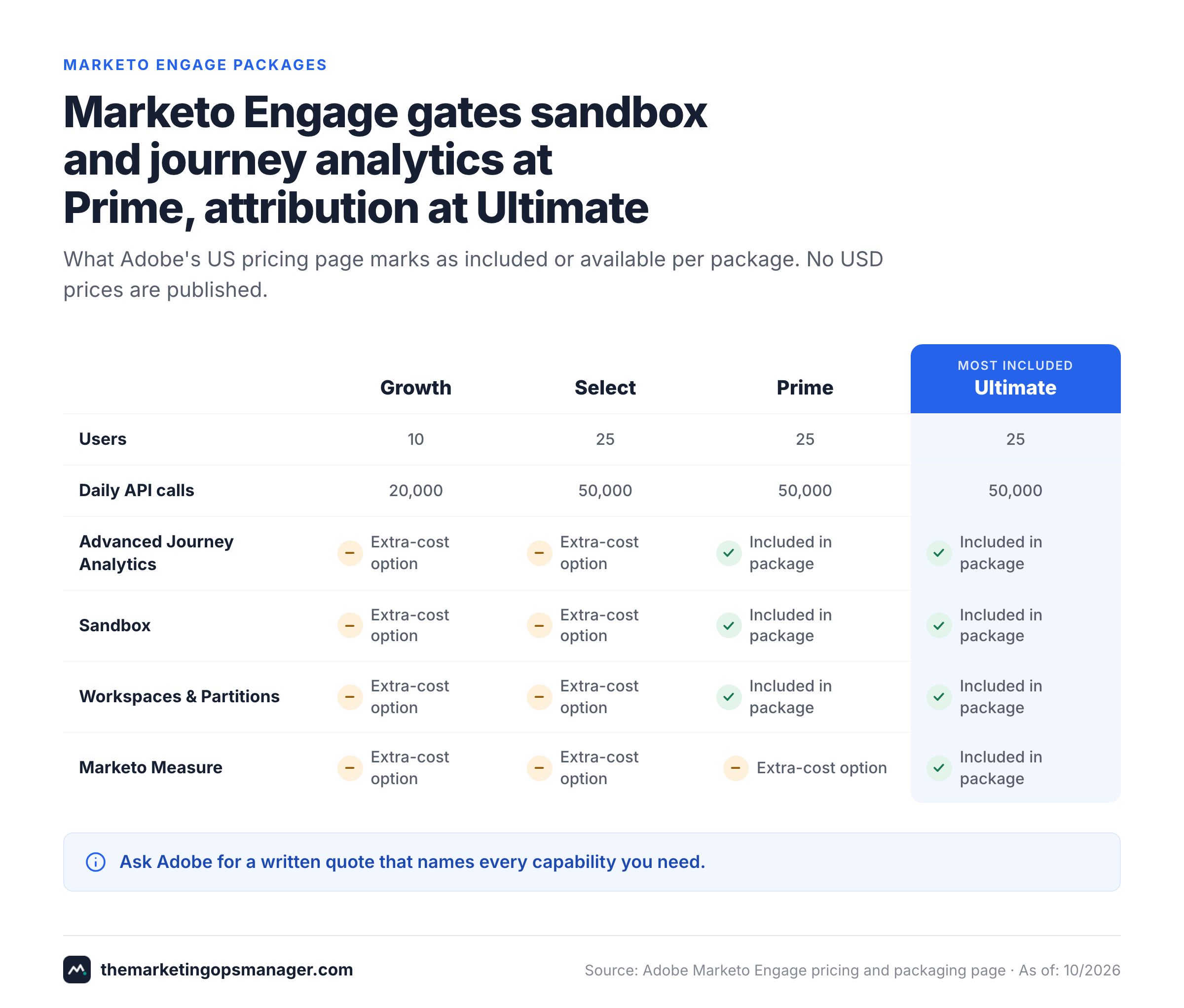
Marketo's four packages shouldn't be mapped one-to-one to those Salesforce editions. Growth is described as core email, segmentation, automation and measurement. Select adds essential marketing automation and measurement. Prime emphasizes lead- and account-based marketing, journey analytics and AI personalization. Ultimate adds premium attribution. The public Adobe matrix shows 10 included users on Growth and 25 on Select, Prime and Ultimate. It lists 20,000 daily API calls on Growth and 50,000 on the other three packages. The same matrix includes sandbox, workspaces and partitions, target account management, predictive audiences and advanced journey analytics from Prime upward, and marks them as available but not included on Growth and Select. These are useful scope indicators, not a quote for a particular contact database.
Salesforce's current page lists 10,000 contacts included in Growth+, Plus+ and Advanced+, and 75,000 in Premium+. Growth+ also lists 50 automation rules, while Plus+ lists 100 and Advanced+ and Premium+ 150. Don't assume an unlimited number of automations or unlimited database capacity because the page advertises unlimited email marketing. Extra contacts cost $100 per 10,000 contacts per month, and the matrix lists 25,000, 50,000, 100,000 and 100,000 API calls per day across the four editions. SMS and WhatsApp appear as add-ons in every edition, with credits starting at $10 per 1,000.
Ask Adobe for a written breakdown of license, contact allowance, workspaces, partitions, attribution, API usage, sandbox, implementation and support. Ask Salesforce for the matching edition, contact blocks, CRM dependencies, any optional analytics, additional business units and services. For a meaningful comparison, use the same expected contact volume and the same year of ownership.
First-year cost: compare the operating model, not just the license#
A budget should include the initial setup and the people who'll operate the system. Model a Salesforce Growth+ subscription at the published $15,000 annual platform baseline, then add separate line items for implementation, additional contact blocks, Salesforce licenses where required, training and support. For Marketo, begin with the signed Adobe quote and add the same cost categories. Never swap in a web estimate for the missing Marketo license number.
Then test two scenarios. In the first, the database grows while the marketing team stays the same size. In the second, regional teams need separate permissions, campaigns and reporting. The cost driver may shift from contacts to edition gates, services and admin time. The best financial decision isn't the cheapest quote; it's the package that meets the real operating requirement with the fewest exceptions and custom workarounds.
CRM integration: which platform keeps sales and marketing aligned?#
Account Engagement has the more natural Salesforce-centered data model, while Marketo offers broader native CRM choice. Adobe explicitly documents native bidirectional integrations with Salesforce, Microsoft Dynamics and Veeva. Salesforce's Account Engagement integration is designed around Salesforce leads, contacts and opportunities. The distinction matters when a company might change its CRM or when marketing operations needs to orchestrate data across a wider stack.
However, neither architecture guarantees clean handoffs, and that's where most projects stumble. The difficult questions are field ownership, duplicate identity, visibility rules, sync delay, consent precedence and who repairs errors. Those details decide whether an MQL becomes a sales-owned record reliably.
Marketo: dedicated sync ownership and backlog visibility#
Adobe's documentation says Marketo starts a Salesforce sync cycle five minutes after the previous cycle completes by default. Adobe adds that a cycle can take a couple of minutes or a couple of hours, depending on how much data has to be written. That isn't a promise that every record arrives within five minutes. Large data updates, additional synced fields and access permissions can extend the queue.
The sync user matters. Adobe recommends reviewing the fields visible to that user and removing access to fields that Marketo doesn't need. The Marketo integration page also describes monitoring CRM synchronization through dashboards. For a marketing ops lead, that means a concrete owner, because it won't run itself: someone must investigate rising backlog, missing CRM values and errors after a schema change.
Custom objects are another reason to test rather than assume. Adobe's Salesforce custom-object documentation says the object must have a direct relationship to a Lead, Contact or Account to be enabled through the described setup. Its documentation also distinguishes which custom-object data can be used in Smart Lists and campaigns. Build a small proof of concept using your actual objects, not a generic contact example.
If you use Marketo with Dynamics instead of Salesforce, confirm the equivalent object, permission and sync behavior in the applicable documentation. The existence of a native connector doesn't imply identical behavior across CRM products.
Account Engagement: native connector still needs mapping and matching#
Salesforce Trailhead instructs administrators to map custom lead fields to contact fields so values survive lead conversion. It also requires field mapping between Salesforce and Account Engagement and recommends testing the connector. Trailhead notes that existing Salesforce leads and contacts require an initial import to establish synchronization, so don't assume all historical records appear automatically.
The integration also has explicit record-matching behavior. Salesforce's planning guidance describes a one-to-one relationship between an Account Engagement prospect and a Salesforce lead, contact or person account, with CRM ID used for matching in accounts that allow multiple prospects with the same email address. That matters for companies with several people records sharing a generic address or a history of duplicate imports.
Finally, check field-level precedence. Salesforce's help explains that sync behavior can determine which side wins when values differ. It highlights opt-out fields as a particularly sensitive case. A marketing ops team should document the system of record for consent, owner, lifecycle stage, region and product interest before any campaign goes live.
- 01Capture
- Adobe Marketo Engage
- Salesforce Marketing Cloud Account Engagement
Breaks when Form payload, UTM source and consent saved - 02Qualify
- Adobe Marketo Engage
- Salesforce Marketing Cloud Account Engagement
Breaks when Score, grade or lifecycle threshold documented - 03Sync
- Adobe Marketo Engage
- Salesforce Marketing Cloud Account Engagement
Breaks when CRM identity, field precedence and backlog checked - 04Route
- Adobe Marketo Engage
- Salesforce Marketing Cloud Account Engagement
Breaks when Sales owner and SLA acknowledged - 05Reconcile
- Adobe Marketo Engage
- Salesforce Marketing Cloud Account Engagement
Breaks when Opportunity and campaign reports match source records
Automation: Smart Campaigns or Engagement Studio?#
Marketo is the more configurable choice for complex program architecture; Account Engagement is compelling for structured Salesforce-led nurturing. Adobe describes Smart Campaigns with Smart Lists, Flow and Schedule. The Smart List decides who qualifies; the Flow defines actions such as waits and choices; the Schedule controls execution. Marketo distinguishes batch campaigns, which run against a selected audience, from trigger campaigns, which respond to events for individual people.
That model is useful when demand generation runs several product lines and regional programs. You can define audience logic once, reuse assets and control how campaigns respond to behavior. The trade-off's governance: a reusable program can also propagate a broken rule widely if naming, testing and ownership are weak.
Account Engagement supports engagement programs, automation rules and lead qualification. Its current edition table also advertises Salesforce Flow for marketers and newer Marketing Cloud Next capabilities. The exact entitlement and scope of those capabilities should be demonstrated in the edition being quoted. A Salesforce-centered team may prefer fewer cross-platform boundaries even if it gives up some Marketo-specific flexibility.
A realistic nurture test for both vendors#
Ask each vendor to build the same journey, and don't let them pick a friendlier one: a prospect downloads a product guide, receives a nurture message, revisits the pricing page, becomes sales-ready, and is routed to the correct account owner. Then change the contact's region halfway through the journey; that's where weak logic shows. Check whether the branch updates, whether the owner changes, whether the email is suppressed when the prospect opts out, and whether a failed CRM write is visible.
The goal isn't to count steps in the automation builder. It's to find out how the team can prove the right person got the right treatment and recover when a downstream system rejects a record. A beautiful canvas is certainly not evidence of reliable operations, and it doesn't tell you what happens when a write fails.
Lead scoring, account-based marketing and attribution#
Both products can qualify B2B leads, but the sales handoff should define what a score means. Don't leave that to the tool. A marketing score based on engagement is different from fit, buying authority or account readiness. If a salesperson can't see why the lead qualified, the number may become an argument rather than a useful signal.
Marketo's public package descriptions emphasize lead- and account-based marketing and journey analytics at Prime, with premium attribution in Ultimate. The detailed Adobe matrix shows Marketo Measure included with Ultimate and only available, not included, on Growth, Select and Prime. A buyer who needs advanced multi-touch attribution should therefore check the precise Marketo Measure entitlement instead of assuming every Marketo license contains it.
Salesforce lists lead scoring and grading among Account Engagement capabilities. Its US edition page shows B2B Marketing Analytics licenses in Plus+ and higher packages, and distinguishes B2B Marketing Analytics Plus as an add-on in some tiers. It also lists business units in Advanced+ and Premium+, two included on Advanced+ and five on Premium+. B2B Marketing Analytics Plus is priced at $3,000 per user per month on the add-on list. The correct edition depends on whether reporting is a departmental dashboard or a governed cross-business-unit revenue model.
For either product, start by agreeing on an attribution policy: what counts as a campaign response, which CRM opportunity is eligible, what the conversion window is and who owns campaign association. Then reconcile a sample of real opportunities against the source events. Software can calculate from bad definitions just as consistently as from good ones, so it won't catch a poor policy for you.
AI capabilities in 2026: separate available features from a roadmap#
Salesforce now presents Account Engagement+ alongside Marketing Cloud Next and Agentforce Campaign Creation. Its pricing page lists these in the new edition positioning. Adobe, meanwhile, advertises a Marketo Engage MCP server that can connect to AI tools and agents, including Claude and ChatGPT. These are current vendor descriptions, not proof that an AI feature's enabled in every customer environment.
For an evaluation, ask for the exact licensed capability, supported objects, permission boundaries, approval controls, audit trail and a demonstration using non-sensitive sample data. A marketing agent that can change a campaign shouldn't be judged like a read-only assistant that summarizes results. Require a human approval point before high-impact changes to live audiences or sends.
AI shouldn't determine the purchase on its own. CRM fit, contact governance, deliverability, reporting definitions and the ability to diagnose failures remain the operational foundation. If the vendor can't demonstrate a proposed AI workflow under your edition and security controls, exclude it from the buying scorecard.
Implementation and migration: the acceptance checklist#
Migration isn't an export-and-import exercise. Both systems carry campaign state, assets, consent, scores, CRM mappings and historical reporting assumptions. Rebuilding a nurture in a new tool can change who qualifies or when a message sends, even if the campaign looks the same. That's the risk nobody budgets for.
Assign a technical owner, marketing operations owner, CRM owner and privacy approver before a cutover. Inventory active campaigns, shared templates, web forms, scoring logic, suppression lists, custom fields and attribution dependencies. Create a mapping document that identifies each source field, destination field, transformation and system of record.
Run the old and new paths in a controlled test window using non-production contacts or a vendor-approved sandbox. Validate both successful and failed paths. Then schedule a rollback decision with a named approver; you'll want it before cutover, not after. If a vendor says the migration's straightforward, ask them to demonstrate the hardest custom-object and consent cases from your environment.
- Inventory forms, nurture programs, scoring and suppression logic
- Map CRM IDs, duplicate matching and field precedence
- Document lead-to-contact conversion mapping and owner routing
- Verify opt-out status across both systems before and after a test send
- Test a new record, existing record, duplicate email and CRM rejection
- Measure sync lag and review error/backlog visibility
- Reconcile opportunity attribution on a representative sample
- Confirm edition gates, add-ons, contact blocks and API allowances in writing
- Assign rollback owner, decision deadline and monitoring responsibilities
Which platform wins by buying scenario?#
- Marketing ops needs reusable complex trigger and batch programsAdobe Marketo Engage
- Salesforce CRM is the long-term system of recordSalesforce Marketing Cloud Account Engagement
- Microsoft Dynamics or Veeva is the required native CRMAdobe Marketo Engage
- Published US package pricing is a procurement requirementSalesforce Marketing Cloud Account Engagement
- Premium attribution through Marketo Measure is a funded requirementAdobe Marketo Engage
- Salesforce business units and B2B analytics drive the reporting modelSalesforce Marketing Cloud Account Engagement
A company that's on Salesforce can still choose Marketo. The question is whether Marketo's program model and its support for several CRMs justify operating an additional synchronization boundary. Likewise, an Account Engagement team shouldn't mistake the Salesforce name for a guarantee that every data mapping and permission rule is correct.
Before signing, score each candidate against five evidence-based tests: campaign logic, CRM record integrity, consent propagation, reporting reconciliation and failure recovery. Weight the tests by the cost of a mistake in your own organization. The highest feature count isn't necessarily the safest or most economical platform.
Who owns failures after the platform goes live?#
The least discussed buying criterion's who investigates the gaps between tools. A landing page can load while its form silently fails. A form can submit while a CRM validation rule rejects the lead. A CRM record can update while the sales owner never receives a useful notification. Neither Marketo nor Account Engagement replaces a documented incident process.
Define monitoring for the whole journey: landing page, form submission, tracking event, marketing record, CRM sync, owner assignment and sales acknowledgment. Assign an owner for each boundary and a target response time. Store evidence such as test submission IDs, field values, error messages and timestamps. This makes failures reproducible instead of anecdotal.
The Marketing Ops Manager focuses on campaign monitoring across landing pages, tracking, forms, CRM connections and handoffs. It isn't a replacement for Marketo or Account Engagement and shouldn't be evaluated as a marketing automation platform. Its relevant role is checking whether the steps around an existing stack work as expected. Access is invite-only and needs an access code.
Frequently asked questions#
Is Pardot still called Pardot?
Pardot's the former product name. Salesforce markets it as Marketing Cloud Account Engagement and now describes Account Engagement+ editions on its US pricing page.
Is Marketo or Pardot cheaper?
Salesforce publishes Account Engagement+ list prices beginning at $1,250 per organization per month, billed annually. Adobe doesn't publish a comparable Marketo dollar price. Request quotes at the same contact count and feature scope before judging cost.
Can Marketo connect to Salesforce CRM?
Yes. Adobe documents a native bidirectional Salesforce integration, but it isn't plug and play. The sync still depends on permissions, field mappings and processing cycles, so test the actual records and monitor backlogs.
Does Account Engagement support multiple CRMs?
Its core connector and operating model are Salesforce-centered, so it doesn't pitch itself as multi-CRM. If native Microsoft Dynamics or Veeva integration is a requirement, Adobe publicly lists those CRM options for Marketo Engage.
Does Pardot have lead scoring?
Yes. Salesforce lists lead scoring and grading among Account Engagement capabilities. Check edition-specific AI scoring and analytics entitlements in the current quote, since they aren't identical across editions.
Does Marketo include attribution?
Marketo has campaign reporting and attribution capabilities, but premium Marketo Measure is included in Ultimate in Adobe's current public matrix. Confirm other packages and add-on pricing in writing; don't rely on a demo.
Which platform is better for complex nurture programs?
Marketo's often the stronger fit for teams needing reusable program architecture and detailed trigger and batch logic. Account Engagement's compelling when Salesforce-centered qualification and reporting are the overriding priorities, and it's usually the simpler start.
Can either tool prevent a broken CRM handoff?
Neither removes the need for monitoring, field ownership and error handling, so don't skip them. You'll want a named owner, and it shouldn't be whoever has time. Test failed submissions, sync backlogs, duplicate identity and opt-out propagation before launch.